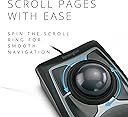
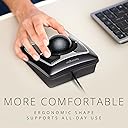
🖱️ Master your workspace with precision and style — the Expert Mouse that means business.
The Kensington Expert Mouse is a wired ergonomic trackball designed for PC and Mac users seeking precision and comfort. Featuring DiamondEye optical tracking, a large ambidextrous trackball, and a customizable 4-button layout via KensingtonWorks software, it enhances productivity with smooth cursor control and programmable shortcuts. Its detachable wrist rest and reliable 180cm USB connection make it ideal for extended professional use without battery concerns.


| ASIN | B00009KH63 |
| Antenna Location | Office |
| Are Batteries Included? | Yes |
| Are Batteries Required | Yes |
| Best Sellers Rank | 7,157 in Computers & Accessories ( See Top 100 in Computers & Accessories ) 4 in Trackballs 1,053 in PlayStation Legacy Systems |
| Box Contents | Detachable Wrist Rest, Kensington Trackball 4-Button Usb Expert Mouse |
| Brand Name | Kensington |
| Button Quantity | 3 |
| Colour | Black Silver |
| Compatible Devices | Windows 7, Windows 8, Windows 8.1, macOS 10.8, Windows 10, macOS X 10.11, macOS 10.10 or above, Chrome OS 44 or above, macOS 10.9, macOS Sierra 10.12, macOS 10.13 or above |
| Customer Reviews | 4.4 4.4 out of 5 stars (4,086) |
| EU Spare Part Availability Duration | 5 Years |
| Embellishment Feature | Crystal |
| Enclosure Material | Plastic |
| Global Trade Identification Number | 00085896643258, 50085896643253 |
| Hand Orientation | Ambidextrous |
| Hardware Platform | PC |
| Item Dimensions L x W | 8.9L x 24.8W centimetres |
| Item Type Name | Kensington Expert Mouse® - Wired Optical Ergonomic Trackball Mouse with Scroll Ring, Compatible with Windows & macOS - Space Grey (64325) |
| Item Weight | 0.34 Kilograms |
| Manufacturer | Kensington |
| Model Name | Expert Mouse Optical Wired USB Trackball for PC and Mac - Silver and Black |
| Model Number | 64325 |
| Movement Detection | Optical, Trackball |
| Network Connectivity Technology | USB |
| Number of Batteries | 1 12V batteries required. (included) |
| Operating System | Windows 10, Windows 7 |
| Power Source | Corded Electric |
| Product Features | Movement detection technology:Trackball |
| Product Finish Type | Matte |
| Product Warranty | 5 years |
| Range | 180 centimeters |
| Style Name | Expert Mouse |
| Theme | Office |
| UPC | 638458744902 085896643258 809385141014 666669843022 803982736673 |
| Unit Count | 1.0 count |
B**E
I absolutely love it!
UPDATE 24 FEB 2011 Here is an update to my original review. I just as keen on this excellent input device as I was a year ago when I bought it. It has been in constant use and it really is imho the best input device I have ever used. I use it for graphics, mostly in Adobe Illustrator for example and there is so much control and it is precise. Equally it can go very quickly across screens so I can get across my two screens easily. I also use it for editing video in Final Cut Pro and here, it is really superb. It's great big trackball makes it very easy to just creep forward and back a frame at a time. I really do think that people may overlook this terrific input device because it is not slick and cool, but it is very much the best possible thing for the job. My only comment that could be negative, but isn't, is that using it exclusively may risk RSI problems with you shoulder. I think this is true of any mouse of this sort. That is why I also use the Contour RollerMouse Free. This I use for scrolling around word processing documents and that kind of thing. ORIGINAL REVIEW MARCH 2010 I bought mine on 30 January so I've had it for six weeks now. I absolutely love it! I do not use it exclusively, I use it in conjunction with a Contour RollerMouse Free. However I use the Kensington Expert Mouse for graphics. I recently just finished doing a lot of editing of a video with Final Cut Express and the Expert Mouse is superb for this kind of thing. Many years ago I used a Kensington trackball, I think in about 1995, and I really like that one, but this is so much better because it has such a large trackball. The negative things about this trackball are that it feels a bit cheap in construction compared with say, a Logitech or Microsoft mouse at this price, however I think it is well constructed nevertheless. It looks rather 70s to me but I don't mind this. In actual use the feel is very good. The scroll wheel bearing surface is noisy in a plasticy way but there is no problem with this in use. From time to time it is a good idea to remove a build up of gunge on the three little ball bearings. I keep an old toothbrush nearby for this purpose. It's also quite good to take the ball out and polish it, perhaps with your shirt :) Any of these small negatives are hugely outweighed by the fact that the level of control over the cursor is superb. That is what an input device like this is for and that is what it does so well. Before I got this I tried the most expensive Logitech mouse, however the software for that on my Mac was a disaster so I had to send it back. IMHO the Kensington Expert Mouse is a far better buy than that more expensive Logitech mouse. The level of control over the cursor is much better. The software for the Kensington Expert Mouse works very well indeed on my Mac. I use it with the default settings and it is fine. The scroll direction can be switched with a menu in the menu bar at the top of the Mac OS screen and this is very handy. If you buy this you will be initially disappointed when you take it out of the packaging. You will think it is a prop from the Star Wars movie. When you first use it you will think it is a bit weird if you have not used a trackball before. You will still be having doubts. After a week of using it you will never want to use a "normal" mouse again!
A**D
Who'd spend this much on this heap of plastic? ...read on
After having used the left/right-handed Logitech Marble Mouse pretty happily for six years why has this monster just become my new best friend? The snooker sized ball is massive and comfortable. It sits very well right next to the keyboard, the wrist rest encourages a very natural and ergonomic sitting position. The Logitech's design always had me wanting to be able to incline it sideways off the desk at an angle. Most of Logitech's right-handed-only models do cradle the hand at a slight angle. The ambidextrous model however doesn't. Presumably this is so they can flog more of these units to both left and right handers rather than simply make just ONE of their products for lefties, ok, rant over. The Kensington's large ball allows you to alter the angle at which your hand sits, as a far larger area of your fingers makes contact with the ball. A lot of other reviewers of this product on other sites say a great deal about the hardware so there's no point re-hashing that here other than to agree it does feel a bit on the cheap and plasticy side, but that said personally, I'd much rather something that's well made and works well than something that just looks good. The hardware is however only part of the story. It's the software that comes bundled with this that really makes the difference. You can easily program each of the 4 buttons and assign functions both the top two buttons and the bottom two buttons being pressed simultaneously too which effectively increases the number of buttons to six. The functions you can ascribe these buttons is extremely impressive, things I'd never have thought of as mouse functions. One click can bring up a really nifty `alt-tab' alternative. You can program any button to emulate any keyboard presses, so anything from entering a string of text to say Windows-D-ing or Windows-E-ing. You can even create your own right click menus. The mouse buttons can also be told to function differently within different programs. I've only just started using this but I knew in an instant that this is a really nice bit of kit.
M**Y
This product has found its home in almost every professional recording studio in the world. It is extremely dextrous and such a comfort to the wrist. Long hours at the studio don't seem so long anymore! The only issue I have noticed is with the scroll wheel not performing smoothly, but it still works. The trackball is weighted and has sufficient momentum to sen e cursor flying to the other end of the wide screen display. Integrates very well with Pro Tools, and general workflow. I am yet to try out the customisable top keys to instantiate macros. Very satisfied with the product finish and quality.
J**S
After having read several reviews around the web and being aware of the potential downsides as well as the upsides, I decided to buy myself one of these. Boy, am I glad I did. Admittedly, I'm the kind of person who's not satisfied with the typical mousing solution (I have really big hands and I do a lot of delicate work) and likes to try new things, so if that's not you then you may want to try one out before you buy if possible, or at least get one with a return policy. Caveat emptor. That being said, short of building a custom one myself, the Kensington Expert Mouse is pretty much what I want in a trackball, and having used it for awhile any regular mouse feels foreign and less-than-intuitive. First, the cons, in order of greatest to least issue (and they're all minor issues to me anyway). :: It does have a bit of a backward slope to it, probably about 10-15 degrees, which my large hands and already-tilted desk find mildly awkward. If you have a desk that's fairly high above your lap, then that backward slant will probably match the angle your arms are already at and this won't be an issue. :: The scroll wheel, as has been mentioned elsewhere, does feel a little scratchy, like a plastic-on-plastic sort of texture. It's not quite the buttery-smooth, gliding motion you expect after using the ball itself (more on that later) - it feels more like the back of a plastic spoon sliding across a Formica counter. That said, mine wasn't that bad, and probably would go away with a bit of silicone oil, but other reviews range from "not a problem at all" to "nasty-feeling deal breaker" so I suspect that Kensington's quality control could use a bit of tightening up. Again, get one with a return policy in case you don't like it. Common sense. I find myself using the scroll wheel less than I would otherwise anyway, as I've mapped one of the buttons to middle-click and I use that in web browsers to scroll up and down by moving the cursor. Smoother and easier than the scroll wheel. :: Occasionally, a button click won't register if you press the button on the corner or edge - you have to get closer to the middle. Rarely an issue unless I'm gaming, because my hands have a large span and I may physically miss the button at a critical moment when I'm not paying attention. It'll come with practice, I'm sure, just something to be aware of if you have palm-a-basketball-sized hands like me. Now, to the pros! Whee! :: Yes, it's got a pretty big footprint - it's about 5.5" by 9" with the included stiff-foam wrist rest (which I do recommend using, because of the aforementioned back angle) - but it doesn't move around. It takes up about 60% of the desk space that you'd dedicate to a typical mouse pad. Especially on those pull-out keyboard trays, there isn't enough room to use a mouse, but since the Kensington Expert trackball is under six inches wide it'll fit in a nice little rectangle next to the keyboard. Height is another matter, since the ball itself sticks out pretty high, but I don't personally find it to be too much of an issue. YMMV. :: The four large, programmable buttons. I'm not a lefty, but I mouse left-handed, so being able to map the buttons to essentially whatever I want with Kensington's free software is absolutely a blessing. In addition, different people will prefer to use different fingers for tasks of varying frequency, so whereas I don't right-click much and map it to where my ring finger sits, someone else may put it under their index finger or thumb. The software in general is pretty easy to use, and has enough functionality to feel nicely customizable without being so in-depth that only an advanced power user can take advantage of its potential. :: The trackball. Oh, that trackball. Smoother than a greased Fonzie on a Teflon-coated ice rink. Right out of the package it actually feels slightly rough or not as free-spinning, because the ball and its three contact points are completely pristine. Once you get some skin oils on it through use, it's like buttah. Gross-sounding, I know, but pretty much everything you touch gets skin oil on it. Speaking of which, the ball is just dropped into its socket, so to clean out the inevitable gunk that will accumulate in any trackball assembly you just have to turn it upside down and the ball falls out. No disassembly required. The inside of the socket is smooth plastic, so you just wipe it out and get back to work. The ball itself has a nice bit of weight to it, and is positively pleasurable to the hands in use. It's got a solid feel and has some inertia when you move it, which brings me to the next point... :: It has an infinite range of very smooth motion. I currently have a dual-monitor setup, and (besides being very awkward and un-ergonomic) I despise having to pick up a mouse, move it back to the other side of my mouse pad and continue my motion across the screen. DESPISSSSSE. It makes my fingers recoil just thinking about it... Ahem. Anyways. A quick flick of the ball will send the cursor moving across the screen, and the ball's inertia will continue the motion. It doesn't jump around or go crazy, it just follows the ball like it's supposed to. I have the acceleration parameter in the software set to maximum, so a fast motion of the ball will cover lots of ground quickly, but slow motions will still allow fine, precise positioning of the mouse. This becomes an even greater blessing with triple- or quad-monitor setups, and once again, this trackball takes up less desk space than an ordinary mouse. You don't have to have a huge screen to need this, either... for extra-fine work like Photoshop or video editing, you may want to slow the cursor speed down, which effectively makes the screen much larger relative to the motion of the mouse. There is no picking up and putting down with the Kensington Expert trackball - you just keep rolling. If you're not there yet... keep rolling. It feels natural, the way navigating a computer should. So, to sum it all up, I guess I could say that I love my Kensington Expert Mouse because it feels right. It's intuitive to use, customizable, ergonomic, and it just works. There are a couple little niggles, but in my humble opinion they are far outweighed by how they make my computing experience easier and more natural. Because everyone has different needs for their computing experience, not everyone will want or need one of these. If I was just an occasional casual computer user that isn't concerned with ergonomics or ease of use, I would absolutely think twice about spending $75 on a mouse I'm not sure I'll like when the one I have mostly does what I need it to. But that's probably not Kensington's primary market here. For me, and people like me, it's worth the money to make my interface with my computer feel good, because I use it every day.
C**E
Muito gostoso de mexer. Botões muito fáceis de clicar ao manuseiar a bola. Minha única ressalva é que o botão raspa na bola quando você segura o botão e roda, mas aí é um uso errado meu... mas com 1mm a mais de distância do botão resolvia.
C**R
Top class, fine control and has a serious pphysical presence but also a serious function. IF you like trackballs, this is IT!
M**N
Trackball nie współpracuje z oprogramowaniem Kensington. Sprawdzałem na 2 komputerach z Windows 10 64bit. Wsparcie producenta praktycznie nie istnieje - na odpowiedź czeka się ponad 2 dni, a uzyskane porady do niczego nie są przydatne. Szkoda, bo sam produkt całkiem fajny.
ترست بايلوت
منذ شهر
منذ شهرين