🚀 Dominate your digital domain with the ultimate WiFi powerhouse!
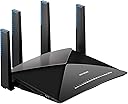
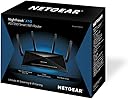
The NETGEAR Nighthawk X10 R9000 is a premium tri-band smart WiFi router delivering up to 7.2 Gbps combined wireless speeds using cutting-edge 802.11ac/ad technology. Equipped with a 1.7GHz quad-core processor and four active external antennas, it ensures superior coverage, ultra-low latency for 4K streaming and VR gaming, and seamless media streaming via built-in Plex server support.
| ASIN | B01M3Z2YA6 |
| Antenna Location | Home, Gaming, Streaming |
| Best Sellers Rank | 203,193 in Computers & Accessories ( See Top 100 in Computers & Accessories ) 1,521 in Routers |
| Box Contents | 1 |
| Brand Name | NETGEAR |
| Colour | Black |
| Compatible Devices | Gaming Console, IPTV Decoder Box, Personal Computer, Smart Television, Smartphone, Streaming Device |
| Connectivity Protocol | Wi-Fi |
| Connectivity Technology | Wi-Fi |
| Control Method | App, Voice |
| Coverage | Wide coverage |
| Customer Reviews | 4.0 4.0 out of 5 stars (2,402) |
| Data Transfer Rate | 7200 Megabits Per Second |
| Frequency | 5 GHz |
| Frequency Band Class | Dual-Band |
| Global Trade Identification Number | 00606449114669 |
| Has Internet Connectivity | Yes |
| Is Electric | Yes |
| Is Modem Compatible | No |
| Item Weight | 1.86 Kilograms |
| LAN Port Bandwidth | 10 Gbps |
| Manufacturer | NETGEAR |
| Manufacturer Part Number | R9000-100EUS |
| Maximum Upstream Data Transfer Rate | 800 Megabits Per Second |
| Model Name | Nighthawk X10 |
| Model Number | R9000-100EUS |
| Number of Ports | 8 |
| Operating System | Chrome,Linux,Mac Os,Safari 1,Vista,Windows 7 |
| Other Special Features of the Product | USB Print Server |
| Product Warranty | Two Years Warranty |
| Router Network Type | hybrid |
| Security Protocol | WPS |
| Smart Home Compatibility | Smart Home Compatible |
| UPC | 606449114669 |
| Unit Count | 1.0 count |
| Wi-Fi Generation | Wi-Fi 5 |
| Wireless Compability | 2.4 GHz Radio Frequency, 5 GHz Radio Frequency, 802.11a, 802.11ac, 802.11b |
D**T
Transformed our Virgin internet experience
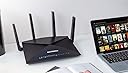
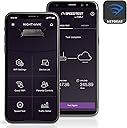
As Virgin internet users (Vivid 200), we'd been muddling along with our Super Hub 3 for the past year, and frankly were getting to the end of our tether with the poor internet connectivity we were seeing. Wi-Fi devices were randomly kicked off the network, or would show as connected but with appallingly slow internet access (speed tests as low as 150 Kb/sec). Coverage was also poor, needing a booster for the back part of the house, which considering it's a small 3-bed semi with mostly stud walls, wasn't exactly stellar. What's more, like many people we are adding smart switches and sockets to the house, and with every new device, the creaking performance seemed to get even worse. The other thing sorely missing from the Virgin Hub 3 was any form of decent parental control. I ordered the R8000 hoping to resolve all of these issues, and a week in, I have to say I wish I'd done it sooner. I now get full internet bandwidth, or close to, on mobile devices, and the stability is absolutely rock solid. Also, the coverage reaches the entire house, and down to the bottom of our 30ft garden with no need for any form of extender. In short, it gives you a proper Wi-Fi network that allows connected devices to perform as you would expect. Installation was a doddle, and took all of 5 minutes to get it connected and working. Simply log in to the Virgin Hub 3's admin webpage, and switch the Hub into modem mode. This disables all of the Wi-Fi functionality on the Hub 3, and uses it only to connect to the Virgin network. Reboot the Hub 3, connect one end of the supplied ethernet cable to any port on the Hub 3, and the other to the yellow "Internet" port on the R8000, using the Nighthawk mobile app. Download the Netgear Nighthawk app to an Android or iOS device, connect the device to the Wi-Fi on the R8000 with the credentials on the sticker on the top of it, launch the app, and simply follow the instructions. It instantly identified the router, connected to it, installed the latest firmware update, prompted me to update the admin password (no brainer anyway), and then it all came to life and started working. There's a lot the Nighthawk app can't do, so after doing this, you will need to go to the admin web page for the R8000 (192.168.1.1 default) and log in with the admin credentials you just provided in order to complete the config, set your Wi-Fi security and SSIDs up, configure your access control and guest network, and so on. You'll be tweaking stuff for a while, but you really do get a basic, functioning Wi-Fi network inside of 5 minutes. The full parental control is achieved via the Circle app (by Disney, strangely), which does come at a monthly cost of £5 (with a month's free trial included), but it is absolutely brilliant. It gives you all the control you need, lots you probably don't, and is so easy to set up and use that it's worth every penny. I created profiles for both my daughters, and assigned the devices they use to them. The software then logs and manages everything these devices do on the network. It will enforce internet access times, bed times, and even let you control access to individual websites or apps. For devices used by adults, or static devices such as our Amazon Echos, smart switches or media streamers, you can set these as 'unmanaged', so that they work without any interference at all. The app also allows you to quickly and easily enable and disable internet access for an individual user with a single click, extend time limits quickly as a reward, and provides a full breakdown of the URLs and apps accessed by each user, with times and dates, and the amout of time spent on each. The other really handy thing is that you get a push notification to the app if a new device accesses the network. I have experimented with MAC address access control on Wi-Fi before, but it is a pain having to log in to the admin console every time you have a guest who wants access, or whenever you buy a new device. With this, you can leave access open, but get a notification whenever a new device logs in. It's a much better solution, for me anyway. Of course, you can still go a step further and restrict access by MAC address, if you prefer. Downsides? The router is a big old lump (see pic) which will need a decent amount of space, close to your Virgin Hub. It's also not cheap of course, but when you're paying £50 a month for 200 Mbit internet, your devices are struggling to see a tenth of that in reality, and the standard hardware supplied by the ISP simply isn't fit for purpose, the performance upgrade it delivers is instantly noticeable. It has been nothing short of a transformation in terms of the real internet speeds we are seeing, and I love the visibility it gives over what the kids are doing and when, as well as the easy control to stop unwanted behaviour. The difference between "proper" Wi-Fi, and what you get with the standard ISP provided junk really is staggering, both in terms of performance and configurability. Fantastic bit of kit. Highly recommended.
S**T
Massive Improvement on VirginMedia's SuperHub
As you'll guess from the headline, I'm a VirginMedia customer and I was frankly fed up resetting my router 3-4 times per day as the wifi fell over. I've got a lot of devices on my network (>30) and the VirginMedia hub seemed to struggle with that. I put the VM hub into router mode and as soon as I plugged the Nighthawk router in and connected a few devices, I noticed a massive difference in signal strength and speed. The wifi signal is getting to corners of my house that have always struggled with VM's superhub. I've had not problems re-connecting all my devices - I haven't gone for making the wifi name the same as I had on the VM hub as others have, choosing instead to have a new wifi name using the smart connect feature (one name for all bands instead of having 3 bands with different names). The additional features that I love - I can use OpenDNS and/or google DNS servers (these are about ten times faster than VM's DNS servers). With the VM hub, I'd offloaded DHCP to a raspberry pi to allow use of 3rd party DNS servers. Doesn't make a huge difference, but there is a lot less lag on webpages that have lots of DNS lookups. Armor Security was an unexpected bonus (I hadn't bought it with additional Security in mind). This is a subscription service but gives you a lot of additional security options including BitDefender apps for supported devices. If you have a lot of devices, the subscription is well worth the money. Circle Family controls - this allows me to have a lot more control over what my kids are up to on the internet. The basic package is free and allows filtering content for varying age groups. The paid option allows setting limits on Kids usage and bedtime across all their devices. Just to recap, stronger signal, faster speed, more control over settings, not having to reset your virgin media hub every few hours and extra security for your family. If you are a VirginMedia customer, this is the answer to any wifi problems you may have!
P**G
lovely fast AC router
Very nice and very fast router. I am upgrading to an AC laptop so wanted an AC router, (my old router is N1 mimo). This router is one of the first with tri band, most routers only have dual band, it intelligently connects devices using all three bands separately, older devices on slow band (2.4ghz) newer and faster devices on one of the two 5ghz bands. So far it works great on all my household devices, which include two laptops, two tablets, two mobile phones, one netbook, a ps3, a Nintendo Wii, two internet connected TV's, etc. The router has all the usual high end features, can have attached storage via usb (usb2 & usb3), can be used as a FTP server, print server, can be accessed remotely, has all the usual security features, WAP, WAP2, etc. You can turn off wifi, use the router as an access point, use MAC address filtering to control connected devices, and have two guest wifi networks, etc, etc. Setup was easy, took about 10 minutes and once setup you can easily manage the router functions using the built in web based software. Your internert connectiion to your devices will be faster and the connection will be more stable and coverage will be further. So far very happy, highly recommended.
M**X
Dopo 3 mesi d'utilizzo lascio la mia esperienza su questo giogliello. Partiamo dicendo che è grosso e pesante ma fa' scena a vederlo (bello). Appena aperto e acceso ho aggiornato il firmware a l'ultima versione, ahi mee e noto problemi seri sulla funzionalità, e già inizio a preoccuparmi non sapendo se lo dovevo rispedire indietro, ovvero con i nuovi firmware sono state ampliate delle funzioni e di conseguenza altri non funzionano, ho voluto dare una speranza ovvero faccio un bel elenco di 5 o 6 difetti riscontrati e apro un ticket alla netgear via email elencanto i problemi riscontrati in merito al router. Passano circa un mese e mezzo e con l'ultimo firmware torna tutto apposto dove ad oggi funziona bene. Ora facciamo un punto della situazione, dispositivo quadcore e 1gb di ram = tanti dispositivi connessi senza fare una piega. La lan agregation non l'ho testata xké non ho un'altro dispositivo da collegare se non il nas a doppia lan, e li c'è una funzione che cercherà la compatibilità x farlo andare più forte, ho solo.notato un picvolo incremento, la Wi-Fi 60 ghz non l'ho testato xké non ho dispositivi che losupportono e la sfp+ neanche. Invece sulle classiche bande vi posso dire qualcosa, la 5ghz funziona bene ovviamente è la più veloce ma a corto raggio a confronto della 2.4ghz dove anche lì funziona bene, ovvero testato confrontandolo con R7800 già maturo nelle stesse situazioni e solito punto, la potenza di segnale è uguale entrambe le frequenze la qualità invece no, R7800 và meglio, del tipo da punto A a punto B entrambi i router escono con i soliti db ma la connessione risulta migliore R7800 da questo lato mi auguro in un update che sistema il tutto, il router non è male ha solo i firmware un po' acerbo ma tirando le somme funziona bene, diciamo si può fare di meglio. I processori quadcore si sentono non perde colpi ed è tanta roba, io ho collegato un HDD da 4 TB e non lo sente tanto x dirne una. La Wi-Fi che tanti si aspettono che copre tanti mq2 non sara' fattibile xké abbiamo i limiti di db in Europa e se si mette in America si quadagna qualche db che migliora la distanza senza aspettarsi miracoli, quindi per un discorso di legge le Wi-Fi x dispositivi Home sono uguali chi più e chi meno. Il famoso plex con gli update ora funziona sia con hhd usb e sia con Nas dove prima non funzionava. Io lo collegato a valle della Fibra Tim 200 è funziona come router perche' non voglio il router Tim che comanda e non riscontro problemi, ha dimenticavo con questo riesco ad avere un ping di 13 contro i 15 del R7800, ovviamente sono piccolezze xké sono 2 dispositivi ottimi, R9000 deve maturare ma del resto è un ottimo prodotto
G**B
Ich habe mir den X10 wegen der Plex Media Server App geholt, daß mein Server nicht 24/7 Lauffen muss. Der HP Z420 war ja beim Streamen ziemlich ausgelastet und machte mir ein wenig sorgen das es Ruckelt oder andere Probleme geben könnte. Nichts dergleichen. It is Huge, it is Bright, is Shiny. Naja Fettes Schwarzes teil mit vielen Blinkelichtern die man zum Glück Abschalten kann. Das TriBand hab ich bis jetzt nicht Testen können, da ich kein AD Netzwerk habe, aber die 2.4 und 5 GHz sind ausreichend. Die UI ist nichts neues. Netgear Like, zwar etwas Langsam aber nicht das es Nervt. Nette Features mit Cloud Save auch mit Handy APP nach Registrierung auf der Homepage. Der kleine Lüfter der Oben zu sehen ist, hat sich bis jetzt kein einziges mal gemeldet, oder er ist so Leise das ich es nciht bemerkt habe. Ich habe in den Anderen Rezensionen Gelesen das das Teil Kein Modem hat... Ähhm das teil ist nen Router und keine Fritz Box. Ja Bei dem Preis... usw. Ich hab das Teil Hauptsächlich wegen dem Plex Server Gekauft, hatte vorher den 7500er und war mit der Leistung schon zufrieden. Wer mehr Funktionen haben will, sollte sich nen WRT54 GL zulegen und DD-WRT als Firmware aufspielen und dran hängen ;)
J**1
Ich verwende ihn anstelle des Nighthawk R7000 - im Verbund mit einem repeater (X6Nighthawk) Die Installation ging gut, und ich habe nunmehr ein deutlich besseres W-Lan Signal in meinem Haus - auch über in Stockwerk hinweg. Einrichtung : Netgear typisch.... Funktionabilität ausgezeichnet. Auch der Netzwerkverkehr innerhalb des W-Lan (und auch LAN) ist deutlich besser, wenn gleich die angegebene Bandbreite nicht ganz erreicht wird.
C**R
J'ai un réseau d'objets connectés chez moi (prises, lumières, assistants), mes appareils nomades (smartphones, tablettes), ordinateur, Android TV, playstation... Plus les appareils des invités... Bref plus de 20 appareil connectés au même temps, la box SFR (ou mon ancien routeur moyen de gamme) étaient à bout: pertes de signal, resets fréquents... Ce routeur est cher, mais il tient la route! Il dispose de 3 wifi (1 à 2,4GHz, et 2 a 5GHz) permettant de creer differents réseaux pour chaque usage, évitant ainsi l'encombrement. Le signal est stable et robuste. Plein d'options à l'intérieur: QoS, VPN, gestion des ports, options de sécurité, DNS... La gestion se fait soit par navigateur, soit par un app mobile. Un mode "basique" ultra simplifié permet une configuration de base, le mode avancé permet de vraiment changer tous les paramètres. Conseil: pour une utilisation "simple", il suffit de connecter par cable ethernet au routeur du fournisseur et c'est parti. Pour un usage avancé (ouverture de ports, etc.) configurer le routeur du fournisseur (SFR dans mon cas) avec DMZ sur l'IP de celui-ci, comme ça ce sera celui qui gérera tout.
V**A
Es un pedazo de router, pero para comprarlo de aquí a dos años. La banda de 60 no está implantada y tardará. Por tanto, se convierte en un router bueno a 240O de doble banda. Yo a día de hoy con el asus triple Banda 3500-5300, mucho mejor.
Trustpilot
3 weeks ago
1 week ago