Desertcart purchases this item on your behalf and handles shipping, customs, and support to KUWAIT.
🛠️ Master every micro crimp with Japanese precision — don’t settle for less!
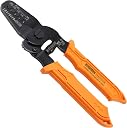
The ENGINEER PA-09 is a premium Japanese-made universal crimping tool designed for micro and mini crimp pins from leading vendors. Featuring dual-action crimping dies, ergonomic TPR grips, and a durable spring-lock mechanism, it offers professional-grade precision and versatility for AWG32-20 open-barrel connectors like JST, Molex, and Dupont. Lightweight and easy to control, it’s the go-to tool for pros seeking flawless crimps without the premium price tag.


| ASIN | B002AVVO7K |
| Best Sellers Rank | 24,416 in DIY & Tools ( See Top 100 in DIY & Tools ) 67 in Crimpers |
| Brand | ENGINEER |
| Colour | Chrome |
| Country of Origin | Japan |
| Customer Reviews | 4.6 out of 5 stars 1,698 Reviews |
| Cutting Width | 1.9 Millimeters |
| Global Trade Identification Number | 00798256188237, 04989833035099 |
| Grip Type | Ergonomic |
| Grip type | Ergonomic |
| Handle Material | Thermoplastic Elastomer (TPE) |
| Handle Type | Rubber |
| Handle material | Thermoplastic Elastomer (TPE) |
| Included Components | ENGINEER PA-09 crimping tool |
| Item Dimensions L x W | 17.5L x 5.7W centimetres |
| Item Type Name | Super-precise Crimping Tool (Made in Japan) works with AWG32-20 Open-Barrel JST ZH, PH, XH, SH/SHL, Molex KK, Picoblade and other narrow-pitch connector contacts |
| Item Weight | 0.14 Kilograms |
| Item weight | 0.14 Kilograms |
| Manufacturer | ENGINEER |
| Model Number | PA-09 |
| Number of Items | 1 |
| Number of Packs | 1 |
| Part Number | PA-09 |
| Product dimensions | 17.5L x 5.7W centimetres |
| Set Name | Engineer PA-09 Universal Micro/Mini Crimping Pliers Set |
| Size | 17.5cm x 5.7cm |
| Specification Met | CE |
| UPC | 798256188237 |
| Unit Count | 1.0 count |
| Usage | Pro |
A**E
Well made, but not without problems.
I have been using this now for a couple of cheers to crimp JST pins onto ribbon cables, I love the JST connectors but I really do not like crimping them. There's a definite "knack" to using this tool, and even having crimped thousands of these, I still find them very fiddly to crimp. The JST crimps have 2 tab sections, one is used to crimp to the insulator ensuring that the cable is held in place, and the second is the actual terminal itself. The method that works for me is: 1.) bend the insulator tabs inwards very slightly with needle nosed pliers, if you don't do this, you won't be cable to perform the actual crimp. 2) place the crimp into this tool, I rotate the tool in my hand so the legend is facing away, I need to do this is ensure that I'm only crimping the insulator and not the other tabs, I gently close the tool slightly to grab the crimp, then rotate the tool back so the legend is visible, the back of the connector is now facing me. 3.) As I'm looking at the rear of the crimp, I insert t he cable into the crimp and look at the other side to make sure that I haven't pushed the cable in too far or not enough, it should be positioned so that the cable insulator is touching the outer tab, and the conductor is touching the inner tabs. 4.) very carefully I close the tool to perform the crimp. At this point, you might get a good crimp, or, you might end up with the crimp rotating in the tool jaws, in which case you have to reset everything and try again, the final problem you may get is that the tabs just didn't fold properly, in which case you need to remove the crimp/cut it off/trim the cable and so on. If the crimp was OK, then you repeat the process again, and crimp the inner tabs, just make sure that you check that you are not crushing the end of the crimp, if you do the pin won't be usable. Other issues also include the crimp bending. It works reasonably well most of the time, but sometimes they can be infuriating, especially when the tabs don't fold properly. This is a common issue I've read with this tool, but this is one of the best tools for these crimps, so I kind of just live with these issues. Take your time, and inspect everything before you make the actual crimp. It's also well worth having a multimeter set to "beep" mode, after crimping you should check that the cable is ok, sometimes the cable may more and the conductor might make no or poor contact.
S**T
Excellent tool that provides a very high success rate.
Perfect tool for crimping connectors. Well made, pressure is controlled by you not by a ratcheting mechanism - which is what you want. These haven't failed me once. I see some people suggesting you crimp the connectors holding the insulation first then do the wires. Don't do it like that. 1) Put the connector with the wire crimps in the centre in a suitable slot eg 1.4mm for JST-XH The fins for the insulation should be sticking out and shouldn't be in the crimp at this point. 2) Insert the wire so that the insulation is just level with the inner part of the outer wings/fins. 3) Crimp. 4) Pinch the insulation wings/fins slightly to narrow the gap a little - finger pressure is fine at this point. 5) Carefully move the wire and crimp to the appropriate slot (1.9mm for JST-XH) with the outer insulation wings/fins in the slot. 6) Crimp again. Open the jaws and take out your newly crimped wire. Using this method you can pretty much guarantee success every single time. I've used these for Dupont connectors and JST-XH with great results. If in doubt, watch the video in the listing it's not marketing fluff it shows you exactly what to do. Yes they cost a bit more but they are, honestly, worth it.
H**E
Much better than a ratchet crimper in my opinion.
Crimping is fiddly, especially if you don't do it a great deal. I've got a couple of ratchet crimpers and I've always had limited success with them, but this ENGINEER crimp tool is a joy to use. It will hold the crimp whilst you position the wire in the right spot then you crimp the first part of the socket. Now you can remove it from the crimp tool to inspect to make sure it's firm and looks ok, then crimp the back of the socket that grabs the cable insulation. This tool is also light, really easy to hold and you control the pressure and the crimping action.
B**R
Good general purpose Crimper
With so many types of connector crimps out there, its not feasible to purchase the dedicated crimping tool for each. This crimper seems to work with most crimp types. Crimps normally have two sets of wings, to hold the bare wire and the insulation. You use this Crimper to compress each set of wings separately, so consequently it is a lot slower. You wouldn't want to use this tool for doing a large number of crimps, but for prototype work, its ideal.
S**S
Cry once
I couldn't find anything else at all for crimping microfit connectors, except for the £600 molex tool, and maybe except for the IWISS, which has some pretty mixed reviews and still costs about £20. This is one of the nicer tools i've owned and it should last a long time. The grip is very comfortable and the tension is carefully set. if you do a lot of crimping then this will save you a lot of time and discomfort. PA-09, which is what I bought, can just about crimp 18AWG (I think the wire is 24AWG in the photos), but I would recommend 20AWG or smaller with these. It makes the process a lot more easier, but you still have to actually crimp the wire which is a skill I have not mastered
S**R
If you crimp a lot of PCB connectors, don't cheap out and buy these
I bought these to replace some cheaper ratchet crimpers I had bought for crimping XH, PH, DuPont and Molex Mini. So first up I needed two different ratchet tools to cover all those sizes which was nearly the cost of these anyway, then the cheaper ratchets often over crimp and smush your connectors anyway and are fiddly to line up. These however are precise, i find it very hard to over crimp with them if I have the right slot selected and yet they produce a solid crimp, yes you have to crimp twice (once for the bare wire then once for the insulation) but given how easy it is to get this done because of the thin jaws i actually found it quicker than trying to line up and crimp just the once with the ratchets. It might seem like a big cost but they cover a wide range of sizes and that means i only need the one tool so buying cheaper ratchets is a false economy. It is hard to overstate how much of a pleasure these are to use, everything is just tight and well aligned, super comfy to use. Just do yourself a favour and buy them I swear I'm actually looking for more things to crimp they are just that nice. In summary Buy cheap, Buy twice. Just get these instead, seriously Japanese tools are the best
S**I
Great crimper
Very easy to use and honestly works great. My opinion may be somewhat biased because I had a different set of crimpers that just DID not work on the conductor crimp for the smaller connections I had to do a lot. The PA-09's work great, I cant fault them so far. I would usually wait longer for a review but after doing up the wiring harness for a custom printer I'm very very satisfied with the results, relative to the price. It can be a little fidgety sometimes but not once you get the hang of it. Works great for molex microfit 3.0 crimp connectors. Great tool, might try their PAD-11 tool when I can justify the purchase.
A**T
Does what it is supposed to
I had been looking around for a tool for the very small JST terminals and this is the only one I found that was not hundreds of pounds. Another tool I had was supposed to crimp small terminals but the jaws were to wide it damaged the rest of the terminal. I think the video and list of terminals the tool will crimp was excellent and I wish other manufactures would do the same. The tool takes a bit of practice to get a good fitting and I recommend crimping the wire with the correct size jaw and crimp hard - if the wire is to small double it up. Then crimp the plastic with the next jaw size up and do not crimp very hard. If you use the same size jaw for the plastic as the wire you can break the tags off or the tags do not bend square. My terminals were so small it took care to get them out of the jaws without bending them; you will have this problem with any tool like this as it is squashing the terminal into a shape. With a bit of practice you will get a good result; make sure you buy plenty of terminals if they are small to practice on. I am very pleased with the tool and the company that supplied them.
C**E
Great
Love this thing, anyone who doesnt has a skill issue.
A**ー
DIY用途 RCドローンやクローラーの小さなコネクタアセンブリーに是非!
他のネットショップや海外のショップで値段が安い圧着ペンチを幾つも買って失敗。 このペンチは1.0mm、1.4mm、1.6mm、1.9mmと小さなオス、メスのコンタクトを圧着するのにとても便利と感じた。 過去からレビューを見ながら品定めをするも、なかなか良い製品に行き当たらなかったが、少し値が張るもののやっと巡り合えたというのがいい得て妙な感じ。 特に製品紹介写真に掲示されている主な対応端子(一例)は嘘のない情報源であった。他の製品は対応していると書かれているので購入してもダイスが厚すぎて抜け止めのポッチを潰してしまうものもあり、この一点でも信頼に値するのではないかと考える。 このペンチを購入してからFC、ESC、モーター、VTX、レシーバーなどのケーブル、コネクタ用に圧着がはかどり、ペンチを握るたびにニヤケテしまうのは個人的な感想の表れである。
J**0
Excellent quality of crimping
Best tool I ever had for JST crimping, including ZH size, which is tiny. Recommended.
E**X
Excellent Control for Small JST and Micro Connectors
I’ve become a big fan of ENGINEER tools over the past year, and they’ve quickly become my go-to brand for precision electronics work. The quality and attention to detail have been consistently excellent, and these PA-09 crimpers are no exception. I already own a ratcheting crimper, and while it’s great for larger terminals, I’ve found it to be a little too bulky and aggressive for delicate JST and other micro connector pins. The PA-09 gives you much better control over the crimping process, allowing you to feel exactly what’s happening instead of relying on a ratchet mechanism. That extra precision makes a noticeable difference when working with tiny open-barrel terminals. The dies are well-machined, alignment is excellent, and the finished crimps come out clean and secure with very little effort once you get the hang of the two-step crimping process. It’s a versatile tool that handles a wide range of small connector types, so I don’t need a dedicated crimper for every style of terminal. The build quality is exactly what I’d expect from a tool made in Japan—solid, smooth, and built to last. If you spend much time assembling cables for electronics, 3D printers, RC projects, or microcontroller boards using JST, Molex, Dupont, or similar connectors, this is a worthwhile investment. It isn’t the cheapest crimper available, but the improved control and consistently better crimps make it well worth the price.
J**.
Worth the cost
Wow do these work well. I struggled for some time with another brand of ratching crimpers that were cheaper and thought would suit my intermittent use needs. I had all but given up on making JST crimps since most of the time they mangled the connector or the crimping was not tight. For my first few crimps with these, I tried the 1.9 mm die for some smaller JST connectors. Once I switched to a smaller die every crimp was perfect. Goes to show what a quality tool can do.
Trustpilot
3 weeks ago
2 weeks ago