Desertcart purchases this item on your behalf and handles shipping, customs, and support to KUWAIT.
🎯 Control Everything, Effortlessly — Your Remote’s New Best Friend
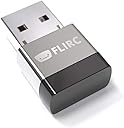
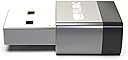
The FLIRC USB (2nd Gen) is a compact, universal remote receiver that transforms any IR remote into a powerful controller for media centers, set-top boxes, and PCs. Compatible with thousands of devices including FireTV, Raspberry Pi, Xbox, and more, it offers plug-and-play convenience with cross-platform pairing software. With a 50-foot IR range and support for up to 10,000 devices, FLIRC empowers professionals to streamline their media and smart home setups with unmatched flexibility and ease.


| ASIN | B01NBRBWS6 |
| Battery Types | No battery required |
| Best Sellers Rank | 57,869 in Computers & Accessories ( See Top 100 in Computers & Accessories ) 102 in Barebone PCs |
| Brand | Flirc |
| Brand Name | Flirc |
| Button Quantity | 1000 |
| Colour | Silver and black |
| Compatible Devices | Set Top Box |
| Compatible devices | Set Top Box |
| Connectivity technology | USB |
| Controller Type | Infrared |
| Customer Reviews | 4.2 out of 5 stars 1,731 Reviews |
| External Testing Certification | Não aplicável |
| Item Dimensions L x W x H | 10L x 10W x 10H millimetres |
| Item Weight | 1 Ounces |
| Manufacturer | Flirc |
| Manufacturer Part Number | FL-25626_SML |
| Max number of supported devices | 10000 |
| Maximum Number of Supported Devices | 10000 |
| Maximum Range | 50 Feet |
| Model Name | FL-25626 |
| Model Number | FL-25626 |
| Network Connectivity Technology | USB |
| Product Features | Universal |
| Product Warranty | 1 Year |
| Special feature | Universal |
| UPC | 604776612469 090281102623 |
| Unit Count | 1.0 count |
T**R
Excellent Addition to my PI Media Centre
Won't bore you with a long review... Have a Pi Kodi / Media Centre setup and needed to add a remote to the situation so I bought this. Extremley easy to set up using any random remore control you have lying around the house in my case I used a old Android TV remote that is about ten years old because it had all the play, pause, rewind extra buttons on it. To set the FLIRC up you just plug it into your PC and it will ask you to program your remote by picking a on screen option and pressing the corresponding button on your remote control of choice... it genuinely could not be easier. Setup on PI was also very quick and straight forward and it just works perfectly. Really cannot fault this... fair price for a well made decent product that is easy to set up and use. 5 stars baby!!
T**T
Perfect with Shield TV Pro
Bought to control Shield TV Pro with Alexa. This little receiver is incredible. It allows me to add any Shield TV Pro button on Broadlink RM Mini and control via Alexa. It wouldn't be possible without it so very glad I came across it. Instructions weren't very clear in my case, they do have an helpful community but I remember it took me a couple of hours to find how to set it up when I bought it a couple of months ago. So I'm going to explain the process on here, if that can be helpful to others: What's needed: - Logitech Harmony Remote - Broadlink RM Mini 3 Method: - Add the Flirc receiver in the Harmony app. For that you need to add a new "Entertainment device" then "Flirc" as manufacturer name and "FireTV" as model name. It will work with Shield TV Pro. - Assign Flirc to the media activity where you use your Shield TV, you should how have all the commands Flirc will use to control your Shield TV. - Just make sure all buttons like Play, Volume etc work fine. If you need to know which buttons are assigned to the remote for Settings etc I suggest looking where they are set on the remote. If you've got missing ones, you can re-assign them on the Harmony remote using Flirc as a device. Now to create Alexa routines: - Link Alexa in the Broadlink app - Add a new custom (this is very important) remote in the Broadlink app and name it as Shield TV - Tap the learn button function in the new remote you've created - Add each command using the Harmony remote - Create routines in the Broadlink app, they should now be exported to your Echo. This is an example of the routines I have: - Break - Pause TV + Screensaver (great for OLED TVs to prevent burn in) - I'm back - Select + Play (If screensaver was on) - Screensaver (Can be set with Long Press Settings in Shield and added as a new command in the Broadlink remote, just press a bit longer than other buttons) - Pause/Play the TV - Volume Up - Volume Up by 2, 3 or 4 - Volume Down - Volume Down by 2, 3 or 4 - Select I suggest to use Sonos Beam with Alexa integrated as she can automatically turn the volume down on wake word to hear every command better. To me that's icing on the cake, if you care about having a good setup.
V**.
I've got a set of quite good home cinema system which came with a remote control ...
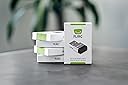
I've got a set of quite good home cinema system which came with a remote control that can collectively control all audio & video sources that IR controlled via either input the right code or use the learning function. As a Virgo/Libra combined personality, it is a torture that all them sources are under this master command except one - the Amazon Fire TV! It does not use IR remote, but Bluetooth. I can't have that! Then I summoned the Almighty Google: ...how to convert bluetooth remote control into IR remote control ...., Google didn't give me a direct answer but give me a few discussion forums, where all point to a name: FLIRC, and all mentioning a bit of configuration needed if you have some level of PC skills. Luckily, I have and excited to go ahead. Next thing I jumped on the FLIRC website and found that there are only few pages. The website tried very hard to explain what it does, but I have to say the language is still too geek to understand by people who are not in the field. One thing it made me more confident is that it specially mentioned the compliance with Amazon Fire TV. So find the product on Amazon and buy. The actual thing in it's own package no bigger than a pack of cigarette with little introduction on the back. Based on the knowledge acquired form forum and a gentleman's demon on Youtube, I realised that I need download the app from the official website. Once installed the app, it gave a firmware update straight away. The rest process was kind of big relief as no complicated configuration needed for Amazon Fire TV at all! It is within the preset list of compatible appliances. Choose Amazon Fire TV from the list, click "go", then follow the on screen step-by-step instruction, about 1 minutes, the small FLIRC is ready. Then unplug it from the PC usb, plug it into the usb of the Amazon Fire TV, point my master remote at it. Here you go, all DONE! Like: it does the job. Easy setup. Dislike: Instructions is not clear. Does not tell user the need of download the app from website first. A bit of usb extension cable will be appreciated for the price £22!
M**G
Just what watching streaming content needs.
Works like a dream. Does what it claims. Nice pleasant charming product.
P**L
Useful but can be a bit tricky...
I bought several of these for work projects and, in general, they've helped me provide my clients with alternative means of accessing steaming devices (shipped with Bluetooth only remote controls) with regular Infra-Red ones. Why would you want to do this you ask? Well some people with limited hand functions aren't able to operate small remote controls and the only way to use their streaming devices like Firesticks is to use another handset. Often HDMI-CEC can be the answer which allows people to use their TV's remote to do so. However, if a client's TV doesn't feature this protocol (it's either too old or a budget model) another way of controlling the streaming device is needed. And this is where the FLIRC FireTV edition can come in useful. It simply plugs in between the streaming device and the streaming devices own power adaptor. Prior to doing this, the FLIRC can be programmed with a number of pre-defined device profiles (you need to download an app first though!) and then it walks you through using an existing Infra-Red remote control to provide a signal for each button you want to emulate. However, I found it was a bit fussy about the remote controls used and the greatest success I've had is with harvesting the Infra-Red signals from a Sky TV remote control - these were the easiest to record and the most reliable in use. When it works, it works great though. One disappointment is that there isn't a larger selection of pre-defined streaming device profiles. Many streaming sticks now come with Bluetooth only remote controls and even Virgin Media's Stream box is Bluetooth only. There is no profile for this and I've not been able to get the FLIRC to play nice with it. So, in summary, if you have a streaming device that's listed in the pre-defined profiles, it can work well. But you may need to try a number of sources of Infra-Red signals.
N**Y
Perfect for HTPCs, versatile for all sorts of other stuff
It's super simple, just use the app to record IR signals then the onboard chip converts them to key or controller USB signals, no drivers or software. So good I got a second, I use old Xbox Media Remotes and Kodi but it works with literally any IR remotes and literally anything that supports USB keyboard controls. So much simpler than bluetooth remotes.
O**E
easy to use and seems reliable
easy to program and seems to work with variety of remote controls. May be a little heavy on power use for laptops etc (gets warm) I use it with VLC on linux box attached to TV. NB keyboard interface only - no mouse support. Deduct half a star for cost - which at £22 I feel is about 25% higher than it should be. Would have bought multiple units if cost was lower.
M**R
Didn't work anything like properly. A disaster.
When I used it, I had to press the buttons on my remote control twice. Otherwise nothing happened. If I used my mouse e.g. with Windows media player, that messed up the FLICR completely. Say I wanted to move the Media Player window on my PC, to make it e.g. to view a webpage. ... Once I moved the Media Player with my mouse, the FLICR no longer functioned. All it would do with any remote button press, would resize the Media Player window. That was without even having programmed FLICR to resize anything. Some of the functions were missing from the closest software set up with it. This was compared to a Windows Media Player remote control, used to program the FLICR. To add to the pain, I returned the item recorded, waited two weeks, and the company did not refund me. I got refund through Amazon.
K**K
コンパクトで便利
素晴らしい😀👍 首を長くして待った甲斐がありました
T**.
Best Device for Universal Remote Control – Works with Google TV & Kodi!
Hands down one of the best devices I have ever used. The FLIRC USB allows me to use any remote I want with my Google TV box, and it even works perfectly with Kodi. Programming it is straightforward and easy – even someone who isn't tech savvy will have no trouble getting it set up. You will not regret this purchase! I personally own two of them – one for my computer setup connected to my TV, and one for my Google TV box. With both set up, I can use a single remote to control all the features across all my devices. It's a total game changer for home entertainment. Highly recommend!
A**E
works well
Great little device - very easy to setup, works well on a NUC media player
C**O
Buen producto.
Es un muy buen producto. Es exactamente lo que buscaba cuando puse, receptor de infrarrojos universal en el buscador. Puedes programar cualquier mando a distancia que tengas por casa para que funcione en tu PC o cualquier aparato con USB compatible. Con un software muy sencillo lo programas y el aparato funciona de forma independiente. Lo compré para otra cosa pero también lo estoy usando para mando a distancia del Kodi, pero lo puedes usar con otros reproductores o para lo que quieras.
Y**X
Recepteur infrarouge pour pc, raspberry pi
Fait son job, et plutôt bien. Rien à voir avec la qualité du produit acheté, ce commentaire concerne certaines télécommandes qui sont mal foutues : certaines touches utilisent le même code infrarouge sur plusieurs touches, ce qui les rend inutilisables pour le recyclage. Utilisé sur un pc windows pour la configuration initiale, puis sur un raspberry pour l'utilisation de tous les jours. Cela me permet d'écouter des radios sur internet avec une belle interface graphique sur ma tv :) Bref, ce dongle flirc rend bien des services.
Trustpilot
3 weeks ago
1 month ago