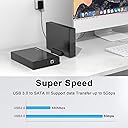
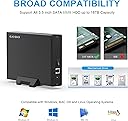
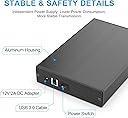
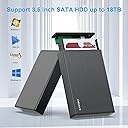
🚀 Elevate your storage game with speed, safety, and style!
The GODO USB 3.0 to 3.5 Inch Hard Drive Enclosure is a premium aluminum alloy external dock designed for 3.5" SATA HDDs and SSDs up to 18TB. Featuring USB 3.0 with UASP for blazing 5Gbps transfer speeds, an independent power supply with multi-layer protection, and a sleek vertical stand, it offers stable, safe, and efficient data access across Windows, Mac, and Linux platforms. Perfect for professionals repurposing high-capacity drives or expanding desktop storage with plug-and-play ease.


| ASIN | B0B9MVWFRG |
| Best Sellers Rank | #14 in Enclosures |
| Compatible Devices | Desktop PC, Laptop, Television |
| Customer Reviews | 4.5 4.5 out of 5 stars (1,138) |
| Data Transfer Rate | 5 Gigabits Per Second |
| Date First Available | August 15, 2022 |
| Hard Disk Form Factor | 3.5 Inches |
| Item Weight | 1.28 pounds |
| Item model number | 3.5" SATA Enclosure-Black |
| Manufacturer | GODO |
| Material | Metal |
| Max Number of Supported Devices | 1 |
| Memory Storage Capacity | 18 TB |
| Product Dimensions | 7.32 x 4.6 x 1.26 inches |
M**G
Nice box!
I put an Apple Air-port 4TB hard drive in this housing after the Air-port was deemed obsolete. Was an easy install and it works great!
G**U
Revive Your Old SATA drives with the USB 3.0 HDD Enclosure that is Plug & Play
Godo USB 3.0 External HDD Enclosure arrived in secure, well-cushioned packaging. Constructed from aluminum alloy, it offers improved heat dissipation but also provides a sleek, minimalistic design that's easy to handle—even for first-time users. Installation: 1) Attach the two plastic side rails to your 3.5" SATA HDD. 2) Remove the rear panel of the enclosure, slide the drive in carefully, aligning the SATA interface with the enclosure’s PCB. 3) Pull the drive forward until the connectors are snugly seated, then reattach the front panel. 4) Secure both ends with the included screws for a firm, rattle-free fit. The enclosure includes both a 12V power adapter and a USB 3.0 Type-A to Type-B high-speed data cable, ensuring stable power delivery and fast transfer under optimal conditions. To access your files: Connect the USB cable and power on the enclosure. Your system should detect the full drive capacity immediately. If you're seeing only partial capacity (common with drives over 2TB): a) Log in as an Administrator. b) Open Disk Management. c) Right-click the drive's label (left-side column), and select "Convert to GPT" (GUID Partition Table). d) Once converted, the full capacity will be recognized and accessible. Overall this enclosure is a cost-effective, efficient way to repurpose high-capacity SATA drives (2TB and above). Whether you're backing up data, transferring large files, or bringing an old drive back to life,this USB 3.0 enclosure delivers reliable performance and exceptional value.
E**K
Inexpensive hard disk enclosure that is still functional
The GODO USB 3.0 to 3.5 Inch Hard Drive Enclosure is 2/3 the cost of others, but still manages to be sturdy and functional. My only complaint is that the activity LED is on the bottom of the enclosure at the back when the drive inside has the top side up. That is not an issue if you don't mind using the drive oriented upside down or on its side. Like most other inexpensive enclosures there is no fan, and there are no ventilation holes, with only air between the drive and the inside surface of the enclosure. I was looking for the least expensive enclosure that still had a power switch and an activity LED. The included stand works well and allows the activity LED to be more visible. The drive is mounted using two plastic side rails that slide into the aluminum enclosure. The fit is a little tight, but the pieces slide in without requiring excessive force. The drive does not move and the pins in the side panels are sturdy enough to hold the drive. The only thing holding the SATA connector on the drive to the adapter board is two foam pads at the opposite end of the enclosure. I found that it was better to not slide the drive completely in before connecting the end panel with the adapter board. Both end panels are plastic but rigid and solid enough to be durable. The drive should stay connected unless you sit the enclosure in an unusual position sitting on the end panel with the foam pads. I have not yet tested to see if the drives overheat or the adapter has any problems. The adapter board is well manufactured and similar to others. Revised 9/13/2024: The drives sometimes go offline. I think that the drive is sliding out of the SATA connector on the PC board. I added some foam at the opposite end to see if it helps keep the drive connected. If you have problems, you can try holding the drive with the power and USB connectors facing down and then wiggle the enclosure a little so that the drive slides downward into the SATA connector on the PC board.
S**2
Works like a charm
Works like a charm. You do have to assemble it a bit but nothing difficult. I barely looked at the manual and figured it out. A nice aluminum enclosure with power switch and LED indicator light. Comes with power adapter and USB cable. NOTE: this is designed for 3.0 and 3.5 inch drives in particular!
C**C
Great value
Perfect. Works as intended which is all I can ask for
T**.
Very good quality.
The quality of the enclosure is really good. All metal case and a solid method of securing the hard drive. It works perfectly and with the included upright stand, one has a choice of having it lay flat or stand it on either side. I would recommend this enclosure.
H**R
Intended to use as a permanently connected enclosure for backups, but included USB cable is way too short and does not reach my PC which is hanging from under the desk. Will keep it and still use as a monthly backup tool, but will need to connect and disconnect to the front of the PC each time. Be aware of this important limitation.
ترست بايلوت
منذ يوم واحد
منذ شهر