We remain fully operational. Our teams are working around the clock to ensure your deliveries continue safely.

قم بتنزيل التطبيق


معلومات عنا
حقوق الطبع والنشر © 2024 Desertcart Holdings Limited
قم بتنزيل التطبيق
Buy anything from 5,000+ international stores. One checkout price. No surprise fees. Join 2M+ shoppers on Desertcart.
Desertcart purchases this item on your behalf and handles shipping, customs, and support to KUWAIT.
📸 Capture. Print. Cherish. Instant memories, timeless quality.
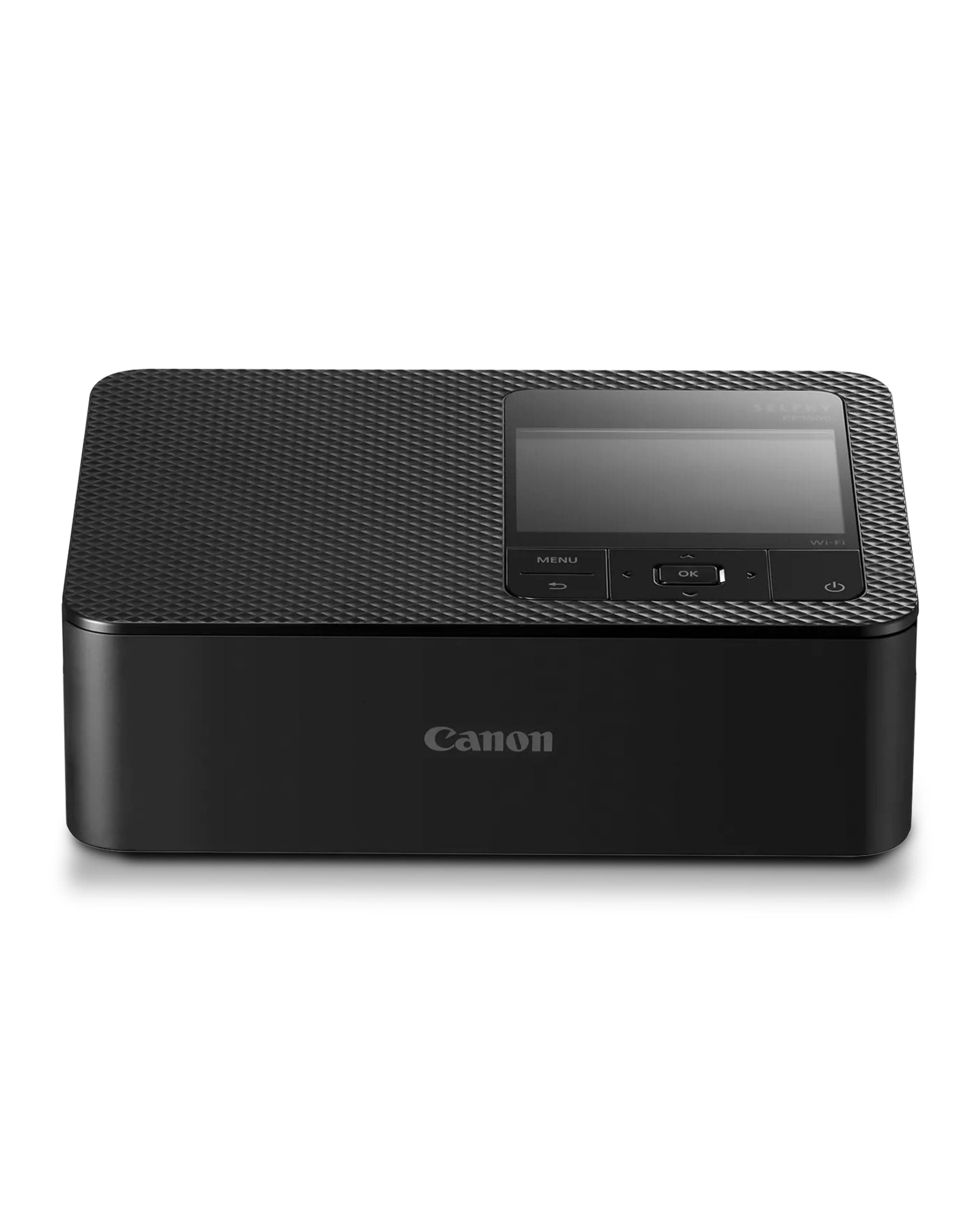
The Canon SELPHY CP1500 is a compact, dye sublimation photo printer delivering vibrant 300x300 dpi postcard-sized prints in just 41 seconds. Featuring 16.7 million colors and a special protective coating, it ensures photos remain water, scratch, and fingerprint resistant for up to 100 years. With wireless connectivity via the SELPHY Photo Layout app and direct printing from SD cards, it offers versatile, creative printing options for smartphones, tablets, and computers—ideal for professionals and creatives on the go.


| ASIN | B0BNJKDB3Q |
| Additional Printer Functions | Print Only |
| B&W Pages per Minute | 1 |
| Brand | Canon |
| Built-In Media | Paper |
| Color | black |
| Color Depth | 24 bpp |
| Color Pages per Minute | 1 |
| Colour | black |
| Compatible Cartridge | Canon SELPHY CP1500 Cartridge |
| Compatible Devices | Laptops, Desktops, Smartphones, Tablets |
| Connectivity technology | USB, Wi-Fi |
| Control Method | App |
| Controller Type | iOS |
| Customer Reviews | 4.4 out of 5 stars 573 Reviews |
| Display Type | LCD |
| Dual-sided printing | No |
| Duplex | Automatic |
| Hardware Interface | USB |
| Initial Page Print Time | 1 minuto |
| Ink Color | Coloured (CMYK) |
| Item Dimensions D x W x H | 30D x 30W x 8H centimeters |
| Item Type Name | SELPHY CP1500 Compact WiFi Photo Printer |
| Item Weight | 850 Grams |
| Manufacturer | Canon |
| Maximum Copies Per Run | 1 |
| Maximum Copy Resolution Black and White | 300 x 300 dpi |
| Maximum Copy Resolution Color | 300x300 dpi |
| Maximum Copy Speed Black and White | 1 ppm |
| Maximum Media Size | Postkarte |
| Maximum Print Resolution Black and White | 300 dpi |
| Maximum Sheet Capacity | 1 |
| Maximum print Resolution Color | 300 dpi |
| Model Name | SELPHY CP |
| Model Number | CP1500 |
| Model Series | CP |
| Model name | SELPHY CP |
| Number of Drivers | 1 |
| Number of Trays | 1 |
| Other Special Features of the Product | Dye sublimation technology |
| Output sheet capacity | 1 |
| Paper Size | 10.5 centimeters |
| Power Consumption | 60 Watts |
| Print media | Glossy photo paper |
| Printer Connectivity Type | USB, Wi-Fi |
| Printer Output Type | Color |
| Printer Type | Dye Sublimation |
| Printing technology | Dye Sublimation |
| Processor Count | 1 |
| Resolution | 300 x 300 |
| Scanner Type | Photo |
| Series Number | 1500 |
| Special features | Dye sublimation technology |
| Specific Uses For Product | Photo Printing |
| Total USB 2.0 Ports | 1 |
| Total Usb Ports | 1 |
| Unit Count | 1 Count |
| Warranty Description | Manufatuer Warranty |
| Wattage | 60 watts |
A**G
One of the TOP product that can produce quality photo. No More studio for passport photo
This product will make your Family Story more Fun. Just make sure that the camera used is very good.
O**A
I really like quality photo
Good printer
J**A
Great purchase
Good quality of photos
A**Y
I recommend this printer!
This is a very good printer for printing photos! Many years ago I used an older model - Canon Selphy CP800 and even then I felt how convenient the Selphy series of printers is. Now I have purchased the CP1500 and the Selphy series has become even better, because now you don’t even need a computer to print photos, now you can print photos directly from your mobile phone. For your information - please note that the printer requires special paper. This printer does not have liquid or powders ink, which is very good if you have children in your home, special film cartridges are sold for this printer. I recommend this printer to anyone who needs the ability to quickly and easily print high-quality photos!
K**D
documented CP1500 defect
The printer was working fine until it reached a documented CP1500 defect, which can happen for no reason. I don’t recommend buying.
A**D
Beautiful!
What are you thinking about? BUY NOW
S**8
👍🏻
مرررره حلوه وجودة الصور حلوه واستخدامها سهل وفي لغات مختلفه حتى عربي
T**E
Must have for photographers and memory keeper
Work great with amazing colors
ترست بايلوت
منذ شهر
منذ 3 أيام