We remain fully operational. Our teams are working around the clock to ensure your deliveries continue safely.

قم بتنزيل التطبيق


معلومات عنا
حقوق الطبع والنشر © 2024 Desertcart Holdings Limited
قم بتنزيل التطبيق
Buy anything from 5,000+ international stores. One checkout price. No surprise fees. Join 2M+ shoppers on Desertcart.
Desertcart purchases this item on your behalf and handles shipping, customs, and support to KUWAIT.
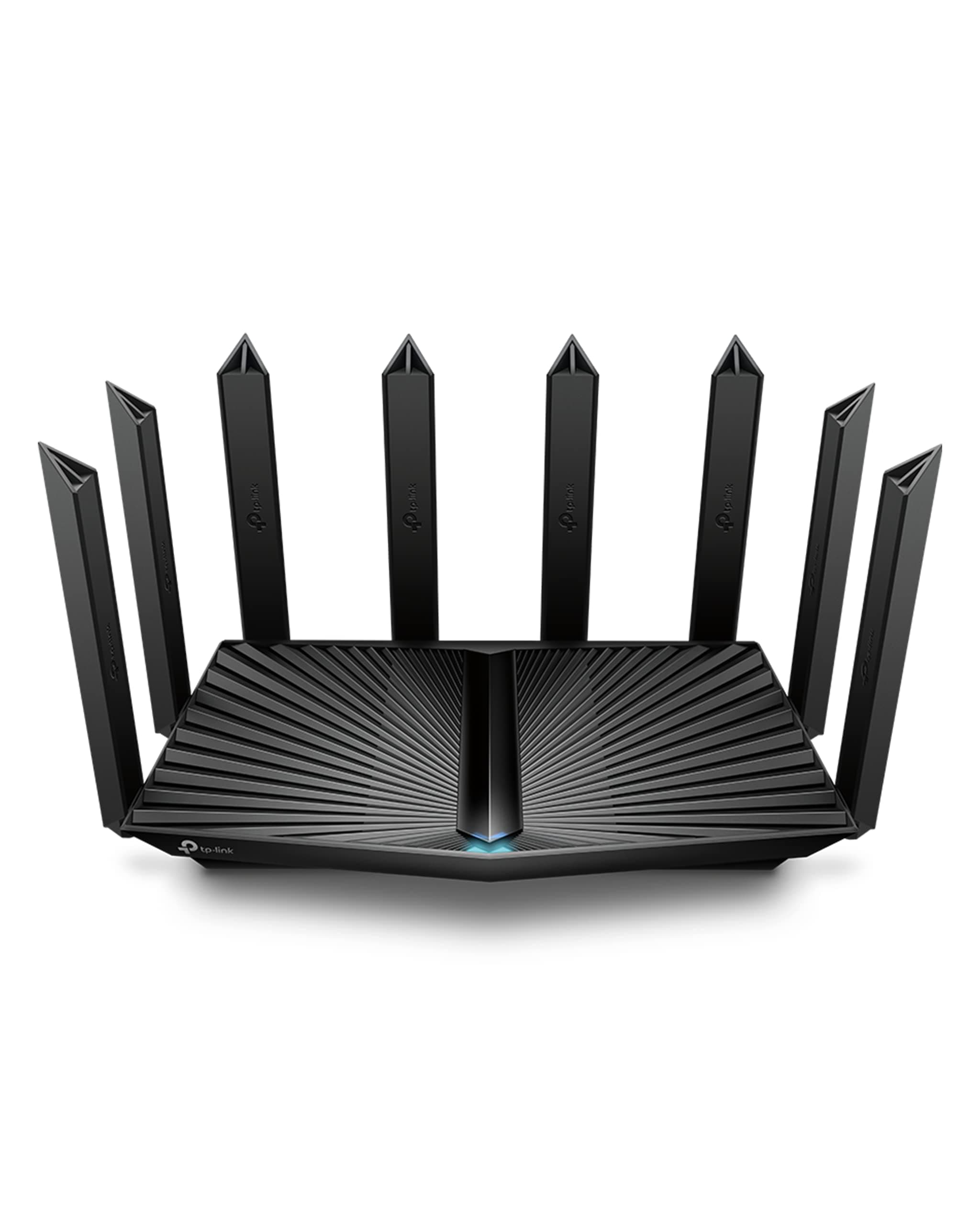
⚡ Elevate your home network to pro-level speed and coverage — because buffering is so last decade!
The TP-Link Archer AX80 is a cutting-edge Wi-Fi 6 router delivering dual-band speeds up to 4804 Mbps on 5 GHz and 1148 Mbps on 2.4 GHz. Equipped with eight high-gain antennas and Beamforming technology, it ensures expansive, stable coverage across large homes. Its 2.5 Gbps multi-gig WAN/LAN port supports next-generation ISP speeds, while MU-MIMO and OFDMA optimize device connectivity and reduce latency. Features like OneMesh compatibility, WPA3 security, TP-Link HomeShield protection, and Alexa integration make it a future-proof, secure, and smart networking solution for demanding millennial professionals.


| ASIN | B0BMWHQH1M |
| Antenna Location | Home |
| Antenna Type | Fixed |
| Best Sellers Rank | #4,815 in Electronics ( See Top 100 in Electronics ) #38 in Computer Routers |
| Brand | TP-Link |
| Built-In Media | Power Adapter, Quick Installation Guide, RJ45 Ethernet Cable, Wi-Fi Router Archer AX80 |
| Color | Black |
| Compatible Devices | Personal Computer |
| Connectivity Protocol | Wi-Fi, Ethernet, USB |
| Connectivity Technology | Ethernet, USB, Wi-Fi |
| Control Method | App |
| Controller Type | App Control |
| Coverage | 3+ Bedroom Houses |
| Customer Reviews | 4.4 out of 5 stars 797 Reviews |
| Data Transfer Rate | 4804 Megabits Per Second |
| Frequency | 5 GHz |
| Frequency Band Class | Dual-Band |
| Has Internet Connectivity | Yes |
| Has Security Updates | Yes |
| Is Modem Compatible | Yes |
| Item Dimensions L x W x H | 10.9"L x 7.2"W x 2.3"H |
| Item Type Name | WiFi Router |
| Item Weight | 2 Pounds |
| LAN Port Bandwidth | 10/100/1000 Mbps |
| Manufacturer | TP-Link |
| Maximum Upstream Data Transfer Rate | 4804 Megabits Per Second |
| Mfr Part Number | Archer AX80 |
| Model Name | Archer AX80 |
| Model Number | Archer AX80 |
| Number of Antennas | 8 |
| Number of Ports | 5 |
| Operating System | Archer Firmware |
| Other Special Features of the Product | Access Point Mode, QoS |
| RAM Memory Installed | 512 MB |
| Router Firewall Security Level | Standard |
| Router Network Type | Dual-Band |
| Security Protocol | WPA/WPA2-Enterprise (802.1x), WPA2, WPA3 |
| Smart Home Compatibility | Smart Home Compatible |
| Special Feature | Access Point Mode, QoS |
| UPC | 840030707957 |
| Unit Count | 1.0 Count |
| Warranty Description | 2 year manufacturer |
| Wi-Fi Generation | Wi-Fi 6 |
| Wireless Communication Standard | 802.11ac, 802.11ax, 802.11b, 802.11g, 802.11n |
| Wireless Compability | 802.11ac, 802.11ax, 802.11b, 802.11g, 802.11n |
R**N
Solid Signal, Incredible Range
This is the best Wi-Fi router/AP I have ever owned. I am using it in AP mode, so I can't comment on the advance features, but here's why I like this Archer AX80: I have a lot of devices throughout my home, between family member devices, IoT Smart home devices and security cameras. Previously I had to use 3 separate APs to get full coverage, and I found the signals were not stable, and dropped frequently. I was very close to going for an expensive mesh system, when I read all the positive reviews on this one and decided to give it a try. This thing is incredible. It can easily handle the entire house full of devices with just this one router. Coverage and range are amazing. Signal is strong and stable in both 2.4 and 5ghz bands. There are a few devices out in my garage that always had problems with weak signals, and now they are working flawlessly and have a very strong signal. Noticeable speed difference on the 5ghz band for all my streaming devices. Videos load extremely fast. Like all TP-Link products, it was an easy and intuitive setup.
D**N
Powerful, feature rich router
This router was delivered in a very large carton with heavy padding inside to protect the large but not so hefty device. This is the third TP-Link router I have purchased in the last seven years, so I am used to their quality and performance, which is first rate. It replaces an Archer30 box, so setting it up to take over the already expansive network of devices in my home was a breeze. I used the web interface on my PC because I am used to it, and the user interface is pretty straightforward and expansive. Having a speed test button on the Network App tab is an especially nice touch too. The first task I had to execute after getting it in place was to upgrade the firmware, which was easy and quick due to the very resourceful (pun intended) TP-Link support page. I decided on the replacement because the connected device count in my home has been steadily growing recently, and I felt I needed more capacity and future proofing. The ability to create a separate IoT network is one of the things that helped me decide to upgrade to this level. I initially tried setting device priority using the QoS feature, but that seemed to cause a few dropouts, so I turned it off and haven't gotten any since. When I first checked the speed on my main PC which is in the same room as the router, the download speed jumped to the 390 - 330 range (on my 300 Mbps Spectrum internet) and settled down to a final read of 355Mbps. The upload speed peaked at 12 Mbps. Speeds generated on devices farthest away from the device stayed in the 270+ Mbps/9+ Mbps (download/upload) range, which is very good. One of the main duties I have expected from my routers over the years is to be able to serve USB connected drives on the local network so I can access them from other network devices. This router recognized my four USB SSD drives connected through a Sabrent DC powered hub plugged into the router's USB port nicely - once I realized the hub needed DC power to the hub to handle the load. I have used other routers over the years and have found TP-Link routers to be the most reliable and feature rich ones. Highly recommended UPDATE: I feel the need to mention this because it may save someone some frustration. Speaking about those four external USB drives attached to the router, I recently replaced one of the older drives with a larger one, thinking that I could just hot swap the drives with no problem. Actually, it was only after I rebooted the router by unplugging it and plugging it back in that it would recognize any of them again. Once that was done, the drives reappeared in the list of USB drives attached, and the network drives were available to be shared. A word to the wise: select a suitable time to add or replace a drive so you can perform the reboot without inconveniencing your network users.
A**R
Good router, not the right fit
I’m sure this thing works perfectly fine. I tried to use it in place of my starlink router, but starlink is so specific about its specs, that this can’t bypass CGNAT. Which is stuff I don’t understand a lot of, but I know it interferes with my Xbox live. My NAT type is moderate at best. I connect with one friend fine, but the other has bad connection with me. Giving HIM the laggy sensation. But my other friend in the same game has NO problems. I’m also trying to use this router as a LAN base for playing “Spatial Ops” on the quest 3 outside in an arena against another player with a second headset. But this router didn’t have the features to allow my phone to be the hotspot for it or to be tethered to it. I know this is all complicated sounding lol. But if anyone out there IS trying to do what I’m doing with VR or has problems with their starlink, it isn’t going to help with Xbox live. Not to mention, it seemed to have moments where shows would pause on and off like it was buffering. All I can think is that the starlink specs limited the router to do things only the starlink could do. So anyway, I don’t the router is bad, just bad for starlink router replacement and for my VR set up.
A**A
Working fine.
It's odd that TP-Link has a place to scan for a quick install. If you scan it, the end result is it says to go Xfinity and have them activate it. You can do this from the start without being dragged through the TP-Link connection interface, which as I said is useless. The is opposite to the ARRIS Surfboard S33 Modem, which does have something to scan for quick install without contacting anyone and it installs and connects perfectly just by the scan. The Tp-Link router interface within is easy to configure if your;re wanting to change anything or you can just leave everything as is and it will work fine.
S**O
Best Wi-Fi Router that I've ever owned
Easy setup with clear instructions. Great online software for access to router settings and speed tests. Truly fantastic speed and excellent coverage on both floors of my home; a big improvement over my previous wi-fi router. My only minor niggle is it's a larger device and takes up more desk-space than most routers, but that doesn't drop it any ratings points for me. Glad that I found this -- highly recommended.
G**N
Reliable Upgrade with Easy Setup
I bought this router to replace an older Netgear Nighthawk that I’d been using for years. It performs well and provides strong Wi-Fi coverage throughout my space. I purchased a used unit from Amazon, and it looked and worked like new. The Tether app and web interface are both easy to use. The only minor drawback is that it has just three LAN ports on the back, but I already use a network switch, so that wasn’t an issue. The option to wall-mount the router is also a nice bonus.
A**N
Good router good range
Awesome speec compared to my old one. Was getting a max of 70 MBps and bow with same Internet im getting over 90 MBps. Range is very good through three walls to my TV its still full strength probably 25-30 feet and 3 walls. Garage 65 feet away and 5 walls one brick and is still a good signal
S**1
Do not buy from TP Link
Well I purchased July of 25 in January 26 my router quit working. I called tech support spent over a hour doing what they said. Said I need another router to connect to theirs to reset it they sent me directions to do this I tried unsuccessfully and contacted them back, email after email it took over a week to get them to do a warranty return on it. I was responsible to ship back to them a cost of 35$ so now I'm 2 weeks in and still have another week or so to get a replacement. I also purchased the protection plan from Amazon they said it was under manufacturer warranty still so the plan would not take care of the product. So if your ok when a product quits working and spending 3 weeks to a month without internet. Thank God I had my old router to keep me with service or I would have had to purchase another my advise do not buy fro tp link.
ترست بايلوت
منذ شهر
منذ شهر