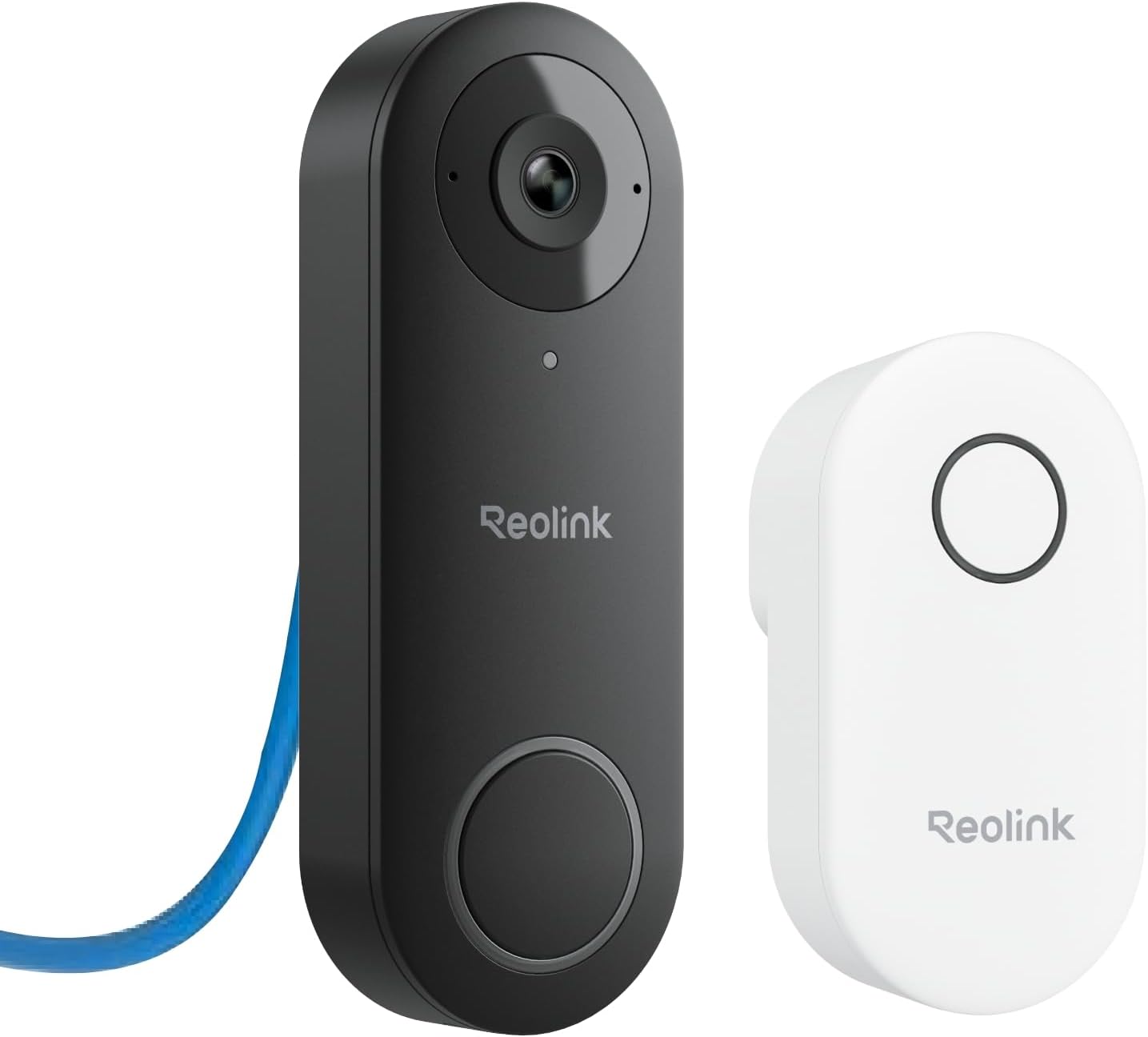
🚪🔒 Elevate your doorstep security with crystal-clear vision and zero hassle!
This Video Doorbell PoE Camera delivers stunning 2K resolution with a 180° diagonal field of view, powered via Ethernet for unmatched stability and 24/7 recording. Featuring advanced HDR, night color vision, and smart humanoid detection, it ensures precise alerts without false alarms. The included Chime V2 offers customizable tones and voice replies, while flexible local storage options eliminate monthly fees. Designed for easy plug-and-play installation, this IP65-rated outdoor camera is the ultimate upgrade for modern home security.


| Night Vision | Night Color |
| Night Vision Range | 100 Feet |
| Video Capture Format | MPEG-4 |
| Number of Channels | 2 |
| Connectivity Protocol | Ethernet |
| Wireless Technology | Wired |
| Connectivity Technology | Wired |
| Unit Count | 1.0 Count |
| Item Weight | 2 Pounds |
| Item Dimensions | 3 x 1 x 5 inches |
| Focus Type | Auto Focus |
| Viewing Angle | 180 Degrees |
| Wattage | 12 watts |
| Are Batteries Required | No |
| Voltage | 24 Volts |
| Power Source | Power over Ethernet |
| Frame Rate | 20fps |
| Video Capture Resolution | 5 MP |
| Alert Type | Motion Only |
| Waterproof Rating | IP65 |
| Photo Sensor Resolution | 5 MP |
| Control Method | App |
| Room Type | Office, Kitchen, Living Room, Classroom |
| Effective Still Resolution | 5 MP |
| Color | Black |
| Form Factor | Turret |
| Additional Features | Waterproof |
| Indoor Outdoor Usage | Outdoor |
| Compatible Devices | Smartphone |
| Controller Type | Reolink APP |
| Mounting Type | Wall Mount |
T**Y
High-Quality Video & Privacy — The Perfect PoE Doorbell
I really like that this is a PoE (Power over Ethernet) unit. We already had a Cat6 cable running to the front door, so installation was incredibly easy and the connection is rock solid. The included chime works perfectly as well, making it a complete out-of-the-box solution. The camera works very well, and I have absolutely no complaints regarding the video quality; it’s sharp and clear. One of the best features is the ability to store video on-premises instead of paying a company a monthly fee to store it for me. I’ve always been concerned with privacy when a third party has access to my video, so local storage is a huge win. For those looking to take things to the next level, this doorbell easily incorporates into Home Assistant. This allows for advanced camera automations you may not get with more "locked-down" brands.
M**T
A great investment! No monthly fees! EXCELLENT QUALITY!
This doorbell is fantastic! Unlike other brands that charge monthly fees just to use the device you already bought, Reolink doesn’t. Once you purchase it, it’s yours — no subscriptions, no hidden costs, just a solid, reliable doorbell that works the way you want it to. It’s also perfect for anyone who values privacy. Your data stays with you, not in some company’s cloud. The video quality is excellent, with a wide-angle view and crystal-clear images both day and night. I was especially impressed by the smart notifications — it can distinguish between people, vehicles, and animals, allowing me to fine-tune alerts to exactly what I care about. The chime setup is effortless: just plug it into an outlet, and it’s ready to go. Truly a “set it and forget it” experience. I went with the PoE version and couldn’t be happier. There’s something satisfying about having one single cable handle both power and data through modern, efficient technology. Storage options are flexible, too — you can record to the onboard microSD card for simplicity, or connect it to an NVR for a more robust setup.
T**H
Easy install and configuration with existing NVR with Onvif compatability
We've owned a security system NVR for a few years now and finally decided it was time to install a doorbell camera. I chose a Reolink camera because I've read positive reviews for their products in the past. I wanted a PoE camera that was onvif compatible, hoping that it would work with my existing AvertX recorder, which is compliant with the National Defense Authorization Act (NDAA). I recieved the Reolink doorbell camera and installed it in the same spot our existing doorbell was mounted previously. This is a wired PoE camera and in order to keep the install hole small, it required me to wire my own ethernet cable with my favorite RJ45 "pass through" connectors. I chose cat5e cable because it was thinner than the cat6a and cat8 cables that I have. The Reolink unit comes with an adapter to tilt the camera at a 15° angle which I chose to use since our sidewalk curves off to one side. I was able to install this, and configure it to work with our AvertX NVR all in the same day. The Reolink app was easy to install, works well and notifies me of any activity captured by the doorbell camera. The picture is crisp, the two-way audio is a great feature and the ability to play quick reply messages to visitors at the door is a nice feature. You can also record your own custom quick reply messages. There are different sounds for visitors, person, or any motion, you can also opt to turn these sounds off. To be honest, the only thing about the Reolink doorbell camera that was disappointing to me was the fact that there are only 10 different sounds to choose from. The ability to add more sounds or make custom sounds for the different motion events would have been a huge plus in what is already a solid performing camera. If you're looking for a great doorbell camera that performs well and requires no monthly fees, Reolink has you covered!
C**L
I didn't use the doorbell feature
After fighting with WIFI cams trying to keep the connection functional, I switched the front porch to a POE ethernet cam. It was small and very quick to install. The resolution isn't quite as good as the previous, but I can see who is near the door I can see dog walkers and traffic well enough day and night. Good for the purpose, and has been reliable for a month with no issues. The doorbell ringer is still in the box.
M**E
Connect to your NVR through NVIF, great system with lots of features at good price
This is the POE version, not wifi. Some basics- for poe, you need to wire the doorbell using Cat 6 cable to an nvr or injector. If you don't know what that is, hire someone to do the wiring and figure out which nvr to buy. If you want home security with nvr capabilities, i.e. many cameras, secure recording to a hard disk, etc. then become familiar with nvr and wired cameras. POE cameras simply mean one Cat 6 cable is used to both power the camera and send its signals to the NVR. Older systems use two cables. So, if you are in the right place and you have a POE Cat 6 cable at your door, this camera is terrific. I had a professional do the wiring and sell me an NVR and 4 cameras plus a doorbell. NVR and cameras are from Dahua. Doorbell was from Aukvox. The latter was very sophisticated, could unlock two locks remotely, had provision for a security card, etc. But its night vision was zero even with infrared, its motion detection was zero and you could only hear but not talk back. Good for business maybe, not residence. $500 device useless to me as a homeowner/residence. Wanted service fee of $175 to come out each time and tinker with it. Had enough and bought this POE reolink. Installed it and it has great night vision and motion detection, 2 way intercom, great features. The rub is how to install it so it shows up on my nvr monitor? It has NVIF capability and my Dahua nvr has nvif ability as well so I gave it a shot. Bought it from Amazon because they have a great return policy and if I was not able to set it up I would return it. The reolink support documents did not help. I did not bother to call tech support. I googled Dahua nvr and Reolink POE camera how to connect and got a lot of good info that way. I will not go into all the detail. Too long already. But, they say get into the camera interface through the URL address. I got in but that didn't help. So if you are trying to connect to nvr, you have to enable NVIF on the camera. How? Do the following on the APP, not the interface or Reolink client on the web. Go to Settings, hit the device name (first item), another screen opens Device Info, go to Network Information, then Advanced, BOOM, the screen gives you choices to enable RTMP, HTTP, HTTPS,RTSP and ONVIF. I enabled them all. Plug the camera into POE. The NVR will now be able to add the camera to its list of cameras. Add camera, initialize, do whatever your nvr manual says to do and it will appear in your phone app as well along with all your other cameras. When you add it, you will have to enter username and pw. I am skipping the nvr steps. Figure those out. I see some negative reviews here but I am very satisfied with it. You also have to pair the chime. My old battery chime ate batteries every 3 months. This is plug in and quite loud with choice of rings. Overall, one week later, very happy. Lets see how it performs over time.
D**W
Ding dong, the WiFi's dead!
Easy installation, good clarity, and no need to worry about wifi drops! The NVR pairs perfectly with it, and the chime is nice and loud! Excellent bang for the buck!
S**K
Nice camera, works well.
It's a doorbell camera, you can record who or what approaches your door. I chose the POE camera because I don't like batteries and I've found WiFi cameras frequently are problematic if outside. Aside from the challenges of running cable in my old house, this thing was a breeze to set up. I have not yet botthered to install an SD card, everything that happens in the camera view gets recorded on my Blue Iris system. You will need to use the Reolink app to get everything configured, which was easy to do. I forget exactly where but in the menus are options that will make it possible to use with y our chosen NVR. Initially this caused me some problems until I figured it out. The doorbell does pair up with Alexa so you can get an announcement when someone rings the door bell. You can also program other actions like turning lights on or some random announcement alerting you to intruders at the gate. You cannot disable the default announcement that I've found. I'm happy overall with this product and would use it again if needed.
V**N
Exelent camera door bell
As most people opt out to go for the ring I chouso to stray from the pack. I just liked the reolink brand since I helped out a friend install a cc-tv sistem in his house. The no subscription or monthly fees is a big plus for me. I got a NVR sistem for my home and the doorbell interfaces seamlessly with it. It does everything as well as it say in the description. The no need for complicated whiring and installation is also a big plus. The cuality of the picture is great as not only you can see who is at the door but they are not pixels on your screen and you have to use your emagination to figure out who is that. The usual delay is minimal just under a second, and the colors are vivid.
ترست بايلوت
منذ أسبوع
منذ شهرين