We remain fully operational. Our teams are working around the clock to ensure your deliveries continue safely.

قم بتنزيل التطبيق


معلومات عنا
حقوق الطبع والنشر © 2024 Desertcart Holdings Limited
قم بتنزيل التطبيق

Buy anything from 5,000+ international stores. One checkout price. No surprise fees. Join 2M+ shoppers on Desertcart.
Desertcart purchases this item on your behalf and handles shipping, customs, and support to KUWAIT.
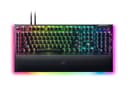
🎮 Elevate your game with silent speed and dazzling control — the BlackWidow V4 Pro commands attention.
The Razer BlackWidow V4 Pro is a premium wired mechanical gaming keyboard featuring ultra-responsive Yellow linear switches with sound dampeners, customizable per-key Chroma RGB lighting plus a 3-sided underglow, and a programmable command dial with 8 macro keys. Built with doubleshot ABS keycaps for durability and a magnetic leatherette wrist rest for ergonomic support, it’s engineered for pro gamers seeking silent precision and immersive aesthetics.


| ASIN | B0BV4BC7LV |
| Additional Features | Chroma RGB, Command Dial - Programmable Macros, Doubleshot ABS Keycaps, Wrist Rest, Yellow Mechanical Switches - Linear & Silent |
| Antenna Location | Gaming |
| Best Sellers Rank | #1,149 in Video Games ( See Top 100 in Video Games ) #114 in PC Gaming Keyboards |
| Brand | Razer |
| Built-In Media | 2x Type C Cable, Gaming Keyboard |
| Button Quantity | 104 |
| Color | Black |
| Compatible Devices | PC |
| Connectivity Technology | USB-C |
| Customer Reviews | 4.1 out of 5 stars 448 Reviews |
| Enclosure Material | Aluminum |
| Hand Orientation | Ambidextrous |
| Item Dimensions L x W x H | 18.36"L x 6.01"W x 1.73"H |
| Item Type Name | Gaming Keyboard |
| Item Weight | 3.6 Pounds |
| Keyboard Backlighting Color Support | RGB |
| Keyboard Description | Gaming |
| Keyboard Layout | QWERTY |
| Manufacturer | Razer |
| Model Name | Blackwidow V4 Pro |
| Model Number | RZ03-04681900-R3U1 |
| Number of Keys | 104 |
| Number of Sections | 7 |
| Power Source | Corded Electric |
| Recommended Uses For Product | Gaming |
| Series Number | 4 |
| Special Feature | Chroma RGB, Command Dial - Programmable Macros, Doubleshot ABS Keycaps, Wrist Rest, Yellow Mechanical Switches - Linear & Silent Special Feature Chroma RGB, Command Dial - Programmable Macros, Doubleshot ABS Keycaps, Wrist Rest, Yellow Mechanical Switches - Linear & Silent See more |
| Style Name | BlackWidow V4 Pro |
| Switch Type | Linear |
| Theme | gaming |
| UPC | 840272903339 |
| Unit Count | 1.0 Count |
| Warranty Description | 2 year manufacturer |
M**T
Best Keyboard I've had
This is nearly perfect keyboard. I spent a long time (20+ years) trying to find which keyboard worked for me. I went through several hundreds of IBM, corsair, razer, steelseries, and logitech keyboards. Mechanical, linear, tactile, and everything else. Over the years, I've easily spent over $4000 on keyboards alone. Everything felt either too clunky, too loud, too soft, not impactful enough, cheap, overdesigned, or underdesigned. **The Good** The simplicities of this board is what make it what it is. From the side piece functionality, to the knobs, to the software. Everything has a purpose, and is optional. A modular keyboard, which allows for all the functionality a gamer would need. It has 5 standard macro buttons, 3 side panel buttons, and a fully customizable keyset. It takes up minimal space, and is made of pretty high quality material. Now, the switches... These switches are the best. Yellow mechanical are silent enough to not be click clacking, but impactful enough to really give it that feeling that you clicked something. The actuation points are on point. Lastly the brightness. This lights up my room, it's actually brighter than my computer. **The Bad** So, there are some improvements to be had. 1. The lenses on the media keys should be see through, so you can see which buttons you're pressing. Not a huge deal, but none-the-less, will improve the experience. 2. The cords that come with the keyboard are modular, meaning you can disconnect the cords from the keyboard. Now normally, this would good, and it does a great job at staying in. However, if you move the keyboard too much, or I'm guessing unplug and replug. The fitting will eventually ware. Even now, with a brand new keyboard, it'll disconnect sometimes in the middle of gaming. That being said, the grips on the bottom with the padding do a really good job at keeping it in place.
L**N
💔 The D doesn't work like it used to anymore. 😏 It was good while it lasted!
I played with this keyboard a lot. Pretty much everyday since I had it. This was a beautiful keyboard. ✨☺️💖 I loved the way the lights wrapped all of the way around the wrist rest pad. It was comfortable, it was even easy to customize with fun different key caps! I spent 2 years and 4 months with it before I started having issues. 💔 I'm not sure what the average lifespan of a keyboard usually is, but I guess I wore out the D after using it too much. Unfortunately, the D is now somewhat unresponsive when I touch it. Perhaps it was all of the repetitive strafing from side to side that went on in the competitive games I had been playing. The A and D keys were definitely put to work with many long hours of play sessions. It was not each time I pressed the key where it didn't respond, but the inconsistentcy was enough to cause me to retire this keyboard. Time to move on to my next, new keyboard. ⌨️🌷RIP🌷 this beautiful keyboard. We had some good times together! Maybe I'll get the same type, or maybe I'll try something different. Who knows! I'm not sure yet!
F**K
Awesome keyboard.
Really neat keyboard that has some cool features. I enjoy the rgb and razer Synapse software. I know razer is a love hate brand, typically known for over priced devices, however I like the Synapse software which works with my Tartarus, cooling pad, and Balisik mouse. The RGB looks awesome and keyboard functions great. I personally need a full keyboard for gaming and fulfilling admin duties which are bound functions on my number pad. The wrist pad feels great and the full rgb can't be beat. The only downside I see is this keyboard doesn't have hot swapable switches, but for me isn't a deal breaker. Im very pleased with my keyboard. I was able to get on sale and save quite a bit which is why I finally bit the bullet and moved from my Tartarus single hand keyboard.
J**F
Toy wrapped in marketing façade. Fine for kids. But working professionals should steer well clear.
TLDR: slipshod programming, excellent marketeers. [NOTE: apologies for the typos - I had no time to proof my notes. But it takes ages to even list all the issues/flaws, much less document them--I'm far from the only person who has tried... and threw up their hands in defeat.] //skip to Part 2 for better grammar :) PART 1 ----- THE HARDWARE ----- Literally every major feature listed (on the amazon page for naga pro and blackwidow v4 pro) has a major issues 1. Media keys 1. Sunken down too far to be visible, aka too short to see and use easily 2. Hard to see. Symbols are faint. No through-key illumination, only peripheral backlight. Very difficult to see even in good light and without glare of the backlight. 2. Indicators above the arrow keys 1. No backlight, cannot see the text, not that you use these often. 3. Command dial - modes + comments 1. Keyboard brightness ® Redundant. Dedicated fn keys already exist on this very KB 2. Windows zoom. ® Programmed with wrong output (e.g. deprecated in newer windows os) 3. Track jogging. ® Limited utility. Works only when player is in focus, which defeats the main purpose ® Doesn't work will all apps ® Windows media: dial ONLY WORKS WHEN FOCUS IS ALREADY ON TRACK SLIDER. Absolutley useless. ® Under the hood, it's just "shift + left arrow" and "shift + right arrow" 4. Vertical scrolling. ® Good use case: gaming. For button mashing quick-events; perform scroll wheel up/dn if you've already mapped your physical scroll wheel's up/dn to something else ® Useless? For me anyway 5. Horizontal scrolling. ® Actually works. Nice to have when synapse crashes, disabling horizontal scrolling on razer's naga pro mouse. (though I haven't tested this extensively). ® UPDATE. Nvm. Does not work w/o synapse. 6. Switch apps ® Alt + Tab… but much worse. you already have alt-tab. But this is worse. Once you stop turning, it selects that app, but gives you little time to glance through them, so you have to key turning the dial. But if you overshoot and reverse dial turn direction… ◊ It Scrolls in wrong direction // If you reverse scroll direction too quickly, it won't recognize the change in direction, aka the wheel doessn't work well 7. Track selector ® Basic next track, prev track 8. Switch browser tabs ® Why would you need this? 9. Custom modes - user created ® Can be useful, but YMMV ® Gaming: map to scroll wheel 4. Dedicated macro keys 1. M1, M2, M3, M4, M5 - useful 2. Side keys - too easy to bump by accident Overall hardware quality - fine for <$100, but not remotely worth >$200 PART 2 ----- THE SOFTWARE ----- No review of Razer peripherals is complete without mentioning their software, Synapse. Razer Synapse - so, so many issues 1. Required for most features to work, integral to the product listed. 2. Frequently crashes (especially during games). Result: i. Your profile stops working: macros and keys return to default (or to some random ghost profile that you can't delete) ii. Your macros stop working iii. Your lighting stops working 3. Profiles 1. corrupted 2. Hybrid storage doesn’t work (white profile on Naga Pro): unable to retain settings when synapse disconnected 3. Profiles and macros don’t work when signed IN to Synapse, but work OK on a guest account. 4. Unable to sync profiles 5. unable to factory reset / erase profiles (!) 4. Macros don’t work in a dozen ways 1. issues with combined modifiers (like win + ctrl) 2. keys stuck in down-press or un-press 3. keys do not respond 4. corrupted in so many ways... 1. random keystrokes removed from macros 2. unwanted duplicates 3. failure to run 4. failure to duplicate correctly 5. corrupted on import 6. up/down keystroke pairs no longer “linked” 7. no name “No macro” 8. unable to edit 9. unable to wipe from account 5. Not synced 6. Disappeared from account 7. Nonfunctional 1. When signed into Synapse 2. When signed into specific user account 3. At all 8. NOTE: yes, I am sure many (if not all) the issues stem from Razer/Synapse, not the user. eg i checked the macro files themselves and discovered, for example, some were missing ID tags, had the wrong ID, sequenced my inputs differently from what was displayed in Synapse, were missing key-up lines (making your keys/buttons stuck "pressed down"), etc. 9. Keys are incorrectly mapped Example: the inputs {up, down, left, right} are mapped to arrow keys ® But with turbo, they are are mapped to numpad 2,4,6,8… ® But Synapse doesn't automatically deactivate num lock. ® So when you think you're rapidly commanding {up, down, left, right}, Synapse is actually putting out {8, 2, 4, 6} on the numpad. ® Even when using "keyboard recording" i.e. they don't actually record faithfuly your key presses, they estimate. ® This bug is hidden. Zero indication is visible to the user. I had to parse the macro files directly to finally figure out what on earth was going on. 5. resource intensive 1. Consumes 1 GB of RAM 2. Consumes 100 MB to 200 MB of GPU VRAM(!) while machine is idle just after rebooting. 3. Generated >10 GB per user in AppData. (Razer, what on earth are you doing that requires multiple gigabytes?!) 6. Seriously, it's easdier to list what they did right than what they did wrong. This is literally the worst piece of software that I (or most people buying Razer products) will EVER use. PART 3 ----- SUPPORT IS TERRIBLE ----- 1. Razer Support actively dissuades users from contacting support: i. they require A LOT of personal info to even start talking to you. ii. they require VERY invasive logs to even start helping you 1) even if their intent is completely benign, would you really trust Razer Security™ with your personal info? If you think Synapse code is bad, do you think their internal code is any better? 2. they can’t help you anyway (so what was the point of collecting all your personal info?) i. their main advice: 1) uninstall/reinstall everything. 2) don’t get fancy: a) don’t make complicated (useful) macros, b) don’t use USB hubs, including their own accompanying peripheral, c) don’t ‘run too many things at once’ 3. Support forums are littered with tons of “yes-men” who just repeat official lines from Razer i. … even if the advice is irrelevant ii. … even if the advice does not work (see a comment above), eg their driver removal tool doesn’t work on recent firmware patches 4. And yes I’ve tried EVERYTHING while troubleshooting over the years: 1. clean Windows installs 2. new machines. 3. laptops/desktops. 4. different OS. 5. different synapse ver. 6. different combinations of razer products 7. different Razer accounts 8. Multiple of same product 9. safe mode 10. lesson: RAZER PRODUCTS WORK BETTER THE LESS YOU USE THEM. 1. don’t use synapse 2. don’t use macros 3. don’t use chroma / lighting 4. don’t reassign keys 5. don’t mix/match razer products 6. Don't use on multiple profiles on the same computer 7. Don't use on multiple computers 8. etc. ad nauseum 9. … which defeats the point! I could go on for hours… this is just the tip of the iceberg… and these are just the issues i’ve experienced this year alone. Razer has written terrible software and fielded terrible support for years and years. Do you expect them to improve any time soon? From the start and for years on, I was a big fan of Razer products because they offered features not found anywhere else on the market. But their value soured. Their broken software is a deal-breaker. If they invested half as much on software as they did on marketing, they would not need marketing. But I can no longer recommend their products any longer. Even if Razer started discounting their products AND Razer’s competitors all went on vacation (no longer true in 2024, if ever), I could not recommend buying Razer products: they just DON’T work. They are tremendously tiresome, hassle-some, fragile, inconsistent, perpetually broken, and time-consuming. They have wasted thousands of dollars of my time. At minimum. I bought Razer products because they not only accelerated my work, but also enabled me to do things I could not otherwise. So I tolerated their terrible software for a long time... until now. This is the last straw. One can’t help but wonder whether their software issues are intentional. It would make more sense than this calamitous never-ending train-wreck. (Seriously, it's as if they slapped together every feature solely to satisfy a checkbox but performed zero user-testing and or zero quality control, especially in their software. ) TERRIBLE PRODUCT. Just buy a Wooting keyboard instead. Or even a Wooting knockoff.
S**T
Feels great but needs better QC.
Keystrokes are moderate volume. 3 buttons on left side panel of keyboard. Was quick to setup after a quick restart with razer synapse installed. Tons of assignable keys and knobs available. Only real issues are that they shipped the box with no outer box (theft risk - my first one vanished before it even got to the final delivery truck) and the quality control needs work (glue on the keyboard body leading to a sticky right shift key as seen in the video.) Tried to speak with razer support on the phone but they had a default support script that was wasteful of my time as they tried to get me to use canned air or plug it into a different computer while ignoring what I was communicating about adhesive or stickiness. After asking for a supervisor they instead referred me to contact Amazon support and they were perfectly able to remedy the situation through return/reorder. That said, the keyboard seems nice enough that I'll try one last time. Here's hoping that third try is the charm. 🤷♂️. Minus the qc issue, it seems like a great keyboard. Update 1: Finally got my third keyboard ordered/received and this one seems to be problem free to the best of my ability to discern upon the first few minutes of use. Wrist rest is comfortable, hopefully that remains the case after the weather gets warmer. Update 2: been using the keyboard for a little while now. Compared to other keyboards the Escape key takes a little bit of time to get used to because you may be used to reaching for escape and end up hitting the command dial at first. The rolling volume knob feels pretty good once you get used to using it. I think I had orange switches last time and these feel audibly more mellow than my last keyboard thankfully. As always I use the hell out of a toggle on one of my macro keys to mute and unmute my primary microphone and I'm thankful that the five macro keys are back because of that. Haven't found myself using the keys on the side of the keyboard quite yet but we'll see if I find the purpose for them still.
D**S
Love Razer, but not bad keys!
Keyboard isn't even 2 years old and the D key has stopped working, I also work away from home every other month so I've technically only used it for maybe a year. Will have to see if I can get a replacement key and solder it in. Hopefully the rub comes with it. I had the original blackwiddow x and that thing lasted me years and was built much better. Metal frame as this one is plastic. This is a nice keyboard, but to have a key go out this quick isn't a good sign for me. Razer brags about its keys with millions of presses before going out...if that were the case my w key would have gone out first. This isn't much of a review more of a complaint and a warning, however mine can just be the rare case. Other than that the keyboard is great with lots of keys to program and do all sorts of things, the USB port in the back is also great, dont need to plug my headphones into my PC anymore. Maybe I'll update this after I fix the issue and post how easy or difficult it is to do.
Z**Y
Great Keyboard
The Razer BlackWidow V4 is a great keyboard. The build quality feels solid, and the keys are very responsive, making both gaming and typing smooth and comfortable. The RGB lighting looks really clean and adds a nice touch to the setup. Overall, it’s a high-quality keyboard that performs exactly how you’d expect.
B**R
A really good keyboard but way over priced.
While this is one of the nicest keyboards I've had the pleasurer to type on it does have some simple flaws that can be addressed by the manufacturer. Reviewed Version had the Razer yellow switches as I prefer the linear switches for the quiet typing. CONS: The first simple thing is the media keys. You can not tell what each one does at a glance as the embossed characters are next to impossible to see especially when the back lighting is used. (to the manufacturer) Paint them white for the users to see. You need to memorize what they do to use them. Not an issue once you memorize what they do but a visual que helps tremendously. The next fixable flaw is the price. While I do enjoy gaming and typing on the is keyboard it is not worth the premium price tag for a corded keyboard. $230+ USD is just not justified for this board even with its options. Wait till the price drops before purchasing. Next the major flaw I found is the side macro keys. On the left side of the board are 3 macro keys that every time you try to move the keyboard you press them. There is no simple fix for this but I just disabled them in Synapse 3 so as I don't seem to use them anyways. PRO's: This board is one of the most well rounded boards I have every seen. It both games well with its quick actuating keys and productivity options allow you to use this board in almost any scenario. The keys actuate quicker than Cherry MX reds (what my last keyboard had) giving you a leg up in games and for those that are quick typists the need to press the key all the way is unnecessary, a help but also a hinderance if you have fat fingers. I don't have fat fingers so it is a pleasure to type on. The reason I never purchased a Razer keyboard before now is that the cases were made of plastic allowing them to flex where as this board has an aluminum case giving it the required rigidity that I expect from a premium keyboard. I am truly enjoying the plush wrist rest that comes with this board. Every other board that I have had has had a plastic wrist rest until this one. I can honestly say this is a big deal compared with other boards I have used. What more can I say on this other than you really need to try it out if you can find one on display some where. You will love the plush wrist rest. If you already have other Razer products having Razer Synapse 3 is no big deal and you are used to how to work the program but for those wishing to keep extra programs off there PC this is not the keyboard for you. For those that don't mind this program is needed to disable, change or edit macro keys. Synapse does use a bit of system resources so be warned. I personally have the Kraken Ultimate head set, Tartarus Pro gaming pad, Viper Ultimate mouse, Fire fly V2 mouse pad and now the BlackWidow V4 Pro so running the Synapse 3 program is necessary for lighting controls. A feature I find cool is that if you do not need a USB passthrough in the keyboard you can use only one cord to the keyboard limiting the amount of wire clutter that PC's create. Of course on the other hand is if you use that feature there are two cords not bundled together adding to the clutter. Over All Thoughts: Excellent keyboard but overpriced. Good for both productivity and gaming. Comfortable to use with quick response. Has some flaws but there are work arounds. Needs Synapse 3 installed to use most features. Best lighting of all of Razers keyboard options.
ترست بايلوت
منذ 5 أيام
منذ 3 أسابيع