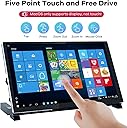
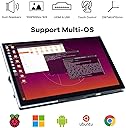
✨ Elevate your projects with a vibrant 7-inch touch powerhouse! 🎨
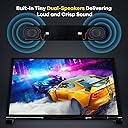
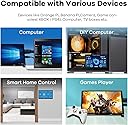
The Hosyond 7-inch IPS LCD touchscreen monitor features a 1024x600 HD resolution with wide 178° viewing angles, 5-point capacitive touch on tempered glass, and built-in stereo speakers with headphone support. Designed for Raspberry Pi and other development boards, it offers plug-and-play connectivity with included adapters and cables, making it an ideal compact display for coding, gaming, and multitasking on Windows and Linux platforms.


| ASIN | B0BKGCB18T |
| Additional Features | Touchscreen |
| Aspect Ratio | 1.71:1 |
| Best Sellers Rank | #5,307 in Electronics ( See Top 100 in Electronics ) #197 in Computer Monitors |
| Brand | Hosyond |
| Built-In Media | 1 x 7“ touchscreen, 1 x HDMI cable, 1 x micro usb cable, 2 x speaker module, 4 x adapter head for raspberry pi |
| Color | Black |
| Compatible Devices | Desktop, Gaming Console, Laptop |
| Connectivity Technology | HDMI |
| Contrast Ratio | 1000:1 |
| Customer Reviews | 4.4 out of 5 stars 567 Reviews |
| Display Resolution Maximum | 1024 x 600 Pixels |
| Display Technology | IPS |
| Display Type | LCD |
| Hardware Connectivity | 3.5mm Audio, HDMI |
| Has Color Screen | Yes |
| Image Contrast Ratio | 1000:1 |
| Is Electric | Yes |
| Item Dimensions D x W x H | 0.56"D x 6.5"W x 4"H |
| Item Height | 4 inches |
| Manufacturer | Hosyond |
| Model Number | f48e4482-6e03-4abf-a460-ded500f6ee3b |
| Mounting Type | Wall Mount |
| Native Resolution | 1024x600 |
| Number of Component Outputs | 1 |
| Picture Quality Enhancement Technology | IPS |
| Pixel Pitch | 0.29 |
| Refresh Rate | 60 Hz |
| Resolution | HD |
| Screen Finish | Glossy |
| Screen Size | 7 Inches |
| Screen Surface Description | Glossy |
| Total Number of HDMI Ports | 2 |
| Total Thunderbolt Ports | 2 |
| Total USB 3.0 Ports | 2 |
| UPC | 782917535669 |
| Viewing Angle | 178 Degrees |
| Voltage | 5 Volts |
| Warranty Description | Hosyond |
S**Y
Solid Display for Various Uses—With Caveats
This 7-inch IPS LCD touch screen has proven to be a solid choice for my various computing needs, but it's not without its limitations. The picture quality is commendable, and the touch response is accurate, making it a pleasure to use for both coding and casual browsing. It connects well with multiple devices, from Raspberry Pis to PCs, which enhances its versatility. One major drawback is the lack of built-in speakers. While I usually connect external audio devices, it would have been convenient to have audio integrated into the display. Additionally, the absence of a power button means you'll need to manage power through your device, which can be a hassle. Despite these issues, it’s a great monitor for the price, and I recommend it to those looking for a reliable secondary display.
C**S
Great little touch screen for an amazing price
Great little screen and works well with Windows 11. Wish it would go dimmer, but other than that it's exactly what I was looking for, a mini touch screen monitor for my PC. Viewing angles are excellent, definitely gets bright, and good resolution.
D**N
Updated. Touch is working on exchanged item.
Revised Feb 15,2025 I returned the original puchase and instead of buying another brand tried this one again. This time it worked just fine. Touch works very well. The screen seems bright enough and it seems to be all around very good. Works well out of the box on pi 5 with raspbian. Will be changing operating system to android on the pi and hopefully will have the same results. Good purchase. ========================== I tried on Raspberry Pi 5 and 4b. Moved cables. Used different cables. Tried several different operating systems. Raspbian, emteria android, moode, osmc. Made all the changes I was supposed to make to the config.txt. (those changes caused a problem with the mouse cursor changing into a big box) I even downloaded the versions of raspbian from Hosyond web site that were preconfigured for the pi. No luck. I did think the picture was good. But without touch I'm not sure I have a use for it. It seems to be decently built. I like that I can mount the pi directly to the back of it and that it has its own speakers but I never tried the speakers so I can't attest to their quality. But I'm sure they would be fine for what I would use it for. Will be returning very soon unfortunately.
T**E
7 Inches of Display Goodness
This is an awesome little display! It doesn't have a case around it, so the electronics are exposed so be aware of that. I like it!
S**N
Worked first time with Raspberry Pi 4B
Pros: * Easy setup with either a Pi3, 4 or 5 - Very clever design with the little connectors on a PCB. Very neat with no wires or long cables protruding. * Clear and crisp display on all resolutions athough 1920 x 1080 on a small screen like this is an eye chart. I have been using 1024 x 576 and 1152 x 648 for my applications. At this resolution the touch screen is very usable even with my fat fingers. * Colors are bright and saturated. Black is as expected for a modern TFT display. No issues. * Worked instantly, no driver issues, no editing config files to get working. Tested with the 2025 version of Raspberry PI 64 Bit OS. * No USB Sound Dongle needed for sound (as the sound comes over the HDMI connection). This saves a USB dongle and amplifier(s) + speaker(s) that would be needed otherwise. * Sound from included speakers is really pretty good and plenty loud. No driver issues at all. * There is a nice little combined brightness / volume control on the side. Works fine. * Multiple possible resolutions (see attached picture). * A little dimmer than the Official Raspberry Pi display and about the same brightness as the Raspberry Pi Display 2. Still plenty bright in an office environment. As good as your average office laptop. * Seems to use the same power as an official Raspberry Pi display. Cons: * Not as easy to mount as the official Raspberry Pi Display screens. * I didn't notice this at first, but this display has a blue color cast to it when placed next to the Official Raspberry Pi displays which seem to have a slightly warm color cast. Again I didn't notice this until I compared the two displays. * Display surface is reflective, but they all are - a limitation of touchscreens. Wishes: * I wish someone would make a good Acrylic bezel / mount for the screen like the Pimorni ones so panel mounting was easier. Bottom line: I would buy this again for sure. Especially if I wanted to try different resolutions.
S**M
So far so good!
Out of the box it was great, with super quick and easy setup. The tutorial instructions were slightly confusing but I was able to figure it out quickly. It took me only a few minutes to update the config.txt file on my Raspbian image, and both the screen and touch are working perfectly on the first try! That said, it didn't take very long for the touch input to stop working, seemingly completely. So, still working great as a monitor and working with my Pi, but docking two stars since it's no longer a touch-screen which is what it's billed as. Others have complained about the strength of the PCB around the mounting holes, but I haven't had issues so far.
R**N
Work great for my Windows environment as auxiliary monitors. Also, for Flight Simulator!
These work great, for the price point. I am using for a number of Windows 11 Desktop applications as auxiliary monitors. My main reason getting two of these for Microsoft Flight Simulator 2024 + Air Manager = Awesome aircraft components in front of my face, and can interact with them! Pros - -You can upscale in Windows to 1920x1080 so that certain apps will still fit on the screen. Small lettering has a hard time due to low actual resolution, but works for most applications that you can adjust scale on(or scale in Windows display options). -Touchscreen micro USB connection will also work to power the screen, so only one HDMI and one USB connections needed. -Multiple connection points so you can choose to have these HDMI/USB cables hidden on back, or coming out the side. -a couple of bonus feet for mounting in your choice of orientation/angle Cons - - If you dont mind connections coming directly off the side, the HDMI connector on the back is soldered on such a flat low profile that almost any HDMI connector I had on many HDMI cables that I already have did not fit. I had to take a knife and shave down the lowest profile connector I had so that I would not have any cables branching off the side connection points. - Low Resolution - This is obvious as stated the resolution in the specs here, shouldn't really be a con considering how affordable these are.
S**T
Perfect for remote desktop access!
I have several Windows desktop computers that I access remotely over the network. Since I only ever use a laptop to access them, I personally don't need a big monitor, keyboard, or mouse plugged in to them. I feel like that's an unnecessary waste of money and space. Unfortunately, Windows doesn't agree with me; unless it can detect that I have a monitor and mouse plugged in to each of those remote desktops, I often get strange resolution problems, an invisible mouse, and refresh problems that prevent all of my open windows from being displayed. It's maddening. This was my relatively cheap solution. I bought three of the 7 inch model over the past six months for around forty bucks each. Plugging one into each computer (two cables: USB for power/touchscreen + HDMI for video) seems to satisfy Windows that I have a "proper" computer setup. I can now remotely stream all of the desktops to my laptop without any issues. These display panels are so small they can be tucked away unobtrusively between the workstations taking up almost no space (see attached image). And I love that they have flexible virtual resolutions. The hardware may be 1024x600, but they're willing to pretend to Windows that they're 1920x1080. This allows Windows to happily generate a full HD screen. Obviously things are tiny & borderline illegible when viewing a full HD desktop on a display with a third of the pixels. But the upside is I can stream full 1920x1080 to my laptop! This was NOT the case with a different small monitor I had previously hooked up. It's an enormously welcome feature if you're only doing remote access like me. I know this is intended to be used as a display + input device for a Raspberry Pi. If that's what you need, it's likely fine for that. But if you're like me and need something for a remote computer setup, it's an exceptional value that I've been very happy with.
ترست بايلوت
منذ 4 أيام
منذ 3 أسابيع