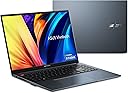
🔥 Unleash Creativity & Power in Stunning OLED Clarity
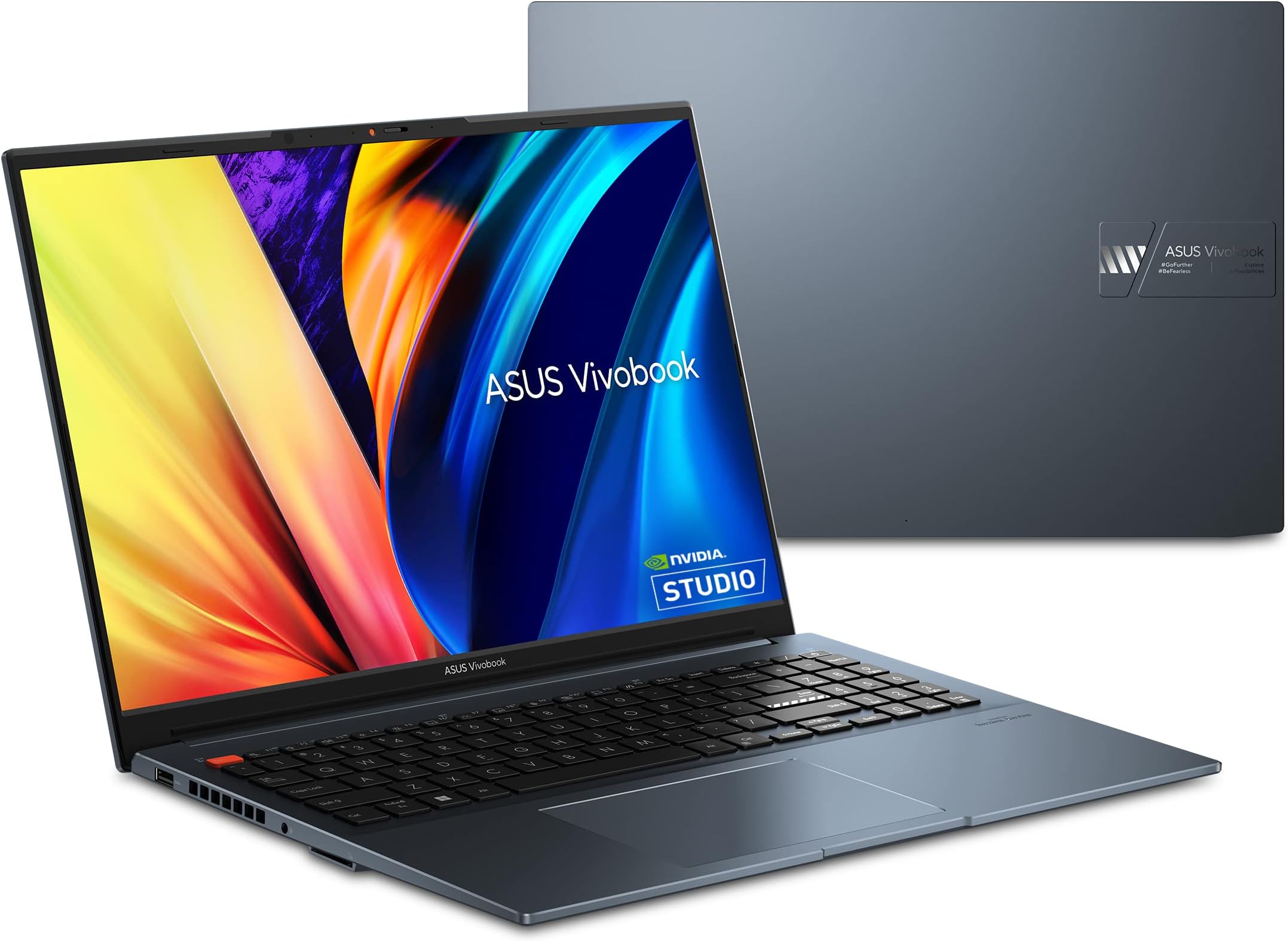
The ASUS VivoBook Pro 16 OLED is a sleek, professional-grade laptop featuring a vibrant 16-inch 3.2K OLED display with 120Hz refresh rate, powered by a 13th Gen Intel Core i9-13900H CPU and NVIDIA RTX 4060 GPU. It offers 16GB DDR5 RAM, 1TB PCIe 4.0 SSD storage, and advanced cooling technology for sustained performance. Designed for creators and power users, it delivers exceptional visuals, immersive Dolby Atmos audio, and versatile connectivity, though battery life is best suited for plugged-in use.


| Asin | B0BWH9VKGH |
| Audio Output Type | Headphones, Speakers |
| Audio Recording | No |
| Automatic Backup Software Included | Adobe |
| Available M2 Slot Count | 1 |
| Battery Cell Type | Lithium Ion |
| Best Sellers Rank | #57,642 in Computers & Accessories (See Top 100 in Computers & Accessories) #9,569 in Traditional Laptop Computers |
| Biometric Security Feature | Fingerprint Recognition |
| Bluetooth Support | Yes |
| Bluetooth Version | 5.2 |
| Brand | ASUS |
| Built In Media | K6602VV-ES94, Powercord & Adapter, User guide |
| Cache Memory Installed Size | 24 GB |
| Chipset Type | Intel chipset |
| Color | Quiet Blue |
| Compatible Devices | Mouse, Keyboard, External Monitor, External Storage Devices, Printers, Speakers, Headphones, Smartphones |
| Connectivity Technology | Bluetooth, USB, Wi-Fi |
| Control Method | Touch |
| Cpu Model Generation | 13th Gen |
| Cpu Model Number | I9-13900H |
| Cpu Model Speed Maximum | 5.4 GHz |
| Customer Reviews | 4.0 4.0 out of 5 stars (57) 4.0 out of 5 stars |
| Display Resolution Maximum | 3200x2000 |
| Display Technology | OLED |
| Display Type | OLED |
| Form Factor | Laptop |
| Graphics Card Ram | 8 GB |
| Graphics Coprocessor | NVIDIA GeForce RTX 4060 |
| Graphics Description | Dedicated |
| Graphics Ram Type | DDR5 SDRAM |
| Hard Disk Description | SSD |
| Hard Drive Size | 1 TB |
| Hardware Interface | Ethernet, HDMI, MicroSD, Secure Digital Card, Thunderbolt, USB |
| Has Color Screen | Yes |
| Human Interface Input | Touch Pad |
| Item Dimensions L X W X Thickness | 13.99"L x 0.78"W x 9.02"Th |
| Keyboard Description | Gaming |
| Keyboard Layout | QWERTY |
| Lithium Battery Energy Content | 96 Watt Hours |
| Manufacturer | Asus |
| Maximum Display Brightness | 500 Nit |
| Memory Slots Available | 1 |
| Microphone Form Factor | Integrated microphone |
| Model Name | VivoBook Pro 16 |
| Model Number | K6602VV-ES94 |
| Model Year | 2023 |
| Native Resolution | 3200 x 2000 pixels |
| Notebook Pointing Device Description | Precision touchpad with multi-touch gestures support |
| Number Of Drivers | 2 |
| Number Of Ethernet Ports | 1 |
| Number Of Ports | 3 |
| Operating System | Windows 11 Home |
| Optical Storage Device | No Drive |
| Other Special Features Of The Product | OLED Display, 120Hz Refresh Rate, NVIDIA RTX 4060 GPU, MUX Switch, Intel Core i9 Processor, Dolby Atmos Sound, IceCool Plus Thermal Technology, 96 Wh Battery |
| Power Device | AC adapter |
| Processor Brand | Intel |
| Processor Count | 14 |
| Processor Series | Core i9 |
| Processor Speed | 5.4 GHz |
| Ram Memory Installed | 16 GB |
| Ram Memory Maximum Size | 16 GB |
| Ram Memory Technology | DDR5 |
| Ram Type | DDR5 RAM |
| Resolution | 3200 x 2000 |
| Screen Bezel Thickness | 14 Mm |
| Screen Finish | Glossy |
| Screen Size | 16 Inches |
| Speaker Description | Surround sound with Dolby Atmos technology |
| Specific Uses For Product | Personal |
| Total Number Of Hdmi Ports | 1 |
| Total Pcie Ports | 2 |
| Total Thunderbolt Ports | 1 |
| Total Usb Ports | 3 |
| Touchpad Feature | true |
| Unit Count | 1.0 Count |
| Upc | 197105098268 |
| Video Output | HDMI, Thunderbolt 4 |
| Video Processor | NVIDIA |
| Voltage | 20 Volts |
| Warranty Description | 1YR International*/Eligible for 1YR free Domestic ADP upon registration with 1-way free shipping/2-way FREE shipping for standard hardware warranty repair |
| Warranty Type | Limited |
| Webcam Capability | No |
| Wireless Compability | 802.11ax, Bluetooth |
| Wireless Technology | Bluetooth, Wi-Fi |
User
Incredible OLED Screen & Power When Plugged In — But Battery Performance Falls Short
This is a seriously powerful laptop and has held up really well over time for everything I’ve thrown at it — gaming, coding, browsing, and running heavier workloads in MATLAB, Visual Studio, and Python simulations.First thing that stands out is the display. The OLED screen is honestly amazing — super sharp, vibrant, and just really enjoyable to look at. Easily one of the best parts of this laptop. Gaming on it looks great, and overall performance when plugged in is exactly what you’d expect from an i9 + RTX 4070 setup — fast, smooth, and reliable.I did upgrade the RAM myself, which helped with multitasking, but even out of the box, it’s a strong machine.Now for the biggest downside: battery performance.Off the charger, this laptop is a completely different experience. It becomes noticeably slower, more sluggish, and just doesn’t perform anywhere near its full potential. Battery life itself also isn’t great — it drains fairly quickly under normal use. Realistically, if you’re buying this expecting high performance on the go, you’re going to want to be near an outlet most of the time.That said, if you treat it more like a portable workstation that stays plugged in, it’s excellent. I use it daily for work and light gaming without issues — as long as it’s connected to power.Pros:Beautiful OLED display (sharp, vibrant, high resolution)Strong performance for gaming and coding when plugged inHandles heavy workloads (MATLAB, Python, etc.) wellReliable for daily useCons:Poor battery lifeSignificant performance drop when unpluggedNot ideal for true “on-the-go” power usersOverall:Amazing laptop if you plan to use it plugged in most of the time. If battery performance matters a lot to you, this probably isn’t the best choice.
User
Lightweight power house!
This is a gorgeous display with a ton of computing power in a sleek package. It is not the smallest or lightest, but it is very portable. I would buy and recommend this again. there is nothing game breaking for me.Pros:-OLED 16:10 screen -- absolutely gorgeous and insanely low response times-rtx 4060 gpu is a lower power beast. even at reduced power it runs well.-LIGHTEST 150w power adapter i've ever used. lighter than most 90w-Plenty of connections : thunderbolt, usb-c, dual usb a!, hdmi, ETHERNET-intel wifi chip-powers from usb-c with caveats-physical webcam switch. remotely unhackable!-mux switch and g-sync both work on hdmi and usb-c displayportCons:-only a single thunderbolt port. i wish they made the other usb-c also thunderbolt. thunderbolt docks are hard to trouble shoot with only a single thunderbolt port.-usb-c power throttles the gpu power to 30 or 35w even with a 90w usb-c. I do not think it throttles the cpu, but you do not get to chose the power levels. i would prefer more power to the gpu and throttling the cpu.-single DIMM slot already populated. this limits the max useable memory as the 16gb is split between 8gb soldered to the board and 8gb in the slot. this laptop should really be 16gb soldered and an empty dimm.-screen reflections: this is not a matte screen, but it is not completely reflective either.-no touchscreen. why can't we add a digitizer to everything, please. this is not even a matte screen-microsd card reader on the dGPU laptop. asus why change that? keep the full sd reader!-thunderbolt attached screens connected to intel gpu. i could not get the RTX to drive them.Other:-Keyboard and trackpad are above average. numpad works well, but it throws the center of the keyboard and trackpad to the left of center of the screen.-fingerprint magnet, but wipes off easily-nice and quiet when idle or low use. when the fans do spin up, they are audible without annoying whine.-volume is plenty loud for voice, but missing low end-build quality feels very good. most of the outside material is plastic. this saves weight and does not block wifi signals.
User
Most gorgeous laptop screen on the market
I own a couple OLED TVs, and a desktop gaming PC, but before this laptop I had yet to experience a PC with an OLED screen. There is definitely no going back. Everything on screen, even Windows itself, just looks so perfect, so colorful, so sharp, so full of contrast... Combine that with the fact the machine is faster than my desktop gaming PC, and that makes this laptop the most attractive computer in the house. Also, I'm a huge fan of black + orange accents, and this laptop delivers on that with orange accents on the bottom, Esc key, and the little webcam blocker. Personally, this laptop is so... ME!!However, there are some flaws. First of all, the DC power plug is in the middle of the left side of the laptop, a super awkward spot especially with the bulky cord. The speakers are good but not that impressive compared to MacBooks. The trackpad also isn't as nice as MacBooks but it's fine. The weirdest thing is that I get these weird graphical screen glitches when waking up the laptop sometimes, not very often but it's jarring when it happens because the whole screen is freaking out. I also wish it had a Windows Hello-capable webcam array, but it doesn't and you have to use the fingerprint scanner instead, which usually works with a couple taps. Lastly, recently it has started making a worrying coil whine sound - very quiet, but noticeable in silence. I'll be keeping an eye (rather, an ear) on that.Overall this laptop works great for me as a portable media viewer, workstation, and gaming PC all in a nice package. It's not super heavy or bulky but not thin either, since there is a lot of hardware packed inside. I don't mind its flaws, however it's not my main PC so I'm not bothered as much by them.
User
Great screen, bad engineering
This laptop is light, easy to handle and has the most beautiful and bright screen I’ve seen on a laptop or monitor. It’s fast, the cooling is good unless you run a high graphic demand app or game. It gets very loud but cools well. I have two issues with it. First, it black screens (BSOD) too much on anything. I made sure the drivers were updated, ASUS service had me reset the bios, installed the updated bios, modified the app settings to use less than full graphic capacity and got a powered cooling board. Made no difference. I played Diablo 4 at both medium and low settings and got the BSOD regardless. I reinstalled the game (no change) and reinstalled the entire system (no change). I opened up one of the ASUS provided photo apps and it gave me the same result (BSOD). I called support twice. Once got the bios reset done which had no affect and the second time was told I’d get a call back from a tech … later. As much as I liked the size, weight and screen, I could no longer accept it as a viable solution as a follow- on laptop. There is an engineering or software flaw in this laptop that causes the BSOD. Being a systems engineer I did run some intensive diagnosis on the device to see if I could find anything pointing to some kind of engineering or design flaw. Unfortunately, I got BSODs trying to run the analysis that could never get a log to say what or where it failed at. It left me very frustrated. If the second call the service rep would have offered a replacement, I’d would have accepted that. All I was told by the customer rep was to ship it to them and they would look at it. So I would be out an $1800+ laptop and still be liable for the payment. I have used and currently use other ASUS products with no issues. Very, very disappointed.
User
Great laptop.
This laptop is exceptional, featuring a lightning-fast CPU speed. The RTX 4070 GPU effortlessly handles modern games and high-workload tasks such as video editing and rendering. The standout feature is its amazing display. Despite the plastic body, it is very sturdy and contributes to a lighter feel compared to its size. However, the battery life is not very impressive.
User
Wow
Purchased the 16GB Ram version (single stick) and added 64 GB Kit. This is an amazing desktop replacement. The processor is almost as fast is a desktop i7 and the graphics card isn't power hungry. Build quality is very sturdy. The keyboard is adequate for the price. It easily runs two 4K monitors at 60hz. Fans are definitely very quiet and when pushed they do not make whining noises. Works well on a dell docking station.
User
The best screen on any 2023 laptop; Great balance of features
Edit November 2023: I must deduct a star for continued instability with Asus firmware. Blue screens, distorted images, random pixelation.Having tried a handful of high end creator and gaming laptops, this is a mixed bag. When compared side by side to the Zenbook Pro 16X there are definitely some tradeoffs.PROS:+OLED screen provides vivid colors and outstanding contrast. The screen is virtually flawless, unlike OLED touchscreens that have a visible touch matrix or grainy "screen door effect". Uniformity is better than most Mini-LED's I've tried.+i9-13980HX provides a near desktop level experience; Performance doesn't noticeably suffer when unplugged like most other laptops.+RTX 4070 can muscle through the latest games at high frame rates at high settings and perform intensive tasks quickly.+Came with top quality Samsung M2 SSD (components used may vary by batch)+RAM is easily upgradeable, unlike the soldered RAM on the Zenbook Pro 16X+Mostly metal build quality is very good and it's reasonably lightweight. The Zenbook Pro 16X is built like a tank, but weighs about 1 lb more.+Stays very quiet while doing everyday productivity and web browsingCONS:-Battery life varies widely depending on task. It's decent when web browsing or typing up documents. Video and audio work will drain the battery very quickly.-No vapor chamber cooling so the laptop stays quite warm, but not worryingly hot. Other high end laptops including the Zenbook Pro 16X use vapor chamber cooling, which makes a huge improvement.-Uses a MediaTek wifi card which doesn't quite match the speed or range of Intel cards-Down firing speakers are good, but lack the bass and clarity that the Zenbook Pro 16X has.-The gray and orange accent keys look a bit cheesy for a professional laptopOverall, this would be an excellent laptop if Asus could make the firmware stable. I deduct stars because of the lack of vapor chamber cooling, the unimpressive speakers, and the cheap wifi card. The Zenbook Pro 16X is definitely a more premium built laptop, but the distracting touchscreen matrix, soldered non-upgradeable components, and trivial raised keyboard make it a very expensive imperfect machine. The Vivobook Pro 16X provides a lot more power for the money but I'd hold off on this until Asus has fixed the firmware.
User
Beautiful screen image for a laptop
Unmatched screen for a laptop in its price range. Would be very good for editing pictures. Crisp clear lettering and very good color right out of the box. Wifi is fast and has not lost connection so far. Processor is fairly fast but I don't really do any gaming or really heavy processing to need anything faster or more powerful. Battery life could be better but I imagine the screen performance does have a bit of an effect on it. Is nice to have USB charging and will charge fast with proper higher powered cable.
User
Muy rápida
Edición de fotografías, con una máquina previa core i7 , esta máquina es muchísimo mas rápida
User
Delivered package damaged
Delivered shippment package damaged and open box
User
Es muy rápida para lo liviana que es
Me parece un buen producto. La pantalla es excepcional. Muy rápida. Compacta. Y liviana. Perfecto para su precio. Lo único malo es que calienta un poco en la parte de la barra espaciadora. Pero yo la uso al máximo que da para tender 3D y video edición de 4K.
User
Una compra decepcionante.
Me gustó su pantalla oled aunque en ocasiones.se apaga cuando l.demandas los recursos y se alenta cuando está sin la Fuente de alimentación. Si tienes el cargador de la laptop conectada y le demandas recursos de procesamiento la computadora se apaga por que se sobrecalienta. creo que no fue una buena compra. en el centro de atencion al cliente asus te comentan que cuando le demandes recursos pongas los ventiladores en alto rendimiento. y gpu en modo discreto y con la fuente de alimentacion conectada a la laptop pero de todas formas se apaga por que llega a un calentamiento del 80°C. mala compra. ademas el conector thunderbolt version 4 en ocasiones detecta la pantalla externa y otras no.
Trustpilot
2 months ago
2 weeks ago