Desertcart purchases this item on your behalf and handles shipping, customs, and support to KUWAIT.
📚 Scan, Listen, and Conquer Your Workflow Like a Pro!
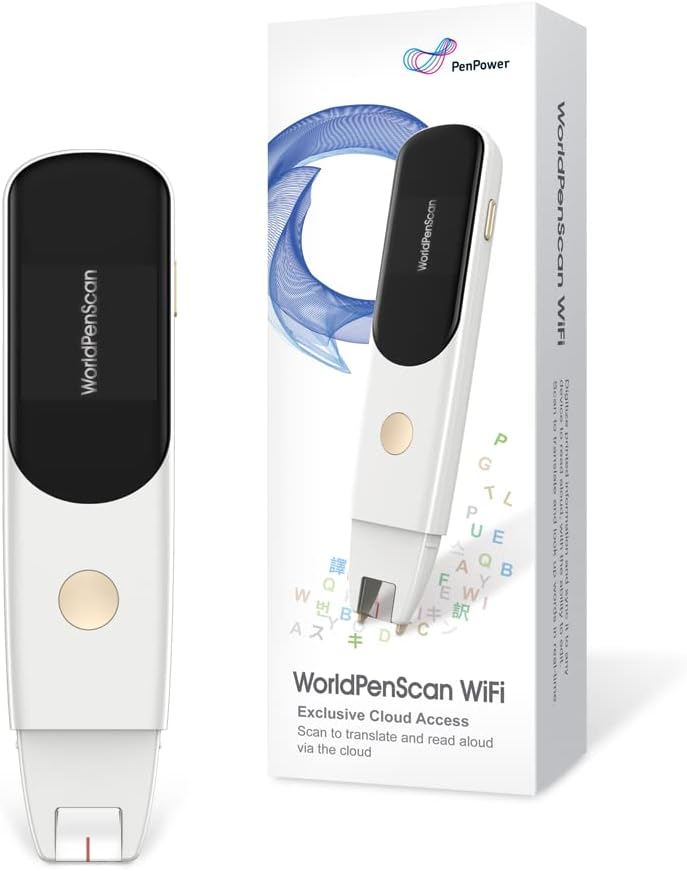
The PenPower WorldPenScan Wi-Fi is a cutting-edge OCR pen scanner that converts printed text into editable digital files at lightning speed. Compatible with Windows, Mac, Chromebook, iOS, and Android, it supports 41 languages and features customizable text-to-speech for enhanced accessibility, especially for dyslexia. With integrated online dictionaries and a reader mode designed for comfort and focus, it’s the ultimate tool for professionals and students aiming to streamline reading, editing, and language tasks effortlessly.


| ASIN | B0BZCPQT7N |
| Best Sellers Rank | #64,465 in Office Products ( See Top 100 in Office Products ) #66 in Document Scanners |
| Brand | PenPower |
| Color Depth | 1 bpp |
| Connection Type | Wi-Fi |
| Connectivity Technology | Wi-Fi |
| Customer Reviews | 3.9 out of 5 stars 66 Reviews |
| Light Source Type | LED |
| Manufacturer | PenPower |
| Media Type | USB |
| Minimum System Requirements | Windows 7 |
| Model Name | SWPSWF01EN |
| Optical Sensor Technology | CCD |
| Resolution | 600 |
| Scanner Type | Document, Text |
| Warranty Description | 1 year |
T**D
scan the text line by line and does the work
i have this scanner pen for a week and use it regularly. it reads aloud/mute or save to a text file after scan. i purchased this scanner for education. it works very well with ChatGPT.
J**6
Great
This thing, to my surprise works really good.
S**R
Skip this one
Save your money. I could not get it to work.
C**T
Not very user friendly
Was not very user frindly, and a lot of hassle to get it to work.
C**T
My son had problems
My son had problems reading this helps him out a whole lot. Appreciate it to be here so
T**H
Works, with functional limitations and a few concerns
To start with, I do like this pen for what it does: scan specific lines of printed text and upload them in an app to be either translated, explained via a dictionary or copied to a text editor. The setup is straightforward, and the instructions included in the package (or downloaded / presented as a video by following a QR code) are clear, complete and easy to follow. The toughest part was entering my network password on the 3-lines / 3 characters per line scrolling keyboard on the pen; sure, it is partly a self-inflicted pain caused by me being security conscious and thus having passwords that are obnoxiously long and complicated. I would recommend NOT to connect this or any similar device / appliance to your day-to-day Wi-Fi network, instead set up at least one guest network specifically for such use. If you do not understand what I just said, please ask someone to assist you, but do follow my recommendation. Once set up, the pen can be connected to either a phone – the easiest thing, just scan with the phone the QR code on the pen’s screen. Or it can be connected to any device that has a browser: open the dedicated webpage in a browser on any device / computer and enter the pen id from the pen’s screen (touch on the small icon on the right / lower side of the pen’s screen to display the pen id). Either way, you end up in a webpage where anything the pen scans gets displayed and can be copied, translated or passed to a dictionary for explaining. To start a new line, the round button on the pen needs to be pressed. Otherwise, whatever is scanned from multiple lines gets captured as a single line – which is what you want to do for a long sentence or paragraph that spans multiple lines. Well designed. Now, for the limitations and drawbacks: - this is totally dependent on the web service that produces the page you are seeing on the phone, or anywhere else in your browser. At worst, if the service is discontinued, the pen is useless, forever. At least, at times the service may not be available, and by Murphy’s law that should happen when you are time-pressed and cannot afford it, like an overdue assignment or just before an exam or such; - the time for the pen to start / boot up is close to one minute; these days, it’s a long while; - there is a minimum writing size and a maximum size that the pen is able to read reliably. Neither one are stated in the instructions / info; - hand writing produces highly unreliable results, this pen is unusable for hand writing; - images and icons interspersed in the written text produce weird results, are not properly filtered out; - battery life is rather short: while I was scanning at a pace of a few lines every minute or so, the battery went dry before the hour. There’s one more drawback, and it’s a bit trickier: the pen id is fixed, there is not a new id every time the pen gets connected / paired to your browser. So, the pen uses a web service to pass through the text you scan to your browser, and the pen’s identity is fixed. That means that whoever runs the service (or whoever may get access to the data from the service) can gather a complete record of everything a specific pen is scanning, across multiple uses. Another concern I had about the fixed id is addressed, not an issue: the pen cannot be connected simultaneously to two browsers, even from the same device. The latest connection disconnects any previous one. This is good. But this opens the possibility for someone hiding anywhere in the Internet thicket to cause pain to users of such pens. There is a one-year warranty for the pen, and the manufacturer provides a direct contact (an email address) for support. Overall, this pen is useful and works well, within its limits. It is different from scanning text with your phone, quicker at extracting just the text needed, and across pages. For me, it also has the tactile aspect that I prefer, it is like using a highlighter. I do prefer this pen over scanning with the phone when it comes to extracting bits and pieces of text.
M**A
Really cool and useful
I like how this pen works and I use it for my school and other things as well. Easy to connect using a QR code, just follow steps to set it up and start scanning. There is no app associated with this device, instead a website page that types in your text automatically when using the pen. The pen also lights up when scanning so that it's easier to see the text. Now I tried scanning text on white and colored background, capitalized and cursive text too and it all seemed to work just fine, meaning every letter and punctuation too. One thing I noticed is that it had a hard time reading fractions like 3/4, instead the pen would either read % sign or 3% or something else entirely. I don't use much mathematical signs and equations so this pen works great for me! I highly recommend for all the students and other folks who doesn't have time to type a whole lot.
D**.
Amazing tech! Standalone version recommended.
The browser functionality has been the best. Every so often it would timeout and I'd have to reconnect the pen. But that wasn't so horrible once I got the hang of it. The web-based pen is great if you're going to do all your work at your desk at home. But something this portable really should be ready to travel. I like the ability of quickly scanning text and copying it into my projects. The accuracy is very good. Smaller, basic font was best. Larger, all caps would sometimes present an error. It struggles with handwriting, which is no big surprise. I would recommend the standalone version if you're looking to use it often or if you're buying as a gift for a student.
T**P
NON SODDISFATTA
Il prodotto è arrivato visibilmente già usato. A scatola era perfetta ma lo scanner non carica ed è arrivata lateralmente aperto e senza pellicola protettiva sul visore
I**.
Nur im WLAN nutzbar
Der PEN funktioniert leider nur, wenn er im WLAN ist und kann somit nicht in der schule eingesetzt werden, weil die deutschen Schulen keine Fremdgeräte von Schülern zulassen. Das war sehr ärgerlich. Der Stift ist echt teue und es hat lange gedauert bis die Lehrer alles geprüft hatten. Am Ende konnte er den Stift nicht nutzen.
F**E
super scanner
facile d'installation , rapidité de transfert impressionnant , un gain de temps enorme ,parfait
J**R
Easy to use
So useful. Easy to connect. Works well
J**S
Lápiz traductor
El aspecto es correcto Pero su funcionamiento es incorrecto
Trustpilot
5 days ago
1 week ago