We remain fully operational. Our teams are working around the clock to ensure your deliveries continue safely.

قم بتنزيل التطبيق


معلومات عنا
حقوق الطبع والنشر © 2024 Desertcart Holdings Limited
قم بتنزيل التطبيق

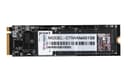
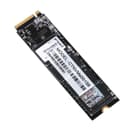
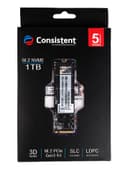
🚀 Upgrade to speed, storage, and security that keeps you ahead of the curve!
The Consistent 1TB NVMe PCIe M.2 SSD 2280 combines cutting-edge PCIe Gen 3x4 technology with 3D NAND and SLC caching to deliver ultra-fast read speeds up to 3500MB/s. Designed for professionals seeking reliable, high-performance storage, it supports NVMe 1.3 and Host Memory Buffer for efficient multitasking. With a compact form factor and a robust 5-year warranty, this SSD ensures your system boots faster, runs smoother, and stays secure for years.


| ASIN | B0C9M1ND4L |
| Best Sellers Rank | #55,668 in Computers & Accessories ( See Top 100 in Computers & Accessories ) #341 in Internal Solid State Drives |
| Brand | Consistent |
| Brand Name | Consistent |
| Compatible Devices | Desktop, Laptop |
| Connectivity Technology | PCIe |
| Country of Origin | India |
| Customer Reviews | 3.6 out of 5 stars 32 Reviews |
| Data Transfer Rate | 2200 Megabytes Per Second |
| Digital Storage Capacity | 1 TB |
| Form Factor | M.2 |
| Hard Disk Form Factor | 3.5 Inches |
| Hard Disk Interface | NVMe |
| Hard Disk Type | Solid State Drive |
| Hard-Drive Size | 1 TB |
| Hardware Connectivity | SATA 6.0 Gb/s |
| Installation Type | Internal Hard Drive |
| Item Weight | 40 Grams |
| Manufacturer | Consistent Infosystems Pvt Ltd. |
| Media Speed | up to 3000MB/s |
| Model Name | CTNvme001S6 |
| Model Number | CTNvme001S6 |
| Network Connectivity Technology | PCIe |
| Number of Items | 1 |
| Product Features | compact |
| Read Speed | 3500 Megabytes Per Second |
| Special Feature | compact |
| Unit Count | 1.00 Count |
| Warranty Description | 5 years replacement warranty |
Z**D
Rating may change later, but for now 5 stars
Bought for ₹ 3,798 on 26 October, 2023 I installed it today. My computer boot time was 5 to 6 minutes. I never reinstalled windows even with this super slow boot time because I did not want to lose my settings and files. I installed this SSD drive, cloned my C drive into it, and now, my boot time is around 55 to 60 seconds. I will try to remember to come back here and report when it fails. But man, my computer is noticably faster. Folders, applications, and files open much faster. My Motherboard is a Zebronics ZEB-H61M2 (LGA 1155 Socket), with a 3rd generation i5 3450 processor. Here's how I cloned it and what i had to learn. This may save you some time: 1. I used the freeware "Hasleo Disk Clone". Installed it, opened and chose "System Clone" which automatically detected my system drives and selected them. Click "Next". Select the SSD Drive to clone into (it will probably be "Unallocated", meaning unformatted, which is fine.) 2. If your HDD is currently using the MBR (Master Boot Record) partitioning scheme, and you want to migrate to an SSD and ensure compatibility with UEFI boot, it's a good idea to check the "Clone as GPT" option during the cloning process. Check "Clone as GPT" to ensure that the SSD will be configured with a GPT partition style, which is recommended for modern systems and UEFI boot. Otherwise, your computer may refuse to boot from the SSD. If you don't know what all these things mean, just check "Clone as GPT". 3. Check "Keep partition layout" to maintain the same partition structure on your SSD as on your HDD. 4. In the next window make sure Disk Alignment is 1M and clone. After the cloning is complete, shut down your computer. 5. You probably can skip this step since the cloning will make your SSD drive the default C drive (or boot drive) and reassign your original boot drive to something else. If it is still booting from your old drive and you are sure the SSD drive is not being used, disconnect the old HDD or change the boot order in your BIOS/UEFI settings to prioritize the SSD as the boot drive, meaning tell your BIOS to boot from the SSD when the computer starts. If you do not know how to do either or are scared, Google "How to change boot order". 6. After the cloning is done and you Windows is working fine, remember to allocate any leftover space in your SSD from step 1. Use the "Disk Management" Windows tool otherwise you may leave much of your SSD drive space unused. You could also clone your other partitions like D Drive etc. into the unallocated space later. The choice is yours. Once you've verified that everything is working as expected, you can clean up the old HDD (e.g., format or repurpose it) or keep it as a backup.
P**R
Decent it is.
Works perfectly fine and has decent speed of read and write. Recommended if you are looking for a cheap but good and decent quality
Y**H
I do not recommend buying this product.
I do not recommend buying this product. After one year of use, it became disabled/corrupted and turned out to be a waste of money.
V**R
High speed profamenc
Esy to install.. High speed data tersfor, window boot just 5 second only.... But ssd hiting problem tempture Normal 51'c any time.. Overall vergood and price range es very good off line market price 5500 rs i am buy Amazon onliy 4700 🥰 nice price range
M**U
Thermal throttling
Consistent brand itself is not consistent.... Thermal throttling observed... The max speed last for 3-4 seconds.. Not suitable for large data transfers.. After thermal throttling started speed reduces to 50 mbps which is lesser that hdd. So practically not recommended for gamers
A**N
great disk space with speedy read write speeds
Product looks good so far and works..Box came open ..i dont know if it refurbished product though. Wanted to see if it works in my pc asrock b450 steel legend. So far great speeds in read and write.They are giving 5 year warranty dont see where to find seller incase of warranty returns.5 years which storage space survives..the other one i have is hp green 256 gb.
H**A
Great product no issues just go for it
Have been using this for almost a year now for backup purpose and it's the best no issues and got it at a great price too , durable and quality is good also performance is as expected no issues till date.
R**I
Good for the Price, Bottlenecked by the SSD controller
Pros: a. Price b. Low heat c. Good Random IO performance. System responsiveness is pretty good Cons: a. No TBW rating. MTBF rating is not useful to determine how much can be written into the SSD before it stops writing data. b. SSD controller SM2263XT limits transfer rate to 2500MB/s Read and 1900 MB/s Write. This is a controller limitation. c. Brand reputation compared to Samsung, Seagate etc.
ترست بايلوت
منذ شهرين
منذ أسبوع