Buy anything from 5,000+ international stores. One checkout price. No surprise fees. Join 2M+ shoppers on Desertcart.
Desertcart purchases this item on your behalf and handles shipping, customs, and support to KUWAIT.
🏠 The ultimate smart home hub that plays well with everyone—because your home deserves the best.
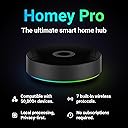
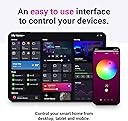
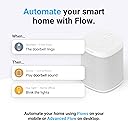
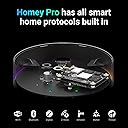
Homey Pro (Early 2023) is a cutting-edge smart home hub that unifies over 50,000 devices across 7 wireless protocols including Z-Wave Plus, Zigbee, Wi-Fi, BLE, Infrared, Matter, and Thread. Compatible with Siri, Alexa, and Google Home, it empowers users to create powerful, local-first automations via an intuitive app interface. Designed for the savvy smart home enthusiast, Homey Pro delivers rock-solid performance, extensive brand support, and energy-saving automation—all without cloud dependency.


| ASIN | B0C5RFQNN4 |
| Additional Features | Backlit, Lightweight, Universal |
| Best Sellers Rank | #428,578 in Tools & Home Improvement ( See Top 100 in Tools & Home Improvement ) #369 in Home Automation Hubs & Controllers |
| Brand | Homey |
| Button Quantity | 1 |
| Color | Black/Grey |
| Compatible Devices | Air Conditioner, Smart home devices, Smartphone, Television, Thermostat |
| Connectivity Technology | Bluetooth, Wi-Fi, Z-Wave Plus, Zigbee |
| Controller Type | Button Control |
| Customer Reviews | 3.7 out of 5 stars 186 Reviews |
| Global Trade Identification Number | 08719327704318 |
| Item Dimensions L x W x H | 5"L x 5"W x 1.57"H |
| Manufacturer | Homey |
| Max Number of Supported Devices | 50000 |
| Maximum Number of Supported Devices | 50000 |
| Mfr Part Number | HOMEY-PRO-US-03 |
| Model Name | Homey Pro |
| Model Number | HOMEY-PRO-US-03 |
| Special Feature | Backlit, Lightweight, Universal |
N**A
Yes it’s expensive but I’m willing to pay more for rock-solid performance.
I’ve been using the Homey Pro for a few months now, and I have to say—it’s one of the most powerful and versatile smart home hubs I’ve tried. The setup was surprisingly smooth, and I love that it supports so many different protocols (Zigbee, Z-Wave, Wi-Fi, Bluetooth, and more). Unlike other hubs that lock you into a specific ecosystem, Homey Pro gives you the freedom to mix and match devices from different brands, which is a game-changer if you already have a bunch of smart home gear. The automation capabilities are where this thing really shines. The Homey Flow system makes it super easy to create complex routines without needing to be a programmer. I’ve set up routines that adjust my lights, thermostat, and security system based on time, motion, and even weather conditions—all from one app. The interface is clean and intuitive, which is a huge plus. Performance-wise, it’s been rock solid. The response time is quick, and I haven’t run into any connectivity issues. I also appreciate that it works locally, so even if my internet goes down, my automations still run. That said, it’s not the cheapest option out there, and it might feel overwhelming if you’re just getting started with smart home tech. But if you want a powerful, future-proof hub that gives you total control over your smart home, Homey Pro is absolutely worth it. Would I recommend it? 100%—especially if you’re a smart home enthusiast who wants everything to work together seamlessly.
T**M
Best Smart Home Decision Of My Life!
I have been using Homey Pro for a little over a year now. Prior to switching to Homey, I was using Apple HomeKit. That was great when I was new to building a smart home, but as time went on, I was growing more and more frustrated with Apple refusing to allow for any kind of advanced automations and with them taking forever to implement even the most basic features and device types. After wanting to try something else, I started using Home Assistant. That is extremely powerful and there isn’t much you can’t do with it, but I also felt like I needed a coding degree to set up even the most basic automations. Having a smart home is fun for me and I had very little fun using Home Assistant. This is when I decided to give Homey a try and I am SO glad I did. Homey has been nothing but amazing. They are fairly new to the US market, so there are some apps and some brands that don’t work at the moment, but unlike Apple, Homey actually interacts with and listens to it’s users. There have been so many new features, small and large, that have been implemented in just the past year alone. They are constantly working with companies to get more brand compatibility as well. I’ve really only had one brand that didn’t work for me and it wasn’t a big deal at all. VOCOlinc. Everything else that I already had, worked like a charm. Creating automations with Homey Pro is super fun. The smallest, simplest automations and the most complex ones. So far, there hasn’t been an automation that I wanted to do with Homey and wasn’t able to. The automations are fast and never fail to work. If an automation were to not work properly, you can get a notification sent to you and troubleshooting it is easy. You can see exactly where the automation failed and get right to fixing it, rather than having to test every part of it individually. People always complain about the price being too high, but honestly, if you can’t afford this, you probably got into the wrong hobby. It’s really not that bad, especially with everything you are getting and everything already being built in to the Homey Pro itself. I don’t need to go buy dongles and other accessories for it to work how I want it to, like I would with Home Assistant, for example. One purchase and you’re set. It’s hard for me to come up with anything I don’t like about Homey. It’s truly a great system and I would recommend it to anyone. Best smart home decision of my life.
H**Y
Non-premium experience for premium device (6 Month update : Not as magical as it promised)
DO NOT buy if your device does NOT have officially supported App. I've been slowly massing smart devices, but no hub. Most of them connected directly to the wifi router and while I was happy with that for the most part. This meant I couldn't really make them "smart". So it always felt like a jumble of services that I couldn't keep track. OG Review : Enter Homey. So far most of the devices I own connected the same way Google Home/Samsung SmartThings did. Curiously some with more features (like my eufy C2 cameras reporting temperatures which not even the Eufy app shows) and some less (Energy monitoring for my Kasa KP125M is not present). Speaking of that Kasa smart outlet. I specifically bought the matter enabled one because I wanted to lessen my "smart home" accounts down. Unfortunately I ran into some issues adding this device as it needed a firmware update which can only be done if you add it via Kasa. Once I did, I ran into another issue. I needed to be on 2.4Ghz which I didn't know it was a problem because Homey just errored out when I tried to add this, but adding it via android gave me helpful tips. So I was able to add them to Homey via "add via Android". Not sure if this was a Homey problem or Kasa problem 1 Month Update : I've added 3 Z-wave switches and so far they are working great. I'm not a huge fan of how delayed the reactions are on the hub, but I think that's just a limitation of the Z-wave itself not Homey. One thing I did notice was that wifi connection wasn't stable enough for me despite this hub sitting with in feet of the router with no walls in between. So I ended up getting the ethernet adapter. Which is mildly infuriating that a $350 hub doesn't even come with such basics as ethernet port, but alas. At least it made my Homey connection stable, and I'm absolutely loving all the advanced flow that I've added. All those automations that had to happen on 3-5 different services and crossing my fingers they'd work together now feels like old news as I've transitioned most of it into Homey. There are few things I wish it could do, but this is a strong start. 4 Month Update : As some of the other reviewers have pointed out the "official app" supports are kind of middling. This seems to be a problem due to European nature of the company behind it. It has a great number of support for products that isn't available in US. There are some "community apps" that seems to have fill some void, but not at the level something like HomeAssistant has. With that said I'm still happy with the decision to buy this over other products, and I've love using it. I do hope that with the recent news of LG's acquisition of Homey means they'll be able to crank up their 3rd party integration work faster. 6 Month Update : As I'm slowly venturing out to more Z-wave devices I've ran into a wall. I wanted to add Stelpro Z-Wave Plus KI STZW402WB+ Thermostat for Electric Baseboards. Unfortunately it does NOT have a Homey App and since Homey has not written a robust enough Generic drive for Z-Wave. While I was able to add the device to my Z-Wave network it does not recognize it as thermostat rendering the "smart" part of the device useless. Beyond frustrating to find out that a device that costs x2-3 times other hubs does not have robust support. Their "request a brand" page is a complete joke as well. I've put in a request for Cielo who makes Smart AC Controller. It's been 6 months and I haven't heard a beep, not to mention that the request has mysteriously disappeared from their forum. I just wish I knew this earlier because it's beyond my return period.
V**A
Great product but needs more compatible devices
This is potentially a great product with awesome flow creations easy to create. Homey needs to add much more brands and gadgets to its App store. I was very excited to get this product but my excitement is gone because i can't add devices of my choice. In fact I'm hardly using it with only one flow and that too sometimes doesn't work as intended.
D**E
Pricing your product more than all others, says something...
Outpricing all your competitors implies you've got 'em all beat, that you've got the whole package, & that you offer something nobody else can. In the case of Homey Pro, only the later applies as this is anything but the whole package and is in many cases substandard to the competition. It does, however, allow users the ability to create quite complex automation "flows", more than I've seen elsewhere (see flow example image). But that's it. And the problem with this is... that no matter how complex a flow you can conceptualize, if the integrations with the device you are trying to control don't work, neither will your genius idea of a flow. 2 integration tracks exist for device compatibility: 1: officially supported homey integrations and 2: Community based independently developed integrations. From a device compatibility perspective, homey claims to have it all (ZigBee, Z-Wave, Wi-Fi, Bluetooth, Matter, Thread, IR, and 433 MHz). But let me be clear that device compatibility remains substandard to most of its competitors. Let's say I want a new way to control my lights and I'd like to try out the Aqara Cube T1 Pro. First you have to check if the brand is compatible with either an official or community integration. Yes, there's an official Aquara integration (see Aqara integrations image). Then you must see if the device is included in that integration (see Aqara device support image). Yes, the cube is included. Then you must see if the version of the device is supported. The Aqara Cube T1 Pro is NOT supported, and the only way you would know this is by searching through community forums which likely only happens after you try to connect your newly purchased device but can't get homey to recognize it upon install. Want clear answers as to when it will be supported? Simply put, get another home automation system because Homey will not provide it. Alexa integration is also substandard compared with Samsung or even the android app Tasker & Autovoice. The Alexa integration expires randomly and sometimes several times a week requiring you to disconnect and reconnect in order to continue using flows dependent on it. Just make sure to configure your flows to alert you when it times out because there's nothing native in the app configuration that would do this. Is this device capable of replacing several smaller niche hubs for home automation? No, absolutely not. Its device compatibility is far too limited for this. Can it be a useful addition to your infrastructure of home automation hubs? Yes, it is a good addition. So if you're not spending the $400 price tag to replace or centralize several other hubs, is it worth it to add yet another hub? That's completely dependent on the value you place on the ability to create highly complex flows for the few products it does work with.
N**E
One Hub to Rule Them All – Best Smart Home Decision I’ve Ever Made!
I jumped into the Homey Pro ecosystem about two years ago when the 2023 version launched, and let me tell you – it’s been one of the best tech investments of my life. I have over 200 devices spread across my home, from lights and locks to sensors and thermostats. Homey Pro has seamlessly unified them under one intuitive dashboard, letting me control and automate literally everything in a single place. I love creating Flows (Homey’s visual automation interface) because it’s so straightforward and powerful. Even if you’re new to home automation, you’ll pick it up in no time. One of my favorite parts about Homey Pro is that it works with practically any device I throw at it. With support for eight communication protocols (including Zigbee, Z-Wave, Wi-Fi, Bluetooth, and more), it connects to everything from major brand hubs like Lutron Caseta and Kwikset to smaller devices from up-and-coming manufacturers. Over time, new features have rolled out – like Moods, Zone Controls, Dashboards, and the energy-tracking feature – proving that Athom (the company behind Homey) continually improves and listens to its user community. I also appreciate that they keep adding support for more US-focused brands, making the system even more convenient for American homes. If you’re on the fence, don’t be. Homey Pro is worth every penny, and the new Homey Mini Pro gives you even more options to get started at a lower price point. Whether you want to manage lights, locks, cameras, or intricate multi-step automations for a fully hands-free experience, Homey Pro makes it happen with style and ease. Don’t think twice – this hub will take your smart home to the next level!
B**.
Reliable hub with ever-expanding support
I switched to Homey pro from SmartThings and haven’t really looked back. Homey Pro is local vs. cloud. I haven’t had any downtime with it. The response is much quicker than SmartThings since it’s local and it just works. It has just recently been made available in the United States, but has been available in other countries for several years. Because of that, there aren’t as many U.S. products support yet, but I was able to get the majority of my devices to connect with either the apps (apps are what you install on the hub to integrate brand products.) or through Matter or Zigbee and Z-Wave. Browse the apps library before purchasing to make sure your devices are supported. They have both official and community-built apps. You can request brand device apps and Homey is very responsive. They are continually expanding their device support. For example, I requested Govee support. There is a community-built app, but I couldn’t get it working consistently. Homey and Govee are currently negotiating for an app. You can see what brands/devices have already been requested and what stage they are in the process of getting the apps built. It is very easy to set up simple or complex automations, called flows. There is a small learning curve, but you can find answers and very helpful people in their online community. I tried Home Assistant before making the switch to Homey Pro, but that was a bit too technical for me and would just take up too much of my time. Homey Pro is a good solution. It’s easier to use than Home Assistant, like SmartThings is, but you have more control than SmartThings. It is pricier than most hubs, but with all the radios included, it being local, and their ever-expanding device support, I feel it is worth it. It’s nice looking too. I recommend getting the Ethernet adapter so it can be used wired and through WiFi. The only reason I gave it 4 stars instead of 5 is the amount of U.S. devices currently available for integration. However, that will continue to expand as time goes on since it is now available for the U.S. They already add 2 new brands, including Kwikset, since I’ve been using the hub for 2 months.
M**E
A Game-Changer for Home Automation Enthusiasts
Where to begin? Over the years, I’ve experimented with tons of home automation hardware (starting with Wink, SmartThings, Hubitat "C-5 up to C-8 Pro", Aqara Smart Hub M3 and Home Assistant), dabbling in technologies like Z-Wave, Zigbee, Bluetooth, and Matter. This device brings it all together seamlessly. It just works. Before purchasing the Homey Pro, I did extensive research to ensure compatibility with my existing devices. To my surprise, setting everything up was incredibly straightforward, and adding all my devices to Homey Pro was a breeze. Even my wife, who used to shy away from automation, has become a pro herself, enthusiastically creating her own flows. To add, I purchased the optional Ethernet adapter, which has significantly improved the stability of my connection and needs. I also 3D printed a transparent wall mount that looks fantastic behind my TV, keeping everything neat and out of sight while maintaining excellent performance. I can’t recommend this product enough. Take the time to do your research to confirm that all your devices are compatible, and you won’t be disappointed. One thing to note: while the forums can be helpful, the experience has been hit-or-miss for me. Many of the active users are based in Germany, which means you might find yourself using Google Translate to understand some of the discussions. If you’re not up for that, you might want to think twice. Overall, the Homey Pro has exceeded my expectations and revolutionized my home automation experience. It's great to have everything I need, all in one hub and super fast!
B**K
Homey Pro hub works as advertised
My Homey Pro hub has performed exactly as advertised. Good support is readily available from a knowledgeable real person. One of my positive experiences concerned a Phillips Hue motion detector. Phillips is essentially a light bulb company so their focus is on controlling lights. My intended purpose was to detect unwanted people in my house. So I had to hack through all the stuff about controlling lights and about needing a bridge. Eventually, I discovered that the Phillips App would not run on my Android 9 phone. I was ready to give up and pitch the Phillips motion detector when Homey came to the rescue. I found out, after a little more hacking around, how to put the motion detector into pairing mode and presented it to my Homey hub. Homey found the motion detector and indicated that there was an App available to support it. Homey then downloaded the App to the hub and the motion detector works just fine. For those having frustrations with their Homey hub, be aware that these hubs are addressing a serious data communication problem. Being able to communicate with a vast array of devices from a large number of different manufacturers, many of whom would prefer that you used exclusively their hardware is seriously a non trivial problem.
A**R
Perfect integration but
I tried to integrate my home and a lot brands work with Homey Pro…it misses yet the brands in America….its because I returned it but in my test the technologies I can integrate worked very well…the only thing is when I remove the internet and close the app, it was NOT possibly to reconnect locally but if we leave the app open, all will work locally…
S**N
Big price tag that doesn’t deliver
Tried setting it up, would not connect to wifi. Retrying multiple times, finally got it to connect but stuck infinitely at updating software prompt. Disappointed and have started my return.
A**R
Good but compatibility issues
I wanted to like and move forward with the Homey Pro and use it to replace my old Smartthings hub. It seems solid, heavy and robust. However, when I tried to integrate into my existing home ecosystem there were unfortunately a number of devices it does not yet support. I gather that they are trying to close the gap on missing North American devices but they are not there yet. Also, it seems that their main focus is on Zigbee and Matter, unfortunately I prefer z-wave devices over zigbee devices but that is a personal choice. After paying $600 for a hub I am not going to dish out a bunch more cash to get a developer to close those gaps for me. I returned the Homey Pro hub and went with Hubitat.
G**E
Great prduct, Great seller
Thank
Trustpilot
4 days ago
1 month ago