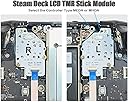
🎯 Upgrade your Steam Deck with pinpoint precision and zero drift!
The ElecGear TMR Joystick Replacement is a cutting-edge module designed specifically for Steam Deck LCDs, featuring the latest TMR Hall sensor technology to eliminate joystick drift and latency. Compatible with both MEDA and MHDA controllers, it includes essential tools for DIY installation and an ESD diode for enhanced durability, making it the ultimate upgrade for serious gamers seeking flawless control and longevity.
| Package Quantity | 1 |
| Additional Features | Ergonomic |
| Power Source | Battery Powered |
| Hardware Platform | pc |
| Controller Type | Joystick |
| Compatible Devices | Windows |
A**.
03/28/2026 - Modern revision works great! Easy install.
The revision 2 model of the ElecGear TMR Joysticks are holding up great! I installed them a few days ago, and I've been playing Katamari Damacy to really put the joysticks to the fullest stress test possible, as the game requires full 360° rotation for the joysticks and also utilizes joystick button clicks (from the reviews, a known issue from early revisions of the model). These joysticks have no stick drift, have a lot of precision to them allowing the Steam Deck to lower the threshold all the way to 2000/2000 for both joysticks. It seems like technically speaking these could even be reduced down to 1800/1800, possibly even 1600/1600 without having drift. However Steam software doesn't allow for that, nor is it really necessary, more just a testament to the accuracy and sensitivity potential of these. The installation instructions were adequate, and there was a relatively good video provided as well. I did record a video of my own as I did not see many recordings, it includes the installation of these TMR Joysticks from ElecGear, as well as a replacement backplate from elsewhere. The video turned out to be a bit over an hour, the install was maybe an hour-40 -- mostly due to pausing to make sure, taking adequate time to check instructions, plus some recording aspects added a little bit of time. I think quite honestly, this is easily a sub-40 minute installation. Take out the SD card, take the backplate off, unlatch and remove the cable and 3 screws on each joystick, then 1 solder contact pad that is relatively easily removed (some glue slowed down the heating of the solder). Then, remove the joystick cap, add it to these TMR ones, and resolder the wire to the contact point. Very very easy soldering practice. For anyone looking to give a small, easy upgrade to their Steam Deck, Revision 2 of the ElecGear TMR Joysticks are a good way to go. Full, circular radius. The installation is seriously easy. Thanks for offering such a great upgrade as such a reasonable price, less than $20 feels like a steal.
P**O
Update: Quality control is bad, the replacement has the same issue.
The video above demonstrates that the button is stuck. UPDATE: The replacement I received has the same issue as the first. Clicking the left analog requires a ridiculous amount of pressure to actuate. I've tried to break it in but the issue doesn't improve. Perhaps they have a bad batch, but I've resorted to using a Gulikit left stick and the elecgear right stick. Gulikits are great but suffer from square deadzones, so I switched to these elecgears for their circular deadzones like the oem sticks, with the added stick drift benefits.
M**L
Issue with reported values while 'click'ed.
Sticks track excellently, until you click them at extreme vertical deflection. Doing this seems to present new maximum values in the output, causing the sticks to fail to reach maximum value unless they are also clicked during deflection. See video. Happens with both of my sticks. Horizontal axis seems unaffected. I haven't been about to calibrate this issue out, SteamOS seems to instantly begin using the new maximum value, and this makes gameplay difficult in some games. Rebooting the console fixes this, until a stick is clicked again at maximum vertical deflection.
M**E
The Perfect Joysticks
We purchased these under recommendation from a user in a Discord server. The joysticks arrived quickly and were super easy to install. They worked perfectly out of the box, and once they were calibrated they blew us away. They're far more precise than the OEM joysticks and much higher quality than the GuliKit ones (which had too loose tolerances and didn't even have full range of motion!) Would definitely recommend buying these to replace your drifting OEM sticks, or just to upgrade your input system!
A**N
Absolutely amazing, easy install, and better than stock!
- very basic soldering needed (easy) - calibration needed (easy) - barely need to take apart the deck (easy) You'll obviously need to take apart your steam deck (remove your microsd card first!) so please watch a YouTube video or two before doing it and make sure you're using the correct screwdriver bit so you don't strip your screws!! Use a PH1 size!! Yes there is minor soldering involved so be aware/prepared for that. I have janky soldering skills and still managed to do this so don't be intimidated by that! Instructions can get you by, but do some research too on how to set these up/calibrate them, its super easy. Once they're set up, they are so much smoother than stock! These use a circle gate rather than square like the other brands which is better. Highly recommend!!
C**E
Work amazing!
These work perfectly, installation was easy and they work like stock (but smaller dead zones due to the hall sensors). Definitely recommend these over the GulliKit ones as these have the proper deflection zone (circular vs square) and are super accurate. Seller is very knowledgeable and helpful should any questions arise!
I**R
It just works. (edit): gamebreaking issue, many others notice this as well.
Extremely smooth response, great recentering, movement and precision accuracy meets or exceeds the original stock sticks due to the exact same range and voltage equalization used and expected by the Deck's firmware. The hardest part of assembling the module is removing the wire from the hot glue on the original stock PCB, which takes a 400C soldering iron. The actual contact pad is silver at the bottom, so you just need to heat up the glue until it eventually melts and 'peels' off the PCB. Any burning residue is not the PCB--it's the glue--just clean your tip constantly with brass. Soldering the wire on the new PCB is easy--just apply flux to the rectangle contact point AND to the wire ends also, apply solder to the tip of the iron and then apply the wire to the contact area on the flux, touch the wire with the soldering tip applying pressure, and the solder will flow and fuse the wire to the contact area. *edit* as others have pointed out, there is a hardware flaw with these sticks, far worse than any 'square gate' gulikit issue (Provided you get a sample that isnt defective, as my right gulikit had a problem with the connection). Pressing middle stick click at max down deflection changes the calibration range slightly, preventing full range downwards unless middle click is held down at the same time! Rebooting the steam deck fixes this, but neither the Gulikit, Stock, or the new HandheldDIY sticks have this flaw. Cannot recommend these anymore for anyone--try the handheldDIY model, if they make one for the LCD deck.
G**E
Great replacement sticks marred by lacking instructions.
I received these sticks as a replacement to a set of Gulikit Hall Effect Steam Deck thumbsticks. The sticks themselves are great to use. No surprises in the way they work, capacitive touch works well once soldered. You can select between two stick types so you don't have to guess about buying an A or B profile replacement. The gate and deflection range is circulate across both sticks. My outer range is maybe on percent off on max deflection on the left stick but still well within the usable area. The only downside, and I feel this is worth a removed star is that the instructions are very, very minimal. The entire set of instructions is a folding slip of paper with a few steps on how to replace the parts. It doesn't go into any details on where the solder points are. I am comfortable with electronics repair so the limited instructions weren't a issue, but if you were newer they could be a real frustration and pain point. Overall these are good hall effect sticks hurt by limited instructions with no ability to get more information about this particular stick online as there is no web tutorials by this manufacturer. Edit after a few weeks of having them: The left stick was only registering 90 percent input at full deflection even after repeated calibrations. Having tested analog, guilikit and this I can say this is still the most impressive but it seems like quality is a bit lacking. Second edit: the first set of sticks had the left one fail. I purchased a second set has an issue with the left stick outer dead zone shrinking from 100 percent to 90 after an hour of use and going lower over time. I've calibrated and reseated the cables to no effect. I like the idea of these sticks but the quality control is terrible it seems.
ترست بايلوت
منذ شهر
منذ 5 أيام