Desertcart purchases this item on your behalf and handles shipping, customs, and support to KUWAIT.
🎧 Elevate your soundscape — stream smarter, listen richer!
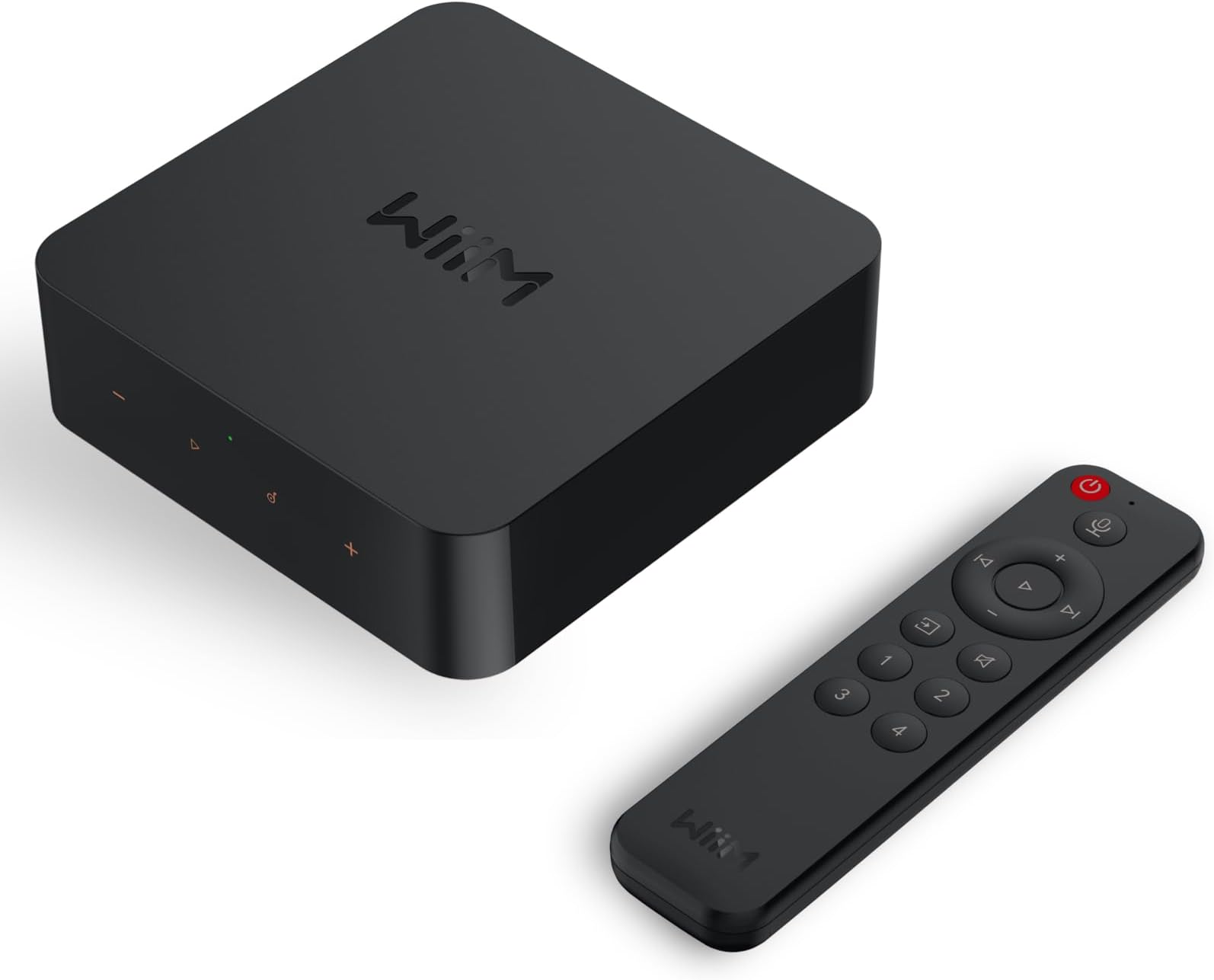
The WiiM Pro Plus is a cutting-edge AirPlay 2 and Google Cast audio receiver featuring a premium AKM DAC for high-resolution 24-bit/192kHz streaming. It supports multiroom playback across smart speakers, integrates voice control via Alexa, Siri, and Google Assistant, and streams directly from leading music services like Spotify, TIDAL, and Amazon Music. Designed for seamless setup and superior sound, it upgrades any stereo system into a modern, high-fidelity streaming powerhouse.


| ASIN | B0CC2HWC7N |
| Best Sellers Rank | #1,466 in Electronics ( See Top 100 in Electronics ) #1 in Audio Component Receivers #4 in Wireless Audio Receivers & Adapters |
| Brand | WiiM |
| Built-In Media | Digital Optical Audio Toslink Cable x1, RCA to RCA stereo cable x1, USB Power Adapter x1, USB Type-C Cable x1, User Guide x1 |
| Color | black |
| Compatible Devices | Speaker, DAC, Amplifier, Mobile phone, Tablet, HomePod, Apple TV, Echo, Google Home |
| Connectivity Technology | Bluetooth, Ethernet, Wi-Fi |
| Connector Type | USB Type-C, RCA, SPDIF (TOSLINK), COAX, ETHERNET |
| Controller Type | Google Assistant, Amazon Alexa, App Control |
| Customer Reviews | 4.4 out of 5 stars 2,763 Reviews |
| External Testing Certification | ANATEL: 077462414664 / Modelo: ASR003 |
| Form Factor | Streaming Media Player (Box or Dongle) |
| Item Dimensions L x W x H | 5.5"L x 5.5"W x 1.6"H |
| Item Weight | 14.1 Ounces |
| Manufacturer | Linkplay Technology Inc. |
| Memory Storage Capacity | 512 MB |
| Mfr Part Number | ASR003 |
| Model Name | WiiM Pro Plus |
| Model Number | ASR003 |
| Other Special Features of the Product | Spotify Connect, Works with Alexa, Google Voice and Siri, AirPlay 2, Google Cast Audio, TIDAL Connect, Qobuz Connect, Roon Ready, NAS, DLNA, Home Media Server |
| Resolution | 1080p |
| Smart Home Compatibility | Smart Home Compatible |
| Special Feature | Spotify Connect, Works with Alexa, Google Voice and Siri, AirPlay 2, Google Cast Audio, TIDAL Connect, Qobuz Connect, Roon Ready, NAS, DLNA, Home Media Server Special Feature Spotify Connect, Works with Alexa, Google Voice and Siri, AirPlay 2, Google Cast Audio, TIDAL Connect, Qobuz Connect, Roon Ready, NAS, DLNA, Home Media Server See more |
| Supported Internet Services | Amazon Music, BBC Radio, Calm Radio, Deezer, iHeartRadio, Napster, Pandora, Qobuz, Radio Paradise, SoundCloud, SoundMachine, TIDAL, TuneIn, vTuner Supported Internet Services Amazon Music, BBC Radio, Calm Radio, Deezer, iHeartRadio, Napster, Pandora, Qobuz, Radio Paradise, SoundCloud, SoundMachine, TIDAL, TuneIn, vTuner See more |
| UPC | 602581806073 |
| Unit Count | 1.0 Count |
| Video Codec | H.264, H.265/HEVC, VP9, AV1 |
| Warranty Description | 1 Year Warranty |
K**R
Feature rich streamer with an above-average DAC and a solid sound quality
Using the WiiM Pro Plus as a primary sound source in an office environment. I'm using the WiiM Home App or alternatively the Tidal Connect link using Tidal's app. The WiiM unfolds MQA on Tidal for a perceptibly clearer and more dynamic sound. The WiiM Pro Plus sits on a shelf above my dedicated headphone amplifier -- a Schist Ragnarok -- and plays music through a set of Audeze LCD-2 headphones that I've had for years. I'm using my iPad as a control device (either the WiiM Home app or Tidal app) while I do actual work on my iMac. I've only had this for a couple of days, so I don't have anything to say about reliabiiity or long-term listening fatigue. I CAN say that I'm finding the sound quality much better than I feared. My primary listening system uses very high-quality audiophile gear that I've painstakingly acquired to achieve great sound. The DAC alone is more than 10 times more expensive than the WiiM, and my electrostatic speakers are over $10,000 these days. So I'm used to good sound. That said, the WiiM Pro Plus is a simply OUTSTANDING deal. I'm not doing any critical listening, but I'm quite happy with my new office music partner. Setup was trivial, although the instructions were either too simple or too complex. The only quick-setup guide was for the hand-held remote, and that's sending me to a device menu buried in the user interface. The full 40-page manual can be downloaded, and poking around will reveal the performance, hook-up, and features that are quite impressive (10-band equalizer, for instance, or the ability to sync multiple units together for whole-house sound, as examples). For my super-simple office application it was major overkill. I use Roon at home, and Tidal. The WiiM Home App works mostly intuitively, although there are a lot of features and capabilities that might be important to those who like to play with their food rather than just eat it. There are a lot of ways to use this streamer, including as a simple streamer into a DAC of your choice if you don't like the built-in upgraded AKC DAC that is the "Plus" part of the WiiM Pro Plus package. At the moment this is not "Roon-Ready" but the previous experience with the WiiM Pro model suggests that it should become RAAT certified in a couple months or so. The WiiM shows up on my Roon app as a Squeezebox Lite unit, which is better-sounding than Chromecast or Airplay. I've tried mine with 3 different control maps: 1) the WiiM App, which you need to run at least occasionally to keep track of over-the-air updates (I've had 3 so far and I've had it less than a week). 2) Tidal Connect let's you cast your phone Tidal through the WiiM where it will connect to your account and run the highest bit-rate supported, depending on what your Tidal plan supports. I'm using the top plan and the high-res + MQA sound quality is best so far. 3) You can run it as a Roon end point player, although not yet certified. When it does get certified, that is likely to be the best-sounding option, giving you the most control of your music. The WiiM app purportedly lets you play your own music if you have it online in your network someplace. I tried linking one of my music folders and it kinda worked, but got very draggy and slow. It's like teaching a dog to dance... it's amazing it can do that, much less do it well. Overall I'm very pleased with my purchase, the great development team behind it and the terrific value it represents in terms of sound quality and capabilities at this price point. Highly recommended.
E**E
Perfect Streaming Upgrade for Any Audio System
The WiiM Pro Plus has been one of the best additions I’ve made to my audio setup. Setup was quick and straightforward, and within minutes I was streaming music throughout my system. The sound quality is excellent, whether using Spotify Connect, TIDAL, or other supported services. Everything works reliably, and the app is intuitive and packed with useful features without feeling complicated. What I appreciate most is how easily it integrates modern streaming into a traditional audio system. It has allowed me to enjoy high-quality music from my phone, tablet, and computer without hassle. The build quality is solid, performance has been flawless, and the feature set is impressive for the price. If you’re looking for an easy way to add high-quality streaming capabilities to an existing stereo or hi-fi system, the WiiM Pro Plus is an outstanding choice and an exceptional value.
P**L
UPDATED x3 -Great DAC! Upsampling!
Updated: This dac can also upsample music to a maximum of 24 bit / 192khz per image when you go to settings, audio quality, and click on fixed resolution. Again, play around with turning this off and on as it can be helpful sometimes but may not always sound as good if the track has been mastered well, which is currently qualitative and there are no known quantitative ways to measure how well each track has been mastered. For example, some tidal cd quality tracks have been mastered so well they sound like 24 bit/192khz in a blind listening test! IMHO, upsampling to 24bit/192khz is the best upsampling method as using audirvana to upsample to DSD 11.2 can sound overly digital and sterile. Updated: While it’s a cool feature to have a room correction parameter eq I would play around with turning it on and off as I have found the parameter eq can make your music sound worse. Same with the graphic eq. Please find graphic eq settings attached for listening to rock and bass boost settings based off chatGPT. Again, sometimes the graphic eq can sound better and sometimes worse. Overall the wiim pro plus is a great streaming dac as it allows tidal connect which can stream 24 bit 192khz music (with tidal connect). AirPlay 2 is strictly limited to 48khz. The student version of tidal is affordable and is much better than apple music as apple music can’t stream as high as tidal connect. Updated: Was using this streaming dac for my outdoor Bose speakers, after weeks of use I enjoyed and loved everything about it but I recently connected it to my ELAC debut 2.0 home theater system to pilot it and am blown away by all of the detail and processing power this dac has!!! I didn’t notice the clarity and warmth while playing it outside but inside it’s a game changer. I know DACs can always be better with the more money you’re able to spend but this dac has it all!! Clean and Crisp sound, a bit on the warm side, tidal connect, room EQ, and the app works flawlessly!! I highly recommend this product and wish I could upgrade to the Ultra, although this dac checks off all the boxes and more! If you’re on the fence about the pro plus or the Ultra, I would save your money and go with the pro plus. How much better can it get🙂 This dac doesn’t come with the highest end dac chip but still sounds great for what I need it for! The app and remote is fantastic and performs flawlessly and I love how this supports Airplay 2!! This rare find is affordable and sounds great, you would have to spend a lot more money to notice a significant difference as the dac chip is good enough and up their with higher end AVRs. To me HEOS isn’t user friendly, even though my Denon AVR-X4500H has multiple zones to power my patio speakers my family hates HEOS. I bought the pro plus to use with airplay and stream music to my patio speakers. I have the RCA OUTS connected directly to my amplifier and it bypasses my entire Denon AVR. Love the ease of use. HEOS multi zone might be easy for me to figure out but my family wanted something easy to use and I wanted it to still sound good so the Wiim pro plus checks all the boxes. The Ultra is overkill for me and the Node is ridiculously expensive and comes with a finicky app. No thanks I'm good with this and highly recommend it. Got it for $185 on prime day **UPDATE** Just like the Ultra model the Pro Plus App now has room correction! In addition, Tidal connects with the astonishing Wiim app to play at higher resolutions than standard Airplay, 96khz for example. This streaming dac checks nearly every box!!
G**S
If I could leave a 6-star review, I would
The Wiim Pro Plus is my second Wiim device and they are both among the best audio purchases I've ever made. You simply cannot get more bang for the buck than what you get with these network streamers. Up until this weekend, I used a Wiim Mini. It's a FANTASTIC bargain and really, it's all you need if you can use its optical digital output paired with a decent DAC. I *loathe* streaming music in general and find that fidgeting with computers to play sound is an extremely frustrating affair: apps lock up, systems need to be rebooted, Siri and Alexa play the wrong stuff, songs are just *missing* from albums. For an old, album-oriented guy like me, it's super frustrating that I can't just walk up to the player, insert a disc, and press the "play" button anymore. But I'm an idiot and I sold all of my CDs so... But the Wiim is rock solid. I've never had to reboot it. It works without question with my phone using Tidal Connect and Spotify. It probably does a bunch of other stuff too (NO Apple, surprisingly) that I don't need; for instance, I could probably yank back some of that out-of-print music I have sitting in my personal cloud drive and use a DLNA server here in the house. It sounds *superb* playing lossless audio, but most of all I just don't have to mess with it. Ever. I can't stress how important that is. Wiim makes a quality product. So why the upgrade? I upgraded my amplifier from Yamaha's entry level to one of their flagship models, and it doesn't have a DAC. Therefore, I could have chosen to keep the Wiim Mini and buy one more little box to convert digital signal to analog, or I could just drop less than $200 and get an upgraded streamer and a VERY high quality DAC all-in-one. Plus it has a digital optical input, so I can link my TV through a SPDIF cable, and *boom*. High quality audio for movies. Even though I'm a two channel guy. My new amplifier makes my turntable sound sublime, and the new Wiim Pro Plus handles everything digital. I couldn't be more pleased. If you have a modern amplifier with digital innards, get the Wiim Mini. You don't need more! If you're like me, and you prefer old school audio gear with as few bolt-ons as possible, but you're looking for something you can stream audio through, get the Wiim Pro Plus. You'll be hard pressed to find anything that outperforms it, even at the $700-800 price point. Dollar-for-feature, this thing is bulletproof.
M**Y
Music streamer that mostly delivers
Mostly grabbed this for my tiny living room so i could send Spotify from my phone to the old receiver after night shifts. Setup was quick. I like that I can toss music from AirPlay or Google Cast without thinking which phone I'm on. Sound is clean and a nice bump over the basic Bluetooth dongle I used before. I just tap the app to group it with the kitchen speaker and it stays in sync while I pack my work bag. Remote feels a bit cheap though, and the buttons are small when I’m half-asleep at 7 a.m. Price felt a little high for what it is, but it does its job.
G**G
This Little Box Made Music a Bigger Part of Our Life Again
I have an external hard drive with all my CDs recorded to it — over 11,000 songs — and while it was great to get the discs off the shelves, actually accessing the music was never as easy as I wanted. The WiiM Pro Plus completely changed that. Now I can get to my entire collection instantly, wirelessly, and without digging through anything. Honestly, it’s easier than when the CDs were on shelves in a different room than the system. We also have a multi‑room setup with a speaker selector box feeding speakers in the kitchen, living room, dining room, and on our deck. That system hasn’t gotten much use in the past few years, but the WiiM has brought the whole thing back to life. It’s made it so simple to play high‑quality music throughout the house that we’re using it all the time now. It’s genuinely enhanced our daily life to have great sound available whenever we want it. Setup wasn’t hard, but I did use AI to walk me through it. The first AI app I tried sent me down some unhelpful rabbit holes, but switching to a different one (Gemini) got me on track. A couple of tips to save you time: 1. Make sure everything is on the same network. Your computer, the device running the WiiM app, and the WiiM unit itself all need to be connected to the same network. I have a mesh system and a separate wireless router offering different networks, so it was easy to accidentally connect things to different ones. Once everything was on the same network, things went much smoother. 2. Don’t try to connect directly to your external hard drive or wherever your recorded music is. The first AI had me do that, and while it technically worked, the interface was awful. Gemini suggested using an app called Serviio, and that made a huge difference. With Serviio, the interface became clean, organized, and easy to navigate. Once I had that set up, I was able to use Amazon Music through the WiiM app, and I also connected it to Alexa so I can control playback by voice. I added my Spotify account too. I’m not sure why some reviewers say Spotify doesn’t work — you just open Spotify and tell it to play through the WiiM by playing a song and selecting the WiiM device at the bottom of the screen. Works great and seems pretty straightforward to me, but maybe some people don’t like that method. I haven't tried all the other built-in apps but the ones I have tried have been easy to use and sound great. There are a couple of small quirks. For example, if your phone has been off for a while, the WiiM app sometimes gets stuck showing a song that already played. But the music keeps going, and it only takes a second to “wake” the app so it shows the current track. The important part: the sound quality is excellent. The DAC in this thing is no joke. It feels great to finally access all my old CDs so easily and hear them sound this good. A lot of them are not available on Spotify or Amazon and it's great to have access to them so easily again! I’m giving the WiiM Pro Plus 5 stars, and I’m already thinking about buying another one for my family room system.
R**Y
FANTASTIC network streamer!!
Absolute game changer for those of us with older analog equipment, but want to stream from a music streaming platform like Tidal. The sound quality (especially coming from Tidal) is phenomenal using Tidal Connect over WiFi. Network streaming is just better all around than bluetooth. So easy to set up and use right out of the box. RCA out from WiiM to RCA in on older receiver/amp. Wish I had something like this years ago. I'd give it 6 stars if I could. Build quality is very nice. You can use the integrated EQ if you want to fine tune to your ear, but I don't use it. I love to hear music the way the artist intended. If you need a solution for using older analog equipment with modern streaming services, you simply cannot go wrong with this product. I know that there are some really good bluetooth streaming devices out there, but they won't do you any good if you are using an iPhone or iPad as your streaming device as Apple has capped the music output over bluetooth to AAC which is compressed. If you want to listen to true lossless quality like FLAC or ALAC on Apple devices, then network streaming is where it's at.
A**N
Moved from Sonos, happy so far
I have been using Sonos since 2007 or so and while it's generally fine, I got a little tired of their ecosystem for a number of reasons. When the last of my old (1st gen) zone players died, I looked for a new solution for streaming my music. After a bit of looking, I decided to try WiiM. It has good reviews, was small, was cheap enough and had a remote. For me, the remote is a huge positive. I listen to music when I fall asleep and using a remote instead of having to open my phone to start an album was very attractive. It turns out, it's even more important than that. I'm not a huge fan of their GUI. It's OK, but I am used to Sonos' interface and finding what I want to play in their GUI is easier for me. Especially playing from my library. After I play something, it stays with what I had selected. With WiiM, I have to choose my library from a list or servers every time. That makes no sense to me. It seems that WiiM is more set up for streaming services than music libraries. It's OK, just not as good. But I happen to listen to the same music for a while and then clear the queue and build a new queue. So it's not too bad, but if i would play a different album each time, it would get really annoying. Here's why I am only giving it 4 stars. WiiM, like Roon, keeps the "queue pointer" at the end of the album when it's done playing an album, instead of returning it to the first track. To explain, if I play the queue that has many songs in it (liek queues tend to have), when it has finished the queue and then I hit "play" again, it will *just* play the last song. Other players, and what seems like obviously the right way, would be to start playing the queue again from the first song. Why WiiM doesn't reset to the top of the queue, I can't fathom. This nearly had me returning the unit because now I couldn't just hit "play" on the remote to hear the album again - I'd just hear the last song. I'd have to hit "play" and then back a number of times to get to the first song. Who thinks this is a good idea, I can't imagine. Thankfully one thing that WiiM has that I hadn't seen before, are presets. You can assign an album, a queue, a radio station, etc to a preset. Then you just select the preset and it will play it. Like a radio preset, but you can assign other things to it than just radio stations. It's a nice little feature, but what made it a GREAT feature is that the remote has 4 buttons for presets on it. And when I select one of these it plays it from the start (unlike the general queue). So I have assigned different albums to each preset and when I want to play something to fall asleep, I just push one of the presets and it plays from the top. But since there are 4 presets on the remote, it's better than just the queue if it worked "correctly" - which is kind of the equivalent of a single preset. That alone is why I am keeping this. The sound is supposed to be better than just the WiiM Pro, but the system I have it connected to can't really show this. It sounds good and I *think* maybe a bit better, but I don't want to state it as a fact since I haven't done a clear test between the two or between the WiiM and the SONOS. I also like that it works with Plex and is ROON ready, but I don't really use it with them. I tried them out and they work fine, but it's just not how I tend to listen to music on that system.
P**L
Świetny sprzęt
Bardzo dobry streamer. Jakość dźwięku świetna, łatwość instalacji i kompaktowe gabaryty to dodatkowy plus. Największym zaskoczeniem jednak jest dedykowana aplikacja, która działa perfekcyjnie i bardzo uprzyjemnia korzystanie ze sprzętu. Pilot również jest ok, można przypisać kilka przycisków do np. ulubionych stacji radiowych. Polecam niezdecydowanym 😎
C**R
It didn't Disappoint
I was looking for a Network streamer and did a bit of research on the internet and Youtube. After comparing the risk reward of each streamer, I finally bought one Wiim Pro Plus streamer. The initial sound from the Wiim Pro Plus connected to my Muzishare X7 integrated amp via a pair of Van Den Hul (The First) interconnect played through a pair of 92db Focal JMLab speakers was definitely better sounding than streaming via a Bluetooth receiver. Initially, even while I was streaming hi-res audio via Tidal, it sounded slightly flat and the sound stage felt a little compressed at the start. However, after watching a YouTube video on Best EQ settings by the cheapaudioman, I punch in the same setting he suggested and make some minor tweaks, and immediately the sound stage opened up, and the bass felt fuller. Now, I'm truly enjoying music that is streaming through the Wiim Pro Plus, playing Tidal via the Wiim home app. Be sure to fit this streamer with the best quality audio you can find, and it will definitely shine, it will not disappoint you. This is a highly recommended streamer at this price point for sure.
R**H
Toller Klang, tolle Software, toller Preis.
der WiiM ersetzt bei mir den zweiten doppelt so teueren, renommierteren Streamer, die in den entsprechenden Zeitschriften sehr gelobt werden Der Klang über den Digitalausgang scheint mir subjektiv deutlich besser als vorher zu sein, auch wenn ich mir der Möglichkeit eines Placeboeffektes im Sinne von „neues Gerät=besserer Klang“ bewußt bin. Den eingebauten DAC nutze ich für meine Nubert Aktivboxen nicht. Hauptvorteil ist aber die deutlich komfortablere Software. Die Einrichtung ist sehr einfach. Die Streaming Dienste sind einfach einzubinden. Deren Liste ist vielleicht nicht so umfangreich wie bei anderen. so fehlt beispielsweise für Klassik Fans Idagio, aber die gängigen sind alle vorhanden. Auch Amazon music funktioniert, allerdings nicht die Favoritenverwaltung. Das liegt nach FAQ aber an der Schnittstelle die Amazon bereitstellt. Hier würde man sich mehr Kooperation von Amazon music wünschen! Die Benützung der Amazon music App mit AirPlay ist dazu keine Alternative, da die Musikwiedergabe dann bei jedem SoundClip unterbrochen wird. Vermißt wird die Möglichkeit die Musiksammlung über USB anzubinden. Der Fitzbox Medienserver ist zwar einfach einzubinden und ermöglicht die Musikwiedergabe. Diesem fehlt aber die Anzeigemöglichkeit für album Tags. Wenn die NAS ohnehin immer läuft und man noch Wert auf die eigene Musiksammlung legt, ist das aber kein Problem. Ich habe zwar keine eigene Erfahrung mit roon, könnte mir aber vorstellen, dass die steuerungssoftware von WiiM eine starke Konkurrenz für die werden wird Resümee in aufsteigender Bedeutung: toller Preis, toller Klang, tolle Software!
Y**S
Powerful, full of features and very good price
This multistreamer was a perfect choice. After a while I found out sone very nice details that made the use much easier. Like the autodetect of the optical signdl from my TV and the trigger output so that my amplifier turns on automatically. The D/A has been tested to be of high quality. I agree.
T**Y
音楽鑑賞がもっと好きになった!
MarshallのWoburn2スピーカーをストリーミング対応させたくて購入しました。 セットアップが驚くほど簡単で、WiFi接続後すぐにSpotifyやAmazon Musicが楽しめるように。 AirPlay 2対応でiPhoneからの音楽再生もシームレスです。 音質は期待以上で、ハイレゾ音源の細かいニュアンスまでしっかり再現されます。 既存のオーディオ環境を活かしながら、最新のストリーミングサービスが使えるのは本当に便利。 Alexaとの連携も良好で、声でプレイリスト変更や音量調整ができます。 マルチルーム機能で他の部屋のスピーカーとも同期再生可能。 この価格帯でこれだけの機能と音質は驚異的です。 高価なストリーミングプレーヤーを買う前に、まずこれを試してみることをおすすめします。 オーディオ初心者から上級者まで満足できる製品だと思います!
Trustpilot
2 days ago
2 weeks ago