We remain fully operational. Our teams are working around the clock to ensure your deliveries continue safely.

قم بتنزيل التطبيق


معلومات عنا
حقوق الطبع والنشر © 2024 Desertcart Holdings Limited
قم بتنزيل التطبيق





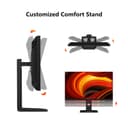

🚀 Elevate Your Visual Game with 4K Precision & Speed!
The INNOCN 32" Mini LED 4K Monitor combines cutting-edge Mini-LED backlighting with a 160Hz refresh rate and 1ms response time, delivering ultra-smooth, vibrant visuals. Featuring 99% DCI-P3 and Adobe RGB color accuracy, USB-C with 65W power delivery, and HDMI 2.1 ports, it’s designed for gamers, creatives, and professionals seeking immersive, ergonomic, and versatile display performance.




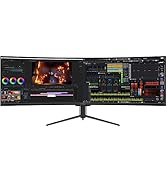




| ASIN | B0CC9G5CPH |
| Adaptive Sync | FreeSync |
| Additional Features | 4K gaming, High Dynamic Range, Local Dimming, Mini LED Backlit, USB Type C |
| Aspect Ratio | 16:9 |
| Best Sellers Rank | #77,340 in Electronics ( See Top 100 in Electronics ) #1,716 in Computer Monitors |
| Brand | INNOCN |
| Brightness | 1000 Candela |
| Color | Black |
| Compatible Devices | Desktop |
| Connectivity Technology | DisplayPort, HDMI, USB Type C |
| Contrast Ratio | 1000:1 or higher |
| Customer Reviews | 3.7 3.7 out of 5 stars (29) |
| Display Resolution Maximum | 3840 x 2160 Pixels |
| Display Technology | LCD |
| Display Type | LCD |
| Hardware Connectivity | HDMI, USB |
| Has Color Screen | Yes |
| Item Dimensions D x W x H | 2.6"D x 28.7"W x 16.7"H |
| Manufacturer | Guangxi Century Innovation Display Electronics Co.,Ltd |
| Model Name | 32M2V |
| Model Number | 32M2V |
| Mounting Type | Desk Mount |
| Native Resolution | 3840x2160 |
| Number of Component Outputs | 2 |
| Picture Quality Enhancement Technology | Mini LED Backlit |
| Pixel Pitch | 3.175 |
| Power Consumption | 75 Watts |
| Processor Count | 1 |
| Refresh Rate | 160 Hz |
| Resolution | 4K UHD 2160p |
| Response Time | 1 Milliseconds |
| Screen Finish | Glossy |
| Screen Size | 32 Inches |
| Shape | rectangular prism |
| Specific Uses For Product | Desktop, Gaming, Photo Video Editing |
| Total Number of HDMI Ports | 2 |
| Total USB 2.0 Ports | 2 |
| Total USB 3.0 Ports | 1 |
| Total Usb Ports | 3 |
| Viewing Angle | 170 Degrees |
| Voltage | 24 Volts |
| Warranty Type | 1 Year Manufacturer Warranty |
E**R
Setup is key
Product arrived promptly. I read all the reviews here and more. Was concerned about time to switch from SDR to HDR and some people having the monitor switch on and off frequently. I have never had an HDR monitor. I had a 10yo Dell 27in. Setup is not clear. It is not plug and play. Much of this is Windows 11 fault. It sets up auto-HDR automatically. Turns out there is a bug in Windows and the monitor is constantly trying to switch. Not mine alone but well documented and occurs with other HDR displays. Key is turn off auto-HDR and use Win-Alt-B if you want HDR. HDR with standard SDR content is TERRIBLE. I leave HDR off most of the time. With this, the SDR picture is amazing. Very very happy with quality and no more off and on. The HDR is great but I don't have much HDR content. Not much of a gamer. Brightness is very high and detail excellent with white whites even on Standard mode. No real need for tweaking.
M**E
Good overall
This monitor works on an M1 and M4 Mac without issue. I also flip over to HDMI for PC gaming, and again flawless. You may want to purchase sun-glasses and some tanning lotion when you first set it up out of box. It is BRIGHT... However once you adjust it, works great.
L**N
Great Colors, Terrible OSD. that's it.
Going on Two years. Great Panel, colors, etc. This software is terrible. It takes several attempts to display anything. The Auto On feature doesn’t work, and the Auto Input Switch doesn’t function properly. The USB Hub also doesn’t work half the time. Frequent unplugs are necessary to get things working. The picture quality is great, but the rest of the display’s functions are frustrating. Customer Support was not helpful. Since its discontinued they don't care
A**R
Really nice looking monitor with HDR
I will add more to this review later, but I just want to throw this up there since there aren't any reviews for the black model. The black finish is nice if your other components are black. I set it to HDR and adaptive sync in the onscreen menu, then set HDR on in windows, and it looks amazing. I hope to never need to use the OSD menu again, it's clunky, but I'm hoping it's a set and forget kind of thing. For gaming, I think 27" 1440p is a better sweet spot. I'm running this on a 4070 super, which can run this at 4k 144 hz in some titles that aren't awfully demanding, but will have to compromise on quality for AAA titles.
S**.
FOR INNOCN 32M2V 4K MINI-LED - 2 UNITS WITH DEAD PIXELS - FULL REVIEW WITH DETAILS
The first 32MV2 4K Mini-LED monitor I received had a dead white subpixel in the middle of the screen that was annoying every time the screen was white. If it were in a corner, I would have kept the unit. The replacement unit had quite a few completely dead pixels in the upper right side of the screen, which is unacceptable for the cost. Also, the warranty is only 1 year - not listed directly on Amazon's website (there is only a link). Even the link does not give the warranty duration, as you have to find the product on INNOCN's site, and it is only listed there. At best, this seems dubious to me. The pros: - The 32M2V gets exceptionally bright. I measured close to 600 NITS in SDR mode with a SpyderXElite colorimeter. Unfortunately, I have no way of accurately measuring HDR. - HDR gets remarkably bright. It's too bright for a desktop PC, and there is no way to turn down the brightness in HDR mode unless I am missing something. - The local dimming works well, and the inverse blooming is not noticeable in everyday use. If you are looking for it, it's there, especially in very dark scenes with one bright object. The screen gets exceptionally dark without backlight bleeding. The panel uniformity is average at best without local dimming enabled. - Using the "standard" mode, gamma 2.2, and "natural" CT settings, I was able to achieve a very accurate calibration with <1 DeltaE for all colors. The gamma was 1.95 before the calibration and 2.18 after. - To my knowledge, there is no way to calibrate HDR mode. The OSD offers no adjustments other than the three built-in modes, of which "standard" looks most balanced. However, the image quality is outstanding, and the monitor shines here - no pun intended. The color volume is OK, but another monitor will unlikely be better unless it is OLED. The cons: - The OSD menu is horrendous - the worst I've seen. I did get used to it, but it isn't enjoyable. - There is no software to control the monitor from Windows, as many manufacturers offer, which necessitates manually going to the menu to adjust the brightness. - If you use the monitor with a DisplayPort cable, the local dimming feature turns off every time the monitor "sleeps," which is also super annoying. I switched to an HDMI 2.1 cable, which worked correctly at 144 Hz. The one-year warranty for a monitor of this cost is not comforting, especially since I received two defective units. - The build quality is cheap, although I knew this when I placed my order. Everything is made of plastic, including the stand. The LG monitor I wanted to replace is considerably better made. Conclusion: Assuming you get a unit without dead pixels, and many people do, the monitor gets brighter than almost any other model at this time. It supports high refresh rates and is quite color-accurate in non-HDR mode. HDR mode is lovely, if not too bright, and there is no way to reduce the brightness. If you're using the monitor in a home office like me, it's too bright to use HDR in darkness without adjustment. The 1-year warranty is concerning, as even though the price is reasonable if you have issues outside of that period, you can do nothing. If you overlook these problems, the product does what it says it will.
M**L
This monitor has great colours but it's really bulky, has poor viewing angles, and a matte screen instead of glossy. Coming from a 5K iMac, the Innocn was just too hard to look at but if you've only ever used PC monitors, it'll probably be an upgrade.
ترست بايلوت
منذ شهر
منذ شهر