Buy anything from 5,000+ international stores. One checkout price. No surprise fees. Join 2M+ shoppers on Desertcart.
Desertcart purchases this item on your behalf and handles shipping, customs, and support to KUWAIT.
🎯 Elevate your workflow with precision, comfort, and unstoppable wireless freedom!
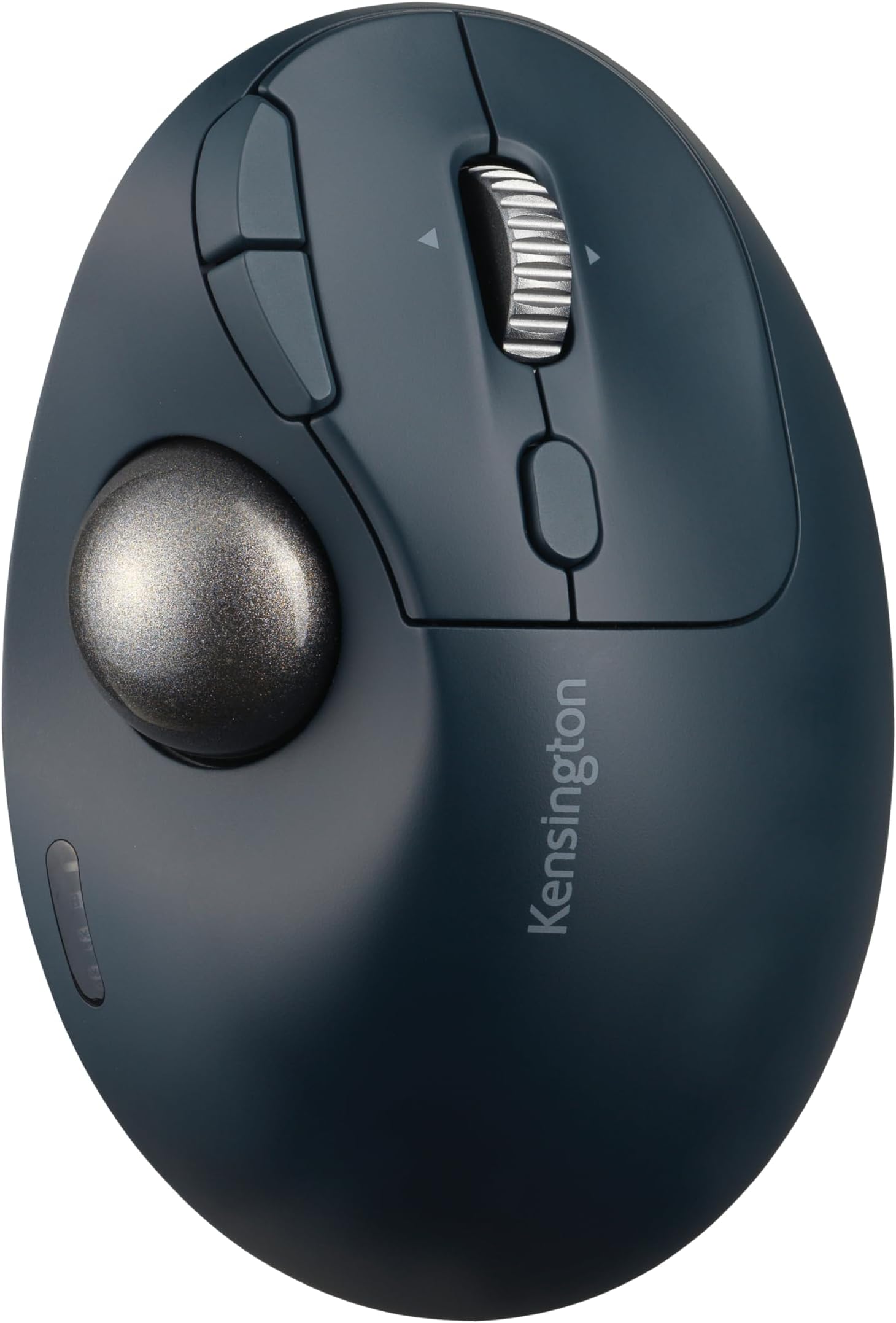
The TB550 Wireless Trackball Mouse by Kensington combines dual wireless connectivity (Bluetooth LE and 2.4 GHz) with government-grade 128-bit AES encryption, offering secure and flexible use. Featuring a rechargeable battery lasting up to 4 months per charge, a 34mm precision trackball with patented easy-clean design, and an ergonomic 45° tilt for wrist comfort, it’s engineered for professionals seeking precision and all-day productivity.


| ASIN | B0CD1QWG2V |
| Additional Features | Ergonomic Design, Programmable Buttons, Rechargeable, Wireless |
| Antenna Location | Office, School |
| Are Batteries Included | Yes |
| Are Batteries Required | Yes |
| Battery Average Life | 4 months |
| Best Sellers Rank | #15 in Computer Trackballs |
| Brand | Kensington |
| Built-In Media | Pro Fit® Ergo TB550 Trackball, Quick Start Guide, Compliance Sheet, USB-A Receiver, USB-C (Male) to USB-A (Male) Charging Cable, Warranty Card, Welcome Card |
| Button Quantity | 7 |
| Color | Charcoal Blue/Silver |
| Compatible Devices | Personal Computer, Tablet |
| Connectivity Technology | Bluetooth, USB |
| Customer Reviews | 4.2 out of 5 stars 556 Reviews |
| EU Spare Part Availability Duration | 3 Years |
| Enclosure Material | Plastic |
| Global Trade Identification Number | 00085896721963 |
| Hand Orientation | Right |
| Hardware Platform | Mac, PC |
| Item Dimensions L x W | 5.44"L x 3.68"W |
| Item Weight | 141 Grams |
| Manufacturer | Kensington |
| Mfr Part Number | K72196WW |
| Minimum Required Operating System Version | Mac OS 10.12 Sierra, Windows 10 |
| Model Name | K72196WW |
| Model Number | K72196WW |
| Mouse Maximum Sensitivity | 1600 Dots per Inch |
| Movement Detection | Trackball |
| Movement Detection Technology | Trackball |
| Number of Batteries | 1 AA batteries required. (included) |
| Number of Buttons | 7 |
| Operating System | Mac, Windows |
| Pattern | Trackball |
| Power Source | Battery Powered |
| Range | 10.0 meters |
| Special Feature | Ergonomic Design, Programmable Buttons, Rechargeable, Wireless |
| Style Name | Thumb-Operated |
| UPC | 085896721963 |
| Unit Count | 1.0 Count |
| Warranty Description | 3-year limited |
R**R
Great product for a great price!
Great product, great price. I use it everyday! Plus it is programmable, and I love how the ball housing has a push button that pops out the ball for cleaning. The different DPI button is awesome as well depending on how precise you are needing the mouse movement to be. Customer service is excellent. I’m very big on customer service support. It connects easily with either the dongle connection or Bluetooth connection. You are able to connect to 3 devices using the 2 Bluetooth and the one dongle. One mouse for 3 devices. It has a fantastic battery life. I can use my rechargeable batteries with it! So far it is still going strong off of the first charge on my battery. I do turn it off when not using it because my lovely cat likes to walk across my desk lol The smooth roll of the ball is probably the best feature though. Slight movement is all that’s needed, especially if you’re using it on a higher DPI setting. I have yet to find a downside. The ergonomic design is very helpful when it comes to my carpal tunnel, I experienced less pain and fatigue in my hand. Love this mouse! Yes, I’m a real customer who just loves this great working trackball mouse.
J**S
An excellent value for a mouse.
I was using a Magic Mouse with my Mac and found it wanting. I think the QC is dropping off in Apple accessories. Had a good experience with a relatively cheap track ball mouse; probably Chinese, but when I installed my new Mac Mini M4, I lost my old Chinese trackball mouse and reverted to the Apple Magic Mouse. After a few days of frustration, I looked for a relatively inexpensive trackball and settled on the Kensington TB450 Wireless Trackball Mouse. It was one of my better decisions. It is top quality and very responsive and easy to use. It is also very comfortable as well. I highly recommend it. Maybe the more expensive ones are better, but this Kensington is a good value.
A**O
Lightweight, Comfortable, and Reliable Bluetooth Mouse
I’ve been using the mouse for a little while now, and it’s honestly a great little mouse. Super lightweight and comfortable. Track ball is on point. Pros: • Ergonomic and Easy to Use: It fits really nicely in the hand and has a smooth, ergonomic shape that makes it easy to use for long periods. My wrist doesn’t feel strained even after hours of clicking around. • Very Lightweight: I was surprised by how light it is, which is great for portability but still feels solid—not cheap or flimsy. • Stable Bluetooth Connection: The Bluetooth connection has been really reliable. It pairs quickly and I haven’t had any issues with lag or random disconnects. Cons: • Not a Lot of Extras: It doesn’t have any fancy customizable buttons or features, so if you’re into that kind of thing, this might feel a bit basic. That said, it’s definitely designed with medium-sized hands in mind. It might feel a little large if you prefer ultra-compact mice, but for most people, it should be a great fit. Overall, it’s a solid choice if you want a simple, lightweight, and dependable Bluetooth mouse. Definitely happy with it so far!
Z**T
The Better Choice
I'd been a Logitech user for 40 years. Their design and quality have been declining for a long time. As a longtime user of trackball devices, which I used in CAD for most of those years, their earlier devices saved a lot of movement and muscle, and lasted a long time. In recent years I was finding myself suffering from carpel tunnel and replacing devices twice a year. So, I decided to give this Kensington device a try. I noticed within days that the carpel symptoms disappeared. And the ease of use was a blessing. I also noticed a better quality of manufacturing that I'm hoping translates to longer life. No seams in the well that the ball sits in should translate to less jamming situations that the Logitech displayed. Well done Kensington!
A**Y
Worst scroll wheel ever
Pros: 1. The contours on the trackball feel very comfortable in the hand. 2. The ball itself moves smoothly 3. The button at the bottom to pop out the ball for cleaning is a very welcomed feature. Cons: 1. The scroll wheel is the worst I have every used on any peripheral. Regardless of settings, it is simply not usable for normal work. 2. The button for switching connections between dongle and two BT devices cannot be remapped. Like me, I am guessing the majority of users will have the trackball on a desk connected to a single device. Not allowing for the remapping of this button makes it a lost button completely in most cases.
D**A
Perfect for Work Productivity
I love this trackball for work. The ability to move the cursor without having to slide the whole mouse across my desk has been a game changer. Just rolling the ball lets me navigate quickly and precisely, and I can get a lot done without repositioning my hand constantly. So far it’s been amazingly responsive, smooth, and comfortable for long periods of use. If you want a reliable option that boosts efficiency and cuts down on repetitive reaching, this is a great choice. Battery life is great, very durable and value for your money for sure. I work from home and it has been the best thing.
S**S
Cheap, works when it wants to, cleaning does improve functionality
Terrible mouse, stopped working reliably within weeks. Cleaned everything repeatedly and nothing helped. I finally tried the ball from my old logitech mouse and it worked ok for a couple months, but now it's doing the same thing where it is unreliable and cleaning doesn't help. Hugely disappointed. Besides that, it feels cheap, and one of the most prominent buttons on the face of the mouse can only be used to cycle through devices, which is worthless and annoying since it's front and center and easy to accidentally click. Could have used that button for literally anything else, and even the software can't change its functionality. The big ball eject button on the bottom is great, but since cleaning doesn't improve anything it is ultimately irrelevant.
C**N
Great low-cost alternative to Logitech
I needed a new trackball mouse after my old one of many years finally bit the dust. I didn’t want to shell out the cash for a Logitech one, I just needed something basic. Amazon had numerous listings, but this one ticked all the boxes. It’s Bluetooth, so no need to use up a USB port with a dongle. It’s Kensington, which has been reputable brand for the last ~20 years. It’s got a scroll wheel as well as the trackball, so easy to just use for online activity. And the best feature of all… it sounds small but it really does come in handy… is the patent-pending “ball eject button”. I think it’s just a plastic button on the bottom attached to a little spring-rod mechanism, so it’s not that high-tech. But it does exactly what it’s supposed to, and it makes cleaning those three little “helper balls” where the trackball sits, a real breeze.
T**.
Pas facile à configurer avec pc
Il y a mieux, je ne parviens pas à configurer avec le Bluetooth de mon pc 💻
A**R
Superior to a standard mouse
This trackball ergonomic shape, is just right. I've used it now for several days and it meets all of my requirements. I find it much superior to an standard mouse. Recommended
A**R
Geen RSI meer
Bijzonder handige muis van(tot nu) uitstekende kwaliteit met bijzonder goede software die men kan downloaden via de kensington site.
F**T
Trackball mouse
Good quality trackball mouse. Exactly what I wanted. Working well so far
R**B
Impresionado
Tengo un logitech ergo M575 y quería otro trackball de backup, pero no quería uno con batería integrada, por eso elegí Kensigton TB450 solo para probar y aquí hago mi reseña inicial: Punto neutro: - La inclinación de 45º es cómoda, pero casí no noto diferencia con la postura en mi ergo M575 que no tiene inclinación. - La conexión del ratón con el ordenador es encriptada, lo cual tiene sentido con teclados wireless (para evitar sniffing de lo que escribe el usuario) pero para un ratón... no termino de ver el valor que aporta. - Los clics son más agradables comparados con el logitech M575, aunque esto es relativo a cada usuario Puntos positivos: - La calidad del plástico se ve muy bien, muy bien el acabado - La precisión del trackball es superior en Kensigton, ya que si giro muy rápido la bola con el pulgar, el puntero se mueve correctamente; si hago lo mismo con mi logitech, se siente que la bola gira muy rápido pero el sensor no lee el movimiento y en consecuencia el puntero ni se mueve. - La bola está mejor sujetada en el Kensigton; es decir, si giro muy rápido la bola entonces el puntero se se mueve según lo esperado; en mi Logitech, cuando giro la bola muy rápido, a veces se escucha que la bola golpea contra la pared interna del ratón lo cual hace que el puntero casi ni se mueva y es molesto tener que bajar la velocidad del pulgar sobretodo cuando quieres cruzar 2 monitores rápidamente - El software de KensigntonWorks me permite configurar una velocidad custom del trackball presionando alguna de las teclas shift,alt o ctrl (o alguna combinación). Por ejemplo, tengo la velocidad del trackball muy rápida para cruzar toda la pantalla sin esfuerzo del pulgar y luego cuando presiono la tecla "alt" la velocidad del trackball cambia, esto lo uso donde necesito más precisión. Este comportamiento tan práctico, no lo puedo configurar con LogiOptions, lo que puedo hacer con LogiOptions es presionar un boton para cambiar DPI o configurar DPI según la aplicación, pero la solución de Kensignton me parece más práctica. - He leído en otros reviews que el boton de cambio de DPI debería de estar arriba pero la verdad es que no necesito estar presionando el cambio de DPI si puedo configurar 2 velocidades en el mismo trackball. Imagino que el cambio de DPI lo necesitaré en linux donde no tengo la aplicación KensingtonWorks - Logitech implementa el scroll inercial en algunos ratones, y es algo que siempre he querido que lo querido en mi logitech Ergo M575 pero no existe. En el Kensignton lo implementan a nivel de software: el scroll fisico del ratón no se queda girando pero simulan una inercia para desplazarse más de una línea si se le da con fuerza al scroll y te permite avanzar muy rápido en documentos largos. - Si no nos gusta el scroll inercial, Kensigton permite configurar el avance del scroll, puede ser configurado a ir línea por línea o hacer scroll de 5 o 10 líneas a la vez, por lo que es otra forma de hacer scroll en documentos largos Lista de deseos: - El ratón no tiene memoria integrada, es decir que necesito estar ejecutando KensigtonWorks para usar mis configuraciones; esto puede ser problema en equipos de trabajo con políticas de seguridad que impidan instalar cualquier software o en linux, donde puedo usar el ratón pero sin personalización. - KensigntonWorks oficial para linux - Sería ideal el mismo concepto de 2 velocidades del trackball (la velocidad normal y otra presionando la tecla shift, alt o ctrl) para la velocidad del scroll vertical; así podria tener por defecto un scroll vertical configurado de unas 10 líneas y presionando shift + scroll hacer el scroll de sólo una línea - Se le podría agregar el desplazamiento horizontal (implementado en el TB550) que en mi caso lo usaría para programar más botones (ya que el desplazamiento horizontal prefiero hacerlo con la tecla shift + scroll) - El software KensingtonWorks, funciona, pero no identifica todas las aplicaciones instaladas en windows; por ejemplo con el LogiOptions+ puedo personalizar los botones de mi M575 para que suba o baje volumen en aplicaciones como Amazon Music, Spotify, Prime Video, Netflix y esto es porque las identifica el software; sin embargo en KensigntonWorks no puedo... y si le doy a explorar, luego tendría que darle permisos de administrador al KensigntonWorks para explorar la carpeta c:\Program Files\WindowsApps... y no me parece dar permisos extra Nota final - Estoy repensando en comprar el TB550, tiene 2 botones más (dezplazamiento horizontal) que pueden ser programables, pero me tira atrás la batería integrada; ya que siempre se degradan y para mí es más práctico usar 1 batería AA recargable. No quiero terminar siguiendo los pasos en algun video de youtube, abriendo el ratón para cambiar la batería integrada
Trustpilot
2 months ago
2 weeks ago