We remain fully operational. Our teams are working around the clock to ensure your deliveries continue safely.

قم بتنزيل التطبيق


معلومات عنا
حقوق الطبع والنشر © 2024 Desertcart Holdings Limited
قم بتنزيل التطبيق




Buy anything from 5,000+ international stores. One checkout price. No surprise fees. Join 2M+ shoppers on Desertcart.
Desertcart purchases this item on your behalf and handles shipping, customs, and support to KUWAIT.
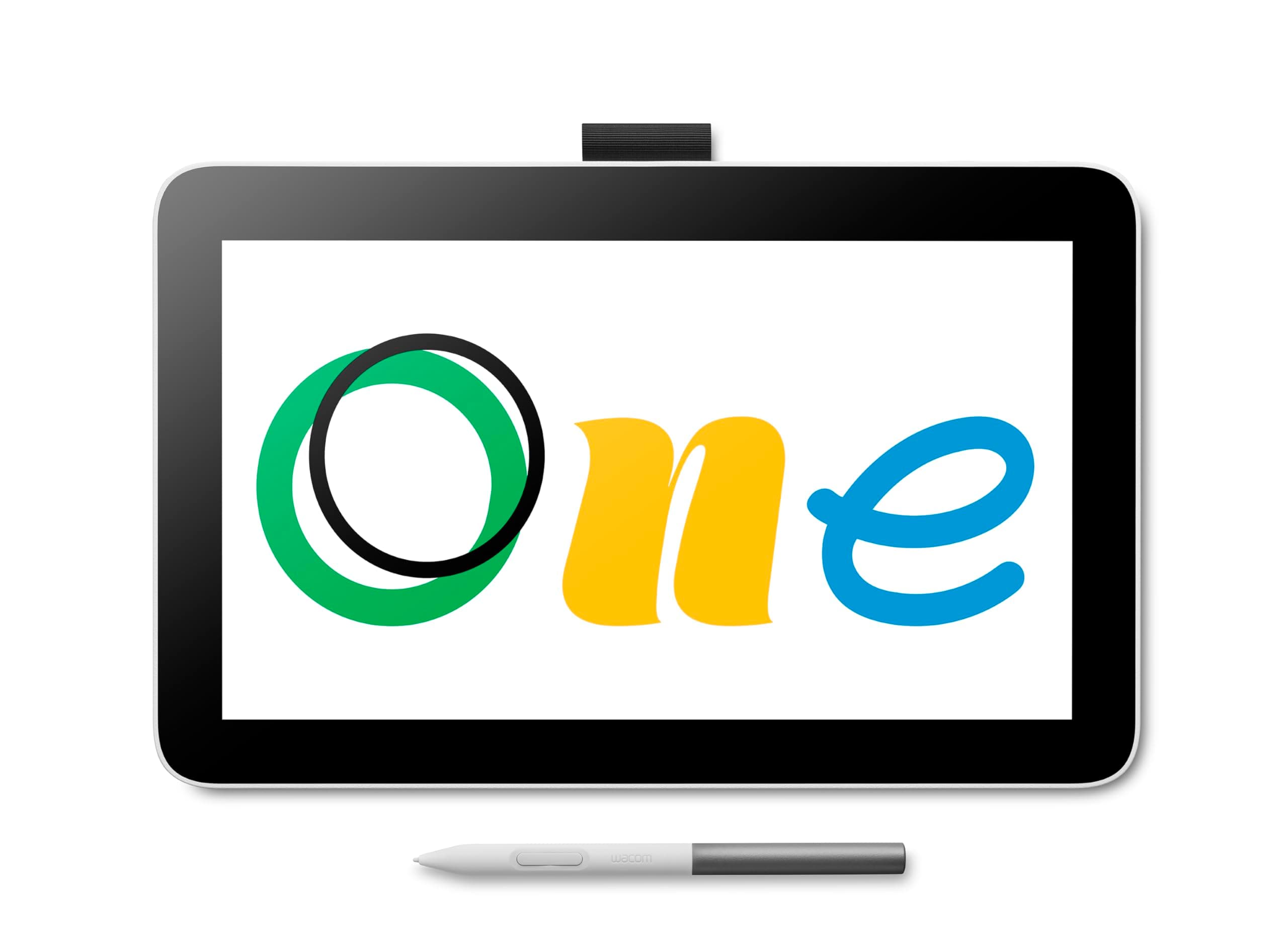
🎨 Elevate your digital canvas—where creativity meets precision and portability!
The Wacom One 12 is an entry-level digital drawing tablet featuring an 11.6-inch full HD laminated display with anti-glare coating, designed to deliver a natural pen-on-paper feel. Equipped with a battery-free pen offering 4096 levels of pressure sensitivity and tilt recognition, it supports Windows, macOS, Chromebook, and select Android devices via USB-C. Its customizable shortcut buttons and lightweight design make it ideal for aspiring artists, students, and professionals seeking a versatile, portable creative tool.


| ASIN | B0B4VRB719 |
| Active Surface Area | 10.1 x 5.7 in |
| Additional Features | Full Lamination |
| Best Sellers Rank | #220 in Computer Graphics Tablets |
| Brand | Wacom |
| Built-In Media | Wacom One 12 Pen Display |
| Color | White |
| Compatible Devices | Personal Computer |
| Connectivity Technology | USB |
| Customer Reviews | 3.9 3.9 out of 5 stars (102) |
| Display Type | LCD |
| External Testing Certification | Não aplicável |
| Item Dimensions L x W | 11.8"L x 7.5"W |
| Item Weight | 0.7 Kilograms |
| Manufacturer | Wacom Technology Corporation |
| Model Name | Wacom One 12 Display |
| Model Number | DTC121W1C |
| Native Resolution | 1920x1080 |
| Operating System | Windows or macOS |
| Pressure Sensitivity | 4096 Levels |
| Screen Size | 11.6 Inches |
| Specific Uses For Product | Animation, Drawing, Online Education |
| Target Audience | Student, Teacher |
| UPC | 753218984791 |
| Warranty Description | 1 year manufacturer |
V**.
Simply Amazing
I'm just two weeks into using this tablet and pen and I'm so damn excited by it. For clarity, I am trash at drawing and can't attest to that. But I've been using it to edit photos in Affinity 2 and Lightroom and manipulate svg files in Illustrator and Inkscape, and it's been incredible. For the past couple of years, I've used the iPad and pencil and have always felt limited by the ios app, though great, I sort of always wanted more from the app. I really appreciate this tablet as a second display screen that I can interact with. Some of the pro's that I'm obsessed with right now are the feel of the pen when editing, the matte finish on the display, and the portability. My only comparison is to the iPad and this pen and display finish feel so much better. There is a more natural comfort in writing and drawing, whereas my experience with the iPad felt glassy and tractionless. It might be simple or unimportant, but I prefer this matte finish to a glossy glass finish. And lastly, this just fits in my bag and goes, I've started taking it everywhere. I love that there are no batteries or charging. The cable that came with is a little stiff, but super minor inconvenience. The cons are hard to parse right now because I'm still learning to navigate, but I've had a couple of issues with the pen losing connection. I think it was a driver issue and hasn't happened in the last few uses, so hopefully that was it. The screen brightness could be better, I'm hoping it's a setting I haven't found it and Google wasn't helpful. Lastly, and this could be a me and my computer thing, the resolution defaults to a super zoomed-in screen and it took me a while to get to the settings menu and fix it. I guess the con is that I can't figure out how to make it default. I'm always happy about more name-brand companies with a bigger following and the amount of customer support and YouTube resources. There are sooooo many, Wacom has a ton of videos to help with creative processes and troubleshooting problems, and for what they don't have, others have made a host of great videos that have helped me. Lastly, and maybe because of the newness of owning this, I've been going out more and taking more photos and designing more stencils and embroidery projects half because of the newness, but I believe the other half is the ease of use. 5 out of 5 stars to anything that gets me excited and active!
T**T
Not worth the investment.
I was searching something to compliment my work setup, sometimes I want to actually write things down as opposed to typing. I had the first gen Ipad with the pencil and that worked naturally, just like using pen & paper. My issue with the Ipad was that there were circumstances I wanted to use the pen for something on my desktop and mirroring wasn't a thing when it first launched and software solutions were a little pricy to my taste. So I went on the search of a specific solution to that. I tried the One from Wacom because it was cheap but I could not get used to trying to write and make annotations while LOOKING at the screen and not where the pen was. So then I did some research and WacomOne seemed to be what I needed.... It kind of is.... but the execution was far from what I was expecting. It took me 10 minutes to immediately compare to my experience with my old Ipad (broken) to realize that this was NOT worth the investment. I would rather go and purchase an Ipad instead. The parallax is horrible and although it kind of "flows" when you start using it and your handwriting kinda works, but I could "see"/"feel" the software making corrections and ending compression letters in words together, all in all a bad experience. My gripe with this product is the price. If it was a $100-150 product I could potentially consider using this and try to get used to the parallax, software processing and attempt to adjust the parallax etc... But at $400 (and NO touch, which I bought by mistake because I wanted the touch - but Wacom naming and product selection is very confusing), I would rather just spend a little more and get an Ipad or just get an old version of the Ipad for a better experience. I really wanted this product to be what I expected but the whole experience and my use case just simply does not justify the investment, ergo I'm about to leave to return this after 10 min of testing. I honestly can't see how you can justify the investment in one of these and Ipad 1nd gen (that has pen) gave me a much better experience than this could. I'm not an artist, my use case is for taking notes, making diagrams, maybe sketch a technical diagram... so I have zero artistic use for this. I'm saying this because I know most Wacom products are for ppl that draw on tables etc.
L**S
Great portable sketch pad!
I have been using this new Wacom One 12 for a few days now. I am no stranger to Wacom. I have a Cintiq which is permanent on my desktop and wanted a small one to be able to move to other locations without using a power cable. This fit the bill. It is very small. There are no pull out legs on the back. I use Art Pucks to angle the tablet and that seems to work fine. The pen does work well and having two buttons on it is a big deal for me. Tilt is ok and drawing is smooth. Laminated display with -0- parallax. The build quality is good. I found no issues with the screen or the pen. Keep in mind this is not the same experience as drawing on my 4K Cintiq but it sure fits the bill for sketching on the go. I chose not to go with the Wacom One 13 touch because I never use the touch function on the Cintiq I already own. I also, did not want to go with another brand as both my Mac mini M1 and Macbook Pro already have the Wacom drivers installed and having to remove them each time I want to use another brand device is just too much bother. The package comes with everything you will need to get setup except a stand. This is more than double the price of other brands but as always it is a Wacom and I am hoping to get years of use out of this. Did I mention it is small? You adjust to it quickly. I do recommend if you have the extra money to spend.
R**E
READ REVIEW BEFORE BUYING
LOVE LOVE LOVE THIS THING! 5/5 Stars! The only thing to keep in mind is that if you have a PC that is NOT compatible with USB-C display, YOU WILL HAVE TO BUY THE DISPLAY CONVERTOR FROM WACOM DIRECTLY. It sucks and idk why it doesn't come with it but it's the sad reality of the situation. Most modern laptops and all Apple devices after 2023 will have this compatibility but custom built PCs will more than likely not have this function so please be aware of that.
M**.
Cuidadosamente embalado e protegido. Completo com tudo que é preciso. Usando já quase há um mês. Funciona perfeitamente. Já sou usuário de pen displays da Wacom faz três anos. Não decepcionam e garantem durabilidade, estabilidade na conexão e drivers sempre atualizados sem bugs. O tamanho é perfeito para espaços mais reduzidos ou para viagens e trabalhos ao ar livre. Pode se conectar por um cabo usb c 3.1 full ou um thunderbolt 3 ou 4, sem necessidade de usar fonte externa de alimentação, desde que seu pc ou note tenha prota usb c ao menos 3.1 10 gbs com opção de vídeo e power delivery, ou então thunderbolt 3 ou 4. Apesar de a caneta ter só 4096 níveis de pressão, é bem responsiva, quase zero de paralaxe (até menos perceptível do que na cintiq 16 que tenho), e permite traços bem definidos na escrita e no desenho. A caneta tem dois botões que podem ser configurados via driver na wacom. A ponta parece mais macia do que a da cintiq 16, então creio que talvez dure menos. Pode ser por isso que vieram logo dez pontas reservas.
E**.
Totally love it for teaching ...for convienient
F**D
I can't get the tablet to work! Called the Wacom support line and was told my PC sends the data for the tablet from the HDMI outlet, NOT the USB C outlet. He recommended I buy a new cable at a high cost from Wacom. This was not mentioned on the Amazon web site where I bought the Wacom. It's an underhanded way to sell a special cable. I then purchased a cable with HDMI and USB-C ends, but it was uni-directional, the wrong way, of course. I then had to order another cable that was unidirectional from the HDMI end. A week later and it still has not arrived. Extremely frustrating!!!
I**R
A marca deixou muito a desejar, comprei sabendo que e uma marca conhecida e me deparei com um aparelho que precisava de um cabo a parte para funcionar no computador sem tipo c, o atendimento deles e lento e sempre que eu perguntava sobre o cabo eles diziam que a próxima leva estava a caminho mas dêsde dezembro não chegou reposição dele, deram o prazo de janeiro depois estenderam para fevereiro. Quando eu consegui outros aparelhos para testar a mesa apresentou mal funcionamento, ela ligou por alguns minutos e logo parou de funcionar e não liga mais ou da imagem, nem mesmo a logo da empresa ela mostra, eu testei em um notebook T14 gen 1 da Lenovo e um tablet Ipad ambos com entrada tipo c e nenhum deles a mesa deu imagem ou funcionou corretamente. Pense bem antes de comprar essa mesa pois para mim só trouxe dor de cabeça e ainda não tive nenhuma resolução do meu problema. Não recomendo.
I**A
Excelente para artistas gráficos, desenhos e outros, e um suporte a mais para quem é profissional de educação e quer fazer conteúdo na Internet. TOP. Recomendo vale o investimento.
ترست بايلوت
منذ 3 أسابيع
منذ شهر