We remain fully operational. Our teams are working around the clock to ensure your deliveries continue safely.

قم بتنزيل التطبيق


معلومات عنا
حقوق الطبع والنشر © 2024 Desertcart Holdings Limited
قم بتنزيل التطبيق
Buy anything from 5,000+ international stores. One checkout price. No surprise fees. Join 2M+ shoppers on Desertcart.
Desertcart purchases this item on your behalf and handles shipping, customs, and support to KUWAIT.
💼 Elevate your data game with MAIWO: where speed meets storage mastery!
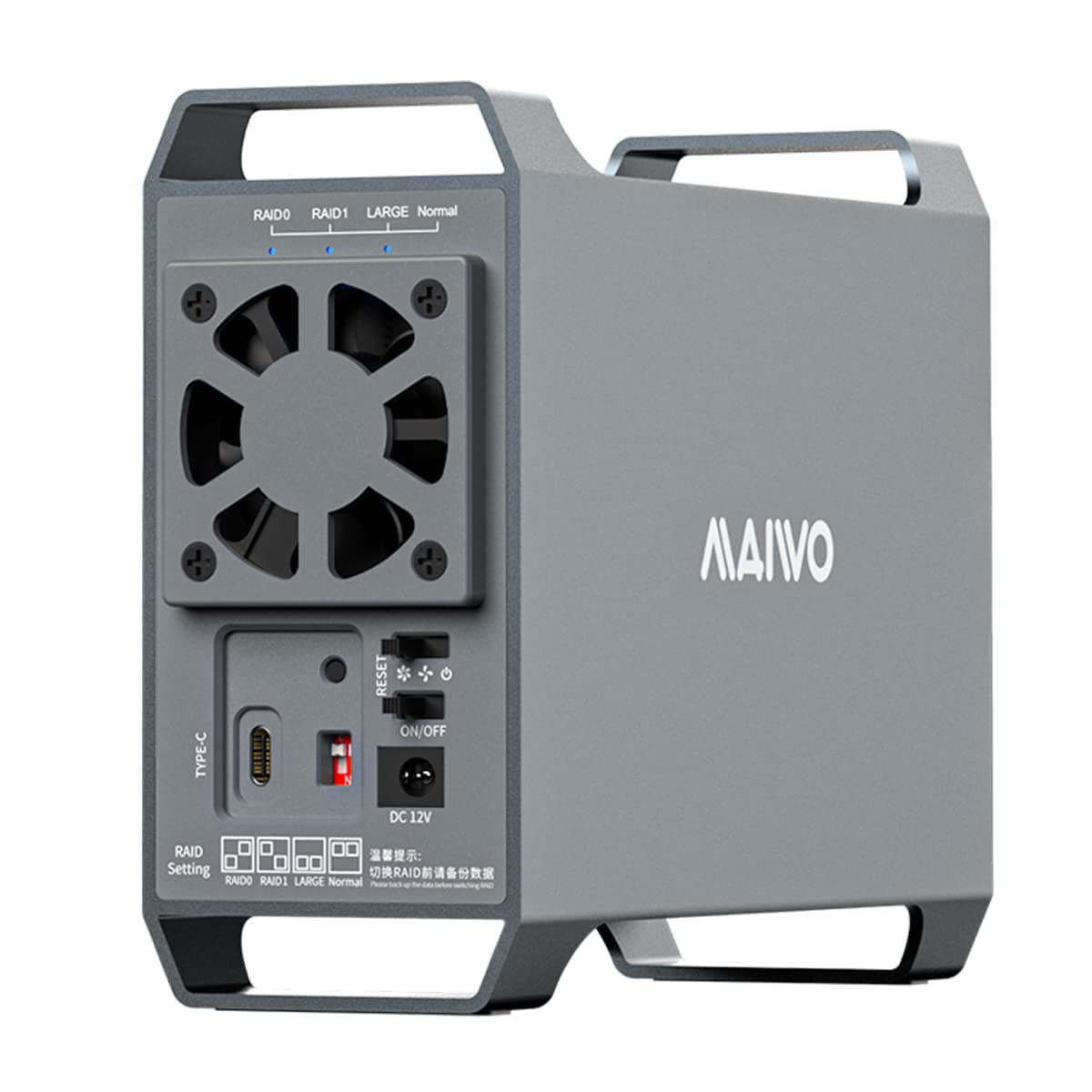
The MAIWO Dual Bay RAID Enclosure is a professional-grade storage solution designed for 2.5” and 3.5” SATA drives, supporting up to 48TB total capacity. Featuring USB-C 3.1 Gen2 with 10Gbps transfer speeds, four configurable RAID modes, and an aluminum alloy body with an adjustable cooling fan, it ensures reliable, high-speed data management and optimal drive temperature control. Perfect for professionals seeking scalable, secure, and efficient storage expansion.


| ASIN | B0CBDW5WG9 |
| Best Sellers Rank | #585 in Enclosures |
| Brand | MAIWO |
| Built-In Media | Cable, Dual Bay Raid Enclosure, Power Supply, Screws, Screwsdriver |
| Color | Gray |
| Compatible Devices | PC, Phone(With OTG), Router, TV |
| Customer Reviews | 3.6 3.6 out of 5 stars (109) |
| Data Transfer Rate | 1000 Megabytes Per Second |
| Enclosure Material | Metal |
| Hard Disk Form Factor | 3.5 Inches |
| Hardware Interface | USB Type C |
| Hardware Platform | PC, Windows |
| Item Dimensions L x W x H | 7.24"L x 2.6"W x 5.63"H |
| Item Weight | 0.6 Kilograms |
| Manufacturer | MAIWO |
| Memory Storage Capacity | 44 TB |
| Supported Devices Quantity | 2 |
| Warranty Description | 1. Shipment received with visible damages must be reported to us within Three (3) calendar days of the delivery date. In the event an item is sold without shipping charge, MAIWO STORE will refund the amount of sale. 2. All returns with missing part(s) (including, but not limited to, accessories, manuals, warranty registration cards, original manufacturer packing materials and retail packaging) wil… |
S**O
It works
It works. It has cooling, sufficient for ordinary HDDs, I recommend those with lower RPM. "Works" is an important feature, because many similar devices do not work. While the electronics is somewhat old already, a RAID1 with quite inexpensive HDDs will save you from warring about infrequent, but very unpleasant storage crashes.
P**N
Inefficient cooling but otherwise a good RAID encoslure.
I've used two MAIWO RAID enclosures before but they were for 2.5" SATA disks. They worked well. Step 1: install drives Step 2: upon power up all 3 RAID LEDs are steady indicating the default normal mode. Step 3: Set the switches for the desired RAID mode Step 4: Press and hold the reset button for 5 seconds. The appropriate RAID mode will light up and be in that RAID mode. Step 5: Format the RAID drives. Step 6: Copy data. Step 7: Set appropriate fan speeds. I don't know why so many people didn't read the manual with complaints that none of the RAID settings worked. They had to press the reset button. It's in the manual! I took off a star because of the cooling solution. It looks like the fan is just cooling the circuit board but there are grooves to stop it from pulling air from behind the case. The seal at the rear of the case is not air tight so I taped it over. I can feel air go in the front ever so slightly and if I put a thin piece of paper or plastic it will stick to the front indicating there is suction from the front. That said it won't cool the space between the 2 drives because the back of the circuit board is sealed. Air will flow around the drives but not through the 2 drives. See picturers for what I mean. As for speeds I was able to copy at 175MBps from a 10TB WD Elements USB harddrive to two 10TB HGST 7200RPM drives in RAID0 on a MAIWO . Task manager pegged both drives at 30% utilization. I also copied from 5TB toshiba x300 drives using a USB dock and the Maiwo RAID0 volume was using 100% utilization with the USB cock drive only using 30%. Transfer speeds were only 75MBps. A laser thermometer showed 80deg F on the front and sides and 84deg F on the rear fan while copying files to it. Ambient was 72deg F. I like the look of it and that it's elevated to keep it cooler. I wish it didn't use the other 2 RAID LEDs as activity LEDs but I understand the cost saving to keep everything on the circuit board side of the case.
D**O
Couldn't get it to work properly - fatal errors and improper ejects during use
Bought this to back up my Synology using Hyper Backup using it in JBOD mode. After running the backup job for a period of time, the Synology would report that the disk was ejected improperly and the backup failed. This happened on multiple occasions, so I took the disks out of JBOD mode and ran the drives independently, manually splitting the backup between the two drives. Got the same error. I read an article on Reddit about similar issues that were evidently caused by the different chipsets between the NAS and the drive. Using a USB hub was the solution, so I bought the same one mentioned in the article that resolved the problem, but I got the same error, and after that attempt, the NAS wouldn't even attempt to mount the drives, with or without the hub. I moved it to my Windows system and tried reformatting the disks to NTFS, but I received "fatal hardware error" messages until Disk Manager would no longer respond. I couldn't even access the disks through DISKPART. I swapped out the drives with another one, and it still wouldn't function properly. I ended up returning the unit, as I could no longer trust it for backups on any platform.
M**N
Dual drive RAID enclosure
The chassis is made of metal, and has a nice feel. Strong and sturdy. The installation of the matching HDD's was pretty straight forward. The only drawbacks are not actual operational paperwork and the speed of the array after configuration as RAID1 is really slow. I placed 2 8tb how's in RAID 1 configuration and plugged the box into a USB 3.2 pirt. Average write speed from an NVME M.2 PCI4.0 SDD was only 20 mps. When using the 8tb drives directly connected to the 3.2 USB port ithout the RAID enclosure averaged a speed of 220mps. So for backups, it's going to be slow (time wise) if you have a lot of files.
A**D
Very good/sturdy metal construction, works fine
Solid metal parts and built to hold drives firmly. Feet/handles on top and bottom make for convenient placement on my desk. RAID operation does require a bit of setup, but then works just fine.
H**N
Good Product, Good Value, Works Well.
O**S
Por el momento todo bien, llevo algunos días utilizándolo con un disco de 3.5 de 1 Tb y otro de 2.5 de 500Gb que no usaba y ya por fin los puedo utilizar. No está configurada con RAID, ya que me interesa poner información diferente en cada uno y por lo pronto todo bien. Buen diseño y la carcasa es toda metálica. El switch superior trasero regula el ventilador ya que no es automático y no se detiene, tiene dos modos para regularlo. El dispositivo se apaga solo cuando deja de recibir información de la PC pero el ventilador lo tienes que apagar manualmente. La tengo conectada con USB a una PC con Windows. En cuanto a velocidad de transferencia, con la configuración NORMAL, le estoy transfiriendo 100 Gb de archivos variados de la PC al disco 3.5 y ronda entre máximo los 41mb/s, no me quejo.
E**N
I have put in a couple of 1TB disc drives. One has a transfer rate all about 200 megabytes the other above 170. This is pretty good and I would like to continue using it plugged into a mini PC with USB 3.2 sockets. My main problem seems to be that if. it is not in concert use the computer which is is connected to lose a connection and I have to physically switch the device off and on to get connection again. This may well make it usable as a occasional backup resource. Anybody with similar problems please post
A**N
Overall, if you want to store a couple drives and don’t necessarily see yourself scaling soon, and want to stay on a budget, I have no qualms recommending this. That said, there are a few caveats. As for installation, it is a bit fiddly and requires a bit more screwing than one would hope — however, being hot-swappable at this price point is quite unexpected and so you can’t really penalize it for that. Next, despite having a built-in RAID controller, it supports limited RAID configurations — but this of course is a result of both the number of drives it takes. I used it only for JBOD, and can’t speak to the RAID experience. It supports three fan modes: off, medium, and full, and can be switched on or off only via hardware switch, as well as having auto-sleep. Software fan control would be appreciated, but the noise (while far from silent) is not louder than the desktop sitting next to it. No complaints about speed beyond that of the hard drive you put in it, and while it is a bit fiddly to get set up, it feels solid once it is, and the only gripe I have is that the fan is not software-controlled and requires manual switching on or off. In whole, I consider it to be a good deal for the price if you’re looking for a simple enclosure where spending for scalability is a concern If you just have a couple drives you need connected up, you’ll likely be plenty happy with this. If you anticipate expanding further, I would say to look elsewhere.
L**Y
I was considering getting a NAS, but since I would rarely need to access my files from outside my work, I went with this 2-drive RAID solution instead. It was about as simple an install as you can get. I bought two new Western Digital NAS HDD's and they just plug into the trays.. a couple of screws later to secure the tray and then just configure the RAID mode (dip switches on back) and the fan mode and you have a perfect RAID backup solution. I run two 3TB HDD's in RAID 1 mode so I have redundancy and with the type-C USB connection, it is very fast.
ترست بايلوت
منذ شهرين
منذ شهر