We remain fully operational. Our teams are working around the clock to ensure your deliveries continue safely.

قم بتنزيل التطبيق


معلومات عنا
حقوق الطبع والنشر © 2024 Desertcart Holdings Limited
قم بتنزيل التطبيق
![J-Tech Digital USB C to HDMI Adapter 4K 30Hz 1080P 60Hz, Dual Monitor Adapter USB-A or USB-C in, USB Powered, Mirror Extend Rotation Clamshell Modes [JTD-USB-2HDMI]](/_next/image?url=https%3A%2F%2Fm.media-amazon.com%2Fimages%2FI%2F61QrgaPPcnL.jpg&w=3840&q=75)



Buy anything from 5,000+ international stores. One checkout price. No surprise fees. Join 2M+ shoppers on Desertcart.
Desertcart purchases this item on your behalf and handles shipping, customs, and support to KUWAIT.
🚀 Elevate your multi-monitor game—because one screen is never enough!
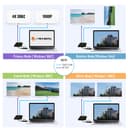
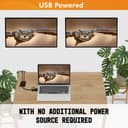
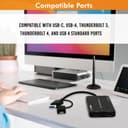
The J-Tech Digital USB C to HDMI Adapter is a versatile, USB-powered dual monitor solution supporting 4K@30Hz and 1080P@60Hz outputs. Compatible with USB-A and USB-C inputs, it enables seamless multi-display setups with mirror, extend, rotation, and clamshell modes. Ideal for professionals seeking flexible, plug-and-play connectivity without external power adapters, backed by a 1-year warranty and lifetime tech support.


| ASIN | B0CJ13GCRD |
| Best Sellers Rank | #486 in DVI-HDMI Adapters |
| Brand | J-Tech Digital |
| Cable Type | HDMI, USB |
| Color | Black |
| Compatible Devices | Desktop |
| Connector Type | USB 3.0 |
| Connector Type Used on Cable | USB 3.0 |
| Customer Reviews | 3.8 out of 5 stars 38 Reviews |
| Manufacturer | J-Tech Digital |
| Number of Ports | 2 |
| UPC | 810058921413 |
| Unit Count | 1.0 Count |
| Warranty Description | 1 year manufacturer |
S**.
Excellent. Extend to a Small & Large monitor, while laptop screen stays off.
Once the driver installed, worked flawlessly with a Dell Inspiron, Win11. Once configured in Display Settings, I was able to keep the laptop screen off, and Extend display/audio output to a small monitor and to a large tv (monitor 2). May need to go into Device Manager and 'Update Driver', or 'Search Automatically for Driver' for the device, titled "SMI USB Device".
J**N
So far so good
I had it for a month and it still works good, though i dont use my laptop daily
J**M
Super bright- and adjustability
I had before other adapter and had lower quality display with the same monitors. Hope this one last at least a couple of years.
G**E
USB-C 2x1: Great except missing one important Enterprise resolution: 1920x1200
This was my second attempt at a dual monitor USB connection for an old PC I use for a Backup server. The first was a StarTech unit which claimed 4K resolution, but had only one resolution and that wasn't the one my wide HP monitor uses. It came with USB-A, this J-Tech has both USB-A and USB-C. This unit seemed to fit the bill but has the opposite problem: while it sees the HP widescreen monitor at 3440x1440, it does NOT see my other monitors at 1920x1200. That resolution had been used since the advent of LCD monitors decades ago by HP, Dell, IBM/Lenovo, and every other Enterprise vendor, aka WUXGA. We have 5 of them in my family. Do a search on Amazon and you still find a ton of them, including tablets with that native resolution. The good news is that I'm operational with the two units, the StarTech supplying 1920x1200 and this J-Tech supplying 3440x1440. 20-20 hindsight I could have used two single port units, but that is an observation not a complaint. I wish the sellers website was more explicit in exactly what resolutions are supported. Even the little pamphlet that came with the unit didn't mention 3440x1440, but thankfully it works. Bottom line: if you are looking for this sort of unit to do TV style 1080P (only!), plus various 4K resolutions commonly found on TV monitors, and "monitors" based on the same panels, then this is an excellent choice.
A**X
Works great on windows pc but..
This adapter works flawlessly on my windows 11 pc but for some reason I can’t get it to work on my Mac. I have an older Mac running High Sierra (10.10.13) but it doesn’t extent at all and the main screen flickers. According to the manual this adapter is compatible with High Sierra using the driver from their website but no luck.
A**N
Solid build inspires confidence. Works perfectly when connected.
Early models of modern laptops sometimes are missing expected features due to the similarity of the ports. In my case the USB-C port on the laptop was data transfer only so would not allow for extending displays, although most devices have that capability. It did have a USB 3.0 port though, so I decided to give the J-Tech adapter a shot. The item arrived in a tidy package and was very easy to get plugged in and setup. I was very happy that no extra driver installation was required, it was truly Plug and play. The dongle comes with what I would like to call, a "sub-dongle" which would permit the adapter to be slotted in to a video capable USB-C interface. Hitting the Windows and P keys together allows the choice of display extension types and the Display Options console (accessed by right clicking the desktop and clicking Display Options) allows re-arranging and managing resolutions. I have not seen any flickering or monitor drop-outs in a full week of office use which is more than I can say for devices from the more popular manufacturers. The price is roughly the same as having 2 separate adapters which would tie up 2 ports AND would likely cause the flickering and drop-out issues I mentioned this one does not exhibit. So that is an added value. Also, the build quality and materials feel "premium" and give me hope the device will endure.
E**.
Works as expected
This works as expected on my MBP and desktop PC for adding two additional monitors. While the refresh rate isn't enough for good gaming, it's more than adequate for watching a movie or for general use. I appreciate that it comes with the adapter giving you the easy option of USB-C or a standard USB-A plug to a USB3 outlet. It comes with instructions but they're mostly just about setting up the multi-display options on your system. The device itself worked right out the box, was detected and worked without the need for any special software, system restarts, or the like. I've had devices like this in the past that were bulkier and only worked with a single display each (though you could use more than one by plugging two or more into ports). They also required drives that had to be routinely located and downloaded for my mac. This is nice and compact and really minimizes the clutter. You'll need to bring your own HDMI cables to the party for using this but other than that, it's ready to go on arrival, or at least it was, for me.
B**W
Works on Windows PC without driver download
I’ve been using USB to HDMI adaptors to set up my 3-monitor desktop display for a long time. The main monitor is via HDMI and the other two are via USB-A (version 3) to HDMI. The earlier one from WAVLINK most likely killed my laptop display with some corrupt driver update. I became extremely wary of these products when there’s a need to download any driver from them. They may work for a while but Microsoft has a habit of corrupting drivers during windows updates. I chose this unit because it didn’t need driver downloads or updates. It’s simply plug and play and I get my 3-monitor setup back instantly. Just to be sure, I rebooted, uninstall the SMI driver that came with the unit, and plugged it back in. The unit continues to work flawlessly. I use the extended mode and disabled the laptop display. If you have a similar setup you might consider this unit instead of one where you need to download a DisplayLink driver before plugging in the hardware. With technology interface nowadays the less complex the better.
ترست بايلوت
منذ يومين
منذ شهرين