We remain fully operational. Our teams are working around the clock to ensure your deliveries continue safely.

قم بتنزيل التطبيق


معلومات عنا
حقوق الطبع والنشر © 2024 Desertcart Holdings Limited
قم بتنزيل التطبيق
Buy anything from 5,000+ international stores. One checkout price. No surprise fees. Join 2M+ shoppers on Desertcart.
Desertcart purchases this item on your behalf and handles shipping, customs, and support to KUWAIT.
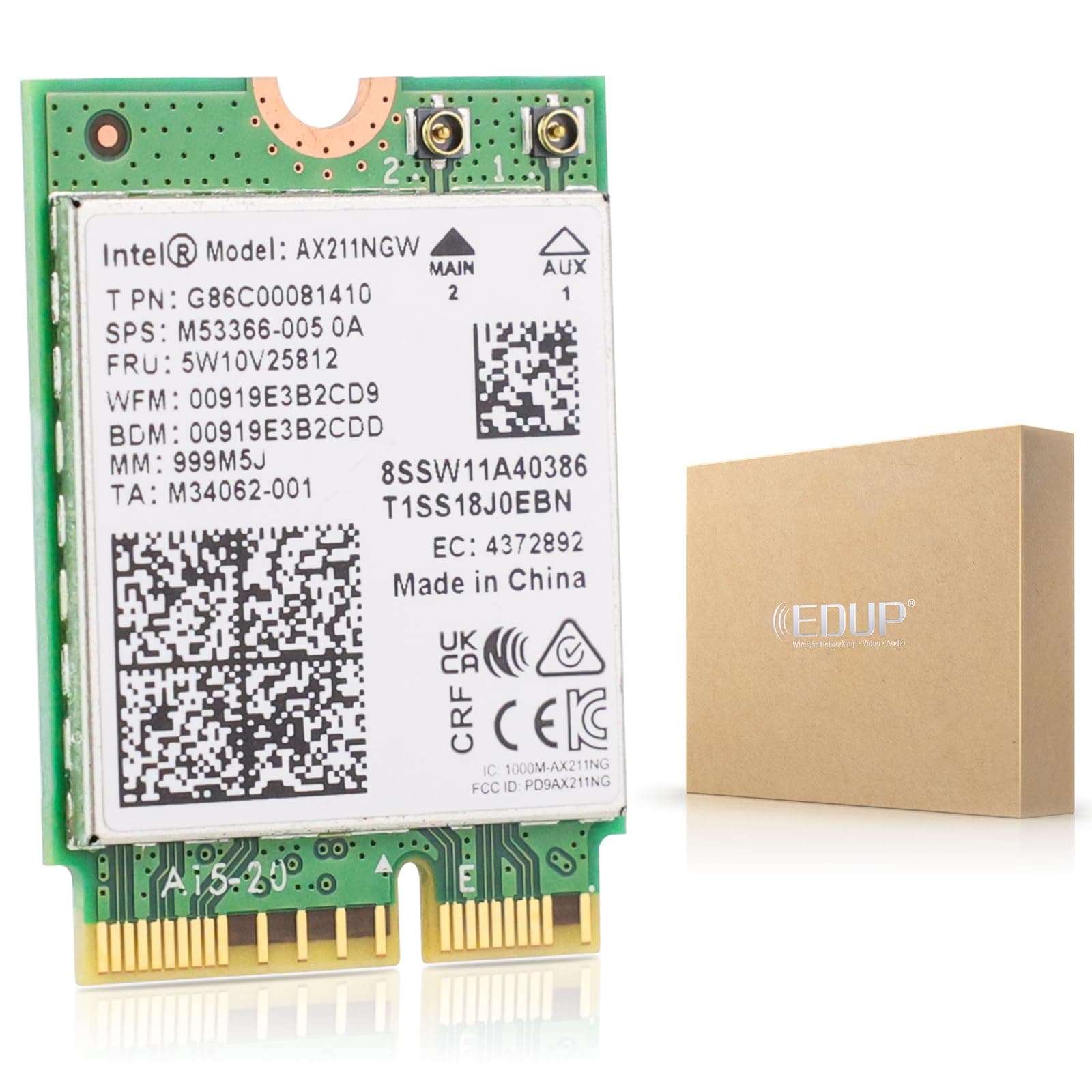
🚀 Upgrade Your Laptop’s Wireless Game to Wi-Fi 6E & Bluetooth 5.3 – Because Speed Waits for No One!
The Intel AX211NGW is a high-performance Wi-Fi 6E M.2 wireless card designed exclusively for laptops with 12th Gen or newer Intel CPUs. It delivers tri-band connectivity (2.4/5/6 GHz) with combined speeds up to 5400 Mbps and integrates Bluetooth 5.3 for superior wireless audio and device connections. Compatible with Windows 10/11 (64-bit), Linux (kernel 5.2+), and Chrome OS, this card offers a future-proof upgrade with official driver support and a one-year warranty.


| ASIN | B0C7ZPTZ1T |
| Best Sellers Rank | #38 in Internal Computer Networking Cards |
| Brand | EDUP |
| Built-In Media | AX211 |
| Compatible Devices | Desktop, Laptop |
| Customer Reviews | 4.5 4.5 out of 5 stars (735) |
| Data Link Protocol | 802.11 b/g, Bluetooth 4.0, 802.11 ac/b/g/n, Bluetooth 5, 802.11 b/g/n |
| Data Transfer Rate | 5400 Megabits Per Second |
| Hardware Interface | Bluetooth |
| Item Weight | 0.05 Kilograms |
| Manufacturer | EDUP |
| Minimum Required Operating System Version | Windows 10 |
| UPC | 793420187344 |
| Warranty Description | one year warranty |
A**R
Works great as an upgrade or replacement but do your homework.
If you are replacing a failed card with the identical model, you don't have to sweat it. This is a good quality part from Intel. If you're repairing and want to go for a little more performance then be careful. You've probably seen all the other reviews and internet forums warning about these being tied to 10th. Gen Intel procs and it's all true. I've attached the info from Intel that shows the range of adapters that you can swing if you have the right proc. I replaced a dodgy AC9461 having connectivity issues with the AX201 because I have a WiFi 6 network here and wanted to exploit it. When the 9461 started to flake out it would work at 40-80 Mbps speed tops and the laptop would sit at "Restarting" for a long time while trying to reboot and it sometimes required me to hit the power button. The AX201 speed tests above 400 Mbps speeds from the better part of my network and about 1/4th that from the worst. It's all signal strength dependent, of course. My internet tops out at 520 Mbps for wired ethernet connections out so I'm happy with the boost. The laptop here is the HP Pavilion 15T-300CS. It's not too hard taking apart if you have the right tools. I've pulled a few laptops, tablets and cell phones apart in my day so I have a lot of the tools required. EDUP supplies you with a small screwdriver and it fits the bill for the tiny screw that holds the card into the M2 slot. Note that it's a very small screwdriver and it may not be sufficient to get the OEM screw out. Why? Well, HP puts Loctite on the threads of a lot of their stuff so you may need help from a good pair of needle nose pliers to remove the screw to get the old card out. Otherwise, just watch a video showing you how to take your laptop apart. After the install I didn't have to do anything in the BIOS to make sure the card worked. It came up ok in Windows 11 and both the wifi and bluetooth showed up in the Device Manager. The card didn't want to connect to my wireless and Windows said it was not turned on. It wouldn't turn on from the network diag menu. I figured it might be a driver issue so I did the driver update from Device Manager and Windows said that the system had the latest driver. I opted to have Windows Update look for newer drivers and it found and installed them. They didn't work any better so I went to EDUP's website and downloaded the driver install packages. Once i got these installed the card worked great for both WiFi and bluetooth. Don't always trust Microsoft on drivers, the ones from EDUP were version 23.x and the ones from MS were version 22.x. I ran all the HP hardware diagnostics on the card and it passed with flying colors. The only other thing of note is that the AX201 has two antenna connections and my laptop had only one antenna. I connected it to the main connector #2 and wifi worked but later I noticed the bluetooth signal was very weak, mostly with headsets. I took the laptop apart a second time and moved it over to the AUX #1 connection and that fixed bluetooth issue without affecting the wifi signal....go figure.
P**N
Great upgrade
Worked great on a Lenovo Legion 5. Make sure to download the proper driver beforehand.
R**R
Fast and easy Wi-Fi 6 card
High quality, great design, thoughtfully priced. Fast speeds, plug and play, strong signal, drivers installed automatically. Would recommend in the future!
N**O
An easy way to add wifi/bluetooth to your system.
Installed this on my mining motherboard as I didn't want to have to drag an ethernet cable across my office. I did have to install the driver manually. It comes with a mini-CD with the drivers, but these days most of us don't have a CD tray (it did push me to buy an external DVD drive for the future since they're so cheap). I was able to download the generic Intel drivers for this chipset and it was immediately detected in Windows. It's working great so far. I did buy a pair of antennas to go with this, although the card will work fine without them if you're not too far from your AP/router. The antennas were a nightmare to clip on but that's with any of them, it's not specific to this product. Remember that this doesn't just fit in any m2 slot; if your motherboard has an M2 slot for you to install an SSD, this won't fit that. This fits into a certain type of M2; most motherboards that have three m2 slots will have the type this requires as the middle slot. An easy way to tell is to look at a "normal" m2 slot an SSD goes into, and see the side the little "tab" is on at the connector. The slot for this will have a "tab" at the opposite side. My point is, just make sure you have the right connector. The Asus Prime Z390-P has it, if you want to google it and see what it looks like. Anyways, yeah, it's been working great. I haven't exactly attempted to push maximum speed out of it as that's not what the machine it's installed in needs, but the quality of the connection is great, I'm connected to a 5Ghz variant and haven't had a disconnection or any lag even a single time.
R**E
Great WiFi card except the connector tabs
I've installed a half dozen of these into my Orange Pi 5 plus single board computers. They work great when installed. The problem is getting the tiny external antenna wires snapped onto the board's two connectors. I've wrecked a good 4 of these boards trying to attach external antenna connectors. The connectors on the board tend to deform much more prevalently than the connector on the antenna wires.
A**R
Works Perfectly!
Does exactly as expected. easy to install. works fine. My DELL G15 fixed!
E**K
Was very easy to install. On windows you need to install both drivers: wifi and Bluetooth and reboot. With Linux Fedora it works immediately.
R**N
La instalación fue fácil, la instalé en una laptop hp y la verdad creí que por alguna razón no sería compatible o algo así pero al instalarlo me lleve la sorpresa de que funcionaba y de verdad que funcionó bien, hice pruebas con el WiFi 6 y la velocidad de descarga y de subida así como el ping me daba casi lo mismo que si la tuviera conectada con Ethernet, es un excelente producto y a un excelente precio.
B**G
The Intel Wifi-Bluetooth card failed in my laptop just off warranty. This card was easy to install, the wifi driver in my computer worked as soon as I turned on the computer and I had to install the bluetooth driver from the EDUP website. For $35 my computer is running like new.
T**E
Nachdem das vorhandene Wlan/Bt Modul mehrere Male rumgezickt hat, habe ich nach einem Ersatz gesucht und hier gefunden. Bisher habe ich keine Beanstandungen.
I**O
Tengo un ASUS Vivobook Go 14/15, que viene con la porquería de tarjeta AW-XB552NF MediaTek MT7902, que no hay manera de hacerla funcionar en Linux. Así que compré esta. Ha sido instalarla (sencillísimo) y echar a andar. He probado tanto la Wifi como el bluetooth y van fenómenos.
ترست بايلوت
منذ 5 أيام
منذ يوم واحد