

Buy anything from 5,000+ international stores. One checkout price. No surprise fees. Join 2M+ shoppers on Desertcart.
Desertcart purchases this item on your behalf and handles shipping, customs, and support to KUWAIT.
🎮 Elevate your dual-screen game with crystal-clear 4K and immersive sound!
The CORSAHD 4K@60Hz HDMI Splitter 1x2 delivers ultra-high-definition 4K video at 60Hz with 4:4:4 color sampling and 18 Gbps bandwidth. It supports advanced audio formats including Dolby Atmos and 7.1 channel surround sound, while bypassing HDCP 2.2/2.3 for seamless content duplication. Designed for gamers and streamers, it offers EDID management, downscaling, and HDR/Dolby Vision compatibility, enabling simultaneous output to two displays with perfect sync and plug-and-play ease.
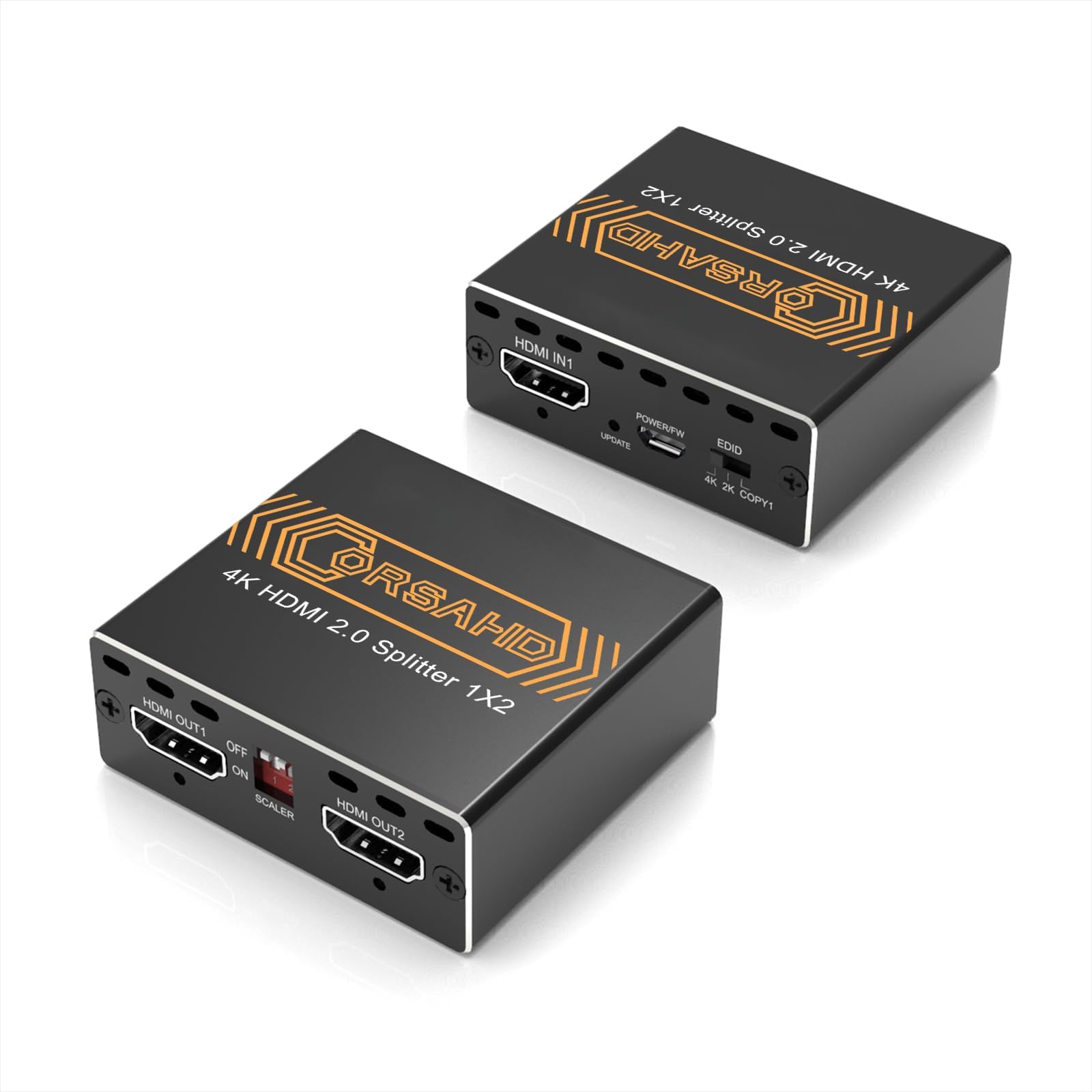


| ASIN | B0CLL5GQXT |
| Best Sellers Rank | #90 in Audio & Video Selector Boxes |
| Brand | CORSAHD |
| Built-In Media | HDMI 2.0 Splitter |
| Cable Type | HDMI |
| Color | Black |
| Compatible Devices | Gaming Console, Monitor, Television |
| Connector Type Used on Cable | HDMI |
| Customer Reviews | 4.2 4.2 out of 5 stars (160) |
| Manufacturer | CORSAHD |
| Number of Ports | 3 |
| UPC | 605129034600 |
C**L
Get this. You will not regret it.
I have been fighting for months trying to find a workaround for hdcp to help covert my grandparents VHS tapes to the modern digital age. Saw this was rated fairly high and gave it a shot. Boy was it worth the purchase. Immediately worked! Plugged in my HDMI VHS system into my elgato HD60 Pro capture card, and not a single hiccup occured! Worked right out of the box. Would recommend to anyone who is trying to do the same. Best purchase ever!
C**L
Perfect for PS3 recording.
Perfect, allowed me to capture my PS3 using a capture card and looks crystal clear with an optional no downscaling or upscaling mode for those who are like me and prefer native resolution, over a device that scales the image up.
K**Y
This product is great and great value for your money.
C**Y
DESTROYED MY TV
Worked fine for a while but not for 4k. I was moving things around and couldn't get it to work again. I unplugged it and plugged it back in. Sparks flew out of it and my TV shut off. This fried one of the TVs I had plugged into one of the outputs. I took it apart and this $30 piece of crap destroyed my $2000 TV. Don't waste your money on this!
E**K
GET THIS FOR PS3 TO BYPASS HDCP (Works as of February 2026)
This is exactly what I needed for PS3 content creation to bypass the HDCP. HDMI cable from PS3 goes to the splitter’s HDMI IN. A second HDMI cable goes to the HDMI Out2 of the splitter and goes to your TV/ Monitor. A third HDMI cable goes to the HDMI Out1 of the splitter and the other end goes to your capture device’s HDMI In. From there it should be captured and displayed on OBS or whatever capture software you use. Just make sure the splitter is powered on using the little USB cable, set the EDID on the splitter to COPY1, leave off the scaler and you’re good to go.
A**A
Use old 1080p av receiver with 4K source
I have a 4 in 1 out hdmi switch and use this device to connect a 4K Apple TV, a M1 Mac mini, a Firecube 2nd generation and an old blue ray player to a 4K Vizio TV and an old 5.1 Yamaha Av receiver which can only do 1080p. So far it works great using Edic pass through and downscaling on one of the HDMI outputs. There are very rare picture and sound dropouts but this could be caused by any of the components. I was using the remote learning function to integrate the av receiver with the fire cube and the Apple TV to make up for the lack of cec pass through.
J**E
This is it!
This is an awesome splitter! HDCP bypass, 7.1 Audio 4K 60fps! Finally!
L**N
This Is The HDCP Bypass For The PS3
If Yu Looking For A LEGIT HDCP Bypass. This Is The One To Buy. Easy To Use And Affordable (especially For My PS3 Gamers Trying To Hook It Up To The Stream) Just Make Sure Ya HDMI From The Game Console Is Plugged In The Out1., And Ya Capture Card HDMI Is Plugged Into The HDMI-In (1 Or 2) *The PS3 Audio Will Make A Crazy STATIC Noise When Yu Try And Run Any Game. TO FIX DO THIS: Go To The Sound Settings. 1. TURN OFF The Audio Multi-Output. 2. Go To Audio Output Settings: choose HDMI: Select MANUAL : TURN OFF The First Box (Dolby Digital 5.1 Ch): THEN SELECT Linear PCM 2 Ch. 96 KHz: A Warning Will Come Up About Damaged Speakers. Just Select OK. Then Select Enter Again. And Yu Are Good From There. Read The Instruction Manual For What Type Of Video Output Yu Want As Far As 1080p., 4K Etc. Picture Quality Does What It Needs To Do. Hope This Helps Anybody.!
S**O
Worked instantly with my PS3 to bypass the HDCP Lockout prior to connecting it upto my scalar.
Trustpilot
1 month ago
3 days ago