We remain fully operational. Our teams are working around the clock to ensure your deliveries continue safely.

قم بتنزيل التطبيق


معلومات عنا
حقوق الطبع والنشر © 2024 Desertcart Holdings Limited
قم بتنزيل التطبيق



Buy anything from 5,000+ international stores. One checkout price. No surprise fees. Join 2M+ shoppers on Desertcart.
Desertcart purchases this item on your behalf and handles shipping, customs, and support to KUWAIT.
⚡ Power your productivity with precision and reliability!
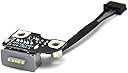
The Padarsey Replacement DC-in Power MagSafe Board (820-2565-A) is a high-quality, tested replacement part designed specifically for MacBook Pro Unibody models A1278, A1286, and A1297 (2009-2012). Delivering 60 watts of power with a proprietary barrel jack connector, it restores your laptop’s charging capability with a robust MagSafe connection, ensuring your device runs smoothly and efficiently.
| ASIN | B07339SVVP |
| Best Sellers Rank | #136 in Laptop Computer Replacement Parts |
| Brand | Padarsey |
| Compatible Devices | MacBook Pro 13" Unibody A1278, 15" A1286 |
| Connector Quantity | 1 |
| Connector Type Used on Cable | Barrel Jack |
| Cooling Method | Air |
| Current Rating | 60 Amps |
| Customer Reviews | 4.4 4.4 out of 5 stars (444) |
| Form Factor | Laptop |
| Item Weight | 0.02 Kilograms |
| Manufacturer | Padarsey |
| Maximum Input Voltage | 16.5 Volts (DC) |
| Mfr Part Number | SF052-02 |
| Minimum Input Voltage | 16.5 Volts (DC) |
| Model Name | MacBook Pro |
| Model Number | 8541584702 |
| System Bus Connector Type | Proprietary MacBook Pro DC Connector |
| Wattage | 60 watts |
K**L
Seems to be working just fine! Very Happy to have my laptop back up and running!
Was what I was looking for, what I ordered and what I got (quickly). There was a bit of what looked like corrosion on the solder side of the board but, because I took the time to read LOTS of reviews, I was already expecting this possibility. Was aware that it was most likely just some flux left over from the soldering and nothing to worry about. Pre-read the installation instructions available on iFixit and had another Mac next to me and was able to follow the instructions step-by-step as I did the actual instillation. It is a bit tricky but, again, having done a LOT of investigating before I even bought this unit, I was prepared for the level of difficulty and knew of the tools I would need to do the job. I chose this particular item based on it's reviews and because it was about in the middle of the price range and I was not sure I could resurrect the laptop anyway. (It had been sitting dead for over 1- 1/2 years!) Between this and the Little Big charger I purchased, the MagSafe connection is now VERY strong! (Better than factory?) Gave it 5 stars "overall rating" and "value" but only 3 on the "Easy to install" category as it is not. But that was to be expected. You best be prepared and have a clear work place and a predetermined idea of how you are going to keep track of all the screws you will need to take out and put back. - (I just pre-wrote the locations on some blue painter's tape, stuck the screws to the tape and then stuck THAT to the inside of the bottom case you have to remove to start with. Keeping note that even some of the screws from the SAME component are different sizes as clearly noted on the instructions from iFixit. So far so good!
A**R
Fits perfect!
The power supply on my MacBook took a crap! So I decided to see if I can fix it! Bought the power pulley and for the value for the money it works perfect! Computer charges and just works perfect! Can’t beat the price!
J**N
Great Product.
-Easy to Install -Works Perfectly -Have had for 2 years and it hasn't broken. Overall i very much recommend this product.
N**O
Great replacement part. Worked as expected
The DC power-in magsafe board worked as expected. The laptop has been in daily use for over two weeks with no issues. The magnetic connector remains secure, and the connector seated properly on the logic board during installation.
M**E
Great value for any old Macbook
If you have any question about how well your old macbook is charging, this should be your very first purchase. I have owned my macbook pro since 2011, and it hasn't failed me ever. I've been through 2 aftermarket batteries, a few charging cables, and now the DC in board. When I took the old board out, the conformal coating on the chipset and the phenolic spacer on the magsafe cable male connector on the board just crackled and turned to dust. I think this board is particularly prone to overheat damage from the charging process. For a $10 fix on an 11 year old laptop, I can't be more impressed. Install is a bit of a pain. Make sure you have a #1 philips and a T6 torx driver, and do yourself a favor and just loosen all the torx screws holding the motherboard to the chassis up front. You have to do it. However, you DO NOT have to remove the motherboard all the way. If you gently pry up on the corner closest to the DC in board, you can see the connector plug on the top side of the motherboard. Gently pry the plug out with your T6 torx, and slide the new connector in its place. The exposed leads on the new plug should be closest to the motherboard. Be very careful not to bend or crack the motherboard when doing this. I found it easiest to simply do this vs actually removing the whole board. I was also able to do this entire swap while my machine was still running. I don't recommend you do that unless you have a lot of experience with small part assembly. All in all, this is an incredible value, honestly. I gave the install 3 stars, because it isn't really all that simple, but any do-it-yourselfer with half a brain should be able to get this done in about 15 minutes.
E**H
Worked like a charm.
Such a simple fix. Can’t believe I suffered for years and all I needed to do was swap this out lol
S**M
CHECK THE NUMBERS ON YOUR OLD ONE FIRST!
I have a late 2011 A1297 MacBook Pro (17" late 2011). But this part did not fit. It was slightly the wrong shape and the holes were off by a couple of mm. Yet I have seen the same part work in some MacBook pros... for example -- I have another 2011 A1297 (again 17" late 2011) and it appears the part might work in that enclosure. So be sure to take your old one out first, read the numbers, and check to see if they match this one. It seems that Apple used some 2009/2010 cases and sold them as 2011 cases. And it seems the power jack is based on the case, not the the model. So it might not be the fault of this vendor, but I put a note here to catch your attention to make sure you take out the old jack first and compare the numbers on the PCB to the one in the pictures.
M**L
LAPTOP WAS NOT CHARGING
Before ordering this part, i was having issues with my laptop not charging. After determining the charger was the problem, I bought a new charger and connected the end that goes to my laptop magsafe port first (not a smart move). Then, i connected the other end to the wall and noticed there was a spark in the outlet. Unfortuneatley I shorted my laptop that way. I decided to order a replacement magsafe port after reading about the role the magsafe port plays on preventing other internal parts from shorting. I suspected that replacing this part would fix my issues and it did! My laptop charges again. I'm glad this part is exactly as described and excellent quality. The installation process was a bit tedious, but if you have time and patience, i recommend you do so as well as you will save money from diagnosing the problem with any computer repair place. Ps. When doing any internal repair on your laptop be sure to always disconnect the battery before doing anything else and refrain from using metal tools, plastic is much safer!
M**T
Very easy to install. Soldering was good quality, fit perfectly and works great so far. I’ve been using it for a month now with no problems.
G**I
YouTube video will show you how to install. Works as new.
N**S
Works perfectly a hundred percent.
A**A
I had some doubts about the aftermarket part but still ordered it as I had no other option. really nice quality module it fitted like a glove and have been working nicely for weeks now.
A**R
Solved the charging problem
ترست بايلوت
منذ أسبوعين
منذ أسبوعين