


Buy anything from 5,000+ international stores. One checkout price. No surprise fees. Join 2M+ shoppers on Desertcart.
Desertcart purchases this item on your behalf and handles shipping, customs, and support to KUWAIT.
🌍 Stay connected everywhere, empower your digital tribe!
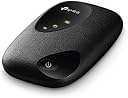
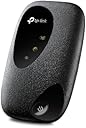
The TP-Link M7010 is a compact, portable 4G LTE hotspot router that delivers up to 150 Mbps download speeds and supports up to 10 devices simultaneously. Featuring a long-lasting 2000 mAh battery for up to 8 hours of use and app-based management, it’s an ideal travel companion for professionals and digital nomads seeking reliable, high-speed internet on the move.






| ASIN | B0CP8C35NC |
| Antenna Location | Travel |
| Antenna Type | Internal |
| Best Sellers Rank | 475 in Computers & Accessories ( See Top 100 in Computers & Accessories ) 2 in Mobile Broadband Devices |
| Box Contents | Mobile Wi-Fi M7010|0. |
| Brand Name | TP-Link |
| Colour | black |
| Compatible Devices | Laptop |
| Connectivity Protocol | Wi-Fi |
| Connectivity Technology | USB |
| Control Method | App |
| Controller Type | Ios |
| Country of Origin | China |
| Coverage | worldwide |
| Customer Reviews | 4.0 4.0 out of 5 stars (223) |
| Data Transfer Rate | 150 Megabits Per Second |
| Frequency | 2.4 GHz |
| Frequency Band Class | Single-Band |
| Has Internet Connectivity | Yes |
| Is Modem Compatible | Yes |
| Item Weight | 1.2 Grams |
| LAN Port Bandwidth | 150 megabits_per_second |
| Manufacturer | TP-Link |
| Manufacturer Part Number | M7010 |
| Maximum Upstream Data Transfer Rate | 50 Megabits Per Second |
| Model Name | M7010 |
| Model Number | M7010 |
| Number of Antennas | 1 |
| Number of Ports | 8 |
| Operating System | RouterOS |
| Other Special Features of the Product | Remote Access, International Roaming |
| Product Warranty | 3 Years Manufacturer |
| Router Network Type | wireless |
| Security Protocol | WPA2, WPA3 |
| Smart Home Compatibility | Not Smart Home Compatible |
| Unit Count | 1.0 count |
| Voltage | 240 Volts (AC) |
| Wi-Fi Generation | Wi-Fi 4 |
| Wireless Compability | 802.11n |
M**E
Wi-fi connection for on the go (or where there's no broadband but you can get a mobile signal)
This gizmo gives you a wi-fi network connection running off a 4G mobile signal that you can then connect your devices (phone, tablet, laptop...) to. If you've ever put your phone into hotspot mode to share it's internet connection with other devices, this is doing exactly that. I've used this as an on-the-go hotspot for wi-fi connections with multiple devices when travelling. Pop in a cheap SIM with plenty of data on it (Lebara works a treat). Plonk it on the dashboard of your car (hook it to a car USB port if you can to keep it charged - I find the battery life is fine, but I like to keep it continually juiced). Kids all entertained in the back on various tablets doing their thing whilst we travel. Great stuff. I've also used it to power a Blink CCTV system at a property where there was no internet connection (but 4G signal was available). Had no issues - able to hop onto the Blink app and monitor the cameras without a problem. If you get a good mobile signal, you'd be hard pushed to find any fault with this and it could easily be a cost effective replacement for a more expensive 'net connection solution. If I had to pick a fault with it, it's a bit fiddly to get the SIM seated (if you've got fat fingers like me), and it's hard to tell from the three green LEDs on it that represent battery, 4G signal and resulting wi-fi availability just what's going on if you ever power it off/reset it ("Oh, they're all on. Oh wait, they've gone off. Now that one's on. It's off. All on? OK. Try now?") - but that's just me being impatient. After powering on, give it a moment to get it's bearings! Recommended.
S**7
Love this mifi unit.
This is a brilliant unit,works as it should,can also download the app to see all functions,i use it with EE data sim,which i find has the best coverage.
S**.
Good once you get it set up.
Needed help setting it up and took a little while to get the hang of it but it works well and I'm happy with it.
S**T
False listing
Says 300mps on the ad but box and literature states 150mps max , poor show tp link , a well know brand too
C**S
Disappointing performance.
Bought as a replacement for a Huawei product which was no longer available. This uses the largest size sim card which meant having to use a fiddly adapter supplied with it to fit the small sim which I was using in the Huawei. Once set up the performance was very poor in comparison to the Huawei providing a very poor connection.
S**N
Useful TP Mifi app is great for battery and data management
Great unit just a matter of choosing the right data sim for your requirements, for me Lovemobile fitted the bill with use in Turkey , UK, AND Spain. Great sim backup from Ali and Zac, essential advice to set up correctly.
V**J
Great Mi-Fi but may need to update your profile to work with your SIM
Took me a while to get this Mi-Fi working as I was going to use an existing SIM from one of my mobiles. I had to call TP Link support who were excellent. To save you hassle and if you cannot see the internet symbol lit up then the following may help you esp. if you have a Sky Mobile SIM. 1. Connect your mobile to the TP Link Wifi created by the M7010 Mi-Fi. (SSD and password on label once you remove battery cover.) 2. in a web browser go to tplinkmifi.net (you will need to set a password) 3. once in you will see a dashboard. at bottom select Dial-up 4. next to Profile List ... click on CREATE and enter the details for the APN. mobile.sky or mms.mobile.sky (all other setting leave as is) Mine worked with mobile.sky 5. click Done and this should save that profile. 6. Check your Mi-Fi and you should see the internet symbol light up. (you should now see battery, internet and wi-fi symbols all lit up) 7. Test by connecting another device to the Mi-Fi. Note: I renamed the SSD and changed the password at the same time. Download the tpMiFi App. this has some useful features as well. Roaming. I believe if you go outside UK you will need to enable ROAMING. Hope this helps. Would I recommend: YES - support was fantastic and a quick google and I was able to find my SIM providers APN record. Some providers may work immediately. Tested with a few devices and I have to admit I was very impressed. By the way I work in IT and for me this was not an issue BUT I think some customers may face similar issues hence why I have provided what I learnt. We are a family of 4 and this Mi-Fi is going to be put to test during our forthcoming trip to Europe. one SIM providing internet access for everyone. Plan is to pop it into the rucksack and forget about it. Will post how we got on after out trip.
A**R
Great wifi provider
Bought to use in campervan, did the job. Easy to set up no issues
T**R
La limitation principale est la vitesse en 4g et le manque de fonctionnalité (reboot automatique à heures fixes, par exemple) mais en dehors de cela, marche très bien. Fonctionne en modem usb aussi !
S**.
Der Mobile Router kam pünktlich an. Es ist schön klein und passt sogar in die Hosentasche. Simkarte rein und schon konnte es losgehen. Ich habe alle Geräte mit dem Router verbunden und es läuft alles flüssig und ich hatte bis jetzt keinen Verbindungsabbruch. Ich kann nur sagen dass der kleine Router echt günstig ist und super arbeitet. Ich bin Mega zufrieden
A**Z
Das Produkt ist gut kann ich weiter empfehlen
O**N
Pratique pas encombrant pour les déplacements
G**N
Bon produit mai malheureusement deux appareils télé et téléphone ☎️ il y a des moments où sa bogue
Trustpilot
3 weeks ago
1 week ago