Desertcart purchases this item on your behalf and handles shipping, customs, and support to KUWAIT.
🚀 Cut the cord on rental fees and turbocharge your home network!
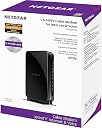
The NETGEAR CM500V cable modem is a Comcast-certified device designed for Xfinity Internet and Voice services. It supports cable plans up to 300 Mbps with 16x4 DOCSIS 3.0 channel bonding, includes 2 phone lines with enhanced voice features, and features a gigabit Ethernet port compatible with any WiFi router. This modem helps users save up to $168 per year by eliminating rental fees, making it a smart, cost-effective upgrade for professional millennial households.


| ASIN | B075XGZ6GL |
| Best Sellers Rank | #29,511 in Computers & Accessories ( See Top 100 in Computers & Accessories ) #109 in Computer Networking Modems |
| Brand | NETGEAR |
| Built-In Media | High Speed Voice Cable Modem—DOCSIS 3.0 (CM500V)^One (1) Ethernet cable^One (1) telephone cable^Quick install guide^Power adapter |
| Color | Black |
| Compatible Devices | Compatible devices: Microsoft® Windows® 7, 8, 10, Vista®, XP®, 2000, Mac OS®, or other operating systems running a TCP/IP network Compatible browsers Microsoft® Internet Explorer® 5.0, Firefox® 2.0, Safari® 1.4, or Google Chrome 11.0 browsers or higher Compatible Devices Compatible devices: Microsoft® Windows® 7, 8, 10, Vista®, XP®, 2000, Mac OS®, or other operating systems running a TCP/IP network Compatible browsers Microsoft® Internet Explorer® 5.0, Firefox® 2.0, Safari® 1.4, or Google Chrome 11.0 browsers or higher See more |
| Connectivity Technology | Ethernet |
| Customer Reviews | 4.2 out of 5 stars 1,284 Reviews |
| Data Transfer Rate | 200 megabits_per_second |
| Global Trade Identification Number | 00606449129748 |
| Internet Service Provider | cox, optimum, spectrum, xfinity |
| Internet service provider | cox, optimum, spectrum, xfinity |
| Item Dimensions L x W x H | 12.81"L x 11.54"W x 16.67"H |
| Item Type Name | Netgear CM500V Cable Modem for Internet & Voice – DOCSIS 3.0 (CM500V-100NAS) |
| Item Weight | 1.9 pounds |
| Manufacturer | Netgear |
| Maximum Downstream Data Transfer Rate | 680 megabits_per_second |
| Maximum Upstream Data Transfer Rate | 64 megabits_per_second |
| Mfr Part Number | CM500V-100NAS |
| Model Number | CM500V-100NAS |
| Modem Type | DSL |
| Number of Ethernet Ports | 1 |
| Number of Items | 1 |
| Number of Ports | 1 |
| Product Dimensions | 12.81"L x 11.54"W x 16.67"H |
| UPC | 606449129748 |
| Unit Count | 1 Count |
| Warranty Description | Limited (1) Year Warranty |
G**R
solid emta modem for the price
I bought this modem to replace the tm822g from comcast. My setup had the tm822g and an asus rt-ac66u, however, due to an issue with comcast I wont go into, I was being charged a rental fee for a modem that I had purchased. All of the other modems that were compatible with comcast did not offer the emta for voice so I was faced with either buying a modem and paying for a triple play that had voice i couldn't utilize. or pay 250 dollars for an arris that had emta but was based off the highly controversial intel puma6 chipset which has been documented as having flaws and being unstable. On top of that, all the devices that had emta were all in one gateway devices that provided routing and wireless which I did not want. I wanted a lean modem that literally only did modem and voice things. After some arguing with comcast they told me the cm500v was coming out in approximately 1 week and it would be what I am looking for. The CM500V has 16 downstream channels compared to the 8 channels on the tm822g. I do not notice any difference in top speed with this new modem as the bursts seem to cap at around 240mbps. It does seem though that when the modem is under load it seems to handle it better having more downstream channels to spread the bandwidth over. This modem does future proof a little as it would be adequate if comcast decides to up the speed to 686mbps at some point. Although, if that were to happen I would need to replace the AC66U because the CTF hardware acceleration on packet switching from the wan tops out around 300mbps. That all aside, I had no problem installing the modem. I plugged it in and it booted up and I was directed to the comcast walled garden. I put in my account information and it rebooted and was working within minutes. I did not have to call comcast. Once the modem was working I plugged it into my router and then I lost wan connectivity. Once I rebooted the router and the modem everything was up and running again. Since I was plugged directly into the modem from my laptop when it first booted up it got an IP address based on the MAC address of my laptop. That was why i lost connectivity when i plugged it into the router. Once I rebooted them both the modem pulled a new ip address and everything was good. The modem has been rock solid since with no issues on the phone or voice side. If you want a modem that is literally only an internet and voice modem that doesn't do any routing (because you have your own routing hardware) and doesn't have wifi (again because you have a router or an AP for that) than this modem is adequate and fits into a nice price point. It also is based off a broadcom chipset and is not susceptible to the issues people are reporting on devices that have been based off the faulty intel puma 6 chipset like the arris 6190. There has supposedly been promised a firmware update to fix the 6190 but it has yet to be seen. The arris 6183 is not affected by this issue in fact, the 6183 uses the same broadcom chipset the cm500v does. The key difference is that the cm500v has voice and the 6183 does not. The 6183 is one of the most popular retail modems and this devices is every bit its equal despite its slightly higher pricepoint, which as you may note, is because of the emta functionality the 6183 lacks. So if you need a reasonably priced 16x4 channel modem that doesn't have all the bells and whistles of the gateways the ISPs try to rent you and you dont have voice service from comcast, you can get an arris 6183 and save a few bucks. If you however have a triple play with voice, this modem is basically a 6183 with voice. If you check the datasheets its the exact same broadcom chipset. If you feel the need to check the webUI of this modem you will find its very simple and there isn't a lot you can do from there other than check the status and reboot the modem. The webUI is very lean on functionality. But honestly, I dont consider that an issue because as subscribers to an ISP we dont really handle any of the configuration anyway. The modem downloads the docsis config form the ISP when its provisioned so really that point is moot.
T**C
Modem is excellent, but was a task to set up
I had a heck of a time getting this set up. First, I downloaded the user manual before doing anything. (Netgear doesn't include it in the box, but that's okay with me.) There is also a Quick Start guide. I chose to follow the more extensive user manual, which was a mistake. The user manual instructs you to log on to your ISP's website (they include a table with all major ISPs) to activate the modem once you've hooked everything up. Everything worked well (internet and telephone) once I hooked everything up, and I was able to log onto Comcast Xfinity's activation website. It seemed to work, but I was never prompted to provide the modem's model number and MAC addresses. This worried me, per some reviews here, that my internet and phone would go down soon if I didn't contact Comcast. The Quick Start guide didn't give any website addresses, but only said call Comcast to activate it. So, I called, and the automated system asked if I wanted to activate a device. I said "yes," and the system sent a reset to my modem. Nothing worked after that. Then I called the dreaded customer support. After almost 90 minutes, the CS rep got my internet back up, but the not the telephone. The rep finally told me he was escalating the issue to "Level 3," and that I'd hear back from them within 24 hours. What, go without my phone for 24 hours, and no guarantee that they'd get it working? Nope, no way. I told the rep to deactivate the CM500V, and I hooked back up my Comcast/Xfinity modem/telephone tower (the thing is really big) to make sure things were back to normal, but decided to try one more time. The second time I followed the instructions in the Quick Start guide rather than the user manual. I first reset the modem to factory settings just in case something had been modified that I wasn't aware of. Next, I started everything up from scratch, got the internet and phone service working, but did not log onto Comcast's activation website. Instead, per the instructions, I called Comcast to activate it. The tech rep told me that it was already set up. I asked him if he had the hardware's MAC addresses and model number, and he said yes. I asked him how they got it, and he said the system picked them up automatically. It has been working like a charm. I hooked it up to a new router with no problems. Now that I'm up and running, I get much higher speeds that I was getting with the Comcast equipment, and I suspect that some of intermittent problems I've had with my internet are resolved now (such as being inexplicably disconnected form some web sites, sudden slowdowns, etc.). I have better control over my technology now and am saving $11 a month on top of that. It appears (and I use that word with caution) that Comcast has actually streamlined the setup of this modem, and possibly others, by automatically picking up the hardware info. In the end, I'm very happy, and love my new Netgear modem.
B**E
Honestly, it's quite possible this modem performs well above the specifications it showcases.
We use this in an art studio that designs branded material for clients, and that being said, all of those designs are privileged. One thing that's absolutely unacceptable about many of the modem offerings is that Wi-Fi is embedded as a feature, and since xFinity ( a.k.a. "Comcast" ) can reset the modem and blast whatever security settings "were" in place for those particular offerings, having a modem like the NetGear CM500V is absolutely necessary for those that require protection of their data and relevant systems. While we were initially disheartened that the NetGear CM500V seemed to have a limit of 680 M/b p/s at the point of service, and in specification is DOCSIS v3.0 and not DOCSIS v3.1 , any wary feelings have since dissipated. The operating speed has been tested to have achieved almost 1 G/b p/s at the point of service while the embedded interface of the modem itself is so simplistic, even the xFinity ( a.k.a. "Comcast" ) service administrators have been unable to cause any trouble. In fact, the only thing we've had to do since we've had it is to periodically verify that the password we use for it is consistently in place during our regular security audits. If that's the worst we have to deal with being stuck with xFinity ( a.k.a. "Comcast" ) as our sole option for that particular office, as stark as this sounds, it's honestly quite refreshing. Additionally, the embedded administration Graphical User Interface for the NetGear CM500V logs every single thing in such a level of specific detail, it is much to the delight of those that perform security audits of ISP related equipment. Perhaps one of the NetGear CM500V's nicest features is also one of its simplest; that of course being its small footprint. While it is kept in a locked network closet, it was by no means a struggle to put in place, and the best part is that the modem doesn't get very warm either, so we're very confident the NetGear CM500V's going to last quite while. Perhaps the NetGear CM500V will even last long enough for the USDOJ to deal with AT&T's subsidiary of Comcast in such a manner to force other great service providers like RCN and FiOS to be able to continue unfinished infrastructure projects of their own that hold significant promise of improving internet access and internet service provider competition that will result in lower prices compared to the presently monopolistic pricing practices of AT&T and its ISP subsidiaries for all. All in all, that may be quite a while because as we all know, the USDOJ is fighting the recent acquisition of Time Warner by xFinity ( a.k.a. "Comcast" that is a subsidiary of AT&T ) , but like anything worth doing, it'll be a hard wait, but it'll happen when everyone least expects it. When all is said and done, our NetGear CM500V will in all likelihood, still be sitting pretty processing data reliably, we'll just have to double check the password setting again of course. ;)
H**G
Works! Not hard to setup but plan ahead to avoid some hassles & bumps in the road
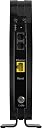
Nice unit, which let me get rid of Comcast's rental modem fees. Setup was fairly ez but not as painless as some folks reported up here. I had to call Comcast to get both my internet and phone service activated with this unit (as it says in the QuickStart guide - although some folks up here said they were able to do that just using their browser, I could not connect to anything). The activation process took about 45 minutes speaking with Comcast on my cellphone (which is "pay as you go" btw). Part of the problem/delay there was due to the tech on the other end mistakenly disconnecting my call when he went to transfer over to the group who does the phone line activation. This caused further hassle in dealing with Comcast's call-in robotic voice system all over again to try to get to the right place, since my activation was then all futzed up being in the middle of the process and even more of a hassle to get to talk to a person to get that sorted. Works great in the end though. I did have to use my IT expertise in getting my PCs.router working the way I want with this (long story) so I would recommend you do some homework/reading first if you are not familiar with some of the wrinkles of configuring routers/PC/etc if you have any kind of special type setup. I am deducting a star for Netgear for not including a full user manual (you get only a quick start install guide), and not telling you in the install guide that this device is preset with a standard admin ID/password that you should change, nor mentioning any of the finer points of this modem like what the lights are/what the colors mean/what functions you can control/get info on by logging into it. Everyone should take the time to go to the Netgear link mentioned in the Quick Start guide and download/read a copy of the full manual. Something else to mention is that although the page up here says this unit has 2 phone ports, they are for DIFFERENT phone #s/lines. I have two needed phone line connections in this room (one for a nearby phone and the other for the phone jack about 50 feet away to get all my other phones working in the house). With Comcast's modem although it had only 1 phone connection jack, I could easily plug in a 2 port RJ-11 male to female cord adapter then have both cords plugged into that, however with this unit the "Tel1" phone jack is right beneath the power connector and that phone cord adapter would not fit into the port because the plug blocked it (it is bigger than a simple phone connector). It was simple to get around that by using a small patch cord to plug into this, then a female/female mating adapter plugged into that then putting the 2 port male to female adapter into that for use with my phone lines, except that I didn't have a F/F adapter on hand! It pays to be prepared, so plan ahead if this might bite you as well, pick up some RJ-11 adapter pieces (there are multiple solutions to this). Hope that makes sense & helps anybody else.
J**E
So easy to set up.. then a complete disappointment.
I was so excited to finally be free of the toxic wifi signals bombarding my family. Modem was super easy to set up, basically plug and play. Just gave Xfinity the new Mac number and I was set. Needed to be rebooted a couple times to get all the Ethernet connections going, normal. However I've had it five days and I've reset it at least 30 times. The internet dropped out of the blue, the phone will not work most of the time even when the internet is connected. Clearly this 'renewed' modem is crap that already got returned once and then sent to me. It does not work for more then a few minutes. The onephone call I was able to receive disconnected within minutes. Anytime we have tried to stream its dropping signal within an hour. I'm returning it and attempting to purchase from another retailer in hopes I can actually get one that works.
G**D
There's good news and bad news here - mostly good
The second modem I received from Amazon has been installed and is working very well. Three years ago, I decided to stop paying Comcast's rental fees and purchased my own modem: an Arris tg862g. That one was also purchased from Amazon and did a nice job for three years (though it appears to be end-of-life now). I decided to purchase a new, faster modem to update my system and came across this one. I didn't want a router because I plan to install a Google Wifi mesh system to help eliminate internet slow spots in my house. I decided to go ahead and get a telephony modem even though I don't use the phone part of Triple Play because I didn't want issues with Comcast. The good news: The installation of the Netgear took about 2 hours. I followed the "Quick Start" guide which came with the second modem, and probably didn't wait long enough for the modem to totally start up before I plugged my computer into the modem. When I tried to call the two phone numbers provided, I didn't get a prompt that allowed me to talk to someone about activating the modem - the phone system would not take "activate modem" as an option. Comcast's own website says that after plugging in the computer, I should have been automatically sent to an activation page. That didn't happen, and putting "xfinitiy.com/activate" into the browser didn't work to get me to an activation page either. So I reinstalled my old modem and started a chat with Xfinity. The guy asked for all of the information that's noted on the Quick Start Guide (make and model number, serial number, MAC address), and then went away, telling me to stay on the connection while he activated my modem in their system. After 20 minutes of waiting I asked if he was still there a few times - no response. So I stopped the chat, installed the new modem, and plugged my computer in, and got to the activation page immediately. A code was texted to my phone and it seemed to be up and running but sadly only for 10 minutes. Then dead again. This time when I called the Xfinity phone number, one of the options was "connectivity issues", which I picked. The computer re-booted the new modem. and all seems to be well. It seems that people have had luck using the "plug and play" method, but my modem required a bit more intervention. Comcast's phone system is still a hurdle but don't despair, it just requires persistence. I had several hiccups when I set the Arris up three years ago, too. So what's the bad part? The modem I installed was the second one I got from Amazon. Here's the story of the first one. When I opened the brown shipping container from Amazon, I knew there was a problem. (1) The Netgear's box was unsealed, and (2) the flap to open the box was torn. (3) the modem was scuffed and dirty, and (4) the power cord was partially wrapped around the power "block" and the rest was stuffed in haphazardly. I didn't realize until I got the second one that a couple of other items were missing from the first one: (5) there was no Quick Start documentation in the box, and (6) the phone cord was missing. I decided that I had gotten a used item that had been installed and could have been defective, which is why it got returned. I really didn't want to try to install a potentially defective modem - installing a perfectly good one is a lot of work and aggravation and the chance that the first one was bad was too much of a risk for me. I don't have any problem ordering a returned/certified item but this one clearly hadn't been looked at to make sure it was in working order. I returned the first one as "damaged" and requested a replacement. The second one came quickly and was sealed and brand new. My review of the first modem was rejected by Amazon (not within their guidelines) but I thought I'd put the particulars here in case Amazon tries to charge me a restocking fee because there are items missing in the box I returned. And also in case this happens to someone else too.
C**4
Bam! Saved $11/month in 2 days and 5 minutes! (UPDATED 4/5)
Five minutes after arriving on our doorstep, the new cable modem is up and running. Bracing myself for difficulty with Comcast, I was pleased at how easy setup was without ever having to speak to Comcast's clueless CS. Using a laptop with an Ethernet jack, here's how easy it was: 1) Wrote down my Comcast account number (This is the MOST important step!!!) 2) Connected modem to cable, power, and phone line 3) Connected Ethernet cable to modem and computer 4) Waited three minutes for the first three lights to blink steady (they'll blink and flash while the modem is syncing. You could wait up to 10 minutes for sync). 5) Turned off WiFi 6) Opened web browser, and Firefox had a nice little 'show login page' button appeared (if this doesn't show, you can go to xfinity.com/activate) 7) Entered my account number and street address 8) The modem reset itself. I plugged that into my Luma and we were off to the races! Ironically, Comcast sent a new tower modem a week ago. I don't know if it's me, but this seems faster than that did - speed about the same but ping time is now 9ms instead of 14 and pages that seemed to load slowly before pop in immediately. Biggest bonus is that we're saving $11/month going forward. UPDATE: 4/5/18 - Everything was working perfectly until Comcast turned off my service this weekend because the modem wasn't registered in the right database and Comcast thought I had no equipment. Object lesson: After activating online, call Comcast to make sure the equipment has registered across all of their databases - 5 minutes could save you 2 hours! The modem, however, is working flawlessly and I still highly recommend it!
A**S
Decent Voice/Cable modem for the Price. Only good up to 400Mbps on Xfinity.
Decent cable modem with Xfinity voice. If you read the fine print - even though this modem is capable of 680Mbps it is only supported up to the 400Mbps tier of Xfinity. So even if you have a higher tier than 400Mbps you will only max out at 400Mbps. The disappointing thing - is I had an older Arris modem - that got 153Mbps down (max) and ~14Mbps up. I put this modem in - and I was getting ~400Mbps down but only 6Mbps up. It isn't the line - as the older Arris modem had more than double the upload. I upgraded to a Motorola 1Gbps modem - and am getting 40Mbps up on the same line. So in my case it had to be the tier/modem that stuck the upload speed so low.
Trustpilot
2 weeks ago
1 week ago