Buy anything from 5,000+ international stores. One checkout price. No surprise fees. Join 2M+ shoppers on Desertcart.
Desertcart purchases this item on your behalf and handles shipping, customs, and support to KUWAIT.
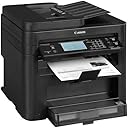
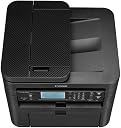
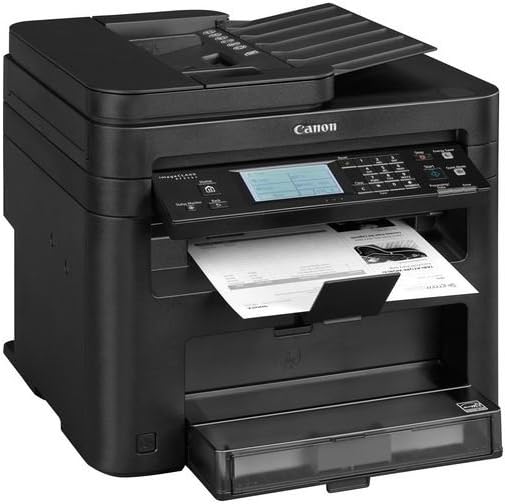
📈 Elevate Your Office Game with Canon's All-in-One Powerhouse!
The Canon MF4770N is a versatile wireless monochrome printer that combines printing, scanning, copying, and faxing capabilities in a compact design. With features like Apple AirPrint, Mopria Print Service, and a customizable touch panel, it enhances productivity while maintaining a quiet workspace.


| ASIN | B00MWDYEFK |
| Additional Printer Functions | Copy, Fax, Scan |
| B&W Pages per Minute | 23 ppm |
| Best Sellers Rank | #1,345,300 in Office Products ( See Top 100 in Office Products ) #1,840 in Laser Computer Printers |
| Brand | Canon |
| Color | Monochrome |
| Color Depth | 1 bpp |
| Color Pages per Minute | 24 |
| Compatible Devices | Laptops, PC, Smartphones |
| Connectivity Technology | Ethernet |
| Control Method | Touch |
| Controller Type | Android, iOS |
| Customer Reviews | 4.2 out of 5 stars 812 Reviews |
| Display Type | LCD |
| Dual-sided printing | No |
| Duplex | simplex |
| Global Trade Identification Number | 00013803241037 |
| Hardware Interface | USB 2.0 |
| Ink Color | Black |
| Item Weight | 11500 Grams |
| Manufacturer | Canon USA (Lasers) |
| Maximum Copies Per Run | 10 |
| Maximum Copy Resolution Black and White | 600x600 dpi |
| Maximum Copy Resolution Color | 1200 x 1200 dpi |
| Maximum Copy Speed Black and White | 24 ppm |
| Maximum Media Size | 8.5 x 14 inch |
| Maximum Print Resolution Black and White | 1200x1200 dpi |
| Maximum Sheet Capacity | 250 |
| Maximum print Resolution Color | Either 600 x 600 dpi or 1200 x 1200 dpi |
| Model Name | MF216N |
| Model Number | MF4770N |
| Model Series | 216 |
| Number of Drivers | 9 |
| Number of Ethernet Ports | 1 |
| Number of Licenses | 1 |
| Number of Trays | 2 |
| Other Special Features of the Product | Compact |
| Paper Size | 8.5 x 14 inches |
| Print media | Envelopes, Paper (plain), Transparencies |
| Printer Connectivity Type | Ethernet |
| Printer Output Type | Monochrome |
| Printer Type | Laser |
| Printing Technology | Laser |
| Processor Count | 1 |
| Resolution | 600 x 600 |
| Scanner Type | document |
| Series Number | 200 |
| Special Feature | Compact |
| Specific Uses For Product | business |
| Total USB 2.0 Ports | 1 |
| Total Usb Ports | 1 |
| UPC | 013803241037 |
| Warranty Description | 1‐year exchange/carry‐in |
| Warranty Type | Limited Warranty |
M**Y
10 copies outta 10++++++++++
My HP C5550 died recently. I've had two of them get to the point where the carriage locks up mysteriously, and there is no fix for it. You cannot even get the toner cartridges out of them. So HP is in my rear view mirror for good. I like writing reviews for truly great products, which this is. This Canon laser printer is amazing. We didn't get off to the best start, because of a series of ME calamities. Here's the first one, I loaded this for USB connection to my laptop, because I needed something simple and quick so I could print out some shipping labels, since HP had shut me down for a while. I figured the USB thing was simpler to hook up than the WiFi connect. My first wrong turn. Laptop wouldn't print anything after loading software which took no time at all. I puttered around with that for some time until I realized my old laptop had a dead or going dead USB receptacle. Printed great after that USB switch. Second one is a good one. So I decide to program my other computers for the printer. I have a Vista laptop, win7 desktop, and a new win10 unit. I loaded the software on win7 and printed out a test page, great! Now, a week or two later, I had an order to place and print a ship label. Oh boy time to use my new printer, NOTHING happened. So I gnashed my teeth for the next two hours and got no where. OK, I'll call Canon, they are smart guys, really, I called them for camera help before, and they are sharp as tacks. I didn't want to return printer, so we worked on this and that for a while, until, I went over to disconnect the USB and try the WiFi hookup. OOPS! Get this, the USB connector I moved, when I put the printer in a more permanent position, got plugged into the Ethernet outlet. Honest to GOD, the USB fits perfectly into the Ethernet slot snuggly. Again, we dealing with black plastic, and it is dark back there. No wonder my printer wouldn't work. End my of idiot stories. I told the guy at Canon that I build computers and can't install a printer(?), we laughed. Enough of my dumb stories. Before all these calamitous miscues, I had printed a test page using the USB. I was immediately disappointed. The paper just spit out of the machine immediately, like in a second, fell on the floor, and was blank. This was looking even more dismal. I picked the paper up off the floor, and to my surprise, the underside of the paper was printed. How is that possible? Is this a magic box of some sort? I hit print and it literally spit it out of the machine quietly in a seconds time, WHAT!? My old HP would have sat there for a moment, and then start making its little printer noises with the carriage zipping back and forth, and 30 seconds later you get your printed thingy. NOT here! WOW! I had to call my computer friend about my crazy laser stories of near disaster and wonderment. Last part of the story, the Canon guy, after we discover the USB in the Ethernet mess, he suggests that we go WiFi on this, OK. BAM, we connected up all the computers in no time flat, and they are all networked now. The printer DOES NOT have WiFi in it. You connect the printer to the router by Ethernet, and everything WiFi's from then on. Many of the reviews for this B&W printer(no color) are negative for less than the dumb reasons my install went south. A bad USB port and then a USB into an Ethernet outlet on the printer. You couldn't make that up. We are talking winVista/win7/win10 all slammed into WiFi perfectly. I cannot imagine where all these other people were going awry with their installations. This is no-brainer proof, really! I am amazed every time I print something, because it rolls out of the machine instantly without sounding like it printed anything, honestly. I am five feet from the printer, I hit print, and need to hurry and catch it. My HP, I could get coffee, and catch it. I have copied things, and there is no menu confusion that I read in the other reviews. HP is like hanging out with a bad marriage for too many years, and trying to make it work. I don't use the FAX function either. The toner cartridge that comes with this will provide over a thousand copies, I believe. That is a lot of copies for months upon months at my volume of printing. The print cartridge normally purchased is about $75 and will do 2500 printings, again, if my memory is correct. So the initial cartridge is half loaded. It takes some time peeling off all the orange tape and stickers, on the cartridge and the printer before you can get the thing in the machine. So be patient, and don't miss any. Putting the cartridge in there is not completely intuitive, because everything is dark, and directions are a little murky, but again, coax it in and be gentle. Did I just say that? For a hundred dollars, if this Canon printer lasts 2-3 years, I'll be happy, but seriously, Canon stuff is built well. Some other camera makers are putting heat on Canon right now, but their cameras are solid tools, like if Fischer-Price made cameras. Canon makes imaging equipment that costs hundreds of thousands of dollars, and uses a lot of that tech in their lowly products too. If you just want a nice B&W printer, cheap, and super efficient this is it, BAM, as Emiril says. Get one!
M**H
Really great printer.
I can't say enough good things about this printer and the software. It's very simple to set up, the instructions are very clear. What is nice is that this printer comes with a full cartridge (some printers come with what is called a "starter" which is roughly half the page yield of a full cartridge). This is a B&W laser printer which uses toner. The yield is I think something like 5000 pages? But since toner is powder, there's not really an expiration on it, unless the cartridge has some kind of weird exposure to heat or water. It's easy to copy, easy to scan, and the print time is ridiculously fast at it's default setting. Faxing is very simple as well, and the setup instructions are thorough. I know there are complaints that this printer does not come with a USB cable. I used to sell electronics for a living, I've never seen a printer come with a USB cable. I'm not sure why manufacturers continue to do this, because it's literally the complaint I never stopped hearing as a sales associate, but there it is. It uses a standard USB printer cable (purchased separately), and comes with a phone line for fax and of course with the necessary power cable. The scanning software is straight forward and easy to use also. I've used it several times to create PDF files of documents, and the autofeeder and scan rate is fairly fast as well. The time it takes to convert to a PDF file, even for a full color or greyscale scan is very fast. I've worked in a copy shop where I had to do scans on an industrial sized copier...this printer is actually faster. The only downside is the weight, but that is to be expected when you get a high quality machine that has so many features. I had to buy a new desk, because the one I use currently for my desktop (and which has quite a bit of equipment on it already) would not be able to take the additional weight of this printer (approx 30 lbs). The price was great for this also, given the quality and the features of this all-in-one. I purchased a similar model from Canon a few years back, and I think the price I paid for that on clearance was on par with what I paid on Amazon. I'm really pleased with my purchase, and recommend this printer highly.
T**A
Sufficient for the price point
When it comes to scanning, printing, and copying the printer performs as it should. I am a tad peeved that I purchased this less than a month ago, and it's already almost $50 cheaper. But, that doesn't apply to how the printer performs. I mention it for anyone researching it to maybe track the pricing on this to get the best deal. I have not used the fax function as it's not needed. The printing comes out clean and precise. I've printed probably 250+ pages so far, and the printing is quick. I do constantly get an error on the screen indicating that the printer doesn't recognize non-Cannon toner even though the toner in the printer came with the printer from Cannon. I'm not sure why that keeps happening. However, it's not impacting the printing. If you have a Mac, double check to make sure your OS is compatible with the printer. You will then have to download the Mac software package from their website to get the printer running. I think the color scanning performs better than the standard black and white; however the black and white is sufficient. I was very surprised at how crisp and clear the color scans showed up, so I was a bit surprised that the black and white wasn't as crisp and clear. The copying feature works well. The biggest issue I've had with this printer, and the reason I gave 4 stars (actually 3.5 stars, but that's not an option) is because of the touchscreen. The touchscreen is AWFUL! I like the printer. However, the printer quickly becomes just "okay" when the touchscreen is acting up. Here are the issues I've had with the touchscreen: (1) It's very small, so it's difficult to select your option. (2) Many times it takes awhile for it to select what your pressing. (3) Many times it will select what your pressing, but then not register your selection, so it looks like you've selected nothing. (4) Due to #2 & #3 you will have to keep pressing your selection over and over and over and over before it registers the selection. Issues #2, #3, & #4 are what makes the printer frustrating. I'm not a tech person, but even I can see how basic the touchscreen portion is. I would've preferred no touchscreen, and just buttons to this unimpressive feature. That being said, you only have to mess with the touchscreen for scanning and copying and to deal with any error messages. I primarily use this for printing, so the printer is more than sufficient for my needs. Overall, I do like the printer for the price point. However, the touchscreen is very frustrating.
P**3
Quality printer
Perfect for the home office, or really, anyone who is sick of spending money on lousy inkjet printers. I guess my one and only gripe about this printer is that I never did get it to work with AirPrint, so I still can't print from my iPad or phone. But really though, that's not a huge deal to me, and the benefits this printer offers far outweigh this one negative. Think you need a wireless printer? Maybe, maybe not. Just because you have a wireless laptop doesn't necessarily mean that the printer needs to support wireless too. In fact, ethernet cables are still far more reliable than wi-fi. The wi-fi router you have at home almost certainly has a few ethernet plugs on the back, and that's what you'll plug this Canon printer into. It will pick up an IP address automatically, or you can give it one manually, which is what I did. The majority of home wireless routers use the 192.168.1.x range of private IP addresses, so you can just pick an address from that network. Pick a number higher than, say, 20, so that you won't grab a number that may already be in use at your house. I picked .100. So the printer's IP address is 192.168.1.100. This information can be entered at the front LCD screen, along with the subnet mask (255.255.255.0 in most cases) and the default gateway (192.168.1.1 in most cases). Literally, these numbers will work with probably 90% of the home wi-fi routers out there, so if you're clueless as to how to configure an IP address, just plug these numbers into your printer and it will most likely work. Anyway, once it is on the network, it is very easy to connect to it. Our Windows 8.1 and Windows 10 computers found it and installed the appropriate drivers automatically. If you're clueless on how to do this, just do a search in Windows for "printers" and you should find the "Devices and Printers" control panel. Just click "Add a Printer" and click Next a couple of times and it should find the Canon printer and install it automatically (make sure the printer is on when you do this!). If you want to do more than print, then you'll need to install the software which comes bundled with the printer. I did so on the computer in our study, with the intent that that computer will be the one to which we send scans. I'd like to go totally paperless, so that when a statement or whatever arrives in the mail, we scan it, then shred it and throw it away. With this machine we can do that! Paper to be scanned can either be fed through the top, or by lifting the bed. The top feed is a really nice option, as it is so much quicker. Using the bundled software, you can configure it so that scans will automatically go to a certain folder on your computer, arranged by date scanned. So I can now literally walk up to the machine, drop a few papers on top, hit a button or two, then walk away, and it will automatically scan them to the designated folder on the computer. Just be sure you have a backup plan for all that data once you get it scanned! Anyway, regarding print performance, it is excellent. Of course it is black and white only, but you already knew that. We, as a family, did very little color printing anyway. There are a million places to get pictures printed online, and all of them can do it better than the average inkjet printer. So think long and hard about whether you really need to print color. The print quality on this Canon unit is amazing and it is way faster than an inkjet too.
V**L
Smooth operator at a great price
I purchased this machine on the Amazon web site and paid the price quoted on the site with no promotional consideration. So I bought this printer to replace an extremely lousy Epson all-in-one ink jet printer that went straight into the trash in less than one year. I was tired of replacing expensive ink cartridges and didn't really need color printing capabilities, so i decided to try this Canon black and white laser machine. What follows are a couple of thoughts on what to do if you take delivery on this excellent little printer. But first, let me report that this is a wonderfully smooth working machine. Set up is almost effortless if you follow my suggestions below. Also, some reviewers have complained about the touch screen. I had absolutely no problems with it. It is clear and easy to follow. This machine does great at printing (both paper and envelopes), copying and scanning. The auto sheet feeder for copying and scanning works very well. I do not use the fax function as I do not have a hard line phone any longer. So here are my suggestions for setting it up. 1. Open the box and read the instructions first. If you do (which I do recommend), you will be very confused because they are complex and hard to follow. I am not a computer professional, but I have been working with PCs. and MACs for many years. The instructions are necessary for general background, but they are not helpful in setting up your machine - just too confusing. I got this machine up and running in no time on my MAC without using the instruction manual 2. Connect the printer to your router via the supplied ethernet cable 3. Connect and supplied power cord to the printer and plug it in 4. Turn the printer on - power button is on the lower left hand side, on the front of the machine 5. The printer touch pad screen will light up and you will need to input a couple of items such as date and time etc. 6. Do not use the supplied CD for the Printer Drivers, instead 7. Go to the Canon USA web site and download and install the most recent fax (if using) and printer (MF Toolbox) drivers for the machine. The ScanGear driver doesn't work and is not needed for the machine to run and scan successfully. Just ignore that download. You do not need to connect the USB cable to this machine as long as it is connected to your WIFI router. It works great without the USB connection. The machine should be ready to go. At this point, you should be able to control copying from the touch screen, printing from your computer applications and scanning from either the touch screen or the MF Toolbox you downloaded from the Canon web-site. Any problems can be quickly and easily resolved by calling Canon customer support at 800-652-2666. I did call with a couple of questions and they were able to resolve my issues very professionally and efficiently. Can't recommend this machine enough for home use.
D**0
had to replace
1. Paper jammed on every attempt to print, ans this was for a single page single sided. 2. It seems the paper is printed but it gets jammed inside the printer and so you get a folded paper. 3. Because Adorama is 3rd party seller you have to goto Canon for support. From Adorama Camera get: 'We are sorry to hear this item is not working as it should so soon after you received it. As this item can normally not be returned us as per our return policy, a Manufacturers case number will be required before we can approve the return. Sometimes, the manufacturer can troubleshoot you right over the phone. If they are unable to solve your issue and advise that it be returned to us, please contact us with the case number and we will advise you on the return at that time. " 4. Tried to use email on Canon support, but kept getting "No email address found. Please contact Customer Support for further information." after filling in all requested information and then clicking on SUBMIT for email support." 1/19/2016 Expect no help from Adorama, I phoned Cannon Technical Support (over 20 minutes on hold) and got a replacement quickly-no refund. It took a week for RMAed unit to get back to Canon. The printer comes with 1 printer cartridge, power cable,install DVD, and manual. This printer doesn't do duplex printing. It's also difficult to setup, and touch screen is not responsive to touch selection. Couldn't get scanner to work over ethernet. Haven't tried wireless or FAX. The printer is made 98% plastic hence light weight.
S**E
A fantastic printer from a fantastic brand
Wow. What a great printer. I have been using HP printers for years and the quality has been going steadily downhill, so this Canon printer working well is a huge breath of fresh air. Here are some things I like about it. PROS - Came with a cartridge. - Very fast print speed compared to inkjet. - Fantastic price. $110 for a multi-function b/w laser printer puts it in the same price category as premium multi-function inkjet printers. - Scans in color. - No bloatware during software installation. - Very little genuine cartridge nagging (yet), unlike HP software. - Scanning and other advanced features work smoothly over the network after installing some simple utilities. - Software isn't full of bugs and hard-to-change settings like the HP software I'm used to. - Refurbished cartridges actually work for laser, unlike inkjet, so replacement cartridges will only end up costing me $20. - According to my calculations, laser cartridges will print between 2x and 10x as many pages as an injket cartridge, which is a fantastic price per page. - Great packaging. A brown box on the outside, and a double-walled printer box on the inside. Styrofoam to prevent movement. Orange tape that left no residue to prevent compartments from opening. Clear plastic covers over all scratchable plastic surfaces. CONS - Doesn't print color. Color laser printers are a bit too expensive, since they require 4 toner cartridges instead of 1, so I decided to go with this more economical b/w laser printer. - I accidentally bought a version with no wireless. No problem though. I like to wire my stuff anyway, so that I don't suffer from any intermittent connection issues. So far I am very impressed with Canon. Out with HP, in with Canon, I say. I will update this review if anything crops up, but with such an auspicious start, I don't really expect any issues.
F**I
Love this printer
Love this printer. Low cost. Works great. Nice features. No it does not hold 500 sheets of paper, but it’s a good printer, scans good, copies good, etc. Good menu controls. My wife wanted to get yet another color inkjet so she could print all sorts of stupid things in color once in a while and my kid treated it like some toy to amuse her by printing 100 color pictures from every stupid website or Instagram post she clicks on that she would just throw away right after. And the ink was a LOT of money and gave lots of problems that “I” had to deal with when wife whined about “the printer is not working! The printer won’t print!”. Well, that stopped when I insisted on buying this black and white laser printer. Not color? Well tough luck, it’s not a toy or some fine art device. We need it to print forms, recipes, directions and stuff....scan stuff....make copies (hit the button and have it actually WORK)....and this does all that without a problem. If your family insists on making life hard for you by treating an inkjet color printer like a money sucking toy that YOU have to be responsible for: make your life a lot easier: throw the inkjet in the garbage and replace it with this, and deal with the family whining about it for a couple days (ignore them). You’ll be glad you did.
C**T
Five Stars
Great printer. Fantastic - works exactly as ordered, easy to set up, less expensive than elsewhere, and quickly delivered. Not only no complaints, but awesome service, too.
T**E
Tomas Mtz
Equipo Excelente, funciona muy bien, la calidad de impresión y Canon es de lo mejor para mi fue una excelente compra.
L**S
Recomendable
Muy buen producto envio rapido no tengo mas que añadir pero vendedor muy recomendable, buen precio y muy recomendable gracias
A**R
Awesome Printer
This is a GREAT printer. I should have gotten a laser printer years ago. I use it at home and I average about 100 pages a month so this should save me a lot in ink? Amazon had it on my doorstep quickly as always. Amazon is a pleasure to do business with, awesome customer service. I was a bit nervous when ordering this printer. I had read comments on some web sites that it was tricky to set up. I only set it up via a USB to my PC. I don't know about wireless set up. This printer is fast and quiet. I'm very happy with my purchase.
B**.
Una copiadora fácil de usar, diversas funciones.
Saca copias oficio únicamente desde la banda lectora. Tiene varias funciones: copia de credencial, varias copias en una sola hoja y copias de ambos lados. El toner con el que viene es uno de inicio aunque dura un tiempo considerable. La velocidad es buena. La utilizo para una pequeña papelería.
Trustpilot
1 day ago
2 weeks ago