We remain fully operational. Our teams are working around the clock to ensure your deliveries continue safely.

قم بتنزيل التطبيق


معلومات عنا
حقوق الطبع والنشر © 2024 Desertcart Holdings Limited
قم بتنزيل التطبيق
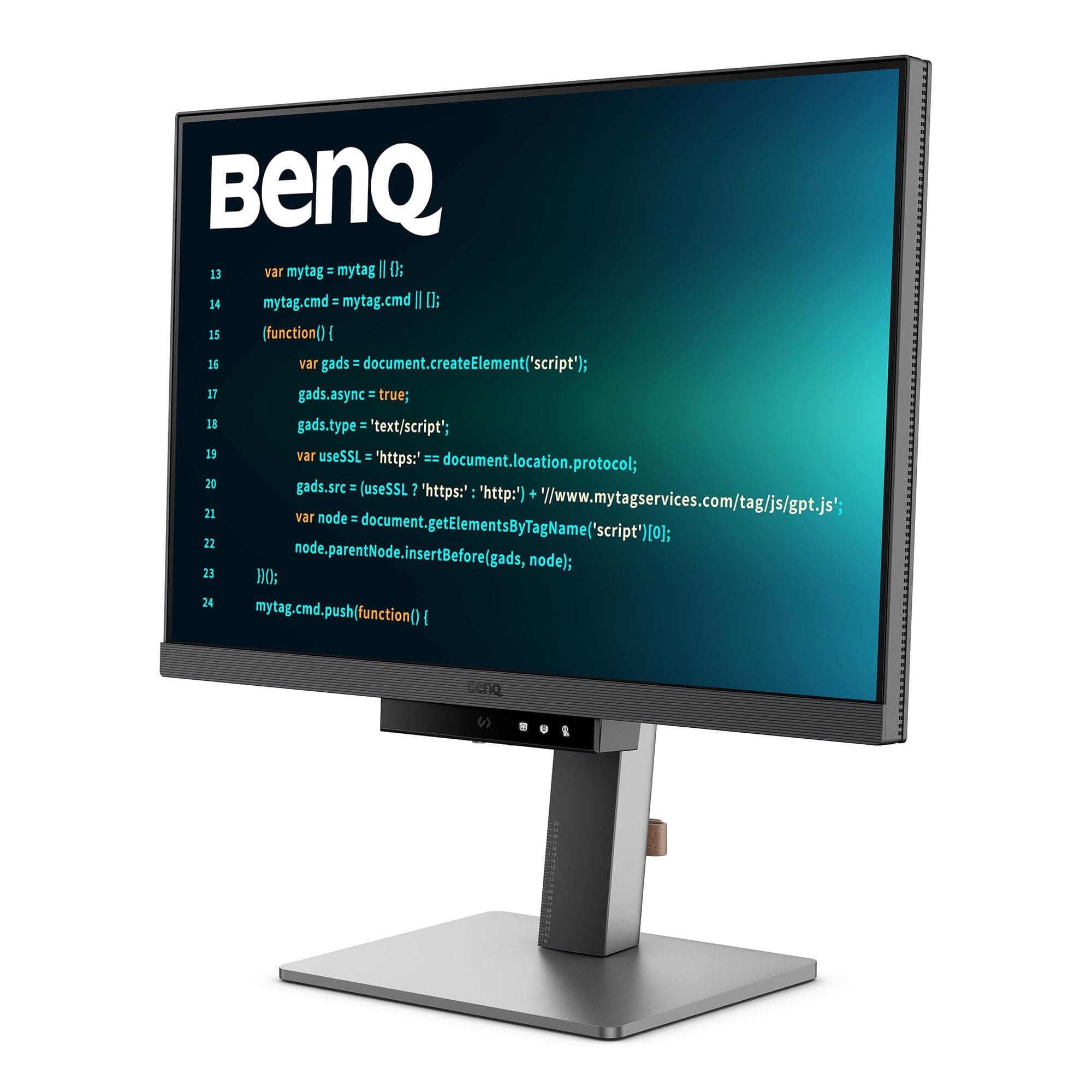


🚀 Code Longer, See Clearer, Work Greener!
The BenQ RD240Q is a 24-inch 16:10 WQXGA IPS monitor tailored for programmers, featuring a 2560x1600 resolution with 95% P3 color gamut for vibrant visuals. It offers advanced coding modes, a dedicated coding hotkey, and a 90W USB Type-C port for power and data in one cable. Eye-care technologies like Night Hours Protection and Brightness Intelligence Gen2 reduce eye strain during long sessions. Its ergonomic design supports adjustable posture, while eco-friendly materials underline BenQ’s sustainability commitment. Backed by a 3-year warranty, it’s a premium choice for millennial professionals seeking productivity, comfort, and style.


| ASIN | B0D2KVY1FG |
| Aspect Ratio | 16:10 |
| Best Sellers Rank | #2,546 in Computers & Accessories ( See Top 100 in Computers & Accessories ) #70 in Monitors (Computers & Accessories) |
| Box Contents | 1.5m 16 amp Power Cable, HDMI Cable, USB Cable Warranty Card, QSG, Safety Instructions |
| Brand | BenQ |
| Brand Name | BenQ |
| Colour | Dark Grey + 24 inch |
| Compatible Devices | Desktop, Laptop |
| Contrast Ratio | 1000:1 |
| Country of Origin | China |
| Customer Reviews | 4.2 out of 5 stars 1,402 Reviews |
| Display Technology | IPS |
| Display Type | LED |
| Global Trade Identification Number | 04718755093272 |
| Hardware Connectivity | DisplayPort, HDMI, USB Type C |
| Has Color Screen | Yes |
| Image Brightness | 300 Candela |
| Image Contrast Ratio | 1000:1 |
| Importer Contact Information | BenQ India Pvt. Ltd. 9B Building, IIIrd Floor, DLF Cyber City, DLF Phase III, Gurgaon, Haryana, India -122002 |
| Item Dimensions D x W x H | 22.9D x 52.2W x 53.4H Centimeters |
| Item Type Name | Monitor |
| Item Weight | 7.6 Kilograms |
| Manufacturer | BenQ, BenQ Corporation 16 Jihu Road, Neihu 114, Taipei, Taiwan |
| Manufacturer Contact Information | BenQ Corporation 16 Jihu Road, Neihu 114, Taipei, Taiwan |
| Maximum Display Resolution | 2560 x 1440 Pixels |
| Model Name | BenQ Monitor |
| Model Number | RD240Q |
| Mounting Type | Wall Mount |
| Native Resolution | 2560 x 1440 |
| Network Connectivity Technology | DisplayPort, HDMI, USB Type A, USB Type C |
| Packer Contact Information | BenQ India Pvt. Ltd. 9B Building, IIIrd Floor, DLF Cyber City, DLF Phase III, Gurgaon, Haryana, India -122002 |
| Picture Quality Enhancement Technology | Wide Color Gamut, Brightness Intelligence Gen2 |
| Product Features | Built-In Speakers, Eye Care, Flicker-Free, Height Adjustment, USB Hub |
| Refresh Rate | 75 Hz |
| Resolution | QHD Wide 1440p |
| Response Time | 5 Milliseconds |
| Screen Finish Type | Matte |
| Screen Size | 24.1 Inches |
| Screen Surface Description | Matte |
| Shape | Flat |
| Specific Uses For Product | Business, Desktop |
| Total HDMI Port | 1 |
| Total USB 2.0 Ports | 3 |
| Total USB 3.0 Ports | 3 |
| Total USB Ports | 3 |
| Total Video Out Ports | 1 |
| Unit Count | 1 Piece |
| Viewing Angle | 178 Degrees |
| Voltage | 240 Volts |
| Warranty Description | 36 months from the date of invoice |
| Warranty Type | 3 Years Manufacturer Warranty |
K**P
6-Month Review: The Perfect Monitor for Coding and Entertainment
I have been using it for 6 months now. It is very good for coding — I haven’t faced any issues so far. Watching movies on it is also great. Once you start using this, you’ll want to keep it as your main screen instead of your laptop. The USB-C port is very useful, especially since I have both a Mac and an office laptop. The only problem is that it charges my Mac when connected. Even though there is a setting to prevent it from charging, it stops working after a few minutes.
M**A
"Exceptional Monitor for Coding and Productivity: BenQ GW3290QT Shines with Clarity and Comfort"
I recently upgraded to the BenQ GW3290QT 31.5" IPS 2k QHD monitor, and it has exceeded all my expectations. The 2K QHD resolution and 99% sRGB color gamut deliver stunning visual clarity and color accuracy, perfect for coding and design work. The large 31.5" screen provides ample space for multitasking, and the IPS panel ensures consistent, vibrant colors from any angle. One standout feature is the Coding Mode, which optimizes contrast and brightness for prolonged coding sessions without causing eye strain. Speaking of eye care, the Low Blue Light and Flicker-Free technology, coupled with Brightness Intelligence Plus, make long hours in front of the screen much more comfortable. The connectivity options are fantastic, with a USB-C port providing 65W Power Delivery, along with HDMI, DisplayPort, and multiple USB 3.1 ports. The built-in speakers are a nice addition, and the monitor's adjustability in height, tilt, swivel, and pivot means I can set it up just the way I like. Overall, the BenQ GW3290QT is a superb monitor that combines excellent performance, thoughtful features, and eye-care technology, making it a perfect choice for anyone serious about their coding and productivity. Highly recommended!
T**E
Good for the Price, But Has Some Flaws
I bought this over a year ago, and overall, it’s a good product. However, a 32-inch screen feels a bit too large for a desk setup. That said, it works flawlessly with a Mac. The built-in speakers are poor and almost unusable. Occasionally, weird lines appear on the screen. In this price range, it offers good value for money. The color accuracy is decent, and the resolution is sharp. It’s easy to use, has good build quality, and comes with HDMI and USB-C to C cables, which is a plus.
A**E
Awesome monitor for development
Is been couple of months. I like the product and highly recommend to developers. No issues with the charging. No issues with the display yet.
P**R
Worts After sale service
Delivery on Time : On the second day, I found that the USB port was not working, and then my struggle started. Amazon's Response: Amazon said they don't manage any issues with the product and that I should contact the brand. They mentioned that if I get a faulty product certificate, they might be able to help. Even if the brand isn't listening, Amazon is not interested in jumping in to solve the problem. Brand's Response: First Day: The first response was, "This is not possible; the USB port should work." After Two Days: On a phone call, they suggested some troubleshooting. After that, the representative said they would log a ticket, but no ticket was logged until then. Next Day Evening: A technician visited but didn't have proper knowledge. He contacted someone on the phone and made a video call to troubleshoot. They finally accepted that the USB port was not working. During this, the person on the phone argued that my devices had issues, like saying the monitor firmware doesn't support my phone, without even knowing which phone I was using. It was a completely nonsensical argument, and they didn't want to accept the problem with their product, instead blaming my gadgets. Next Day: The head office representative said they could send a new monitor but questioned what if it also had the same issue. I was shocked by this response. He said his senior would call me and provide a solution by the end of the day, but no call came. Next Day: I pinged him for a status update, and he gave me another number to contact. When I called, he said he had ordered a new monitor as a replacement and that the team would share tracking details. Again, no message or call came. Next Day: I called again for tracking details, and those tracking details showed that the product was going to another service center, not directly to me. Then after 2 days: Finally, the monitor arrived, and the USB port is working now. The brand doesn't have its own service center; they are managed by a third party. It seems all YouTube videos are paid promotions. Amazon doesn't want to interfere, so you are on your own risk. BenQ doesn't provide transparency in their communication. All communication is over personal phone and WhatsApp, and the customer has to call and ask for details. No messages or updates are provided proactively.
M**D
Perfect monitor for coders
Was searching for perfect monitor from long time. Got it in flash sale for 22.5k luckily in May 2023. Features 1. 2 usb type C ports (1 downstream, 1 upstream) : just 1 wire for charging and display, very clean. With another type C, Connect phone or any device and get access to it. 2. 3 usb type A ports 3. Daisy chaining (I am using it to connect one more monitor) 4. Auto brightness 5. Different modes and best part is when you modify each mode like brightness, blue light, volume, auto brightness etc it stays with that mode only, you can change mode and whole settings will change accordingly what you have saved in different mode, one time effort but very very useful 6. Flat base, very nice can be use to place things. 7. 2k screen feels good 8. Very good blue light filter for long sittings 9. Ergo stand 10. Joystick to control settings. 11. Looks premium white monitor, edges are small, no hassle, easy to use. 12. Built in mic with Noise cancellation and on/off switch. Not that useful as its 27 inch screen so u will place it a bit far. Cons 1. Speaker of no use. 2. 16 Amp power plug (use adapter or old monitor 10amp wire) 3. No dp cable (need to buy 300 rs from outside) 4. Benq display software (needs to download from website) doesn't support any feature like screen split etc in this desktop. Only support rotation.
A**T
Benq RD280U is an Excellent monitor for Programmers
It's color modes are super cool and relaxive for eyes. Also it's comes Coding Mode Dark and light, Cinema, epaper, sRGB and Custom mode. Codes on this monitor is super easy to read and it's Cutts most of the glares because it's have anti-reflective mate coating. Benqs app Display pilot 2 is a awesome application to control the monitor as well as adds more features through the app If you are a software developer you should definitely try this monitor. Also comes with of 3 USB port . Only downside is speakers in the monitor is not that loud.
A**R
Good Quality
The Product is really good for programmers Pros 1. Brightness is very good. I mostly keep it at 0 which is still bright for me. (I wish we could lower brightness a little more. 2. Display is excelent. Not as good as mac but one of the best I have seen in this price. 3. No backlight bleed 4.Microphone is good. 5. Coding mode as you can see in pictures makes a huge difference. Cons 1. Speakers not loud at all (Barely audible even with fan off. 2. 16A power cord shipped may not work for everyone. You can use old monitor wire or ask support to send a smaller one.
ترست بايلوت
منذ شهر
منذ 3 أسابيع