Desertcart purchases this item on your behalf and handles shipping, customs, and support to KUWAIT.
🖋️ Elevate your iPad experience — write, draw, and swipe like a pro with zero compromises!
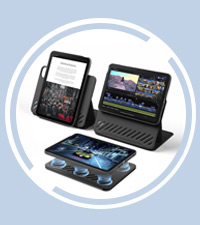
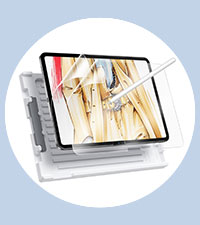
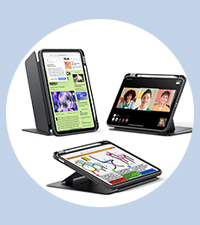
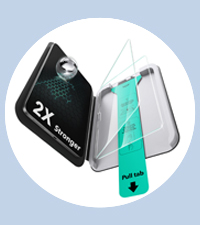
The ESR 2 Pack Paper-Feel Screen Protector is a precision-engineered matte shield designed exclusively for the iPad Air 11" models M2, M3, and M4 (2024-2026). It offers a natural paper-like writing experience with enhanced pen friction, while maintaining crystal-clear display quality and reducing glare. Featuring a bubble-free installation kit, 3H hardness for scratch resistance, and fingerprint-proof matte finish, it’s the perfect upgrade for professionals who demand durability and clarity without sacrificing style or functionality.




| ASIN | B0D418W22B |
| Best Sellers Rank | 4,912 in Computers & Accessories ( See Top 100 in Computers & Accessories ) 87 in Tablet Screen Protectors |
| Brand | ESR |
| Brand Name | ESR |
| Clarity | 10 |
| Colour | 2 pack with flawless fit |
| Compatible Devices | ipad air 11" m2 2024 |
| Compatible Phone Models | iPad Air 11" (M2) 2024 (A2902, A2903, A2904), iPad Air 11" (M3) 2025 (A3266, A3267, A3270), iPad Air 11" (M4) 2026 (A3459, A3460, A3463) |
| Compatible Tablet Computer Models | Apple iPad Air 11-Inch (M3) |
| Compatible devices | ipad air 11" m2 2024 |
| Compatible phone models | iPad Air 11" (M2) 2024 (A2902, A2903, A2904), iPad Air 11" (M3) 2025 (A3266, A3267, A3270), iPad Air 11" (M4) 2026 (A3459, A3460, A3463) Compatible phone models iPad Air 11" (M2) 2024 (A2902, A2903, A2904), iPad Air 11" (M3) 2025 (A3266, A3267, A3270), iPad Air 11" (M4) 2026 (A3459, A3460, A3463) See more |
| Country of Origin | China |
| Customer Package Type | FFP |
| Customer Reviews | 3.9 out of 5 stars 7,858 Reviews |
| Finish Type | Matte |
| Global Trade Identification Number | 04894240211892 |
| Item Dimensions L x W | 29.2L x 20.5W centimetres |
| Item Hardness | 3H |
| Item Weight | 35 Grams |
| Item hardness | 3H |
| Manufacturer | ESR |
| Material | Plastic or polymer [tentative] |
| Model Name | ESR Paper-Feel Screen Protector |
| Model Number | ipad Air 11 (2024) |
| Number of Items | 2 |
| Part Number | 1e_ef3a_in_chs |
| Product dimensions | 29.2L x 20.5W centimetres |
| Screen Size | 11 Inches |
| Screen Surface Description | Matte |
| Special Features | Paper Feel, Matt Finish |
| UPC | 489424021189 |
| Water Resistance Level | Not Water Resistant |
Z**F
Better than PaperLike, at a more affordable price.
Since there are obvious comparisons to be made between this screen protector and the PaperLike, here's what I've found: Put short, this screen protector is better. This screen protector is easier to apply with the great installation kit included. Also, the PaperLike has a rougher surface, which decreases the image quality of the iPads display. This screen protector is not as rough, which means it doesn't reduce the image quality at all. However it does mean that when writing with the pen, there isn't as much friction as with the PaperLike. The best way to explain would be the PaperLike is closer to feeling like writing with a real pencil, whereas this screen protector is more like writing with a real pen (it still makes satisfying "drawing" sounds like the PaperLike though, if that's what you're after). Both are still far better than drawing on glass, and I actually prefer the feel of this screen protector, as I'm more used to using pens instead of pencils anyway. Also this won't damage the tip of the Apple Pencil as much in the long run. In terms of durability, this screen protector is far more durable than PaperLike. My PaperLike already had scratches all over it within one day of applying it. This seems to be far less easy to scratch. This matte screen protector also reduces glare every bit as well as, if not better than the PaperLike. Overall, this screen protector is better than PaperLike, at a more affordable price. It manages to create a more enjoyable drawing/writing experience, while also being good for watching media and browsing apps. Something the PaperLike isn't good for as it reduces the image quality so much. If you're an artist who wants the closest feel to drawing with a pencil possible, and you don't use your iPad for anything other than drawing, then maybe consider the PaperLike over this. However if you're someone who uses their iPad to take notes or draw with, but you also like to watch movies, browse social media, play games, etc, then this screen protector is easily a better choice than PaperLike.
D**S
Absolute value for money
Absolute value for money. The installation makes life easy and the quality is ideal. Please do watch the set up video from the QR code scan as they advised. The set up video was easy to follow and replicate. Ended up with a flawless install within minutes and no bubbles or whatsoever. And it fits my 11inch M4 iPad Pro just right. I also love the material. It’s not that kind of matte display that makes everything look less sharp. Instead it preserves the display vibrancy and quality of the iPad, yet giving just enough friction for writing. So while this may not be exactly paper-like, it’s a significantly improved experience than the feel of writing on slippery glass. I’d say this is similar to writing on a whiteboard. Which is just fine for me. It doesn’t look like this would prevent the screen from cracking in an accident, but it sure would prevent scratches. The durability remains to be seen overtime. I literally just installed it 20 mins ago or so, so I can’t speak to that yet. Might comeback here to leave a follow up update in about 3 months.
T**M
Good result on the 2nd attempt. It seems to be a nicely thought out product.
Nice inclusion of the non-slip feet on the underside of the simple but effective alignment jig. It means you won't have your tablet sliding about during the installation process. I genuinely appreciated that it was provided with two separately sealed cleaning accessory kits (each one containing a sealed wet wipe of reasonable size, a micro-fibre polishing cloth and a large and narrow dust removal sticker), and the bubble removal tool. Used in combination, they worked very well to achieve a good result. For the first protector, installation went wrong, despite following the written instructions and watching the video tutorial more than a few times. Somehow, peeling off the tab marked 1, didn't just peel off the screen protector's underside film, it managed to peel off the screen protector away with it as well, leaving just the protective top cover film marked 2 on the alignment jig. Applying screen protectors are an unnecessarily nerve-wrecking exercise, as the emphasis is on wanting a flawless result, correctly aligned, with no trapped dust or air bubbles. ESR got the alignment jig right, the cleaning packs are also nicely thought out, the adhesive on the dust removers were very effective. The second protector installed well, ended up nicely aligned on the tablet and a no dust or air-bubble outcome. Here's hoping it will offer a good length of service life. I think it should prove itself to be a good value item. Just wish Apple saved us the hassle and prefitted these at their factories. Turning off the screen, is definitely required, with the panel turned off you'll be able to identify if further finessing is required before you start the application process. Do this in a well-lit room. Try to use this product within a slightly humid environment, not one that's been heated and dried out by central heating. The slight air moisture helps make dust less prone to remaining airborne. Make sure you have zero distractions whilst you are doing this. The slightest thing will end up winding you up whilst you're concentrating. Update: Credit to ESR for sending me a replacement after notifying them of the installation issue. Just a shame the Amazon delivery driver just left the unannounced package on front doorstep and overnight became soaked by rain. What is going on with Amazon delivery drivers? Too lazy to knock on doors or ring a doorbell, and for an item that could fit within the letterbox. Amazon please take notice - your UK deliveries need investigating. I'm sure you are losing customers and this is costing the Bezos empire a pretty penny - net result prices go up. All because these contracted drivers have no sense of what it means to provide customer support.
P**E
Fingernails down a blackboard feel
Normally I love ESR products. I’ve had many and all have been excellent, until now. I got this “paper feel” system, based upon reviews and other feedbacks. I can’t understand why so many seem to love this type of touch screen scraping/scratching finish. I’m not an artist but do occasionally use Apple Pencil for annotating etc. it feels horrible and scratchy on this surface and must surely wear down the nib. It curls up at the edges despite following the fitting instructions perfectly. It is very matte finish so is very good for not showing reflections from lights windows etc. but it seems to dull the iPad screen sharpness giving a slight fuzz appearance to everything. Scrolling with fingers produces a horrible dry sensation (and sound!). If you catch it with finger nails, then it really is like nails on a blackboard. I eventually managed to squeegee the bubbles out but despite careful use of the installation system, it is not accurately centered onto the iPad screen. So it’s really not for me and really wish I had not bought it. I have just now ordered an ESR tempered glass x2 kit. I’ve had these before and they have been perfect. Very disappointed and 100% waste of money as far as I’m concerned. Sorry I hate criticising this company but have to speak the truth this time. The remaining unused paper feel protector will now go in my rubbish bin.
C**L
Perfect for the pen
I bought this product because I do like the feel of it with the pen. Installing the screen was easy just follow the instructions BUT after placing it on the screen it was full of dust and hairs, what the heck, when you peel back the film it creates static that attracts all the elements in the air so I removed it and applied the second film in the kitchen, once again static, not as much particles get stuck on the film but enough to notice it badly. If you register your ESR product they give you a 2 year guarantee. I got in touch with ESR via email and told them of my issues when installing it, as promised they will send you a new screen free of charge with additional advice. The new advice is to install it in a humid room say like a bathroom after having a shower and peel the film back slowly as you install it on the iPad screen. Awaiting for the new screen to apply it cleanly. Poor cat got static shot on the nose from me. The overall impression is a great screen protector and texture, makes me write a lot neater than on a smooth glass. ESR are the only products I use for my iPad 13 pro 2024 M4, I have the case with keyboard. I trust ESR products to protect and the functionality of uses.
M**O
Great for drawing, but destroys the quality of the screen (pixel effect)
Great quality screen protector, ideal if you are into art/drawing with the apple pencil as it makes it feel paperlike. Cons is that your ipad screen will look significantly worst after installing, you'll lose quite a bit of clarity so watching media/photos will look worst than just a normal clear screen protector (or none)
R**I
An Artist's Review
Edit #2: Two years later, I thought I would come back with an update and change my rating from 4 to 5 stars. I have tried a couple of other screen protectors during this time but I keep coming back to this one because it easily makes for the best drawing experience. I find that it offers just the right amount of resistance while still feeling smooth and pleasant to the touch; the way it reflects light diffusely is pretty great, the light noise is negligible, and the pencil tip wear could honestly be worse. I'd be super happy to continue buying these. * Edit #1: It's been a while, and I personally remain a fan. I love drawing on it! The installation process is much more comfortable than I initially thought (have not messed up since). It keeps the iPad screen safe from scratches. However, it wears down a pen tip in about two months (though, admittedly, I draw quite heavily); the pen does leave traces on it; and as the metal inside the tip gets exposed that can in turn scratch the protector - so, ultimately, I feel like they both end up needing to be replaced for best results. I have not tried other paper-like protectors to compare, but I would recommend this to someone looking for a traditional feeling and the ability to draw precisely - with the caveat that it might become a recurring expense (or lead to one in the form of pen tips). I stand by my initial piece of advice, which is to try it out first, if possible, and see whether the drawing experience makes it worth it for you. * Let me start by saying that I am paranoid about the safety of my high tech items, so the first thing I did after buying an iPad was install a durable tempered glass screen protector. And, hey, I felt safe - but, boy, was it a pain to draw on (virtually impossible to get a straight line). When I finally decided to make the switch to a matte paper-like protector, I was hesitant because they're simply not as resistant; but right now I would not go back for the world. So, the ESR protector - I love it, and the feeling of drawing on it is incomparable (it really does give a very traditional vibe). The display grain is kept to a minimum, so I wouldn't say it significantly impacts other uses of the tablet; but I would primarily recommend it for people who use the pen a lot for writing and/or drawing. I found the installation a bit of a hassle and found myself having to apply the second screen in the package right off the bat, but I think it can be done more smoothly. Regarding wear and tear, I have read that paper-like protectors have a bad impact on pen tips - so I adjusted the pressure curve to something more sensitive and everything seems fine so far. The screen protector itself might have to be replaced every few months, though, as I think it does scratch - but, honestly, I'm completely fine with that given that it's made my experience so much better. My advice for artists out there - if you're unsure, find a friend who has one, try it out, and see how you feel. The change was quite dramatic for me, which makes it entirely worth it.
G**N
Paper feel… more like 600 grit sand paper!
Paper Feel screen protector 11inch 2024 iPad Pro. This didn’t last 24hrs on my device before I ripped it off. Application was extremely easy with the tray and cleaning wipes being well thought out and of good quality. Once on though, it ruined the screen quality significantly to the point I thought my eyes were struggling to focus. It became really hard to do anything on the iPad, especially reading text without feeling like a headache was inbound. Then the noise of the pen or fingers on the screen….every swipe sounded like striking a match on a safety match box. I think this protector was based on 600 grit sand paper as along with the sound it visibly sanded the apple pen tip or finger tips leaving a very fine white smear behind each movement (visible when the screen is off and locked). When using procreate and this protector, it seemed to mess with the screen sensitivity with gestures becoming erratic, such as the canvas zooming/rotating/moving continuously with hand heel pressure or erase or paste gestures randomly being triggered by the side of my hand. Finally the screen protector doesn’t fit edge to edge and leaves a 3mm gap all the way round which is slightly irritating when using the pen as it catches the side of your hand. Shame the experience of this item is so poor as some of ESR’s other accessories are really great.
A**R
Känns som att skriva på papper
Det blev en helt annan upplevelse med detta skärmskydd, känns precis som att skriva på papper.
J**S
Very pleased...
Incredibly easy to apply to your iPad thanks to the unique positioning system. The more time you take preparing the iPad for the screen protector, the happier you'll be with the results. the screen protector has a great texture and is very reminiscent of drawing on paper - an amazing feature for someone making the jump from traditional to digital art
S**E
タッチの感度は少し落ちるが、それ以外はまあまあ良好(今のところ
他の方が描かれている通り、薄い割にはタッチの感度は意外と落ちてしまっている。タッチタイピングをしていると一文あたり1文字は子音が打てて無いという頻度である。 しかし、それを考慮しても「Apple Pencilで絵を描く」という点においては素晴らしい描き心地であると思う。実際に使用していて、文字通り紙のようで描きやすかった。 ペン先の消耗については、私は他にレビューされてる方々の半分も描いていない為に実感しづらいだけなのかもしれないが、何となく私でも予想よりも早く消耗している気がする。その辺りは私以外の方のレビューを読んで頂いた方が早いと思われる。まだ実害が無い為、一応星の数は下げないで置く。 ただ、今年の1月に購入したのだが、遅れてこのレビューを書こうと思ったら既に製造中止(在庫切れかつ再入荷予定無し)になっていたため、恐らく不満の声が高く(全体的な評価もそうだが、海外のレビューも星が1~3個のものが多かった)、それで改善品を開発・販売するためにこちらの販売を停止したと言う所なのだろう。 なのでこの商品に対してどちらかというと好意的な印象を抱いている私としては『手遅れ』になってしまって申し訳ないのだが、ESR社の商品は個人的に使い勝手が良く、しかし未熟な製品に対しては率直に伝えると手厚いサポートをして貰え、全体として好きなメーカーなので、今更ながら応援の意を込めてこのレビューを投稿させて頂きたい。
L**D
Bonne qualité
Installation facile grâce au système d'application. Je recommande
M**K
I dont like how it fells
unpleasant sensation when touching this film with hands and pencil
Trustpilot
1 week ago
1 month ago