We remain fully operational. Our teams are working around the clock to ensure your deliveries continue safely.

قم بتنزيل التطبيق


معلومات عنا
حقوق الطبع والنشر © 2024 Desertcart Holdings Limited
قم بتنزيل التطبيق




Buy anything from 5,000+ international stores. One checkout price. No surprise fees. Join 2M+ shoppers on Desertcart.
Desertcart purchases this item on your behalf and handles shipping, customs, and support to KUWAIT.
🌌 Unlock the universe—your personal gateway to the stars!
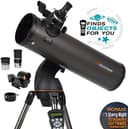
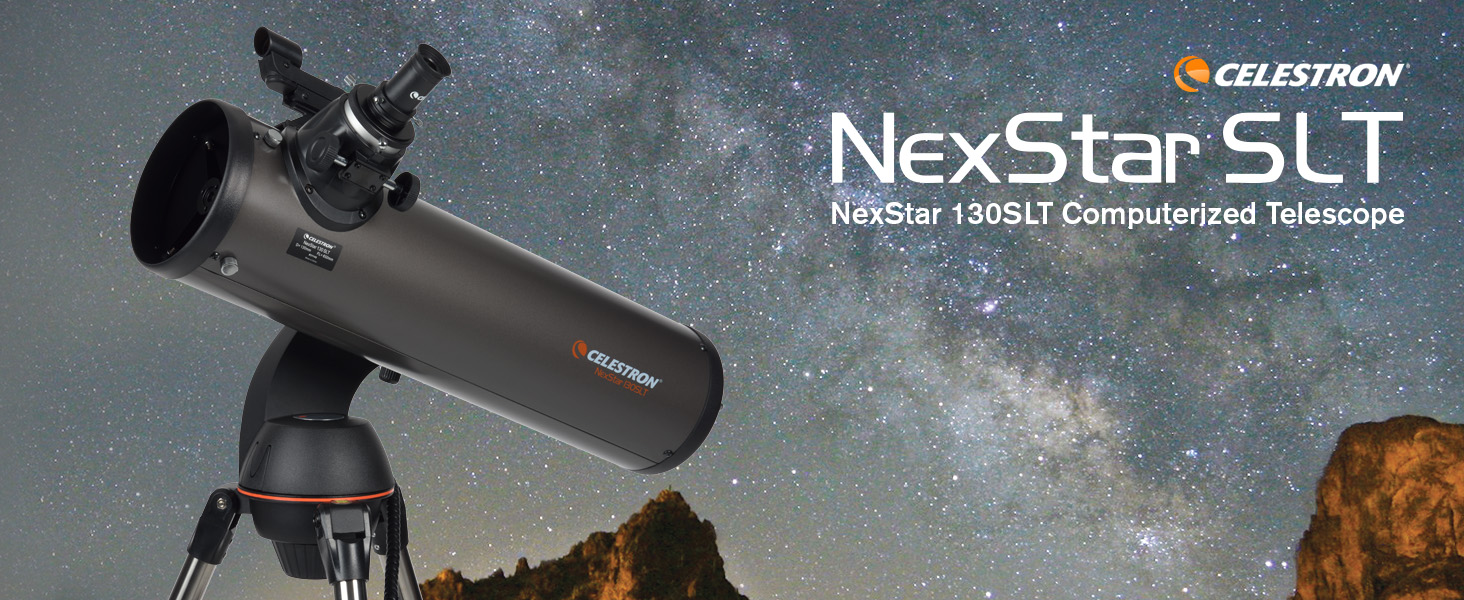
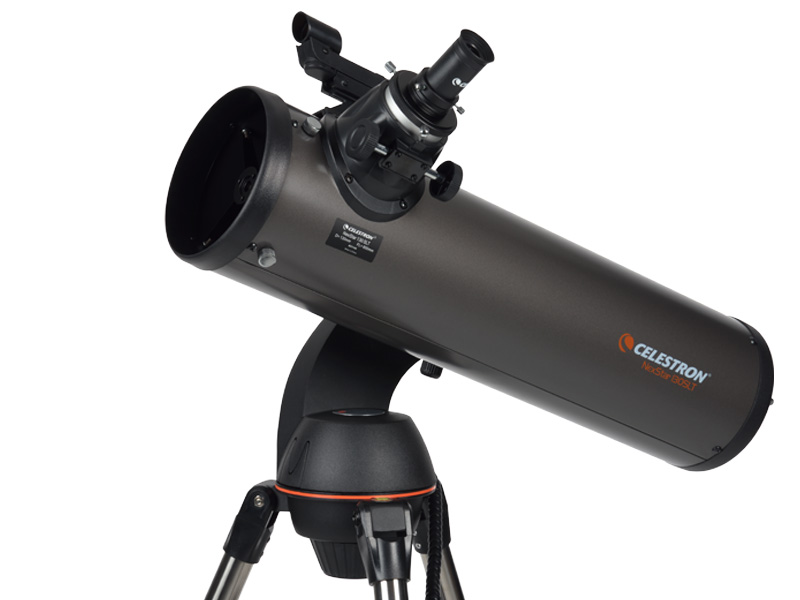
The Celestron NexStar 130SLT is a computerized Newtonian reflector telescope featuring a 130mm aperture and SkyAlign technology. It offers a database of over 4,000 celestial objects, enabling precise automatic locating and tracking. Compact and portable with a pre-assembled tripod, it’s designed for easy setup and transport. Included is free Starry Night software for interactive sky exploration, backed by a 2-year warranty and expert US-based support.

| ASIN | B0007UQNNQ |
| Additional Features | Portable |
| Age Range Description | Adults |
| Best Sellers Rank | #246 in Camera & Photo Products ( See Top 100 in Camera & Photo Products ) #5 in Telescope Reflectors |
| Brand | Celestron |
| Built-In Media | 20mm and 9mm eyepiece, Accessory Tray, NexStar+ Hand Control, Optical Tube, Single Fork Arm Mount and Tripod, Star Diagonal, StarPointer™ red dot finderscope |
| Coating | Aluminum |
| Compatible Devices | Smartphone, Camera |
| Customer Reviews | 4.3 out of 5 stars 2,176 Reviews |
| Dawes Limit | 0.89 Arc Sec |
| Exit Pupil Diameter | 26 Millimeters |
| Eye Piece Lens Description | 20mm and 9mm eyepiece |
| Field Of View | 6.3 Inches |
| Finderscope | StarPointer™ red-dot finderscope |
| Focal Length Description | 650 millimeters |
| Focus Type | Manual Focus |
| Global Trade Identification Number | 00050234311458 |
| Item Dimensions D x W x H | 38"D x 56"W x 38"H |
| Item Weight | 11.4 Pounds |
| Manufacturer | Celestron |
| Manufacturer Part Number | 31145 |
| Model Name | Celestron NexStar SLT Series |
| Model Number | 31145 |
| Mount | Altazimuth Mount |
| Number of Batteries | 1 Lithium Metal batteries required. (included) |
| Objective Lens Diameter | 130 Millimeters |
| Optical Tube Length | 635 Millimeters |
| Optical-Tube Length | 635 Millimeters |
| Power Source | 12 VDC - 8xAA Batteries (not included) |
| Telescope Mount Description | Altazimuth Mount |
| UPC | 050234311458 |
| Unit Count | 1.0 Count |
| Warranty Description | 2 years warranty |
| Zoom Ratio | 20 |
B**N
An Excellent Starter Scope!!
Last week I received my NexStar 130 SLT. I made the decision to buy this scope based almost entirely on the recommendations of reviewers both here on Amazon and elsewhere. This is my first telescope, and I will say will say up front that I am completely happy with this scope! Regarding the negative reviews, I can sympathize that in some cases a truly defective article can arrive. For many, I would suspect that the issues encountered were largely of their own making. While in the main, this scope is relatively simple to set up and use, it still helps to have at least a modicum of technical skill (a healthy dose of common sense will help too!). The evening I received the scope (15 July) I set it up on my deck. Yes, not the most stable of platform, but I live in a dense neighborhood with lots of obstructions and murderous light pollution. The star alignment, using the 3-star "Star Align" process, took me two attempts. I blame my ineptitude with the use of an eyepiece and not having stars truly centered in the field of view for this. Regarding this, I think an eyepiece with a crosshair would be excellent for performing these alignments. (Another night I had multiple failures. This turned out to be related to the incorrect time, which was off by a few hours. The system will apparently remember the last values you entered. Be advised, they will not update and will be incorrect. Check your time and date each time you power up the system! (Many complain that the system does not retain the time once it is entered. I would venture a guess here as to why. The simple truth is that it would drift off of "real" time within a very short matter of time. Maybe adding the optional GPS module would fix this problem, but the internal NexStar clock is simply freewheeling and will inevitably be off the longer it ran on its own. Having to re-enter it each time you power up ensures that time is not an issue during the alignment procedure. Imagine your frustration if you took tons of time aligning each star in your eyepiece, and despite your best efforts the system would not align? Re-entering the time alleviates this factor, assuming you enter it correctly!) For my location, I simply plotted my deck in Google Earth and wrote down the coordinates. This seems to have enough fidelity for the star alignment to work. Once I had the telescope aligned I picked a random bright object in the southern sky to examine. Imagine my surprise when the first celestial body I have ever viewed through a telescope turned out to be Saturn! Using the provided 9mm eyepiece, the rings were clearly visible. I had not yet received my collimation eyepiece, so I was worried that it might need an adjustment. No adjustment necessary on my scope at this time! I am looking forward to viewing through higher-quality optics though. Regarding the stability issues that many have commented about. Yes, images do move about quite easily, especially on my wooden deck. I have not yet weighted the tripod or gotten a set of the damping pads. I will say that image stabilization is not completely unbearable on my scope. In just a couple of seconds after making a focusing or alignment adjustment, images became still enough to view nicely. I can only imagine this will improve with weights and dampers. I do see why this scope would not be ideal for astrophotograpy though. I would think it would not be impossible, but you would have to ensure the scope is deployed on a solid foundation and go to great lengths not to disturb the scope in any way. I was able to configure and control my scope with Celestron's enclosed NexStar Observer List (NSOL) software and the freeware Stellarium packages relatively painlessly. Install the drivers that come with your USB-to-Serial Port adapter. (The computer interface to the NexStar handset requires a serial RJ-11 phone jack. Celestron sells a cable with an RJ-11 phone connector on one end and computer 9-pin RS-232 serial port connector on the other. Most likely your computer/laptop will not have a serial port, so you will have to further adapt this to USB) My laptop configured the COM3 serial port, but your mileage may vary depending on your system. Make sure to restart your computer once the drivers are installed. Truth in advertising, I tested my scope indoors using an arbitrary alignment. The scope tracked and moved what seemed to be the proper azimuths and elevations for the objects I selected in the software. Any issues I find in the wild once I get the scope outside again can likely be mitigated with the anti-backlash settings for the motor drive. If there is anything significant I find, I'll make an update! Regarding some of the slewing, anti-backlash, and cord wrap settings, I would have appreciated a little more information in the manual as to what the settings actually do and how they work. I did see an example where my scope attempted to go the long way around counterclockwise to a position that just should have been about 10 degrees clockwise. This was very likely due to bad settings in the aforementioned utilities. I made a few tweaks after that and the problem seems to be alleviated, though I am not exactly sure which setting did the trick! :-) At the end of the day, I have to say that for the money, this scope does everything it is intended to do. Have some realistic expectations going in. You are not going to get Hubble Space Telescope views out of this scope! But you will get a lot of enjoyment out of it if you take the time to set it up and align it properly. I did get a good view of a deep space galaxy, which as many have stated, was simply a distant smudge of stars. However, it was clearly visible amongst the background of distinct stars.
R**N
Great scope once you get the setup down
My wife bought this scope for me for Christmas. I had no experience with astronomy prior to that. It's a little finicky to set up but once you do it correctly, it'll work well. The image may not be exactly in the center but it should be close. The eyepieces that come with it are just okay. They're a step below kelner eyepieces (which is below Plossls). For eyepieces, use a low power eyepiece (25mm) to scan for objects. With eyepieces, the lower the number the higher the magnification. If you buy eyepieces, stick to good quality eyepieces in the 5mm to 35mm range. More magnification (<5mm) doesn't really help as the scope is limited by the atmosphere. Lower magnification eyepiece (>35mm) will result in an exit pupil that is too large (makes it difficult to see without a moving black blob appearing in the eyepiece). Celestron X-Cel eyepieces would work well for this scope and aren't too expensive. I like the Baader Hyperion as well. It gives a wide angle view and a large eyeglass with good eye relief to look through (great for eyeglass wearers). A x2 Barlow lens is a good option to pick up as well. Combined with your eyepieces, it doubles your available magnifications (9mm becomes a 4.5mm, 25mm becomes a 12.5mm). I have the Orion shorty x2 barlow. Don't bother with the eyepiece kits. The optics are too close together in strength so you'll probably only use 3 of the 5. The color filters are pretty useless except for a moon filter. All you really need are 3 eyepieces a low power (no greater than 35mm), a medium power (14-18mm) and a high power (no less than 5mm). You'll need a collimator. With Newtonians, you'll need to align the mirrors. It's best if you check it each night before you use it. Moving the telescope can knock it out of wack. A collimator helps you line everything back up. I have the Orion laser collimator. Here are some setup tips for setting up the scope for Goto use: 1. If you picked a city instead of entering a latitude longitude, and you don't actually live in the middle of the city (you just picked the closest one), do a factory reset of the computer and choose latitude-longitude instead. It's much more accurate. You can find the latitude longitude with a smart-phone app (e.g. Compass for Android) or by googling your address. You'll need the lat long in degrees, minutes, seconds (not the digital version like -117.0101). It should look like W 117 15' 12' Sometimes a city selection is too broad. I am about 20-30 miles outside the city I chose and it makes a big difference when the scope is skewing. 2. Make sure you're using the correct time/date settings including daylight savings time vs standard time. Use your cellphone time. 3. Instead of using 3-star align, use Auto-Two-Star align. It'll require you to know the names of the stars but it's much better. I use Google Skymap to find one of the stars in the list if I don't know the name or the ones I do know are obscured. If you use the 3-star align, chose bright stars that are on opposite sides of the sky and not in a line (a triangle pattern is preferred). For example, if you just used the stars in Orion, that's probably too small of an area of the sky. Choose one star in Orion (e.g. Betelgeuse), one in Gemini (e.g. Castor) and one in Cassiopeia. 4. When centering a star during alignment, defocus the star so it looks like a ball rather than a point of light. It'll be much easier to get in in the center. 5. When centering on the final star try to move the scope in the same direction as it was moving when it skewed to the star you chose. So for example, if it was moving down and to the left when it stopped, position the scope so that when you get it in the center of the view that you are moving it down and to the left when you stop. UPDATE 5/19/2016: I recently purchased a ZWO ASI185MC camera that I'm using with the 130SLT. The camera will easily come to focus when used in the 2" adapter. It will come to focus in the 1.25" adapter as well but it's a little closer to max in-focus. I'm getting pretty good images with it doing short exposure (<15seconds) and stacking. You'll want to use a Bahtinov Mask to focus. I purchased an Orion Accufocus which greatly helps with focusing the image without everything shaking. Check my reviews for the correct items. I also have it working with a computer (computer drives the scope). You need to install ASCOM drivers (6.2) and ASCOM drivers for the Celestron product line. Just search for "ASCOM drivers" on google. It's not necessary but it's nice for an all-in-one software package (Astrolive USB). I added some pictures I took of M51, M57, Jupiter and the moon. These were taken from my front yard about 5 miles from the city. The deep space objects won't appear that clear when viewing through the eyepiece (cameras pick up more light than our night vision does). Update 6/28/2016: One thing to really improve your goto results is to use "Precise Goto". It's undocumented in the manual. It's accessed differently than a regular goto. Press the "Menu" button. Then use the up/down arrows (6 &9 key) to find "Precise Goto". Then select "Database". Finally, choose from the object list type using the up/down arrows (e.g. Messier, NGC, Named Objects). So for instance, if I choose "Messier" and then enter the number for the Messier Object (1-110). It will calculate and give you a list of 5 bright stars with #1 being closest to the object. Select 1. The scope will slew to where it thinks it is. Center the bright star with the red dot finder and look through your eyepiece to see if it's centered there as well. Once it's centered in the eyepiece, hit <Enter>. The scope will slew to the object and there's a good chance it will be centered in your eyepiece. I use this feature with my camera and it almost always gets it close to the field of view. You should easily find the object in the field of view of a 25mm eyepiece (though it may be faint and fuzzy).
R**T
Good for even light polluted skies
I got this yesterday afternoon with first light for the Celestron NexStar 130 SLT last night... I live in the suburbs of Los Angeles so I was curious to see how it would fare under light polluted skies. It was quick and easy to set up; I wish it was easier to change the slew speeds but that's a minor quibble. I have to say I've been quite impressed. As an FYI, it was partly cloudy and we had a lot of high level cloud interfering with some views later that night (it rained in the early hours of the morning.) First was Venus, then Mars and Mercury. You could easily see the discs of the planets - later in the evening, I turned to Uranus as well and with the 9mm eyepiece (62x) you could barely make out a tiny disc. Later on, I ran it through its paces with the Andromeda Galaxy, Almach, the double cluster, Uranus, the Pleiades, the Orion Nebula, M43, Alnitak, Gamma Arietis, Zeta Piscium and Comet Lovejoy. Couldn't see M78, M79 and the Crab Nebula under the light polluted skies but these are all easily within reach of the 'scope. I'm impressed by its ability to align with just one star or by simply pointing the 'scope at three random stars. Very useful for someone like me, whose view of the entire eastern half of the sky is blocked by our apartment building. If you only use one or two stars or the SkyAlign (where you randomly pick stars to align with) you'll probably need to re-sync the 'scope later. The object would rarely appear dead in the center and the 'scope would nearly always need to be slewed slightly, but I was expecting that. The object would almost always appear in the field of view, but occasionally might just be outside of it - someone totally unfamiliar with the night sky that might be frustrating as they won't know what they're looking for. As someone who's never really properly used a motoized 'scope, I love having the luxury of not having to constantly move it to track the object. I was able to just enjoy the view. Optics seemed very good as double star images appeared crisp and colourful. With the 9mm eyepiece (62x) the Orion Nebula showed a greenish tint and there was visible texture, even through the light pollution. The Trapezium looked particularly nice. I hope to compile a list of objects that can be seen from light polluted skies... One thing learnt: in a city, a GoTo is invaluable as the sky is too bright to star hop with a finderscope. In the country (or darker suburbs of smaller towns) star hopping is always much more fun. A good star chart, a book and a flashlight will always help you to find something new - but if you don't have the time (or the clouds are quickly rolling in) then the GoTo offers a great alternative.
C**R
Great Telescope for Beginers and serious viewers
Being an amatuer astronomer and keen to pass on the topic to my two kids, I did a lot of reasearch and then zeroed in on the Celestron Nexstar 130. I was surprised at the size of the box when it arrived, but the weight was manageable. Setting up was a breeze using the colored brochure and I was soon gazing at the moon and marvelling at the crisp images. However, there are a few things worth remembering: 1. Performing a collimation of the scope is not a very easy task manually. I suggest to go in for a manual collimator available from Celestron, which makes it a tad easier. However, if you want to be really fast, buy a laser collimator or else make one. It is pretty easy to do so. 2. The supplied tripod is very flimsy and when you are viewing small objects, it tends to be disturbed easily and the slightest vibration tends to get amplified by a large extent. Somebody suggested using a weight on the tray and it worked to a large extent. 3. Nobody tells you how quickly the batteries tend to run out. From the begining, it is better to buy a adaptor and use it with power. However, while slewing the scope, be careful of winding the cord around the mount and tripod legs. If the power goes off, the handheld computer pad needs to be setup from scratch. 4. Setting up the scpe, espcially the hand device needs a little bit of practise and input of the lat lon needs to be precise as the computer uses this, the date and time to identify the night sky and traverse to the right position in the night sky for viewing. 5. The finderscope is very good at centering the scope the stars and moon for accurate alignment. 6. Invest in some Barlows and Plossls from the begining as the scope will not give you much pleasue with what comes out of the box. The Celestron eyepice set is quite good with Barlows/Plossls and filters all in a nice box. All in all, it was a steal at the price I got last year. The kids, my wife and a host of my friends love the scope and the crisp pictures it offers.
J**E
Great Scope for Beginners and Veteran Stargazers!!!
I bought this scope to replace my old Mead 4.5" reflector scope which has served me well for well over 20 years. This scope actually surprised me at how good the quality of the mount is and the scope itself is no joke! This scope is set-up beautifully for the beginner. It came direct from Celestron and was boxed very well. Since I know my way around telescopes a little bit, putting this thing together was no problem without using the instruction book that came with it. I did look at the instructions prior to writing this review and they are pretty straight forward for the beginner. You should have no problems with set up and it will only take about 15 minutes to all together and ready for viewing. I instantly fell in love with the NexStar hand controller. It can be updated right from your computer with a mini-USB cord (not included) so it has the latest sky data and control inputs from Celestron. It has several calibrating options including a Sky Align feature where you don't even have to have a knowledge of stars to align the scope. There are many tracking and slewing settings so the scope can be tailored to your viewing style. There are many functions built right into the controller that will make your gazing much more fun even you have no knowledge of the night sky. I ran the scope with batteries the first night I used it. It was okay, but I only got about 2 hours of use out of the batteries before I had to change them. I do recommend purchasing the 12V power adapter. The two eye pieces that come with it are great for general viewing and are completely meant for beginners. I purchased an additional eye piece set and filters (also available from Celestron) right from the get go as I knew they would not suffice for me. Once you get used to operating the scope and figure out all of the functions on the hand held controller, you will find yourself wanting better and more detailed views. It is worth the extra $100-$150 for additional eye pieces. If you do decide to purchase additional eye pieces and filters, I can tell you from experience, you will get what you pay for. Cheap eye pieces look good on paper, but not so good when you are looking through them. For less than $500 this is a perfect scope for the beginner right out of the box. For the veteran star gazers on a budget, for less than a $800 you can have a set-up that will rival even some of the most expensive set-ups. You just can't go wrong. Clear skies to all!
A**R
Buyer Beware- 2 defective units
I ordered this to gaze the night skies at my lake house. I have experience with these Celestrons and know what to expect and how to use. The first unit I received and assembled the motor unit was DOA on arrival and I was getting error code 16/17 in the handheld. I had to use the scope manually to view planets. No way this unit was new. I ordered a replacement, which means I had to disassemble the unit again and ship it back. The new one arrived a few days later. The first thing I noticed is the base was already assembled in the box and the OTA had scratches and you could tell one of the screws was threaded/spinning. Once I put the mount on the base it had an insane wobble. This was completely different from the first unit. Once I powered it on, the optics were not even as clear as the first unit and the shake was insane, once I focused on the boom it would shake for a few seconds and I couldn’t even get my face near the viewfinder without the whole picture shaking. 2nd the handheld units internal time clock was total out of wack, it would count seconds 2x as fast and within minutes I would be 20 minutes ahead of the current time which means the tracking and sky align is total garbage and out of sync. It would miss Jupiter and Saturn by a good half an hour. 3rd once I tried to switch back to a planet the handheld would just restart and the scope would turn endlessly in circles!! What a disaster. That’s 2 bad units I got. I’m not sure how these are new but I will not be buying Celestron again! Totally unusable and I can see this ruining the astronomy experience for beginners. TLDR: Received 2 defective units .First unit perfect optics broken motorized control, 2nd unit, Bad optics, unit and handheld. I will not be getting a replacement this time and will be shipping the unit back for a refund.
D**R
Great optics. Here's what to do if you get the "BOOT LOADER Invalid Pkg: 0080" error.
OK, here is the Bible according to Celestron SLT scopes. When the scope is working, it's fantastic (see below if you have a non-working scope with a boot loader failure). The Newtonian design is comfortable to look through - the eyepiece is at the front of the scope, and it is positioned around eye-level when standing. Newtonian optics are also simple, which keeps the cost down (and minimizes light lost to lens absorption). The optic properties of this scope are outstanding. The 650mm focal length and 150mm (about 5-1/8") aperture are great specs, especially when paired with the highly-recommended Celestron accessory kit (Celestron Model 94303, available on Amazon). The scope comes with a 9mm and 25mm eyepiece, for magnifications of 72 and 26 power (magnification is focal length divided by eyepiece length, so magnification increases as focal length increases, and decreases as eyepiece length increases). The big 130mm aperture of this scope gives the scope a maximum useful magnification of about 307 power, using the rule of thumb that you can magnify 60 times for each inch of aperture. At a focal ratio of f5, this is a fairly "fast" scope, meaning it lets in a lot of light for it's focal length. The f-number is the focal length divided by the aperture size, and the lower the f-number, the faster the scope. Faster is (generally) better. F-numbers will be familiar to photographers, and telescopic "lenses" operate on the exact same concept as fast photographic lenses. In photography, a lens is "fast" because it allows a shorter shutter speed (because it lets in more light), meaning you can capture faster motion that would be blurry with a longer exposure (as would be required by a "slower" lens). The auto-orientation works like magic, but it's better to give it very precise time and location. Use a GPS for location; don't just tell it what city you are in (you can choose your location input method). For some reason, the controller can remember your last location and the time zone of your previous observation, but the controller does not keep time when it is switched off, so you must enter the (exact) time again whenever you switch the power off and back on (C'mon, Celestron - seriously?) You can orient the scope by pointing the scope at ANY three bright objects (you do not need to know what they are) or two objects if you know what they are (but this is said to be less precise). The scope must be level (it has a built-in level bubble). Although this scope is not really classified as a "beginner's scope," it is great for beginners - you don't need to know anything to begin viewing amazing things, and a beginner will not "outgrow" this scope anytime soon. The only comparable computerized Newtonian scope that I could find in this price range is the Orion StarBlast 6i IntelliScope, but it is available only with a table-top mount (???). If that Orion scope (750mm focal length, 6-inch aperture) was available with a sturdy tripod mount in this price range then I would be writing this review for that scope, because I would have bought that scope instead, without a doubt. Orion lost my business because they expected me to have a study TABLE available at each observation site. The optional Celestron accessory kit includes (among other things) 6mm, 8mm, 13mm, 17mm, and 32mm eyepieces and a Barlow 2X adapter. With a 6mm eyepiece and a Barlow 2X adapter (which effectively doubles the magnification of the eyepiece, making it a 3mm focal length), the scope can achieve a magnification of 216 power (pretty respectable). You could purchase shorter eyepieces or a 3X Barlow to push the magnification near the 307 power limit, but I don't think you will find yourself wanting to do so - you will be amazed at what you can clearly see (the bands of Jupiter and its Galilean moons, the rings of Saturn, etc). Note that the 307-power limit cannot be exceeded with eyepieces or Barlow lenses - the image will be pretty much worthless if you try to exceed this limit, which is a function of how much light the scope can gather (which is determined by the aperture size). As you approach this limit, the image quality decreases, so you will probably find images much more satisfying at low-to-mid-200 power than you would at theoretical maximum 300+ power. The gray moon filter in the accessory kit is especially useful for bright objects (such as the moon, of course, but also Venus and Jupiter). The longer eyepieces are needed for viewing large objects such as various asterisms, galaxies, and nebula. Some of these objects span 2 or 3 degrees of sky (or more) - which is really big (the sun and moon are 0.5 degrees.) Some objects can only be fully viewed at very low magnification (such as afforded by binoculars), so don't make the mistake of assuming that high magnification is always better. If you attend a star party, expect to find binoculars (usually mounted on a tripod) in use. The Pleiades star cluster, for example, is best observed at lower magnification. The eyepieces that come with the scope (and the accessory kit) are 1.25" diameter, but the scope can also accept large, very nice (and expensive) 2" eyepieces - just remove the 1.25" adapter which comes with the scope. The tripod mount is good, but will wiggle a bit in the breeze, especially at higher magnifications. It helps to add some weight - the tripod has a small shelf which lends itself to this purpose. A couple bags of rice or beans will do, but I bought a 20-lb theatrical-grade sandbag (double zippers keep sand out of my optics, and sand doesn't attract bugs or rodents). Put that weight on your tripod and don't touch the scope while viewing (take your hand OFF of the focus knob) and you should have a steady view, even in breezy conditions. Stiff winds may require additional measures, such as springs attached to the legs and anchored to stakes in the ground. I was told by someone at a Star Party that this mount is not well suited for long-exposure deep-field photography. As it tracks objects across the sky, the mount makes slow adjustments, but it does not adjust azimuth (side-to-side) and altitude (up-and-down) at the same time, but in succession, in a stair-step pattern. The eye won't notice, but a long-exposure photo will see blurring. Alas. But I have not verified this info. In any event, it should work fine for short-exposure shots, like the moon (you will need a camera adapter, of course). The motorized mount goes through batteries pretty fast, especially if it is tracking something all the time. The default power source of eight (standard alkaline) AA batteries will probably last a night, but I would not push it to two nights if I had been tracking the whole night before. You can hook it up to a car battery and it will run forever. I use a wheelchair gel battery - they are smaller and lighter than car batteries, and will take the deep-cycle use (charge and deplete, charge and deplete). Buy a trickle charger and use it when the battery is not being used, to keep the battery fresh and extend its life. Or you can get the Celestron Power Tank. You can use an AC adapter if you have access to AC - any adapter that puts out 12 volts DC at 2.5 amps or more with a 2.5mm barrel plug (negative on outside, which is standard) will work just fine (you can have all the extra amps you want - it won't hurt anything). There are scads of suitable adapters on Amazon that are a whole lot cheaper than the one Celestron sells. This is a Newtonian scope, and Netownians are subject to collimation errors, meaning that the two mirrors are not precisely aligned. I recommend the Celestron Collimation Eyepiece (Celestron Model 94182, available on Amazon). This will allow you to quickly and easily (and accurately) calibrate your scope for an absolutely perfect image. Some people do this each time they transport their scope, because any sort of vibration can cause the mirrors to drift (though it seems to be a rather minor problem for this scope, in my experience). The instructions that come with the eyepiece are excellent. Get a red flashlight. Celestron makes one that has a dimmer. Red won't mess up your night vision nearly as badly as other wavelengths. I rate this scope at five stars, despite the BOOT LOADER problem (solution below). ========= BOOT LOADER PROBLEM ==================================================== Within two days of getting this scope, it failed to "boot" (the mount is computerized, and it needs to successfully "boot up," just like any computer. If it cannot boot, it is useless). When the hand controller was turned on, it said, "reading packages" and then stopped with an error message, "BOOT LOADER Invalid Pkg: 0080." This renders the scope dead - it cannot be moved, even with manual arrow buttons. Fixing the problem is a bit tricky. You need to flash the firmware in your hand controller (which has somehow become corrupted), but it's not as simple (or as well-documented) as it should be. First, you need to buy a serial cable to connect your computer to the controller. It's 9-pin RS-232 (female) on one end and a modular connector on the other end (it looks like a telephone plug). The Celestron model number for this cable is 93920, and you can buy it on Amazon. If you have a reasonably modern computer then you probably don't have a serial port. If you have a 9-pin MALE D-connector then you have a serial port (though it may be disabled in your system BIOS settings). Otherwise you need to buy serial capability - I recommend a USB to Serial converter (also available on Amazon from many suppliers). Connect the computer to the controller. Make sure you are plugging the serial cable into the base of the handheld controller, and not into the body of the motorized mount. Both the controller and the mount have modular serial connections (and both can be flashed), but you are flashing the handheld controller, not the mount. You need to download and install the Celestron Firmware Manager (CFM) from Celestron's website (it's in Support/Downloads/Software, near the bottom of the list). It's a Java application, so it should work on any computer platform. But it will be downloaded as a zipfile - you must extract the contents and then run CFM.jar (on Windows, just double-click it). You can't run it within the zipfile - it must be extracted. Make sure your scope is connected first. THIS IS IMPORTANT: There are two types of Celestron motorized controllers. There's the Alt/Az (which is used by this SLT mount, as well as LCM, SE 4/5/6/8, and CPC) and the Equatorial mount (used by CGE, Advanced, and CGE*). In the CFM menu (along the top of the CFM window), select "Hand Control" and make sure the proper type of control is selected for your model of scope (this CST scope is Alt/Az). THIS IS THE REALLY REALLY IMPORTANT PART - Under the mount type selection you will see three radio buttons. The first one is selected by default, and it tells CFM to automatically detect the mount type. This is NOT GOOD. CFM thought I had an Equatorial mount. Even if I select Alt/Az, my selection will be overridden by the "Auto Detect" option. Select the Second option, which says "Always do what I selected this time" and CFM will then respect your selection. Now flash the controller in the CFM, and you should be good to go. And if you go to a remote site or star party, it's a good idea to bring a laptop with CFM (and your cables), just in case you need to do this again. I was 160 miles from home (beneath a rare Class-1 darksky!!!) when I had this problem. Fortunately it was only an hour before sunrise, so I didn't miss too much.
S**Y
Telescope is easy to use and can easily see lots of things
The Celestron 130SLT Computerized Telescope is a fantastic option for beginners and amateur astronomers who want a reliable, easy-to-use telescope that provides impressive performance without a steep learning curve. With its 130mm aperture, this telescope offers excellent light-gathering capability, providing bright and clear images of a wide range of celestial objects. Whether you’re just starting out in astronomy or you’re an experienced stargazer looking for something more portable and user-friendly, the 130SLT offers a solid viewing experience that delivers on its promises. One of the telescope’s standout features is the SkyAlign computerized mount, which simplifies the setup process. Aligning the telescope is quick and easy — the mount guides you through the process, ensuring you’re ready to observe in just a few simple steps. This computerized mount automatically locates and tracks celestial objects for you, eliminating the need for time-consuming manual adjustments. Once aligned, you can easily select from a database of over 4,000 celestial objects using the included nexStar hand controller. This feature makes the telescope perfect for those who are new to stargazing and don’t want to spend a lot of time searching for objects by hand. The system’s accuracy means you can focus on enjoying the view rather than worrying about alignment issues. In terms of optics, the 130mm reflector design provides a sharp, clear view of the night sky. This telescope excels in delivering detailed views of the Moon, showing off craters and surface features in crisp resolution. It also provides beautiful views of planets like Jupiter and Saturn, allowing you to see Jupiter’s cloud bands and the stunning rings of Saturn in excellent detail. Additionally, it offers great views of deep-sky objects such as galaxies, nebulae, and star clusters, making it a versatile telescope for those interested in exploring a wide variety of celestial phenomena. While the 130SLT is an entry-level model, the image quality it provides is impressive for the price, and it makes celestial observation much more accessible to newcomers. The telescope is designed with portability in mind. Weighing only around 18 pounds, it’s lightweight enough to easily carry and set up at dark-sky locations, where you can escape the light pollution of city environments for the best views. The mount and tripod provide a stable base, and while they might not be as heavy-duty as those found in higher-end models, they still provide smooth movements and solid tracking. This makes the telescope perfect for those who want to take it on the go for impromptu stargazing sessions, whether it’s in the backyard or at a remote location away from artificial lights. In terms of ease of use, the Celestron 130SLT truly shines. The SkyAlign system makes it incredibly user-friendly, even for complete beginners. You don’t need to worry about complicated setup processes or manual adjustments — the telescope takes care of everything for you. The auto-tracking feature also means you can enjoy longer observation sessions without the need to constantly reposition the telescope. Whether you're focusing on the Moon’s craters, tracking Jupiter and its moons, or exploring distant galaxies, the telescope is designed to offer a seamless experience that’s both fun and educational. However, there are a few minor drawbacks to keep in mind. While the included 25mm and 10mm eyepieces are a good starting point, they may not provide the highest magnification or the clearest views possible. For those looking to get even more out of their observations, investing in higher-quality eyepieces or accessories, such as a Barlow lens or filters, can help enhance the viewing experience. Additionally, although the mount is generally reliable, it’s not as heavy-duty as more expensive models, meaning that in windy conditions, the telescope may become slightly unstable. Overall, the Celestron 130SLT Computerized Telescope is an excellent choice for anyone looking to dive into astronomy without the complexity of more advanced telescopes. It’s easy to use, offers great views of the Moon, Jupiter, Saturn, and a wide variety of deep-sky objects, and is portable enough to take with you on stargazing adventures. With its impressive performance, simple setup, and fun-to-use features, it’s a fantastic value for anyone interested in exploring the wonders of the night sky. Whether you're observing planets, star clusters, or galaxies, the 130SLT is a great way to start your astronomical journey.
ترست بايلوت
منذ 3 أيام
منذ شهرين