We remain fully operational. Our teams are working around the clock to ensure your deliveries continue safely.

قم بتنزيل التطبيق


معلومات عنا
حقوق الطبع والنشر © 2024 Desertcart Holdings Limited
قم بتنزيل التطبيق
Buy anything from 5,000+ international stores. One checkout price. No surprise fees. Join 2M+ shoppers on Desertcart.
Desertcart purchases this item on your behalf and handles shipping, customs, and support to KUWAIT.
🖥️⚡ Triple your screens, triple your productivity!
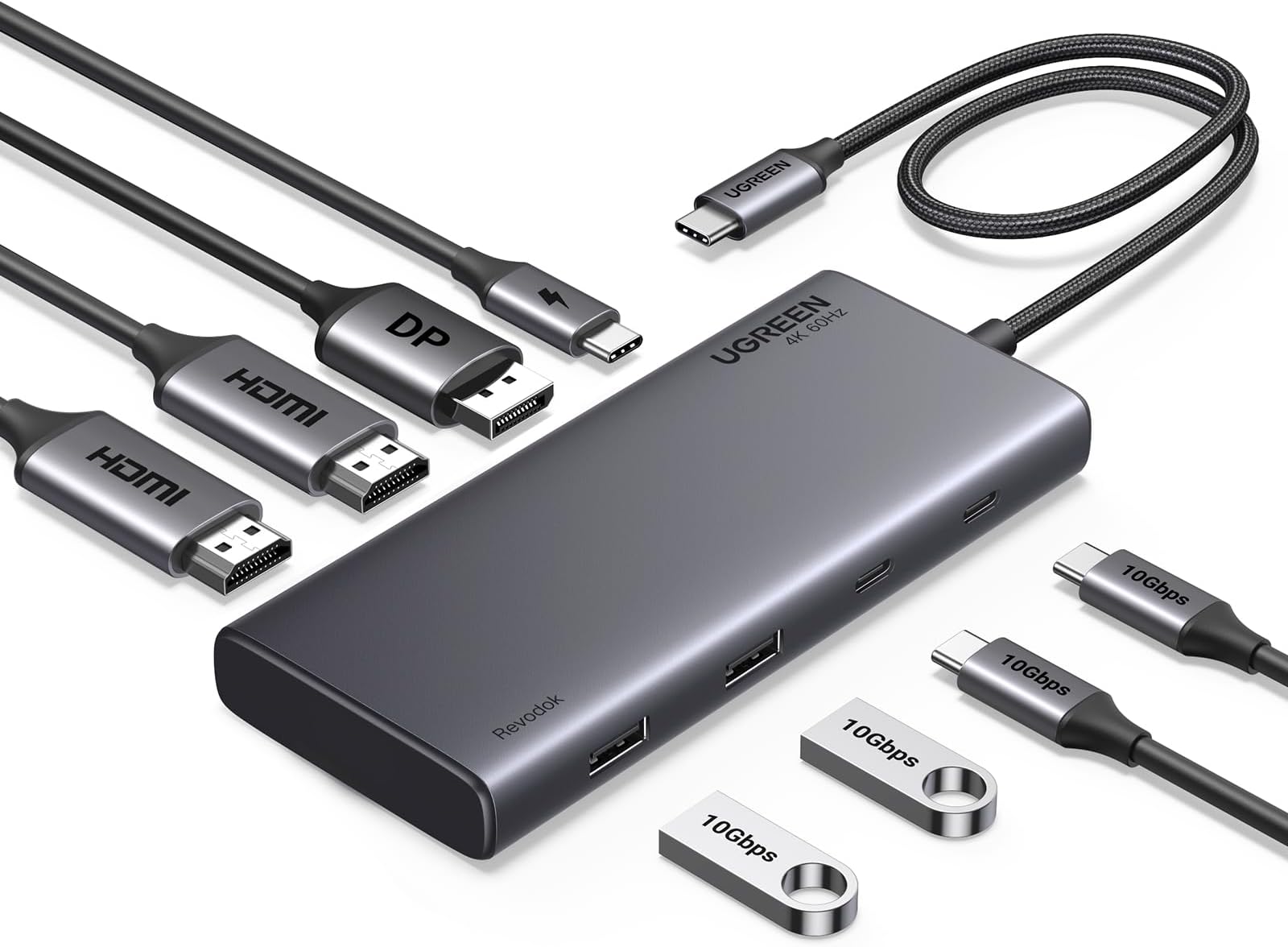
The UGREEN Revodok Pro 308 is a sleek 8-in-1 USB-C docking station designed for professionals craving seamless multi-display setups. It supports triple 4K monitors via two HDMI and one DisplayPort, offers ultra-fast 10Gbps data transfer through multiple USB-C and USB-A ports, and delivers 100W power delivery to keep your laptop charged and ready. Compatible with a wide range of laptops including HP, Dell, ThinkPad, and MacBook, it’s the perfect desktop upgrade for enhanced productivity and clutter-free connectivity.


| ASIN | B0CR6J2HCK |
| Best Sellers Rank | 3,644 in Computers & Accessories ( See Top 100 in Computers & Accessories ) 31 in Docking Stations |
| Brand | UGREEN |
| Brand Name | UGREEN |
| Colour | Space Grey |
| Compatible Devices | MacBook Pro, Air, iMac ENVY 15, XPS Yoga C740, Surface Go, Book, Dell Latitude E6500, DELL E6400, E4300, E5500, E4200, Precision M4400, E5400, M2400, Nokia 5.1, LG G5, HP ProBook |
| Compatible devices | MacBook Pro, Air, iMac ENVY 15, XPS Yoga C740, Surface Go, Book, Dell Latitude E6500, DELL E6400, E4300, E5500, E4200, Precision M4400, E5400, M2400, Nokia 5.1, LG G5, HP ProBook Compatible devices MacBook Pro, Air, iMac ENVY 15, XPS Yoga C740, Surface Go, Book, Dell Latitude E6500, DELL E6400, E4300, E5500, E4200, Precision M4400, E5400, M2400, Nokia 5.1, LG G5, HP ProBook See more |
| Country of Origin | China |
| Customer Reviews | 4.2 out of 5 stars 769 Reviews |
| Data Transfer Rate | 10 Gigabits Per Second |
| Enclosure Material | Metal |
| Hardware Interface | HDMI, USB, USB Type C |
| Hardware interface | HDMI , USB, USB Type C |
| Item Dimensions L x W x H | 13.3L x 5.5W x 1.6H centimetres |
| Item Weight | 0.24 Kilograms |
| Manufacturer | Ugreen Group Limited |
| Manufacturer Part Number | 35625 |
| Model Number | CM639 |
| Number of Ports | 7 |
| Operating System | macOS, Windows |
| Product Features | Fast Data Transfer |
| Product Warranty | 2 year manufacturer |
| Special feature | Fast Data Transfer |
| Total USB Ports | 4 |
| Total USB ports | 4 |
W**S
It just works
Having had so many problems with the overly expensive Dell Docking stations, this one is amazing. I had the Dell d3100 for a while and it stopped working so was in the market for a new one, i needed one that will charge my laptop through USB-C at the same time, so i got the Dell TB16 and oh my god what a horrible product that is, always disconnects and never just works, had to faff around with drivers and so on. Eventually i had a look around and bought this one instead and it just works....no messing around with drivers or figuring out how to get it working, it just works straight out the box. It is also a hell of a lot smaller than the Dells, it fits very nicely on my desk and my monitors look great. This is a great product for the price. I needed one with HDMI and DP and some USBA and USB C ports and it has it all. Supports both my displays and is very easy to use. If you need higher display resolution or more ports perhaps look at the other ones but this is perfect for working at home and great value for money
S**N
Excellent docking station
I wanted to connect one single pair of keyboard & mouse to my laptop and to my desktop pc. I needed this Dock as there were very few ports on my new laptop. The dock has powered USB which can charge my laptop. Has plenty of spare USB C & A ports. Has HDMI to hook up my fairly old widescreen monitor. Setup was easy. Build quality excellent. Early days, but very happy with the product. There were cheaper options available online, but I didn't want to take risk with an electrical gadget which remains powered on 24x7, 365 days, and chose this well known UGREEN brand.
V**V
Short cable but nice little dock on a budget
Working from home, I hated the faff of plugging/unplugging multiple cables everytime I wanted to move my laptop. This little dock works brilliantly and much cheaper than the official HP dock. No hassle setup being just plug in and play, no software/drivers needed. 2 hdmi ports handle two monitors with ease, and I use a USB-to-ethernet adapter for wired Internet via the dock. No issues with the connection speed on that either. Very versatile and capable of pass through charging if you have a usb-c charger to plug into the dock. No issues with heat although I haven't used the pass through charging feature yet. Only complaint is that the cable from dock to laptop could/should be MUCH MUCH longer. It's only 30cm at best so you can't really position the dock out of the way or move the laptop too far. It has to be on your desk, with everything that's plugged in clearly visible, leaving a bit of a cluttered look instead of just a single cable.
J**E
Plug and Play
Just works, used with a 2019 MacBook Pro and every display I tried seamlessly connected in bootcamp and Mac OS, good build quality, fits easily in the front compartment of my laptop bag and the pass through charging is great, even close in colour to the space grey.
A**N
Just works
Just works first time. No lag with 2 x HDMI 1920x1080 displays. Also works with work laptops that are locked down.
V**R
UGREEN Revodok USB C 08 3Docking Station Dual Monitor, 8-in-1 USB C Hub Dual HDMI 4K@60Hz/ HDMI & DP
The description offered for UGREEN Revodok USB C Docking Station Triple Monitors 308, 8-in-1 USB C Hub Dual HDMI 4K@60Hz by the manufacture is inaccurate, incomplete and misleading. It is more a multiport adapter rather than a docking station and cannot be claimed to be a dock at all for the reasons given below. This product unlike what UGreen has mentioned under the description on Amazon’s portal does not support 2 X 4K resolution at 3840 2160 @ 60Hz and can only support one 4K resolution if one monitor is connected to the computer. It can support up to 2560 X 1440 @ 60Hz on both of the monitors when two HDMI ports are used and could only once get 4K 3840 X 2160 resolution @50 Hz on one monitor while the second monitor delivered a resolution of 1920 X 1080 @60Hz as ‘Active Signal Mode’ although the ‘Desktop Mode was 1920 X 1200’ @ 60Hz. I tested this adapter on Dell XPS-13 9300 laptop which is among the monitors mentioned by UGreen as a compatible laptop for getting 2 X 4K resolutions. I connected a Dell DA310 adapter to the other port while one port was connected to this UGreen adapter and could get 2 X 4K resolution on both of the monitors. The same applies if Dell WD19TB dock is connected to the above-mentioned Dell XPS-13 laptop. This Dell XPS-13 is also capable of supporting 2 X 4K resolutions by using a Dell U-22 dock connected to it. Therefore, it is not a matter of the laptop but UGreen’s adapter which is not capable of supporting 2 X 4K resolutions. I did not test this UGreen’s dock with three displays and can’t comment on this application. The other issue with this adapter which is quite misleading is that although this adapter might be able to deliver up to 100W power through its USB-C port but UGreen doesn’t tell you that you will need a 100W power adapter and also a 100W cable in order to be able to deliver this power to your computer or any other device through the USB-C port; otherwise, it won’t be possible for the UGreen adpter to do so as these two items do not come with the adapter and which are pricey. The additional price needed for buying the 100W power adapter and the cable might be the reason for UGreen not mentioning it, although the competitors are concealing this fact from the buyers as well. UGreen needs to make this quite clear on Amazon portal so that the buyers know they need to pre-own or but the 100W power adapter and the cable in addition to UGreen adapter so that the buyers can make an informed decision before buying the adapter. I haven’t used other UGreen adapters/ docking stations and can’t comment on them but have ordered its 308 version which has a DP port in addition to two HDMI ports and am waiting for it to arrive to test and gauge its performance. Although I like UGreen brand for products such as its 67W power adapter but am disappointed by the performance of its adapter or as claimed by this manufacturer, docking station, and do not recommend it for using it with two 2 X 4K monitors as you will be disappointed with the resolution you will get.
R**M
Good price and well made
Exactly what I was looking for to use an external monitor for my sons' laptop, with extra USB ports. There is only 1 USB-C on his laptop. This hub has 2, plus a PD USB-C and 2 more USB-A, and can hook up 3 monitors with 2 x HDMI and 1 x Displayport. And all for a reasonable price.
V**A
Does not work with 3 monitor setup
I usually have good experience with Ugreen products. So, when I was looking for a docking station to have three screens setup, Ugreen was one for the choice to look for options. When I found this product, Amazon had a note on the product page stating "this is frequently returned product". Even after that, I took a chance and ordered it. It arrived promptly. However, this DOES NOT WORK WITH THREE MONITORS. I wanted to use two monitors using HDMI and 3rd one using Display port. For some reason, when I plug all three, one monitor does not work. If i remove any one cable, the other two starts working. You can remove any cable from any port and the rest two will work without any issues. Tested this with different cables, different devices and different monitors. But in all times, the result was same. I have also made sure that its powered by 100W + charger so that I can be sure that its not the power issue. May be its just my product that might be faulty but now I had two different docking stations from Ugreen and both tend to be faulty in the same way. I usually don't say this, but for this time, I would stay away from Ugreen docking stations. I have ordered another brand one now and will see how it behaves.
ترست بايلوت
منذ شهر
منذ شهرين