
قم بتنزيل التطبيق


معلومات عنا
حقوق الطبع والنشر © 2024 Desertcart Holdings Limited
قم بتنزيل التطبيق


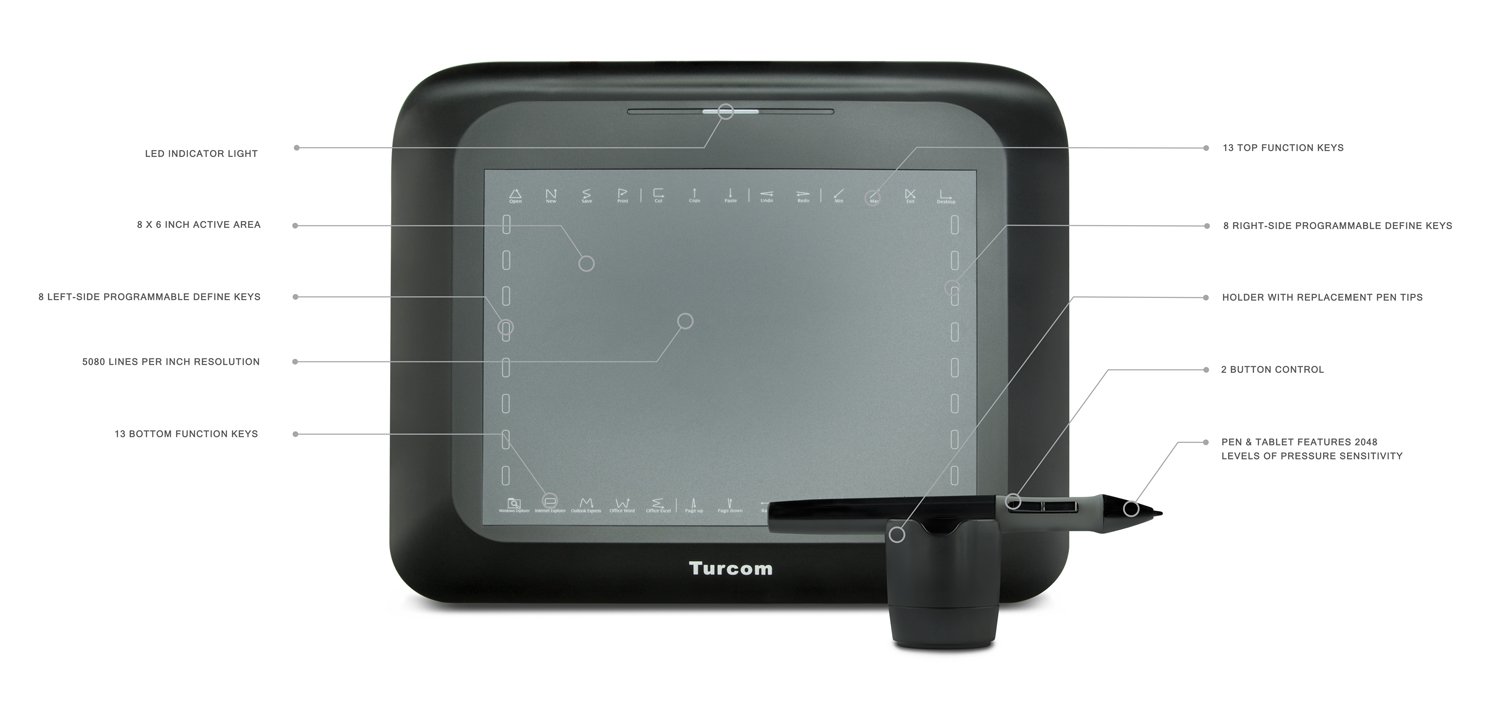


🎨 Elevate your digital canvas—where precision meets passion!
The Turcom TS-6608 is a sleek, refurbished graphic tablet featuring an 8x6 inch active area, 2048 levels of pen pressure sensitivity, and a high 5080 LPI resolution. Designed for both PC and Mac users, it offers plug-and-play ease with customizable hotkeys, making it an ideal choice for aspiring digital artists and professionals seeking precision without breaking the bank.









| ASIN | B00A40U0OC |
| Best Sellers Rank | #609 in Computer Graphics Tablets |
| Brand | Turcom |
| Color | Black |
| Customer Reviews | 4.0 4.0 out of 5 stars (414) |
| Date First Available | November 8, 2012 |
| Is Discontinued By Manufacturer | No |
| Item Dimensions LxWxH | 2 x 16 x 12 inches |
| Item Weight | 2.2 pounds |
| Item model number | TS-6608N |
| Manufacturer | TURCOM |
| Max Screen Resolution | 4000 x 2500 pixels |
| Operating System | Windows |
| Product Dimensions | 2 x 16 x 12 inches |
| Screen Resolution | 5080 |
| Series | TS-6608N |
| Standing screen display size | 9 Inches |
E**A
Super Awesome
First off, kudos to Amazon for shipping super fast. I got it earlier than expected and I started playing with my tablet as soon as I received it. Right out of the box: Tablet is simple, thin, light. Yes, it looks like it would break easily, but I wasn't expecting something that was heavy duty especially for the price I paid. I am a college student on a budget so the price was perfect for me. Anyway, you can either plug and play. I just connected through USB on my MacBook Pro (OS X Mavericks) and it worked with Illustrator right away. Also, I was able to still use the keyboard with the tablet activated. Don't bother reading the manual. Like some reviewers, it's a little confusing and hard to understand. I did read the whole manual, but ended up figuring things out for myself. It was pretty easy. If you want to program the hot keys, you have to install the driver provided in the CD. Just go to the MAC installation option and it's as easy as 1-2-3 from there. Once the driver is installed go to the Applications and it's going to be in a folder titled "PenTabletSetting"... do not look for a special icon or anything because there is none- it's just a file folder. Once you're there go to TabletSetting and you'll see the options. I was able to set the hot keys for my Adobe programs, calculator, office, and internet which are the main things I needed. To set up a hot key for an app, go on the Hot Cell tab, click on the key you want to set up which will turn blue, click Define, choose Application, then Browser, choose the app you want and then Open. You can also disable the left, top, right, and bottom cells. I disabled the right cells since I'm right handed and it would prevent me from opening apps all over the place. You can also modify the drawing area and some pen options in the Scope Tab. I didn't mess with these since I'm happy with the default settings. In the Pressure tab, you can change the sensitivity of the pen and color. I didn't mess with these either. I was happy with how sensitive the pen was and I don't want to press on the tablet hard so I don't break it. To recognize handwriting, you have to go into Systems Preferences and find your Ink program. There you can either choose to ink on any application or choose one of the pen options. I chose to ink on any application since it wasn't comfortable having to hold down any of the buttons to write stuff. It works on my Office program, but you also have to memorize some short cuts. I am trying to figure out how to set up a hot key for the space bar right now. I will update this review in the future.
M**X
A great beginner tablet
I am an artist in learning. This was one of the first tablets I have ever had, and I have to say it works great. I noticed in certain programs, (Photoshop CS6, Flash Pro 11, and Paint) It has MAJOR lag. However, it works great in Paint Tool Sai. When it arrived, It was bigger than I expected. (Which isn't exactly a bad thing!) I decided to wait two or three months before reviewing. Just so I could learn everything about this wonderful equipment. Pros: Lots of pressure sensitivity, nice flow, smooth writing EXT. Driver is easy to install. Cons: Lags in other programs besides SAI, The pen "breaks" in half when using, specifically the screw together part in the middle. Overall, this is a great (and affordable!) Tablet for beginner artists like me EDIT: After almost 6 months with this tablet the pen officially broke. When I first got it, the pen seemed fine. But now its officially broken in half and will not respond. The pen is made from cheaper plastic, I did however order a new pen, that is rechargeable.
R**H
My Review with detailed Guide!
After reading some of the bad reviews on here I was a bit concerned. Thankfully I didn't have any big problems, but there were minor issues and I can definitely see people who aren't "computer savvy" run into many problems with this product. First off just like the reviews said the quick start guide isn't really helpful. It tells you all the basics like connecting your device to the computer (duh). For installing the driver it tells the user to follow the instructions during the installation (make sure you choose TS-6608) but that's about it and I consider it poor documentation since it doesn't mention any potential problems or any alternative places you can download the driver from. Thankfully the installation of the driver was quick and easy and required a simple restart. The problem that most people can get from here is nothing happened after installing the driver. First follow these steps after the restart. *Make sure your tablet is not connected *Plug in USB of the tablet and wait for it to power on *Tap your pen (the one that came with the tablet) on the tablet and make sure it lights up green Assuming you follow all these steps we know your tablet works, an icon should appear at the lower right at your screen (by your clock). You click on that and viola, you can set up your properties in there. If the icon isn't there (like me at first), you may have another driver conflicting with your tablet and it doesn't start automatically, so instead you have to run the program manually. Now the stupid part about that driver installation is that it stored it in an odd place in your computer instead of a normal directory. To run the program manually go to: C:\Windows\SysWOW64 and there should be a file called -> tabcfg.exe (This is the file from the driver!) Make sure you save a copy of this on your desktop to manually run this instead of going into this directory again. The program is really nice and the pen feels great and the pad works they it should. Another thing that made me mad was the pen (spring inside the pin was bent sideways so battery couldn't go in very well). In conclusion this product is definitely worth the $40. But for reasons above I can't give this product a 5 star rating.
P**D
The "pen" requires one AAA pbattery and you'll need to install the program in your computer for a perfect use of this pen. Excellent results! Received it fast and in perfect condition.
C**M
We bought this for our teenage son and he absolutely loves it. He's had no complaints and uses it daily. No problems at all.
R**D
Sensitivity doesn't respond well enough. You have to push hard and numerous times to get it to respond.I also have to do a work around every time my computer shuts down by unplugging it, on start up , and then plugging it in twice when computer is re-booted.To be fair though my Mac is old 2009 and I don't think it "Happy Compatible" with this computer. Maybe a newer Mac would work better?
N**N
This is my first drawing tablet. I bought it for the intention of creating images for animating and visual effects. Included in the box: Tablet, Stylus, 4 replacement nibs for stylus, Pen holder, Driver CD ( huion-tablet. com for up to date drivers) Positives: The tablet has a good response rate, level of accuracy, and a paper-like surface that i enjoy using. The stylus is the size of a large ballpoint pen and is comfortable. Sturdy cord with decent length (5 ft) Negatives: The drivers on the huion website were not clear on which i should download (Download the H610/H580/680/H610N, then run the P608N exe) The stylus buttons on the grips do get pressed by accident once and a while due to their location and small amount of force to be used (Can be remedied by rotating the stylus so you thumb is not on the buttons) Non-detachable cord For ~$40 this tablet is a great product.
A**R
Delivery was great and the product is good, now I just have to learn and get used to using it.
ترست بايلوت
منذ 3 أيام
منذ شهرين