We remain fully operational. Our teams are working around the clock to ensure your deliveries continue safely.

قم بتنزيل التطبيق


معلومات عنا
حقوق الطبع والنشر © 2024 Desertcart Holdings Limited
قم بتنزيل التطبيق


🧵 Preview. Organize. Stitch smarter.
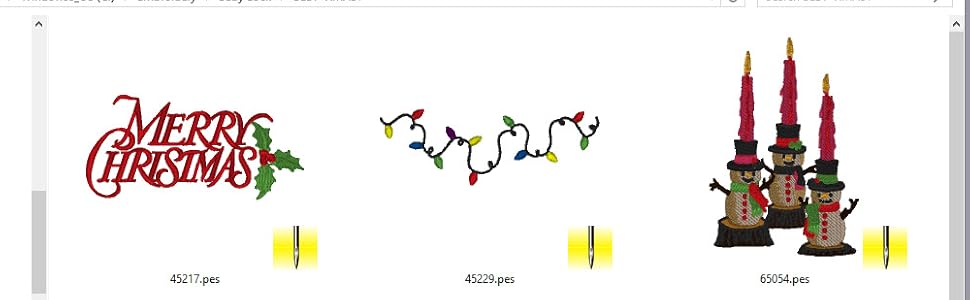
Embrilliance Thumbnailer is a lightweight, cross-platform embroidery software that enhances your design management by generating realistic 3D thumbnails for a wide range of embroidery and vinyl cutting file formats. Compatible with both Mac and PC, it streamlines your workflow with customizable thumbnail preferences and diskless installation options, making it an essential tool for embroidery enthusiasts and professionals alike.


| ASIN | B07FYVB86H |
| Computer Platform | PC and Mac |
| Customer Reviews | 4.4 4.4 out of 5 stars (686) |
| Date First Available | July 5, 2012 |
| Is Discontinued By Manufacturer | No |
| Item Weight | 3.2 ounces |
| Item model number | EMT10 |
| Manufacturer | BriTon Leap |
| Product Dimensions | 7.5 x 5 x 0.13 inches |
| Publication Date | July 26, 2018 |
| Software requirement minimum physical memory | 10 MB |
| Software requirement minimum ram | 1 GB |
| UPC | 810002100017 |
A**I
GREAT PROGRAM
I bought a used iMac from the Goodwill and wanted to use it for my embroidery designs and digitizing. It was not until I completed my hard drive and memory upgrades that I realized my design software (Floriani Total Control Universe) is not Mac compatible. So...I did a little research and decided to purchase Thumbnailer which is wonderful and allows me to see my designs while brousing design files. That was such a game changer that I went all in and also purchased Embrilliance. Both are great products for a fraction of the cost - wish I had bought this software first. I am not a serious digitizer, but the programs work well for all my needs. With Thumbnailer I can quickly find the designs I am looking for without a lot of unnecessary file name changes and sub folder creation. I sort my designs by vendor and I use the iMac file tag feature to attach a category to the file name. I now have a visually searchable design database that really helps me get to the fun part and start stitching.
A**R
WISH I BOUGHT IT SOONER
WORTH EVERY PENNY!!
D**K
Easy to use and install
This is a real time-saver for machine embroidery. So easy to install and use and you can actually see a thumbnail of your file rather than just a file name. Could not function without this program! Looking through hundreds of files without seeing a picture is impossible. Worth every penny. Also have Enthusiast and it is also a great program.
J**I
Great Product!
I was so tired of not being able to see all the embroideries on a disk or stick. Now I can see exactly what is on it and not have to pull up each individually.
A**L
Not good for windows 11
It worked on my windows 10 with no problem. Sadly broke up so on my windows 11 not matter what I do I went thru lots of videos on YouTube and nothing works. It doesn't read my megabundles etsy designs.
P**M
Nice
Very nice
L**G
Once it is installed, much better view of embroidery designs.
A little tricky but not too to install. After installation works as desired. The patterns show up in the Explorer right away. The colors are a little odd but that may be my computer. There is not a lot of detail but that doesn't bother me I know what it should look like. Very happy. Since this little program worked so well I bought the Essentials program and am working through that to see what it does. Seems to be good and documentation is, so far, very good.
A**Z
Perfect Solution to a Big Problem
I would give this software 6 stars if I could. Problem: So many embroidery designs. Brother's PE Design software is super slow to preview. You can create thumbnails with it but then you have to be searching for the design, updating every time you add a design and is a pain to use in general. Solution: Thumbnailer installs and treats embroidery files the same way Windows deals with photos and videos. It automatically creates previews using the same functionality found in the OS. Basically it installs a small software that lets Windows KNOW how to preview embroidery files. It runs from Explorer. Works like previewing photos. Just open the directory where your designs reside and you get a preview. One of the most elegant software solutions I have seen in a while. Note: This software worked with Windows 10, no problems. Support: I had some small issues using the software in Windows standard account (not an admin account). I put in a ticket on a Sunday and on Sunday I got a reply. I got some instructions on an email to resolve (all you need is to do is a) convert standard user to admin b) install software c) revert user to standard user) and I was set. Wife is happy so I'm happy.
ترست بايلوت
منذ أسبوعين
منذ أسبوع