Buy anything from 5,000+ international stores. One checkout price. No surprise fees. Join 2M+ shoppers on Desertcart.
Desertcart purchases this item on your behalf and handles shipping, customs, and support to KUWAIT.
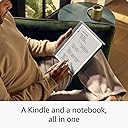
🖋️ Kindle Scribe: Where your ideas meet the future of reading & writing.
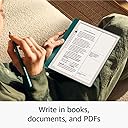
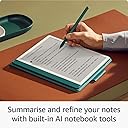
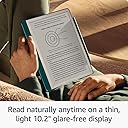
The Amazon Kindle Scribe (16 GB) is a revolutionary 10.2" Paperwhite e-reader with a flush-front display and uniform white borders, paired with an upgraded Premium Pen for natural handwriting. It features built-in AI notebook tools to convert and summarize handwritten notes, supports distraction-free reading and writing with no notifications, and offers up to 12 weeks of battery life. Designed for professionals who demand seamless integration of reading and note-taking, it supports multiple file formats and Wi-Fi connectivity, making it the ultimate digital notebook and e-reader hybrid.
| Display | Amazon’s 10.2” Paperwhite display technology with built-in front light, 300 ppi, optimised font technology, 16-level greyscale. |
| Size | Device: 196 x 230 x 5.7 mm excluding feet Premium Pen: 162 x 8.8 x 8.4 mm |
| On-Device Storage | 16 GB, 32 GB, or 64 GB |
| Weight | Device: 433g device only. Premium Pen: 15g. Actual size and weight may vary by configuration and manufacturing process. |
| Wi-Fi Connectivity | Supports 2.4 GHz and 5.0 GHz networks with support for WEP, WPA, WPA2 and WPA3 security using password authentication or Wi-Fi Protected Setup (WPS). Does not support connecting to ad-hoc (or peer-to-peer) Wi-Fi networks. |
| Content Formats Supported | Kindle Format 8 (AZW3), Kindle (AZW), TXT, PDF, unprotected MOBI, PRC natively; PDF, DOCX, DOC, HTML, EPUB, TXT, RTF, JPEG, GIF, PNG, BMP through conversion; Audible audio format (AAX). Learn more about supported file types for personal documents. |
| Accessibility Features | VoiceView screen reader, available over Bluetooth audio, provides spoken feedback allowing you to navigate your device and read books with text-to-speech (available in English only). Kindle Scribe also includes the ability to have dark mode, adjust font size, font face, line spacing, and margins. Learn more about Accessibility for Kindle. |
| Warranty and Service | Kindle is sold with a limited warranty of one year provided by the manufacturer. If you are a consumer, the limited warranty is in addition to your consumer rights and does not jeopardise these rights in any way. This means you may still have additional rights at law even after the limited warranty has expired (see here for more information on your consumer rights). Use of Kindle is subject to the terms found here. |
| Setup Technology | Amazon Wi-Fi simple setup automatically connects to your home Wi-Fi network. Learn more about Wi-Fi simple setup. |
| System Requirements | None; fully wireless and doesn't require a computer to download content. |
| Included in the Box | Includes wifi-enabled Kindle Scribe, Premium Pen, USB-C charging cable, 5 replacement tips, tip replacement tool, and built-in rechargeable battery. |
| Generation | Kindle Scribe 1st generation - 2024 release |
| Battery Life | For reading, a single charge lasts up to 12 weeks based on a half hour of reading per day, with wireless off and the light setting at 13. For writing, a single charge lasts up to 3 weeks based on a half hour period of writing per day, with wireless off and the light setting at 13. Battery life will vary and may be reduced based on usage and other factors such as Audible audiobook streaming and annotating content. |
| Charge Time | Fully charges in approximately 2.5 hours with a 9 W USB-C power adaptor. |
| Documentation | Learn more about Kindle devices with our Quick Start Guide and Kindle User Guide. |
| Available Color | Tungsten and Metallic Jade |
| Software Updates | This device receives guaranteed software security updates until at least four years after the device is last available for purchase as a new unit on our websites. Learn more about these software security updates. If you already own a Kindle e-reader, visit Manage Your Content and Devices for information specific to your device. |
H**S
Love this product
I have had the scribe for some time now and can honestly say I love it. This gets used every day for notes for work and work documents for reading and also for listening to audiobooks. So why do I use this over my IPad?(which I also love) well ther are few reasons 1. Writing- It feels really good to write on, it gives a pleasant scratchy feel so it isn’t like writing on ice but feels very paper like & I can rest my hand on the pad while writing without it going balmy. 2. Files - I can separate my notebooks, so I have a work day book a scrap pad for making notes while on calls or mapping ideas or presentations, my grandson has his own folder where he can draw and doodle and when I go conferences or specific events I have a note book for these so it dosnt get lost in my work day book, and all this in one device so no more scraps of paper cluttering my desk or car, no loosing notes and most important not carrying different notebooks 3.Kindle & Audible- I use both of these services in my everyday life, it is how I switch off, relax and reset and these gives the use of both, I love the big screen for comics and I am still fascinated by whisper sync the best feature Amazon has ever released, reading of standard books is good the screen is very adaptable so you adjust so you can read without wearing glasses something as a new glasses user appreciates (I can’t get use to wearing them) 4. Documents - this is more for the wider kindle infrastructure but uploading docs is so easy, using the document upload feature is so easy and again this feature means I have access to all my work related docs in one location without carrying 15 brochures in my bag when seeing customers and I never forget the one I need!!! All in all I can’t recommend this product enough and I look forward to the coloursoft version because that will make comic books pop and will be better for my work related brochures.
D**R
Surprised by how much I like it
I tried the original release of the scribe and returned it as I could barely do anything with it. So when they released this upgrade I was tempted to give it a try. My use case is both as a kindle reader, and as a self study student. The device itself feels amazing on the hand, love the light feel and quality build. Only part of the build I hate is the white bezel. I think they were trying to make it look like a note book page, but honestly to me it just looks tacky YMMV. Writing on it is amazing feeling. Not quite writing on paper, but pretty darn close! As a kindle reader it’s a solid experience. It has all the issues I’ve come to expect with the kindle os, issues I wish they’d fix. However one of the biggest issues is the device is underpowered, when doing anything it can take ages to get a response from the ui. Downloading is as hit and miss as it is on any other kindle device, this is especially true of larger files. I have some that are over 1st and kindle has never been able to handle them properly. Sometimes I need to redownload the files multiple times to get them to go from 99% to 100% If you’re only going to be reading normal novels, get a paperwhite. However if you’re going to be reading manga, magazines, comics then you’d may well be better off with this. Now, let’s talk the main use. Writing. A lot of the texts I’m studying can either be directly bought on Kindle or uploaded. So there’s a big advantage there to being able to do it all in the eco system. The inline writing still needs some refinement as it’s a bit clunky and dosent always go where you want it to. However for my usage as self study and essay writing it works a treat. I can make all the notes I want in the text books and then add them to my actual notes. So far after a month of constant use I’ve found it very valuable and worth its investment. However I do still find I go back to my Paperwhite for reading in bed or on the bus. How does it compare to the likes of Remarkable? Honestly I prefer it. I have owned both the Remarkable 2 and Remarkable Pro Color. The problem with both those devices is you can’t get your text books on there. For a corporate setting they may be ok, but for a student I think the Scribe has more versatility. I do hope Amazon work on the OS kinks and bring more functionality to the writing side
S**R
Wasn’t sure if I needed this or not. Honestly still don’t know, but I don’t regret it
I spent ages contemplating whether to purchase this. I own an iPad Pro which I use a lot. I ended up getting this on a prime day sale and have no regrets. On the cons, it does feel like a big tablet, I would love to see a smaller version, but overall it’s fine. The interface is really responsive compared to other kindle devices. USB C charging is great as the rest of my devices have this, so I don’t need any additional cables or chargers. The battery life lasts for many days (unlike my iPad). Where this really fits in well for me (and wins amongst competitor devices) is the kindle integration. I like having my entire kindle library on this. I can get non-fiction books and highlight sections and make notes as I read the book, then just have the summary of my notes at the end. The other ease of use is uploading pdf to a kindle website to have it sent straight to my device. The stylus feels great and responsive to write with. Having compared with friends remarkable ebook readers, I am confident I have made the correct decision for the functionality. It’s not a cheap reader but it’s premium quality, well built, lightweight and has a backlight.
S**N
A fantastic device - I see a bright future
I'm a massive fan of eink devices. I have been using Kindle e-readers since the beginning and have been waiting for the Amazon to release a large screen e-reader since they discontinued the DX. I have been using the Supernote for the last couple of years and wouldn't be without a device like that. It has the Kindle app and does an amazing job as a digital notebook. I am largely comparing the Scribe with that. As an ebook reader... I'll start by saying I love the bigger screen. I've always felt the normal Kindles are a great size for taking with you in a small bag or when hitting the beach / pool side on holiday. However, I much prefer a bigger screen the rest of the time... which is most of the time. As a result I love the Scribe. I love Kindles in general for reading and am fine with the Amazon ecosystem. The reading experience here is everything I love about the Kindle just on a bigger screen. As a notepad... The note taking functionality is definitely still in the early stages of its lifecycle. My Supernote is miles ahead. Having said that, the Supernote didn't release with all its current functionality. I would also argue I don't really use much of what it is capable of. You can add headings that can be navigated. This is really cool and I used it loads at the start. I still mark headings but I can't remember the last time I actually navigated them. Useful but not essential. General navigation is much better on the Supernote as it's much easier to jump between notebooks, especially if you have them in folders. But as is the way of digital notebooks like these, simplicity is a feature. The feature creep on the Supernote means it is now not the simple device it once was. I'm actually enjoying the simplicity of the note taking on the Scribe. Having said all this, I'm only talking about notebooks. I do not and therefore have not written notes on ebooks. The current implementation of inserting blocks into the page and wrapping the text around them seems like a terrible idea. They need to go back to the drawing board on that one. The pen is probably the next thing to discuss. I really like writing on the Scribe. I wish the stylus was more like a real pen, like it is on the Supernote. I want the feel of a pen and I want a cap like a pen. The eraser on the back end is really good and feels great to use. There is just enough resistance to almost feel like a pencil eraser. I also wish it didn't need replacement nibs. The Supernote uses ceramic tips and a special screen protector on the device. Not the end of the world to replace the tips but I'd rather not have consumables. All in all this is a very good, if simple, note taking device. I really like it and will happily continue to use it. It is my favorite Kindle for reading books. Having both in one device is really cool. There is still lots of room for software updates to improve things, and I expect Amazon are focusing on the notebook side as it is the USP for the Scribe.
K**N
Really enjoying this as a productivity tool
I'd been going back and forward on an e-ink tablet for a while now, but couldn't make up my mind about which one suited my needs best. It's hard because until I have an e-ink tablet, I won't know all the ways that I might utilise it. I'd been comparing a Boox Note Air 4, reMarkable 2, and the Kindle Scribe. What made my mind up was the ease at which I'd be able to read my Kindle library on the scribe, take notes in books that I am reading, and annotate PDFs that I send to the device. In the end I realised that the other options on the market were wither way too overpowered for my needs (Boox) or were missing critical features I didn't want to live without (reMarkable has no backlight). Pros: Lighter than I imagined. Wouldn't want to read a book for a long time holding it, but it's perfectly manageable for reading. Backlight is very clear, auto adjusts and can be set from cool to warm or something in between. The screen is crisp and clear. Even very close to it, the writing looks like actual pen - with little to no pixelation visible. From a standard writing distance, it's indistinguisable. Writing experience is really good. Screen is lightly textured so it's not as slick or 'slide-y' as using a stylus on a tablet or phone screen. There's a pleasant tactile experience to writing, and unlike a stylus on a tablet, I find my writing style being a little slower - which in turn makes it far more readable. There are plenty of writing options; pen, fountain pen, pencil, felt tip, all with different tip sizes to adjust to what you want. It remembers the size setting for each writing implement separately, so if you like pencil at smallest, but pen at medium, it remembers that. I love the pen and the eraser tip. The quick function button is great too (have mine set to highlighter). Summarisation tool is really good, fairly accurate and useful for compressing several pages of my writing into a single page that's more legible (which in turn I can then further write/doodle on). A standard undo option is great for removing an errant mark that the eraser would have trouble removing (without removing something you want to keep, I mean). Battery life is pretty decent. Getting about a week and a half's use out of it before it needs a charge. Web browser is fast and decent. Viewing news websites feels a little like reading a newspaper. Cons: Document organisation. You can create folders and folders within folders, and so on - which is great for creating structure, but that's about it. You can't create shortcuts to notebooks that are several folders down from your current poistion. When you send PDFs or Word DOCs to the Kindle, they appear in your book library like any other book. You can add them to collections to keep them tidier, but that's about it. They'll always be littered among your books in your library. Summarisation can only summarise writing. It can't tidy up diagrams or flowcharts you've created - even if they have text in them. That's not a unique problem with the Scribe. Most other similar devices struggle to understand shapes beyond square, triangle, circle. It also only offers adding the summary page at the very start or very end, with no option to select any other position (although you can immediately open the doc overview and move it whereever you want). Copying across notebooks. You just can't. You can move pages around within a notebook, or select sections with the lasso and move them around with a cut/copy/paste. But you cannot move anything from one notebook to another. It doesn't remember (and has no option to enable this) the last used writing tool in different notebooks. If I switch from note taking with a pen, and go to a book where I've been drawing with a pencil, the pen tool is still selected. I admit this is a minor annoyance. You can't set the quick button on the pen to the eraser. I know you're thinking "Why would you need to, there's one on the other end" but it's a wide tip. Using the eraser tool from the menu and the fine tip of the pen can erase very fine detail that the "rubber" end can't. Again - minor annoyance, easily rectified by using the menu to change tool. Neither Pro nor Con: Not sure if this is a pro or a con, it depends on how you view it I suppose. It's a rather bare bones device in terms of what they've added above what a standard Kindle has. That means no distractions, which is great, but also means it won't have features you might find useful. reMarkable has more writing tools for example, and the Boox has the entire Android store available to add new apps as needed. This one is something they all suffer from: It's hard to draw straight lines. On paper you can use the natural resistance of the material to help. There isn't that here. With a bit of proactise, you can put reasonable boxes around key text you want to highlight.
T**Y
Extremely Disappointing – Not Reliable for Study or Note-Taking not worth the money
Definitely not worth the money Stuck on the same page for over 19hours now I bought this device hoping it would be a reliable tool for reading and taking handwritten notes for my studies. Unfortunately, my experience has been extremely frustrating. The device freezes at times and recently became stuck on the restart screen and would not turn on properly, even after charging it for hours and attempting the recommended resets. Because of this, I cannot access any of the study materials and notes that were saved on it. What makes the situation even worse is that I am currently travelling and cannot receive a replacement in time. This means I have lost access to important information I needed while preparing for my exams. I purchased this specifically to organise and rely on my study notes, so it is very disappointing to discover that it is not dependable. For a device that is promoted as a digital notebook, it is concerning that it can freeze or suddenly stop working, leaving you unable to access your own notes. Based on my experience, this is not something I would recommend relying on for important study or work. I expected much better reliability.
J**S
No where near the hype.
I have been researching digital notepads for some time. It was between the scribe and the Remarkable pro. I opted for the scribe due to the balance just tipping with no subscription required, kindle and compatability with Microsoft. I would have to say the quality of the device felt good. I do not think the pen nib will last though. After testing several various scenarios of note taking, editing word docs and books overall the experience is really poor. When using a word doc, all you can really do is highlight. I tried ticking boxes on a questionnaire but all the scribe did was place these on separate pages. The conversions of writing to text is pointless as it wasn't clever enough to utilise the lines of the template, so I spent time editing it manually. Overall it is just a large kindle with the ability to draw/write on books. I have returned it and will try the Remarkable to see if this is any better. Or maybe digital notebooks are just not there yet. I have given it two stars as the quality of build and the kindle functions are good but overall not worth the price tag.
D**S
EXACTLY what I’ve been looking for after 3 other rivals I’ve not got on with…
Let me tell you what I like about the KS (1) Screen clarity and contrast (2) Screen clarity and contrast (3) Screen clarity and contrast (and front light) (4) Writing note experience - pen is nice in weight, lag imperceptible, Smart Button and erasers work well. I don’t ever find myself pressing the smart button accidentally and I have big hands - perfectly placed with just the right pressure sensitivity (5) Having my Kindle library for study / serious books. I think when I read for leisure the Paperwhite is best (6) The pen menu in note taking is minimalist and fits with the distraction free ethos those of us who have epaper devices are after. I have had 3 others now, all returned and all disappointed. I can’t tell you their makes but one from the most famous in this space (liked; minimalism and file management, didn’t like no front light and 227DPI a bit scratchy - you can’t unsee the pixels - yes, my OCD and your MMV) and the others poor screen contrast too black or colour on grey. KS is really easy on the eyes. These devices are not a bundle of Pros and Cons of which screen quality is one alongside software, eco system, etc. Screen is all that matters first. If it passes that, go to step 2. If not the rest doesn’t matter! (7) I really like the design. slim and good weight. Understated and elegant. (8) Kindles own sleeve (I got the fabric effect one) is really nice to hold and the choice of a top rather than side hinge works great and well done Amazon for the pen loop. Magnet is great but in a bag it would fall off. (9) How they manage screen refresh - whole screen or around the eraser … they’ve got this right where avery other one I’ve tried has ghosting problems What is not so good? (1) Switching between reading library and notebooks - too many steps. Off screen swipe up or two finger swipe to a switcher could be used? (2) When deleting an active canvas (or anything) delete? Yes. Are you sure you want to delete? Yes. Don’t put in the second step. I told the screen I wanted to delete. Done. (3) It froze after one active canvas and needed a re-boot which isn’t fast (about a minute?) (4) a split screen option to write notes beside studying book in library (in landscape) (5) When you highlight text in a book on an iOS device kindle app one option is ‘copy’ the quote. Can’t do that here. Why not? Be supper cool to be able to do that and paste into a note you’re working on…. Notice something? Every limitation I’ve got is software and every ‘compliment’ is hardware. If the former can be changed with updates, and of course it could - can’t wait for the promised big margin thing for notes which I would prefer to active canvas (a rival has this and its a good fix) - the balance shifts even further to Pros over Cons. But if you but something with a dull screen, or no front light if you need it, no software update will sort that. Which brings me to Amazon’s marketing / PR failure, and a plea to think carefully, dear would be purchaser. If you look at the reviews of the KS 2022 almost all 5 stars. And of the KS 2024 almost all low stars, and many one. Why? everyone loved the first because it never claimed to offer AI. In the second better hardware and software, failed only because it didn’t offer the AI in non USA markets. Over promise, under deliver. If you can see past this, you will love the KS 2024. If AI comes to the UK great!! But for me without it, it is perfect for what I want it to be and do. I honestly can’t believe any AI could manage my handwriting anyway. I’m really impressed. ———————————- Just another thought (Amazon!?) the orientation self sorts for portrait either way after inverting the device. But to set to landscape takes 5 steps/taps. I switch between them a lot for different tasks. Couldn’t this be automatic with an orientation lock to prevent of reading lying down?? Thanks Amazon!
Trustpilot
1 month ago
3 weeks ago