We remain fully operational. Our teams are working around the clock to ensure your deliveries continue safely.

قم بتنزيل التطبيق


معلومات عنا
حقوق الطبع والنشر © 2024 Desertcart Holdings Limited
قم بتنزيل التطبيق



Buy anything from 5,000+ international stores. One checkout price. No surprise fees. Join 2M+ shoppers on Desertcart.
Desertcart purchases this item on your behalf and handles shipping, customs, and support to KUWAIT.
🚗 Upgrade your Mazda, upgrade your drive — smarter, safer, and seriously connected!
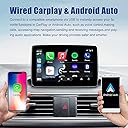
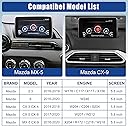
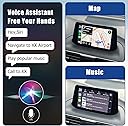
The Mazda Carplay and Android Auto Retrofit Kit (TK78-66-9U0C) is a 2024 upgraded OEM hub designed to seamlessly integrate Apple CarPlay and Android Auto into Mazda models from 2015-2020. It offers ultra-fast iPhone connectivity, supports Mazda SD card navigation, and delivers 9-12W device charging. Compatible with multiple Mazda models including CX-3, CX-5, CX-9, Mazda 2/3/6, and MX-5, it preserves original car controls for safer driving and comes with 24 months of warranty and professional support.


| ASIN | B0BPYD7JR9 |
| Best Sellers Rank | #100 in Car Audio & Video Input Adapters #881 in Car Electronics |
| Brand | HMYC |
| Color | Wired Carplay +Wired Android Auto |
| Compatible Devices | Mazda CX-3 All models 2016 to 2019 CX-5 All models 2016 to 2017 CX-9 All models 2016 to 2020 Mazda3 4-Door All models 2014 to 2018 Mazda3 5-Door All models 2014 to 2018 Mazda6 All models 2016 to 2020 MX-5 Miata Club / Grand Touring 2016 to 2020 MX-5 Miata RF Sport 2018 to 2019 MX-5 Miata Sport 2018 to 2020 Compatible Devices Mazda CX-3 All models 2016 to 2019 CX-5 All models 2016 to 2017 CX-9 All models 2016 to 2020 Mazda3 4-Door All models 2014 to 2018 Mazda3 5-Door All models 2014 to 2018 Mazda6 All models 2016 to 2020 MX-5 Miata Club / Grand Touring 2016 to 2020 MX-5 Miata RF Sport 2018 to 2019 MX-5 Miata Sport 2018 to 2020 See more |
| Connector Type | Micro USB, Mini USB, USB Type A, USB Type C |
| Customer Reviews | 4.3 out of 5 stars 674 Reviews |
| Finish | Matte |
| Item Dimensions | 3.4 x 2.6 x 1.5 inches |
| Item Weight | 5 Ounces |
| Item dimensions L x W x H | 3.4 x 2.6 x 1.5 inches |
| Manufacturer | huazhi technology |
| Mfr Part Number | TK78-66-9U0C |
| Model Number | TK78-66-9U0C |
| Number of Items | 1 |
| Number of Ports | 3 |
| Package Quantity | 1 |
| Power Plug Type | No Plug |
| Smart Home Compatibility | Not Smart Home Compatible |
| Specific Uses For Product | Mazda CX-3, CX-5, CX-9, Mazda 2/3/6, MX-5 |
| UPC | 719081242581 |
| Unit Count | 1.0 Count |
| Warranty Description | 24 month warranty |
| Warranty Type | 24-months warranty |
D**K
Perfect OEM-Quality Retrofit
Works flawlessly. Integrates seamlessly with the factory head unit like an original Mazda part. No lag, perfect fit, and easy installation. Highly recommend for adding CarPlay/Android Auto to your Mazda3.
B**N
Easy to install with videos
I was a little nervous about attempting to install this, but the process went smoothly. There are many tutorials on Youtube to guide you. The hardest part was removing the old unit, which is held in place by clips that are difficult to manipulate due to the constricted space. I would recommend using a butter knife or flathead screwdriver to hold the clips down. I would also buy a trim remover tool, as I put a scratch on my dashboard. Once installed, the unit works perfectly. There is some lag once you start the car, but this is part of the software design and not a huge issue. Also, sometimes CarPlay will cut out and stop working, but I suspect this is a phone issue and not a problem with the unit.
R**W
Works great
This gave me carplay functionality in my 2015 Mazda 3 i GT. Installation will be basically identical with any of these, which is to say not too difficult. I've had it a few weeks now and have no complaints that could be the fault of this unit. Some installation advice if you get this: Don't disregard the foam pads you get. I noticed a bit of rattling near the shifter, even though it was zip-tied to other wires, and had to remove that part of the trim again to use the foam on them. Spend a minute or two flattening out one of the cables, just ~2 feet, or alternatively use a different cable all together. Feeding the wire from the nav unit down to the footwell genuinely was the hardest part. You can tie the other cable to the flat one once you've routed it through and pull it down further. Take your time, get an $8 trim removal kit, and enjoy saving a ton of money.
S**N
Good upgrade to my 2017 CX-5
Worked great in my 2017 Mazda CX-5 (after upgrading the firmware). Instructions do not come with it so I had to look up a YouTube video but after about 2 hours I was able to connect my Android phone to the heads up display. I wish the wires were a little longer (In the youtube video the guy had a lot of extra wire; this kit was exactly the right length) and that more foam tape was included (I had to use some extra foam tape I had lying around) but overall a good purchase for my car.
S**C
Great! Be carefull while installing, i scratched my dash
Great!
G**L
Awesome
Works great, can confirm that I have installed two of these already on a Mazda 3 and a Mazda 6. No issues whatsoever with either install. I just wish it was easier to find install instructions or videos for specific car models.
D**R
Works great when it works, but
I installed the USB hub in my 2017 Mazda CX-5,and it initially worked great with my Android phone (Galaxy Note 20 Ultra}. I used Google Maps for navigation and Spotify for music/podcasts, and the hub worked very well with my phone. However, the SD card slot did not work at all - the mechanism to retain the SD card was broken, so the card would go in too far. I contacted the seller, and they sent me a replacement hub. While I was waiting for the replacement, the USB hub I had installed began randomly shutting down and/or restarting. Sometimes it would go an hour without issue, sometimes only a few minutes. It would either restart or shut down completely and not start up again. installing the replacement hub did not solve the issue. This unit would not start at all, never connecting to my phone, or even providing charging power to either USB port. The SD card slot seemed to hold the card correctly, but it was not recognized by the Mazda navigation system. Thinking it could be an issue with the cables, I took apart the dash and connected the cables that came with the replacement until to the head unit and USB hub. No change. The seller did refund my money, but I would not recommend this USB hub.
E**0
Works great, will change review if issues.
Awesome, easy to install with trim removal tools and a long drill/wrench for that one part in the head unit. Good value imo since places charge so much to do this upgrade. I have no idea why your bluetooth has to be on for it to operate as a cord but it works great, looks good on the head unit. It did invalidate my navigation license for some reason, I'll probably try to get that fixed at Mazda but not a huge downside for me. Car: 2015 Mazda3 grand touring i
ترست بايلوت
منذ 3 أسابيع
منذ شهرين