Buy anything from 5,000+ international stores. One checkout price. No surprise fees. Join 2M+ shoppers on Desertcart.
Desertcart purchases this item on your behalf and handles shipping, customs, and support to KUWAIT.
✂️ Cut smarter, faster, and wireless—Romeo’s got your creative edge covered!
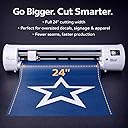
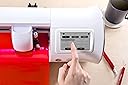
The Siser Romeo High-Definition Cutter is a professional-grade 24-inch cutting machine designed for vinyl, paper, and more. Featuring WiFi compatibility, a mat-free cutting option, and bundled Leonardo Design Studio software, it delivers precision cuts up to 60% faster than traditional desktop cutters. With a sleek touchscreen interface and advanced features like adjustable rollers and a registration camera, Romeo empowers both beginners and pros to elevate their crafting and production efficiency.


| ASIN | B0BNLP9PQQ |
| Active Surface Area | 285.5 square inches |
| Best Sellers Rank | #59,720 in Office Products ( See Top 100 in Office Products ) #232 in Paper Trimmers & Cutting Mats |
| Brand Name | SISER |
| Color | White |
| Customer Reviews | 4.5 4.5 out of 5 stars (56) |
| Included Components | Leonardo Design Studio Software, Roll Holder Accessory, 45° Blade, 60° Blade |
| Item Dimensions D x W x H | 18.4D x 92.7W x 19.7H centimeters |
| Item Weight | 10 Kilograms |
| Manufacturer | Siser |
| Material Type | Vinyl |
| Model | SNAHDCR24 |
| Operation Mode | Automatic |
| Part Number | SNAHDCR24 |
| Print media | Card stock |
| UPC | 810078551140 |
E**M
Since I got my Siser Romeo, I stopped using my Cricut Maker 3. So much that I put it back in it's box, and might sell it. That being said, I'm not criticizing the Maker 3 as it is a good machine for beginners, people that are not too tech savvy or people that want an easy machine. At the opposite, the Siser Romeo requires a much bigger learning curve given that the user controls all settings (force, speed, length of the blade). But once you know how to make it work, it is an incredible machine.
O**Z
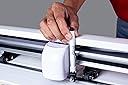
Es increíble lo fácil de usar que es. Tengo años usando Silhouette y me adapté muy fácil a este cortador. Es muy rápido y silencioso. Se siente bastante sólido y robusto. La navaja es fácil de poner y ajustar. Si quieres subir de nivel para cortar directamente vinil de 24" te recomiendo Romeo
Z**S
I have bought two of these, the first one malfunctioned and the seller took excellent care of me in resolving that problem (Happy Crafters has a lifelong fan as a result!). The machine itself is frankly amazing, especially compared to my Maker 3 and Cameo 4. There are things I can do on this machine that I just could not on the others, mostly comes down to accuracy, but Romeo is: 1) Much, much faster than both - try 1 pass die-cut instead of 3 at a speed about twice as fast as Maker 3 2) Much quieter than both, but especially the Cameo 4 3) So accurate that I can cut a .05" 'thumbnail peel' edge on the stickers I make without adding extra time doing the second 'kiss' cut (in the same job!) 4) The software hasn't had an update in the couple weeks I've had the machine. I can't say that when it does finally update that it won't break the cutter, but I can imagine that's a problem unique to Cricut software iykyk 5) Built in Wifi - if you have trouble getting it to connect, it doesn't like WPA3 security at all. I couldn't find this documented anywhere, but changing to WPA/WPA2 connected on the first try All of these machines have their quirks, and their accompanying software varies. Leonardo Design Studio is Siser's. It seems less capable at first, but I quickly found out that it was perfectly suited for everything I need, with several features I haven't tried yet. I will say that I DO NOT like that Leonardo Pro is a subscription instead of a one-time fee, but I also have decided that I don't need Pro at this time anyway. It came with a trial and it saved some time being able to tile your designs and have them fill the available page space, but copy/paste is free, for example. One of the better parts of Leonardo is that it is able to use more surface area of my material, I'm able to get an extra sticker per sheet because of this, so it's saving money right out of the box! If you're serious about your cuts, your time, your business, this is your machine. It's definitely an investment, but one that's well worth it, in my opinion. The feeling of quality my stickers now have was worth the cost of admission alone. I was manually slitting the back of my stickers for 'easy peel' before, this takes it to a new level of professionalism and quality. The biggest gripe I would say I have with this, its features aren't well documented, including Leonardo. I was able to find everything I needed by searching and mostly great folks on Reddit. If you have used Design Space or Silhouette Studio, most of what you can do in Leo is old hat (except they call offsets 'contours'). It has a literal camera for alignment, that works very well. Place the blade near the line, but directly above the triangle (you'll see). Tip: when it can't find the first registration mark, it's looking for the bottom left corner of the 'L' page mark. Adjust the crosshair on the screen to this corner and say OK, it should then find the other three and continue on its way. I do glossy stickers with a clear overlay and it's been able to register successfully every time (try that with the Cameo 4). In my opinion, this is going from hobby grade cutters to (entry-mid level) professional without getting into the $1000s. I love it and can't recommend it enough!
J**E
So far so good. Within 10 minutes I had it set up and already doing my first design. I was kind of worried that it would not take regular vinyl, but it does. I can't wait to start doing t-shirts and I do recommend this product. Plus, I can't wait to try out the stickers.
I**A
Muy buen producto, me gustó mucho. Nada que ver con mi cameo o mi primer plotter chino respecto a calidad de materiales y rigides. Sobre los cortes: buena calidad en letras pequeñas, en print and cut tuve algunos problemas pero se solucionó con la calibración de la camara; la camara no tuvo ningún problema con el vinil tornasol, un problema que tengo con mi cameo 4. Solo que tengo unos peros: en los rodillos; ningun rodillo se puede inavilitar o modificar la precion, solo tiene dos modos de preción. También es muy sencillo el programa Leonardo a comparación de otros; es muy austero. Mi otro pero es que no corto una parte de letra, no se si fue mi diseño o la máquina. Me hacen falta más pruebas pero para empezar es una muy buena máquina en verdad se las recomiendo.
Trustpilot
1 month ago
1 month ago