Buy anything from 5,000+ international stores. One checkout price. No surprise fees. Join 2M+ shoppers on Desertcart.
Desertcart purchases this item on your behalf and handles shipping, customs, and support to KUWAIT.
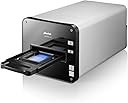
🎥 Elevate your analog archive with precision and speed — don’t let your memories fade!
The Plustek OpticFilm 120 is a professional-grade film scanner designed for photographers and enthusiasts seeking ultra-high resolution scans up to 5300 dpi optical and 10,600 dpi input. Featuring motorised automatic film transport and built-in infrared dust and scratch detection, it supports a wide range of film formats from 35mm to 120/220mm. Bundled with SilverFast Ai Studio 8 software, it offers advanced color calibration, multi-exposure HDR scanning, and dust removal, making it a top choice for digitizing film with exceptional image quality and workflow efficiency.
| ASIN | B0094YCP3I |
| Best Sellers Rank | 23,187 in Computers & Accessories ( See Top 100 in Computers & Accessories ) 26 in Film Scanners |
| Brand | Plustek |
| Brand Name | Plustek |
| Color Depth | 48 NA |
| Connectivity technology | USB |
| Customer Reviews | 3.7 out of 5 stars 7 Reviews |
| Global Trade Identification Number | 04042485365645 |
| Greyscale Depth | 281474976710656 NA |
| Item Dimensions D x W x H | 57D x 44W x 39H centimetres |
| Item Weight | 5700 Grams |
| Light Source Type | LED |
| Manufacturer | Plustek |
| Media Type | Photo, Slide |
| Minimum System Requirements | Windows 7 |
| Model Name | Plustek OpticFilm |
| Model name | Plustek OpticFilm |
| Network Connectivity Technology | USB |
| Optical Sensor Technology | CCD |
| Paper Size | A5 |
| Product dimensions | 57D x 44W x 39H centimetres |
| Resolution | 5300 |
| Scanner Type | Film, Photo |
| Scanner type | Film, Photo |
| Unit Count | 1.0 Count |
T**S
Poor customer service
This is an expensive scanner. Over all it does give a good scan with sharp result (if you technical enough). My problem is not so much with the scanner but with the customer service which is none existence. You might want to check out first with the Plustek website and look up service & help page. You will find that there is no UK service phone number to call, only for sale (which always on a answer machine). You have to fill out their questionnaire and wait for them to contact you, which for me it never came. Three times I have problems with it and waited for some help, none came. I finally figured it out myself but to be honest after paying out this much you would want a little more security and re-assurance. So my message is that if you buy any of Plustek goods, expect to be your own engineer too. And a message for Plustek, you need to do much better then this.
J**3
Scanner 3 Stars & Software Zero Stars
This is a review of the OpticFilm 120 Scanner and the bundled SilverFast Software. We photographers know that these two things have to work together, rather like knowing that photography is one part science and one part art. Since I have five stars to work with, I’m going to allocate a potential three stars to the hardware and two stars to the software. The reason is alternative high-quality scanners are hard to come by, but alternative equally-effective software is readily available. First let’s consider the hardware. The OpticFilm 120 is well built and has impressively sturdy film carriers. If fact, this is the first scanner since the Nikon units that does not look like a toy. If I compare the OpticFilm 120 to either the Minolta Elite 5400 or the OpticFilm 7600i, the OpticFilm 120 is better. The Minolta Elite 5400 did not have an infrared channel, thus could not remove dust spots as effectively as the OpticFilm 120. The OpticFilm 7600i claimed a lot of resolution, but its lens was not nearly as good as the lens in the OpticFilm 120. As Nikon proved with its scanners and as we photographers know, the lens makes or breaks the image. If I scan the same slide with all three of my scanners, the OpticFilm 120 produces the best image because it has higher real resolution and more acutance by way of edge contrast. Although the OpticFilm is called a Flagship scanner and carries a high price, it is not yet “world class”, but could be when Plustek starts using “ED” glass elements in its lens. However, to recognize that the OpticFilm 120 is the best scanner currently available that can be used with a 64 bit operating system, I will give it three out of three stars. Now, let’s consider the software. The bundled SilverFast Ai Studio 8 software makes effective use of the infrared channel and removes most of the inevitable dust softs. The software also uses an HDR like technique that is strangely labeled Multiple Exposure to extract more information from the shadow areas. We photographers are familiar with how most of the available digital tonal information is allocated to the highlights and how little digital tonal information is allocated to the shadows. We are also familiar with using HDR techniques for some scenes to either bring down highlights that are too bright or open up shadows that are too dark. Thus, in an HDR like way, to compensate for the lack of shadow tonal information the software combines one scan for the mid-tones and highlights with a second “over exposed” scan for shadow information. This produces scans with sufficient tonal information for further image refinement. The bundled SilverFast software also has a lot of automatic correction and refinement options that could be applied to your scans. Ten years ago, these refinements would have been impressive and even necessary, because we didn’t have the impressively powerful Camera Raw or Lightroom software for endless post processing options. Today, these SilverFast correction and refinement “bells-and-whistles” could be the primrose path to limiting your post processing options. We photographers are familiar with both the benefits of shooting in Raw and the limitations of shooting Jpegs. Analogously, applying the SilverFast correction and refinement options to your scans is like shooting Jpegs, because whatever refinement options you now apply to your digital scans can neither be undone nor adjusted at some later time. The software implies through its workflow that you need for such “bells-and-whistles.” In reality, such “bells-and-whistles” are not only a misdirection of our efforts but may turn out to be our worst enemy. As I tell my students, we should expect and allow for the possibility that we will become smarter, see things in our images that we just had not seen before, and want to use not-yet-available or newly improved post processing software. Analogous to shooting in Raw and to allow for such future possibility, I would prefer that SilverFast software engineers concentrate their efforts on providing a neutral scan with a high Dmax. For this infraction, I will subtract one of the potential two stars. In the world of digital photography, we photographers are familiar with the necessity of calibrating and profiling each and every device that we use. We would not even think about making color-critical decisions for our images on a monitor that is not calibrated and profiled. Thus, for the film that we want to scan we understand the necessity of calibrating the scanner with an IT8 standard based on that film. In the days of shooting film, I and every other professional photographer that I knew used Fuji Velvia ISO 50 slide film. Almost every publishing photographer or camera-club competition level photographer also used Fuji Velvia ISO 50 slide film. Incomprehensibly, SilverFast does not offer an IT8 calibration standard for Fuji Velvia ISO 50 slide film. This omission is like thinking that the Berlin Wall had no importance in Germany, Baroque music was not important in Italy, the Louvre has no importance in Paris, or the Smithsonian has no importance in Washington DC. Moreover, to offer IT8 calibration standards for Kodachrome and Fuji Provia with the implication that these calibration standards are sufficient for all our needs is both disingenuous and a disservice to the photographic community. It is true that IT8 calibration standards are available from other sources, notably Coloraid.de. However, SilverFast seems to have gone out of its way to make it difficult to use such essential (but non-SilverFast) calibration standards by causing the software to ignore the reference file for IT8 standards without a barcode. Although a SilverFast representative says there currently is a known issue with getting their software to recognize such reference files and that a fix will be in the next version, the overall impression is that SilverFast wants to discourage use of non-SilverFast IT8 standards presumably because it wants to have a competitive market advantage. By any logic that you care to apply, until SilverFast either offers to sell a Fuji Velvia ISO 50 IT8 calibration standard or makes it easy to use such calibration standards from other vendors, they run the risk of changing a very expensive Flagship scanner into something that is of little use and has the value of a paper weight. To borrow a line from Sir Walter Raliegh, this infraction is “In folly ripe, in reason rotten.” For this infraction, I will subtract one more of the potential two stars.
W**L
A waste of money and time
This scanner hasn't worked from day one. Amazon won't except a return and the manufacturer, Plustek, despite the unit being under warranty and registered make no effort to return my calls or emails, to replace, repair, return the unit. It's an expensive piece of kit, which you would expect to work. I can't voice my disappointment enough. Do yourself a favour and avoid this product.
A**R
One Star
It will not work with Windows 10 http://www.amazon.co.uk/Plustek-OpticFilm-120-Negative-Scanner/dp/B0094YCP3I?ie=UTF8&ref_=cm_cr_ryp_prd_ttl_sol_0
ترست بايلوت
منذ 5 أيام
منذ شهر