We remain fully operational. Our teams are working around the clock to ensure your deliveries continue safely.

قم بتنزيل التطبيق


معلومات عنا
حقوق الطبع والنشر © 2024 Desertcart Holdings Limited
قم بتنزيل التطبيق
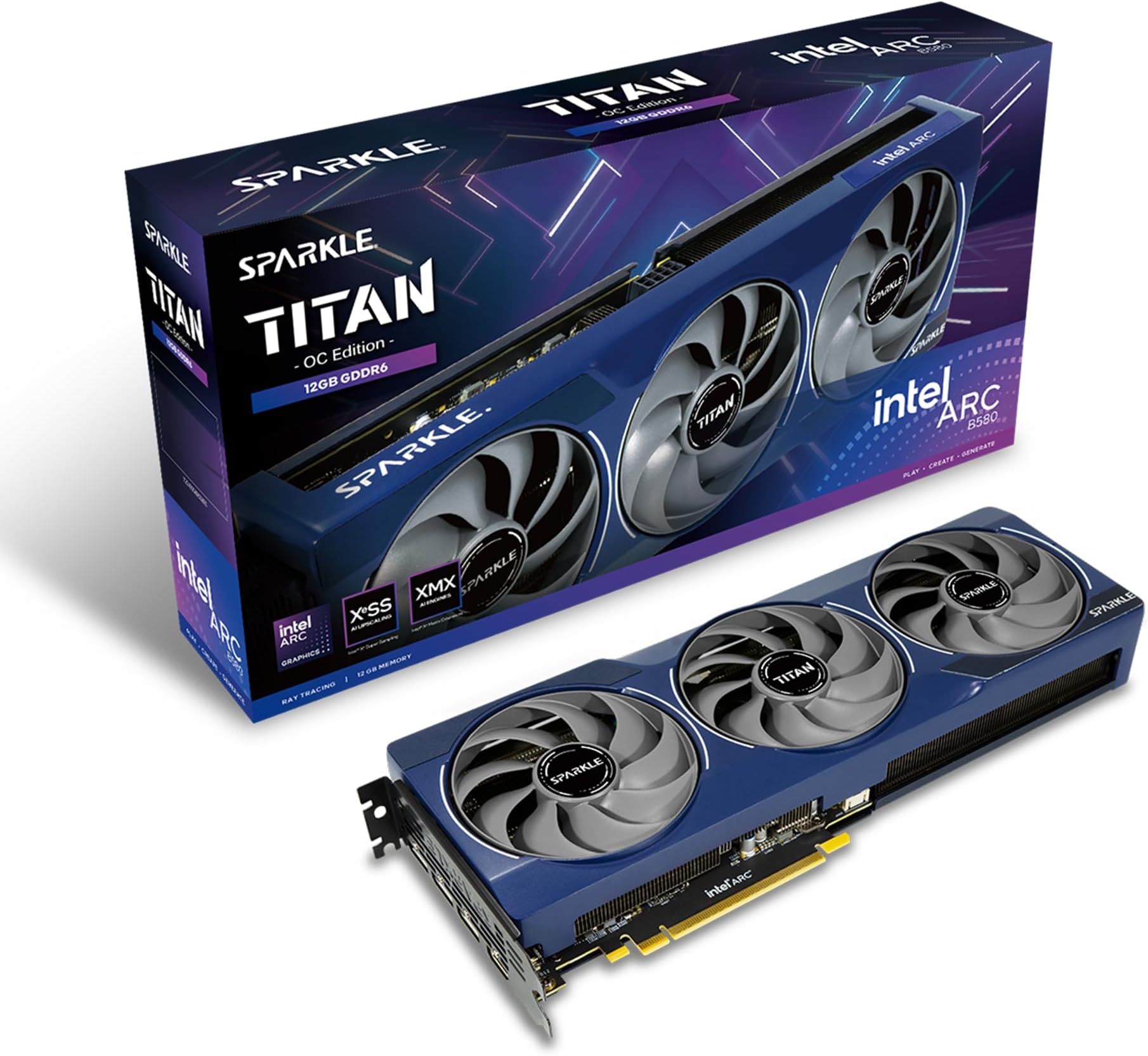
Buy anything from 5,000+ international stores. One checkout price. No surprise fees. Join 2M+ shoppers on Desertcart.
Desertcart purchases this item on your behalf and handles shipping, customs, and support to KUWAIT.
⚡ Power your play, cool your style.
The Sparkle Intel Arc B580 Titan OC is a high-performance graphics card featuring a 2760MHz overclocked GPU, 12GB of fast GDDR6 memory, and advanced TORN Cooling 2.0 with triple axial fans. Designed for 4K gaming and demanding workloads, it offers premium build quality with a metal backplate, customizable blue breathing light, and versatile connectivity including HDMI 2.1 and DisplayPort 2.1. Ideal for gamers and professionals seeking RTX 3060 Ti-level performance with future-ready features and reliable 3-year warranty.


| ASIN | B0DNMH4KQM |
| Best Sellers Rank | #20 in Computer Graphics Cards |
| Brand | Sparkle Computer |
| Built-In Media | Graphics card |
| Compatible Devices | Desktop |
| Customer Reviews | 4.4 4.4 out of 5 stars (169) |
| Display Resolution Maximum | 3840x2160 |
| GPU Clock Speed | 2760 MHz |
| Graphics Card Interface | PCI-Express x8 |
| Graphics Card Ram | 12 GB |
| Graphics Coprocessor | Intel Arc B580 |
| Graphics Description | Arc B580 |
| Graphics Ram Type | GDDR6 |
| Item Dimensions L x W | 12.4"L x 4.61"W |
| Item Weight | 954 Grams |
| Manufacturer | Sparkle Computer |
| Memory Clock Speed | 19 GHz |
| Model Name | SB580T-12GOC |
| Number of Fans | 3 |
| Video Output Interface | 1x HDMI 2.1, 3x DisplayPort 2.1 |
| Video Processor | Intel |
| Warranty Description | 3 Year Limited |
L**A
Buy it soon, it's only getting more expensive
This card performs well. It is really RTX 3060 Ti performance level which is very nice for it's price. My 3060Ti was $400 new. This one at it's price new is great and drivers are getting better with each release.
O**O
Good GPU
Plays all my games well
Y**O
Powerhouse
This runs battlefield 6 at high graphics and frame rates. It also works incredibly well in my Plex rig for transcoding!
T**N
Don't believe the 1440p hype- 1080 is still king with this card
This card is a nice mid-high card. I upgraded from the 3060 oc and it's a nice step up and not enough to need a larger power block. The 2k gaming is great, but 1080p is a great alternative and the card does a great job of keeping up with AAA Games with high settings. The 1440p is good, but not as advertised. ( No throttling) I need to drop the quality settings for larger games to keep a solid 60fps. I don't throttle out due to the 3 fan design. Of course, plenty of air flow through the case. Oh, and it comes with a matching holding bracket The cons are not being able to keep stability with ANY OC settings. I hope they address this, though, I don't mind, personally. The color is hard to match anything else in the case, aside rgb. I paid more due to the shortage and even that amount, I feel like I received my money's worth.
J**E
High price but works
B580 GPU came as described. Bought at $332 which is extremely overpriced due to the Ai chip shortage. Functions quietly, haven't been able to test it to it's full capacity but it's exactly what I ordered.
K**R
Amazing
Never have any problems and plays all of the games I launch on maxed out settings
J**B
Great budget GPU performance per price is perfect
This Gpu is a perfect budget friendly choice with plenty of power I pair it with my 5600 and it’s great. The cooling is very cool. It’s a very quiet card despite its size. I can play vertically every game on ultra settings with 1080p and get great FPS . It hold frames very steady with the XESS enabled. Very happy with my purchase I’m excited to see the next flagship from intel arc.
A**.
Beware sparkle brand
Not worth your time. Needs to be more stable during gaming
L**Z
Muy buena gráfica , potente y con 12gb
D**R
Buen estado del embalaje, mucho más sencillo que el oficial de Intel. Desembalar y a instalar. Fácil instalación y buen rendimiento. La he configurado con un i5-14600KF. Sólo he tenido el gusto de probarlo con Hell let loose y Satisfactory y va como la seda. Buen salto de calidad viniendo de una GTX 1650
M**O
Works for my needs. Handles the indie games I throw at it just fine. Note for anyone running linux and deciding to buy this card: you have to manually update the firmware using "Intel Graphics System Firmware Update Library (IGSC FUL)" since the firmware isn't being propagated through LVFS (Linux Vendor Firmware Service).
G**N
There was nothing wrong with it im a little stressed out always so when I saw 4 bad reviews I was a little stressed but it came it worked perfect and it has a gpu sag bracket
Y**T
シンプルな箱型でPolaris/Vega辺りのRADEONリファレンスを柔らかくしたようなデザインで個人的には好きです、ただ出来れば2スロットで納めてほしかった所ですね。 BIOS切替スイッチ類なども無くシンプル、ファンはダブルボールベアリング仕様、ブラケットもクーラーも合わせてネジ止めされ、質実剛健といった作りになっています。 intel ARCのロゴがLEDで淡く青い光でゆっくり明滅し、良いアクセントになっていますし、要らないという場合でもそれほど目立たないと無いと思います。 バックプレートに大きくBの文字があしらわれていて、これは正直あまり格好良くは無いかなと思いますがそれほど目立つものでもないです。 言及されていませんが補助電源挿し忘れを赤いLEDで知らせる機能もありました。 冷却に関しては申し分なくコアメモリ共に高負荷時で60を少し超える程度になっています。 性能的にはミドル級としてムラがあるのですが、先行する2社にそこまで劣るものでは無いかなと思います。 比べると色々至らない点はあり中々勧めづらいのですが、AMDがかつて動画で強かった部分を捨ててしまったのに対し、デコーダ、エンコーダなどこちらは維持されており、NVIDIAのRTX VSR相当の機能もさり気なく持っています。 元々強いNVIDIAに加えAMDもRDNA4で強化されて相対的に目立たなくなりましたが、レイトレにも割と強いです。
ترست بايلوت
منذ 3 أسابيع
منذ 5 أيام