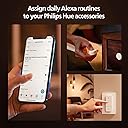
💡 Command your ambiance, anywhere, anytime — because your space deserves smart sophistication.
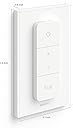
The Philips Hue Smart Dimmer Switch is a wireless, battery-powered remote that offers seamless control over your Hue smart lighting system. Featuring four clearly marked buttons, it allows you to turn lights on/off, dim or brighten, and toggle between custom scenes. Its magnetic backing and adhesive mounting options provide versatile placement throughout your home or office. Compatible with the Hue Bridge and ZigBee-enabled smart home hubs, this switch enhances your lighting experience with effortless customization and reliable connectivity.


| ASIN | B08W8GLPD5 |
| Actuator Type | Switch |
| Best Sellers Rank | 1,334,605 in Home & Kitchen ( See Top 100 in Home & Kitchen ) 1,760 in Dehumidifiers |
| Brand | Philips Hue |
| Circuit Type | 1-way |
| Colour | White |
| Connectivity Protocol | ZigBee |
| Connector Type | Clamp |
| Contact Material | Stainless Steel |
| Contact Type | Normally Open |
| Control Method | Touch |
| Controller Type | Push Button |
| Current Rating | 10 Amps |
| Customer Reviews | 4.7 out of 5 stars 3,648 Reviews |
| Global Trade Identification Number | 00046677562779 |
| International Protection Rating | IP20 |
| Item Dimensions | 15 x 89 x 125 millimetres |
| Item Weight | 0.08 Kilograms |
| Item height | 4.92 inches |
| Manufacturer | Philips Hue |
| Material | Brass, Copper |
| Model Number | 562777 |
| Mounting Type | Wall Mount |
| Number of Items | 1 |
| Number of Positions | 4 |
| Operating Voltage | 120 Volts |
| Operation Mode | ON-OFF |
| Specification Met | CE, ETL, IEC 60669-2-1:2002, RoHS, cULus |
| Switch Type | Toggle |
| Terminal | Screw |
| UPC | 046677562779 |
| Unit Count | 5.6438 gram |
V**O
Good Quality and Stable Functionality
I have about 6 years of experience with home automation and Philips Hue products, and this Hue Smart Dimmer (v2) stays in one of the best of my home automation gadgets like the title states. In the very beginning, I was hesitate to purchase this v2 dimmer from hue product line, as it has round corner and has the dimmer up and down button on actually one physical button which differs from the v1 hue dimmer, which I have been used it for many years and liked it so much. But since last year, one of my v1 dimmer became unstable connecting to my home assistant hub, I started to consider to buy a new one, and since then, the v1 dimmer was already difficult to find on market and thus after waited for a year, eventually decided to go with v2. First of all, v2 dimmer (this one) has the same amount of buttons, but different labels, as the top button has changed to be ON/OFF rather than v1's ON only. This led to the bottom bottom to be customizable. You can configure it on your phone app to be a scene-change button or others. This v2 dimmer works smoothly with my home assistant (HA) green (I have hue bridge as well, but switched to use HA one year ago), I would highly confirm that it works so good and smooth with HA and so customizable). So that, if you are an HA user, go for it, won't regret. The attached picture shows what actions/automations I added for the dimmer in HA, I left the bottom "Hue" button unused for future.
U**7
Recomendado
Entrega en 3 días, con éste interruptor puedes cambiar las escenas que hayas configurado desde la app, apagar los focos y atenuar o subir la intensidad de las luces, además de controlar 2 espacios. Es Inalámbrico y utiliza 1 pila cr2032 (necesario tener el bridge).
L**O
Transform Your Lighting with Philips Hue Wireless Dimmer Switches!
These Philips Hue wireless dimmer switches are an absolute game-changer! Seriously, I'm kicking myself for not getting them sooner. If you're looking for an incredibly easy and convenient way to control your Philips Hue lights, look no further. Effortless Installation Forget about tools, drilling, or messy wires. Installation is unbelievably simple: just peel off the adhesive backing and stick them wherever you need them. A quick wipe of the surface with rubbing alcohol beforehand ensures a super strong bond. It's truly a no-fuss, no-muss setup. Quick and Easy Setup Configuring these switches is just as straightforward. My first one took about five to ten minutes to get set up, but after that, each subsequent switch was a breeze—literally about a minute per switch. They work beautifully right out of the box. Remote Control and Magnetic Convenience One of the coolest features? These switches aren't just for your wall! You can easily remove the switch from its base and use it as a portable remote. And here's the best part: the back of the switch is magnetic! Stick it to your headboard, a metal nightstand, or any other metal surface within reach. When you're done, simply pop it back onto its wall mount. It's incredibly versatile and convenient. I'm truly impressed with these switches and the entire Philips Hue ecosystem. The ease of use, simple installation, and clever features like the magnetic remote truly set them apart. If you're considering enhancing your smart lighting setup, these wireless dimmer switches are a must-have!
J**E
Easy to set up with lots of control options!
This switch was easy to set up and connected quickly. I just need to go in and change the brightness settings as it relates to the time of day. I want to keep these lights dim all the time. I am using this switch for some lights at the bottom of our basement stairs. The stairs are kinda in a Alexa "dead zone" where, if you forget to turn them on by voice before heading downstairs, you'd have to shout to have them turn on. I considered a motion sensor but didn't want them turning on all the time. Plus this switch was cheaper than a motion sensor by almost half!
A**V
Genial atenuador
Compra en Amazon: El producto llegó en tiempo y sellado, el precio fue muy bueno, muy por debajo del precio de lista, El atenuador: en cuanto al accesorio es muy bueno, cuenta con una base que se puede montar a la pared, con tornillos o pegando, los orificios están en múltiples puntos, haciéndolo compatible con las tradicionales «chalupas» de México, sólo hay que quitar el apagador anterior, enlazar los cables y cubrirlos. Se atornilla la base y listo. Configuración: La configuración se debe hacer primero reiniciando el atenuador, este cuenta con un orificio de debajo de la tapa, la tapa se puede abrir con una moneda, se puede agregar vía hue app, o una app de terceros como homekit etc. Es importante mencionar que para usarlo se requiere tener un bridge de hue. El atenuador puede guardar 5 escenas, estas escenas pueden ser las que vienen por defecto o si se tiene una ambientación en la habitación está puede ser configurada, el atenuador puede controlar varios focos, es importante considerar que si son de colores y no están configurados en la app en la misma habitación, no tomará las ambientaciones guardadas. Por último el atenuador se siente de calidad y queda fijo ya que está inmantado, lo recomiendo ampliamente.
ترست بايلوت
منذ أسبوعين
منذ أسبوع