We remain fully operational. Our teams are working around the clock to ensure your deliveries continue safely.

قم بتنزيل التطبيق


معلومات عنا
حقوق الطبع والنشر © 2024 Desertcart Holdings Limited
قم بتنزيل التطبيق
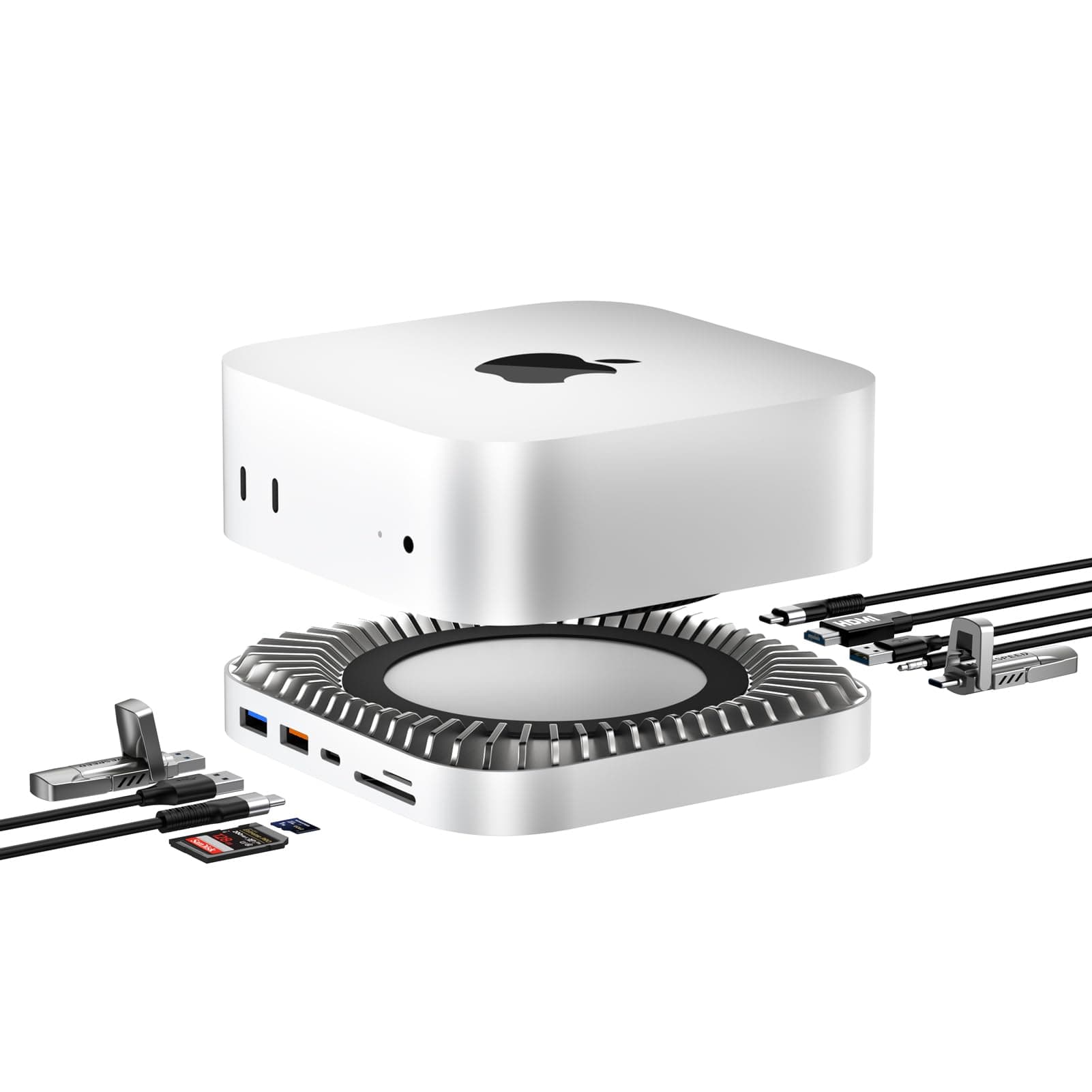
🚀 Elevate your Mac Mini setup with power, speed, and style — don’t get left behind!
The Mac mini M4 Dock by RayCue is a premium 10-in-1 aluminum stand and hub designed specifically for Mac Mini M4 and M4 Pro 2024 models. It features a built-in M.2 NVMe/SATA SSD enclosure supporting up to 8TB, a 4K@60Hz HDMI port, ultra-fast 10Gbps USB-A/C ports, additional 5Gbps USB-A ports, SD/TF card readers, and audio jack. This dock not only expands your Mac Mini’s connectivity and storage but also enhances desk aesthetics and airflow, making it an essential upgrade for professionals seeking seamless performance and style.


| ASIN | B0DT5LKD93 |
| Best Sellers Rank | #6,813 in Electronics ( See Top 100 in Electronics ) #107 in Laptop Docking Stations |
| Brand | RayCue |
| Compatible Devices | Mac Mini M4 Pro, Mac Mini 2024, Mac Mini M4 |
| Customer Reviews | 4.4 4.4 out of 5 stars (752) |
| Data Transfer Rate | 10 Gigabits Per Second |
| Hardware Interface | HDMI, MicroSD, USB 3.2 Gen 2×2, USB Type C |
| Item Weight | 0.53 Kilograms |
| Manufacturer | RayCue |
| Minimum Required Operating System Version | Mac OS 12 Monterey |
| Number of Ports | 10 |
| Operating System | macOS |
| Total Usb Ports | 5 |
| Warranty Description | 1 years |
C**S
Great Upgrade for Mac mini
Love this dock — it’s turned out to be a perfect match for my Mac mini. First, the packaging is impressive, and I liked the little bonus of decorative stickers for the hub. The dock itself fits and aligns perfectly with the Mac mini, and the color match is so good that it looks like part of the original design. The aluminum body feels solid and well made, and it helps with heat dissipation too. The added ports are exactly what I needed. Having USB ports and card readers on the front makes a big difference in daily use. There are plenty of USB-C and USB-A connections, which is great since the Mac mini doesn’t offer USB-A ports. Everything I’ve connected so far works smoothly. It also includes a built-in M.2 NVMe enclosure on the bottom for storage expansion. I haven’t installed an SSD yet, but I really appreciate having that option. They even provide the tools for installation, and the manual is clear and easy to follow. I’m using this with my M4 Mac mini, and it’s been working flawlessly. Overall, it’s a sleek, space-saving accessory that adds a ton of useful functionality while looking great on the desk. Definitely a worthwhile upgrade.
V**S
Perfect Hub for the M4 Mac Mini!
I recently upgraded to the new Mac Mini M4, and this hub/stand has been a fantastic addition. The build quality is excellent, with an aluminum finish that matches the Mac Mini perfectly. It looks like it was designed by Apple! The biggest selling point for me was the 40Gbps NVMe/M.2 SSD enclosure, which works flawlessly. I installed a high-speed NVMe drive, and the speeds are as advertised—super fast and perfect for extra storage without cluttering my desk. The port selection is well thought out. Having two USB-A ports, a USB-C host port, and a 3.5mm audio jack at the front makes it incredibly convenient for plugging in accessories. It saves me from reaching behind my Mac Mini all the time. Setup was straightforward—just plug and play, no extra drivers needed. It also raises the Mac Mini slightly, improving airflow, which is a nice touch. Overall, if you own the new Mac Mini M4 or M4 Pro, this is a must-have accessory. It expands functionality, improves convenience, and looks great on the desk.
F**A
Clean Setup and Big Upgrade for Mac mini
This dock feels like it was made for the Mac mini. Super clean look, tons of ports, fast SSD support, and smooth 4K output. Everything just works. Great for keeping my desk tidy and powerful without clutter. Really recommand it!
C**E
Good Product with Caveat
Arrived in a day and in good condition. I like the features and design. Easy to install an working fine. Fits my new M4 Mac Mini fine. Very happy with my order. Update: I don't like the access to the power button with this dock installed. I have to lift up the Mini to turn on the power. I've noticed competitor docks have a curved corner to allow easy access to the power button. Mac is also to blame for poor product design putting the power button under the back left corner of the Mini.
Z**Z
Perfect Mac mini dock!
First, I am impressed by the packaging of this Mac mini dock, got some cute design elements (it comes with decorative stickers that you can put on the hub). The dock itself has everything I need, and aligns perfectly with my Mac mini. Love the usb and card reader ports in the front. It even gave screw tools if you want to install internal SSD underneath. The manual is also specific and easy to follow. Overall, it looks and works great with the Mac mini.
R**3
Power Packed Hub
If you have a Mac mini M4, then you need this hub. It allows you to connect external storage, a second monitor and other devices. It allows for unobstructed cooling, is very thin and looks like it could be a part of the Mac Mini. The integrated NVME slot allows you to install a large fast NVME SSD drive, an HDMI slot, SD Card slots, USB-C and USB-A connections. All of this in this little hub at an unbelievable price. It is aluminum for durability, full of connection options and the NVME slot for an SSD drive. It is a super value and it performs great. I love it and it gets 5 stars.
S**G
Audio output isn't stable
One of the drawbacks of the Mac Mini design that has always frustrated me is the placement of the headphone jack on the front panel, along with the power button located on the underside and the absence of any USB-A ports. I purchased this docking station in hopes that it would address several of these limitations—specifically by providing front and rear facing USB-A ports and relocating the audio output to a more convenient location. While it does deliver on those physical aspects, I have encountered a significant reliability issue with the audio functionality. After periods of inactivity—often when the Mac Mini enters sleep mode—the audio output through the dock ceases to work. Each time I return to the computer, no sound is produced via the dock's headphone/speaker jack. The only reliable workarounds are to either momentarily unplug and replug the dock or restart the computer entirely. I have not yet tested the M.2 SSD expansion slot, as I do not currently require additional storage, though I viewed it as a useful future-proofing feature. Overall, I appreciate the dock's aesthetics, build quality, and ergonomic design. Regrettably, the inconsistent audio performance renders it unreliable for daily use and ultimately frustrating.
N**Y
Perfect Dock for Mac Mini M4 — Sleek, Fast, and Functional
This dock is a perfect match for the Mac mini M4. The aluminum design looks seamless and matches the Mac perfectly. Plenty of ports — including fast 10Gbps USB and a full 4K60Hz HDMI — make it super convenient. The built-in SSD enclosure for NVMe/SATA is a great bonus for extra storage. Everything runs cool and fast, and setup was plug-and-play. Highly recommend for expanding your Mac mini setup!
N**A
Il fonctionne parfaitement / rapide et contient plus de ports différentsque le satechi, il est plus aéré aussi et est de construction très solide. Pour le moment aucun problème avec.
R**Y
Superb quality bit of kit, super easy to add additional 2TB SSD..
F**N
Multiplie les capacités de mon Mac mini M4 et apparemment, le mien ne chauffe pas. Je l'ai équipé d'office d'une barrette SSD de 1 To. Ça me semble suffisant
M**E
Pratique et très esthétique. Cette station d'accueil permet d'ajouter de nombreux ports d'entrée dans le Mac mini, ainsi qu'un disque SSD interne. Jusqu'à présent, le tout fonctionne parfaitement.
R**8
’ve been using this dock with my Mac Mini M4 and I really like the practicality and organization it brought to my workspace. The aluminum design matches the look of the Mac Mini perfectly, and it fits securely. The dock offers several ports (USB-A, USB-C, HDMI 4K/60 Hz, headset input), making it easy to connect peripherals, monitors, and external drives. The NVMe M.2 slot lets you install an SSD directly in the dock for fast file storage and transfer – a big advantage for video editing and backups. Positives: Attractive design that matches Mac Mini Multiple connections for USB, HDMI, audio, etc. make everyday use easy Slot for NVMe M.2 SSD adds storage without clutter Helps organize cables and keeps everything tidy Great performance for 4K video editing and daily tasks Areas for improvement: NVMe speed could be better (doesn’t reach top speeds of the fastest SSDs) Audio output can have static noise when not in use (I reduced this with an extra adapter) Only one USB-C data port; more would be useful Overall, it’s a very interesting accessory to get the most out of the Mac Mini M4. Excellent value for money and ideal for anyone who wants practicality and functionality.
ترست بايلوت
منذ يوم واحد
منذ 3 أسابيع