Buy anything from 5,000+ international stores. One checkout price. No surprise fees. Join 2M+ shoppers on Desertcart.
Desertcart purchases this item on your behalf and handles shipping, customs, and support to KUWAIT.
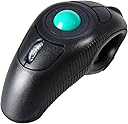
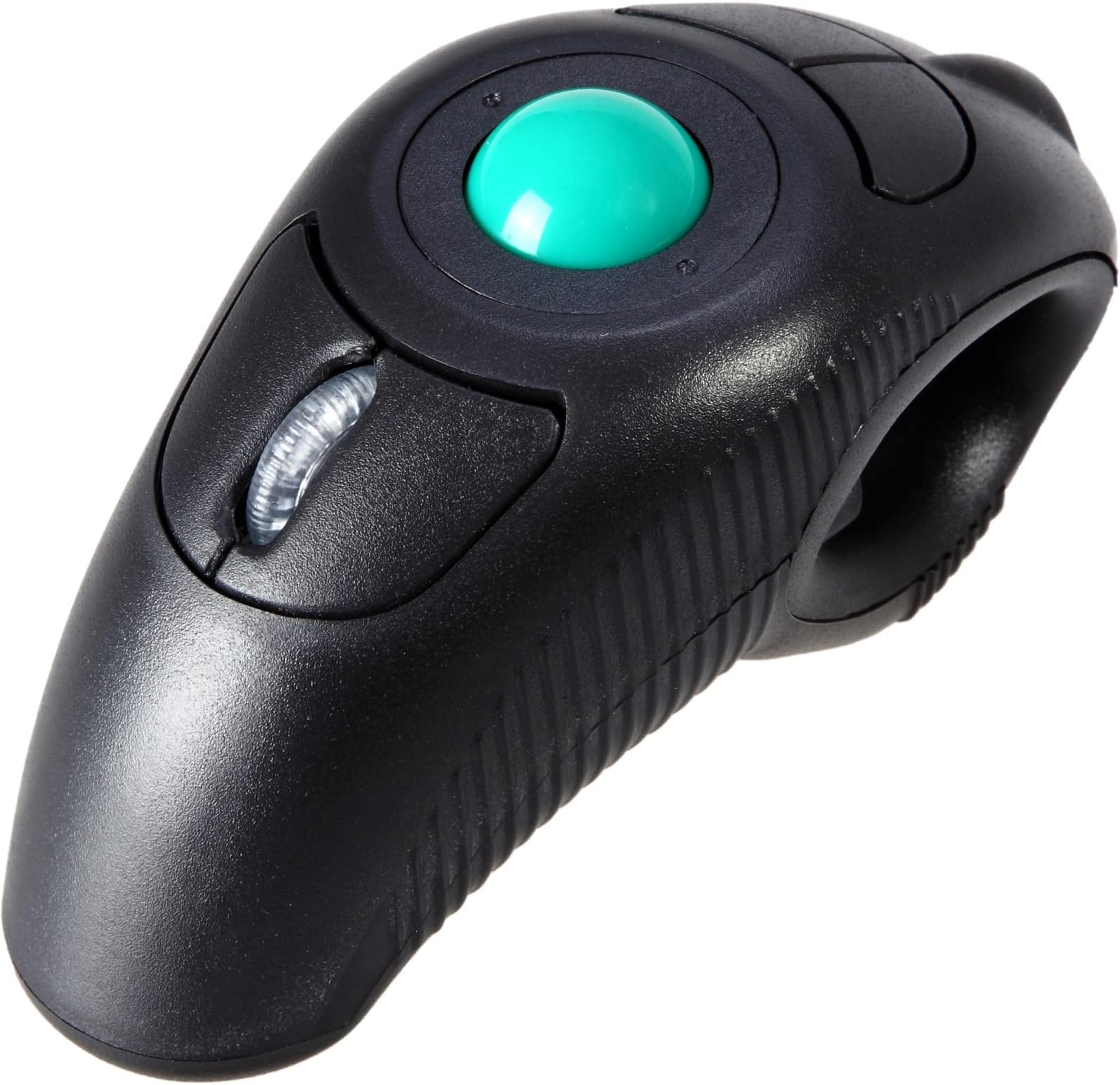
🖱️ Elevate your workflow—comfort meets precision in one sleek trackball!
The EIGIIS Wireless Trackball Mouse offers an ergonomic handheld design that minimizes wrist and shoulder strain, ideal for professionals working long hours. Featuring adjustable DPI settings (800-1600) for precise control, a 2.4GHz wireless connection with up to 10 meters range, and ambidextrous usability, it supports seamless productivity across Windows, Mac, Linux, and Unix systems. Powered by a single AAA battery and requiring no software installation, this plug-and-play device is perfect for those seeking comfort and efficiency beyond the traditional mouse.


| ASIN | B07F7H3PYT |
| Additional Features | Wireless |
| Antenna Location | Laptop |
| Are Batteries Included | No |
| Are Batteries Required | Yes |
| Best Sellers Rank | #525 in Computer Mice |
| Brand | EIGIIS |
| Button Quantity | 5 |
| Color | Black Wireless Green TrackBall |
| Compatible Devices | Laptop, Personal Computer |
| Connectivity Technology | USB |
| Customer Reviews | 3.7 out of 5 stars 2,350 Reviews |
| Enclosure Material | Plastic |
| Hand Orientation | Ambidextrous |
| Hardware Platform | Laptop, PC |
| Item Dimensions L x W | 4.3"L x 1.9"W |
| Item Weight | 140 Grams |
| Manufacturer | EIGIIS |
| Mfr Part Number | DCAHMVF2 |
| Model Number | HT-DCAHMVF2WR |
| Mouse Maximum Sensitivity | 1600 Dots per Inch |
| Movement Detection | Optical, Trackball |
| Movement Detection Technology | Optical , Trackball |
| Number of Batteries | 1 AAA batteries required. |
| Number of Buttons | 5 |
| Operating System | Linux, Unix, Windows 98, Windows XP |
| Power Source | Battery Powered |
| Range | 10.0 meters |
| Special Feature | Wireless |
| Style Name | Modern |
| UPC | 653451820590 |
| Unit Count | 1.0 Count |
O**0
Great little mouse for comfort and convenience
Great mouse. This is the 2nd time I've owned one. I really like the ability to hold it in my hand instead of having to rest your hand unnaturally on a platform and rest your hand on the mouse (or use your delicate tendons to poise over it). As a Legal Asst I've done a LOT of computer based work including the whole MS Suite, and I can tell you this is not for long-term document work or Excel since you must hold this mouse and put it down repeatedly if your doing keyboard work. But having looked for ways to rest my hands while at home and still use my computer, this device is a god-send. For presentations, gaming, online selling portals, and just web-browsing such as shopping, reading, as well as using for streaming video this is a fabulous device. The only thing is, for extended use the mouse is a bit small, so instead of resting in your whole hand it really rests on your fingers, and the thumb helps stabilize it when it's not busy moving the cursor, which causes some fatigue, at least for me. If the hull and ball were a bit larger it would be more ergonomically sound, probably. But with this device, you are able to sit comfortably even several feet away from your laptop, and hold the mouse in your lap if desired. Even without the laser it's great for presentations (and if you don't already know, you can change the size, shape, and color of your cursor to eliminate the need for a laser pointer, which is actually more 21st century.) But it does have a little quirk, as mentioned by this seller: it can stop working for reasons unknown. The fastest way to fix is to remove the USB and count to 3 and then plug it back in. If it happens frequently, I've noticed just changing the battery resolves it. Obviously, a more quality product would have fewer quirks but although this mouse is inexpensive and unbranded it appears to be the only one of it's kind. Please note: the seller's description here clearly states the item does not have a laser pointer; on more expensive versions that include it, the forward left button would be the control. Also the little button called DPI is for changing your Dots Per Inch & probably gamers already know this, which is who would find this button useful. Love the little velvet-esque travel pouch -- and the antenna magnetizes to the bottom of the mouse for transporting.
B**R
Reduced pain in wrists
Working well. The ball takes some getting used to. I wouldn't use this for gaming because the ball is hard to use precisely, but it's great for scrolling the web, copying and pasting, kindle or pdf reading on the computer, etc. the enter and escape buttons on it make it even more ergonomic, since I don't need to reach out and use my keyboard unless I need to type words. My right shoulder, arm, and wrist were extremely sore from scrolling through pdfs for classes for hours. I've experienced a lot of relief from this. Can relax my arms wherever, in my lap, etc, and scroll in comfort. Easy to use in either hand, even for someone as extremely right handed as I am. Also, I keep accidentally knocking it onto the ground bc I'm clumsy (this happens with all of my objects, so I wouldn't know if the design makes that more likely or not). The battery cover part pops off when this happens. But it goes back on fine, doesn't break, and works the same. So I'd say it's fairly hardy. eta: so I meant to submit this 6 months ago. I'm still using this mouse without issues. If it stops working, it normally just means the battery needs to be replaced. Occasionally I'll need to unplug and replug the usb- but this is after I've had it plugged in and shut and opened my computer multiple times, sometimes over a period of days. Been using this mouse for over a year and it's still going strong and getting much more intuitive. Also no longer have issues with accidentally dropping it.
S**A
Super dope
Works way better than I expected. I love not having to worry about a surface like a normal mouse when I'm trying to click stuff on my living room PC is amazing. It's a lot easier to use than I expected. Not for gaming obviously but can still play turn based strategy with it. You might have trouble if you have large hands, the trigger well might be tight. Luckily I have thin fingers so it is no problem.
B**G
Interesting product, but annoying to use
UPDATE 4/3/23 I have two of these and have now used them for a couple of years, and they've gotten even worse. On one the thumb wheel stopped working. On the other one the main problem is that it deactivates within a few seconds and then I have to push one of the buttons to reactivate it. It used to go several minutes before deactivating. The trigger switch (left mouse click) is also getting flaky and often does not make contact. Maybe the newer ones work better, but the ones I have seem to have been made with the cheapest possible components. My two units were purchased several months apart, so it's not just one bad batch. Having both develop problems is remarkable, and makes quality look pretty bad. ORIGINAL REVIEW It works OK as a remote control for watching YouTube videos, but it constantly deactivates, and I have to push a top button on it to reactivate it, and then it works for a few more minutes. It deactivates when it sits idle for six minutes, which happens each time I watch a video. I have been using it for a couple of weeks now, and the need to constantly reactivate it has become a huge annoyance. I'm very tired of it and I'm sorry I ordered it. Aside from the deactivation problem, it works well for YouTube, and it can be used from the other side of the room just fine, but it does not work for anything else. Operating it with one hand for normal computer use is almost impossible, so I don't use it for that. When I watch videos, I use both hands to operate it, and I'm OK with that. I have a second, older one of these units that I got a year ago, and it does not have this six minute deactivation feature, but yet has satisfactory battery life. But on the other hand, that old unit has a problem that was fixed in the new one, the speed at which the pointer moves. On the old one, the pointer moves too fast, even at the slowest setting, but on the new one, it moves at a comfortable speed. So it appears that the manufacturer keeps tweaking the firmware in this thing, but has no sense of how to make it convenient and pleasant to use. That's unfortunate, because it really could be a good product if they would just set up the firmware correctly. There is also a mechanical problem...how the trackball works. There's something about it that makes it tedious to get the pointer precisely to where you need it. That's OK for YouTube because the thumbnails are big, I'm using both hands, and I only have to select a new video once every few minutes. But it's very difficult to use it for anything other than YouTube, so I would not try to use it for any serious type of work. I would return it, but in my area to do a return I have to drive several miles to a store where I can take the return package, and that's very inconvenient for me.
A**R
NEAT, and that's it.
I was in a weird phase 2 years ago, where I was buying wacky mice. And I bought a pair of these. Does it work as intended? YUP, full stop. Pros: -great small size, nice to chuck it into a suitcase, luggage, purse whatever. -Works as intended* -Decent 2.4GHz Wireless dongle. Works as well as other 2.4GHz devices I've used, so slightly short range, doesn't work too well around corners, but haven't run into a device that uses this style of connection perform differently. MEANING, it's more the same. 15ft LINE OF SIGHT range. BUT, if you're like me, and you have it plugged into your laptop and you're using this as a couch mouse, to watch YouTube/Netflix/Vids on your hard drive, your laptop's metal lid might cut down the reliability of it. Causing stutters. Cons: -It's not ergonomic, maybe smaller hands can have better luck with it, or maybe larger hands, but in the natural holding position of this mouse, I find my thumb gets quite fatigued. I like the idea of it, but if you have to traverse a long list, like searching something on a streaming site, you're going to hurt after a while. I think partially the issue is you can't throw this, meaning you can't flick your thumb and let the momentum cause the ball to continue spinning and do the scrolling for you. The ball is too light for that. Which makes it great for FINE controls, not broad controls. -No place to store the dongle on the thing. Weirdly there's a square indent with a sticker on it that could have benefited having a magnet behind it so you could attach the USB dongle to the device when traveling. There isn't even a place to store it in the battery compartment. WHICH kind of stinks. Since if you have a lot of generic 2.4GHx dongle-d devices like I do, you'll notice this receiver looks identical to 90% of those generic ones. I color coded mine with Sharpie Metallic markers, but still. ANNOYING. Conclusion: It's neat, but not great. More novel than functional. I don't feel like I got ripped off, hence the middling 3 out of 5 review. It's not functional enough for 4, but it doesn't fail at anything it sets itself out to do, and didn't claim any silly gimmicks outside of ergonomics which in and of itself is a gimmick.
J**I
Still Love it after 1 Year
I love this mouse so much! I really wanted something that I didn't have to use on a flat surface like a standard mouse. For work I regularly use a program that is keystroke driven and this mouse makes it possible for me to type short key sequences without having to put my mouse down or move my arm away from my keyboard. The trackball is very responsive on screen and works smoothly. I really like having scroll, left click, right click and enter keys all in one hand. The best part is the flexibility of being able to use the mouse from any location. My mouse hand used to get very cold while using a standard mouse where I had to keep my arm in one place for so long. With this mouse I can rest my hand and arm in any location. Being able to drop my hand down in my lap but still continue to work is fantastic! The position of my hand and wrist ( and shoulder) is so much more comfortable and natural! Cold day? This thing works from under a blanket which is perfect for online shopping, reading or streaming. Not sitting at your desk? No need to balance this mouse on your leg or on the arm of the chair - set it down anywhere or keep holding it while you type a little! After using it for one year, the main drawback I've had is occasional non-responsiveness. At first I thought it was eating batteries, but that's not the case. It just seems to stop communicating with the computer. I'd say that 80% of the time I can fix that by turning the mouse off and back on, which is quick and easy with the exterior switch. 10% of the time I simply unplug the USB dongle from my laptop, plug it back in and it gets back to working just fine. The other 10% of the time the batteries are just dead or dying. The non-responsiveness issue happens at least once a month - I use this product 5 days per week, 10 hours per day and don't find this issue to be a major detractor at all. If this thing died today I would buy another one without hesitation. The design really works for me (I don't have exceptionally small or large hands). Perhaps if I had really large hands this might not work as well, but that's not my experience, so I really can't say for sure. If you are a road warrior for your job, you may really love this gadget - no flat surface required, skip the laptop touch pad, no laser light shooting out of the mouse when it's tipped over, fits in a cup holder too. It won't pack as small as a travel mouse in your laptop bag, but it's fine. If your are having sore shoulder, wrist or numb hand, this mouse might be just the relief you need.
N**O
Not the best
Feels to plastic. The cover of the battery is the easiest thing to lose. Tbh I like the multiple buttons and functions. But it has stopped working, it only works half the time. Checked batteries and all. Would rather have bought the laser mouse
D**O
Has both advantages and disadvantages.
I have been using this as my primary (only) mouse for more than a year, and there are several things I really like about it, as well as a couple of glaring drawbacks. Pros: - Ergonomic and ambidextrous: It can be used with either hand in any position. This helps avoid fatigue/carpal tunnel issues. I can easily use it standing up, leaning back, or sitting with my hand in my lap, and if one hand is tired I can use the other one. Cons: - Doesn't allow right/middle clicking while moving the pointer. With a regular mouse you can hold the left click button, right click button, or middle (scroll wheel) button while moving the pointer. With this you can use your index finger to hold the trigger (left click button) while using your thumb to move the wheel. However, right-or middle-clicking can only be done with the thumb, which prevents you from also using it to move the pointer. This is a fairly rare use, but still noticeable, for example when you want to copy (not move) a file from one folder to another by dragging and dropping, or for actions in certain games. When I want to do this with this mouse I have to use one thumb to hold the button and the other to move the pointer, which is a bit cumbersome. - Uses batteries rapidly. It only uses a single AAA battery, which gets drained every few weeks. Turning it off when not in use may extend this, but it does seem to have a "sleep mode" feature, in that if you don't use it for a few minutes and then move the ball nothing happens, but clicking one of the buttons once will wake it up. Not sure if this saves as much power as turning it off would. Just make sure you have a steady supply of AAA batteries on hand if you're going to be using it extensively. - Replacing the battery is easy, but removing the ball to clean the rollers is tricky and requires a specialized device. Basically you have to have something very small and pointy but also very strong (i.e. a hard, sharp piece of metal; a paperclip wouldn't work; I use the point of my cuticle nippers) to stick into a small indentation to rotate the clasp, which inevitably ends up being damaged in the process because it's made of plastic. - I've bought it several times in the last year because the right-click buttons inevitably break and fall off after a couple months of use. Fortunately there are two, so when one breaks there's a backup, but eventually the second one breaks off as well, and then the device becomes useless. It's not too expensive, so buying three or four per year isn't prohibitive, but it would still be nice if it was designed to last. I make a point of having a spare one on hand for when the current one breaks. Overall the pros outweigh the cons, and so far I haven't been able to find anything better for freeing my hand from the desk, but it definitely has room for improvement.
C**E
Versátil para novos usos e ergonomicamente confortável.
Muito prático usar estando em qlqr posição, para quem lê e marca PDFs é ótimo. Mesmo sendo destro consigo usar na mão esquerda, descansando o lado direito. De pontos negativos é só precisar de pilhas e ter q desligar o interruptor que vem nele, pq mesmo o PC desligado fica gastando a pilha.
A**ー
思った以上に使いやすくて良いです。
トラックボールで、しかもハンディタイプなので別作業しながら片手で操作できるのでとても便利です。
M**R
Best controller by far.
This is my go to PowerPoint remote controller. This one uses the roller ball to mimic the control of a mouse. The trigger is the left click button. Nice 30+ft range and reliable. I have 3 of these. One for each laptop. Excellent.
め**す
左手持ちで最高
僕は右利き。マウスを右手で操作するとキーボードは左手で操作。。。と言うことが多く、随分昔に購入して以来6台目(落としたりもあるし)。左手でトラックボール操作すると右手がフリーなので、キーボードを打つにも、プレゼンで右手が使えるのは最高だ。
C**Y
Trackball sucks
I bought this mouse after I got into an accident requiring me to wear a brace on my right wrist. For me, this mouse is much easier to use than a conventional mouse and even though my brace made it difficult for me to use this mouse with just one hand, it was comfortable with two hands. However, as much as I wanted to like this mouse because of its comfort and ease of use, I was incredibly disappointed with the trackball. Only seconds after any click, the track ball would stop registering any movement. At first, clicking the trigger would reactivate the trackball, but sometimes even clicking the trigger doesn’t work. Reactivating the trackball is a very inconsistent and frustrating process. Once the trackball is reactivated, the movement can be choppy at best and it is almost as if I am using a computer with constant lag. I was using fresh batteries and changed them out for another set of fresh batteries and the problem persisted. I only bought this about a week ago. I am very unsatisfied with this product and I want my money back. I regret ever buying it.
Trustpilot
2 days ago
5 days ago