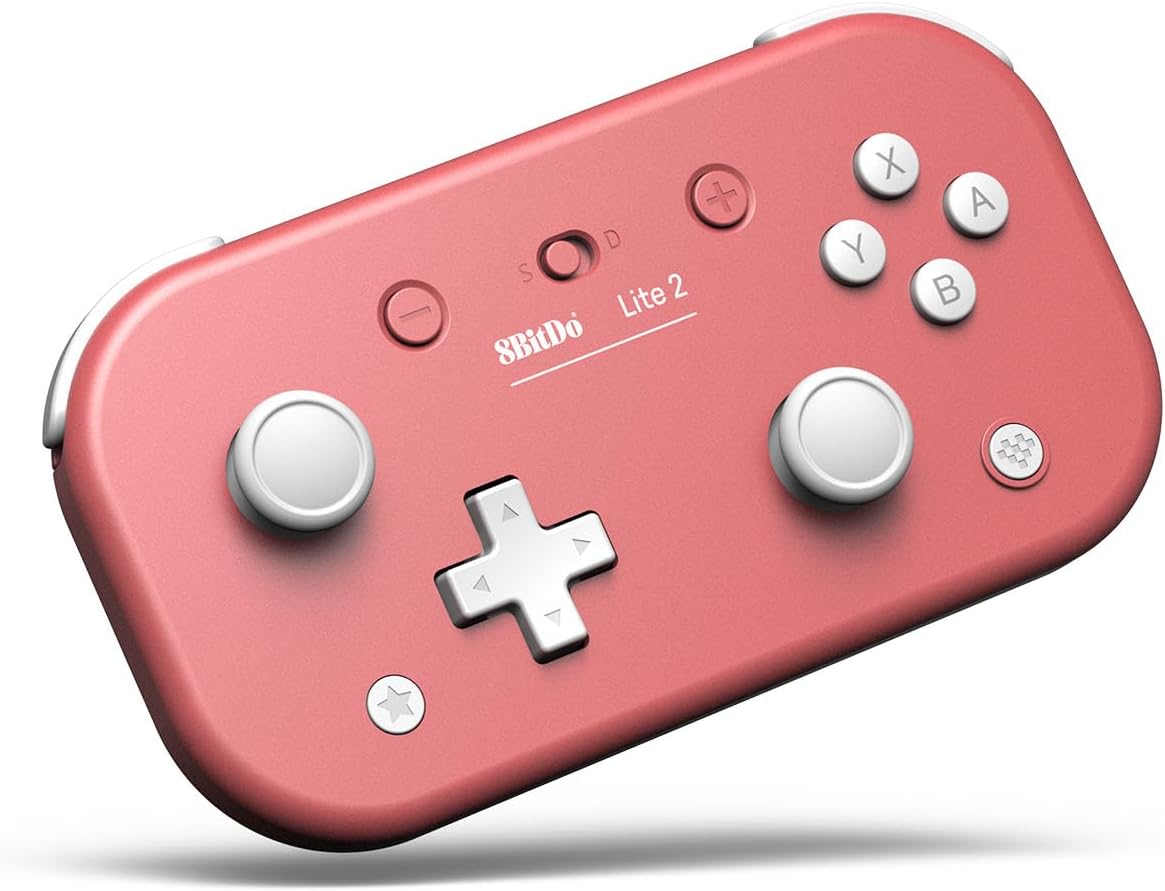
8BitDo Lite 2 Switch、Switch Lite、Android、Raspberry Pi(ピンク)用のBluetoothゲームパッド (Pink)
Product ID: 725699487
🎮Ultra-portable design
📶Bluetooth wireless connectivity
🔋Rechargeable USB-C battery
Desertcart purchases this item on your behalf and handles shipping, customs, and support to KUWAIT.
🎉 Game anywhere, anytime — your pocket-sized power player!
The 8BitDo Lite 2 is a compact, Bluetooth-enabled gamepad designed for Switch, Switch Lite, Android, and Raspberry Pi. Featuring a rechargeable USB-C battery, rumble vibration, motion controls, and customizable turbo buttons, it delivers a full-featured gaming experience in a sleek, ultra-portable pink design. Perfect for professionals and gamers who demand convenience without compromise.





| ASIN | B0B3DKMS13 |
| Amazon Bestseller | #1,896 in Video Games ( See Top 100 in Video Games ) #73 in Nintendo Switch Controllers |
| Batteries | 1 Lithium Polymer batteries required. (included) |
| Country of Origin | China |
| Customer Reviews | 4.4 4.4 out of 5 stars (2,041) |
| Item model number | 6922621502319 |
| Product Dimensions | 12 x 0.8 x 0.8 cm; 80 g |
| Rated | Suitable for all ages |
| Release date | July 15, 2025 |
納**ん
持ち運びにちょうどいい
旅行に持って行って、スマホゲーの日課やるために使いました。薄くて小さいのに、持ちやすくて押しやすい。気に入ってます。
し**も
Practical but not for everyone
This controller is quite good : easy to connect, with every button needed. Due to its size, it's very easy to bring everywhere you want. If you wanna play at work during your lunch time : no problem ! You are doing some camping or staying in a hotel : it is easy to put in your baggage. But logically, it has a price : if you have big hands, playing can be a bit difficult... Overall, I recommend it but you are now aware of its little problem.
こ**ぶ
小さい!ボタンはちょっと硬い
小さいスティックのコントローラーが欲しくて購入。 Joy-Conにある全てのボタンが使え、このサイズで振動機能まである。 連射機能もあるけどSwitchでは使えない。 スティックの大きさ・高さはSwitchのJoy-Conと同等。手計で直径15mm、高さ7mm ABXYボタンのサイズもJoy-Conと同等。直径7mm ABXYと方向キーはおそらくゴム接点なので、Joy-Conよりも押し込みが深い。 ボタンを押す力はプロコンよりも少し硬い為、見た目と少しギャップがあるかもしれない。 方向キーの大きさはWiiリモコンより1mm大きい19mm バンパー部のLRボタン等はJoy-Conと同じ形状。こちらもJoy-Conより少し硬い。 とにかく小さくて薄く、グリップも無いので大人だとホールド感はほぼ無い。 右スティックとボタンが離れている為、Joy-Conのようにスティックがじゃまになることがないのはとても良い。
ハ**郎
これで充分!
軽量 コンパクトで持ち運びにも便利で、子供の手にも扱いやすいサイズで重宝してます。 多人数プレイする際に、コントローラーが沢山必要、高価なコントローラーを四つも買えない、持ち運びもしたい、我が家にはピッタリな商品でした。 一部の商品にある、コントローラーのグリグリする部分が持ち運びする際引っ込む仕様だったら100点満点の商品でした!
C**L
great for travel
This is great for travel, but I wouldn't use it as my main controller. The ABXY buttons require a lot of force and hurt my thumbs for the first 10 hours before breaking in. The sticks might register a direction when neutral sometimes, but it goes away after flicking the stick.
"**"
十字キーの手応えが良く、汎用性抜群
十字キーの感触がしっかりしていて、Switch以外にもAndroidやRaspberry Piまで一台でカバーできる汎用性が想像以上に便利でした。ターコイズの発色も写真通りで満足しています。
K**様
概ね満足しておりますが…
サイズといい機能といい、私の用途にぴったりなのですが、この機種の不具合なのか私の買った製品の個体差によるものなのか、R2トリガを押した時に押されたまま戻らないことがあります。 内部でボタンの部品とガワが干渉しているようなのですが、これが時々ゲームプレイの邪魔になることがあってストレスです。
ア**ー
10分、15分を学んでくれました、
5歳児に使ってます。10分、15分と自分で刻み、時間を決めて遊ぶことが、たまーに出来る様になってきました。これだけで買ってよかったです。
G**.
Bello e funziona benissimo
Funzionano bene, buona l'ergonomia e la portatilità, la batteria dura a lungo e il colore è molto bello. Con un aggiornamento firmware durato forse un paio di secondi, funzionano perfettamente con NS2. Acquisto must.
C**R
Idéal pour les petites mains
Super agréable pour les petites enfants âge de 3 à 7 ans. Idéal pour bien apprendre et commencer à bien manier les touches de la manette. Cela servira à s’adapter aux plus grosses manettes plus tard.
A**N
Mando compacto y de buena calidad
A la altura de los joycons de la switch, un buen mando muy compacto con buena batería y que funciona perfecto en todas las plataformas que he probado (Android, Pc y switch), funciona con rewasd y es tan compacto que lo uso incluso con una sola mano para atajos de teclado en krita, photoshop etc Eso si, no es un mando pro en el sentido de que se nota que los botones, joysticks y demás no son los mejores y la ergonomía no es su punto fuerte, aun así muy buen mando que cumple perfectamente, bien construido y con buenos materiales. Si buscas un mando compacto y que te puedas llevar a cualquier parte es una muy buena opción.
M**A
Prima Controller
Mooie game controller voor onderweg. Voelt stevig en kan makkelijk worden geconfigureerd met verschillende retro spelcomputers of je mobiel.
P**V
Bra grejer
Höger- och vänsterknapparna ovanpå har vara av/på så i vissa bilspel där man gasar med den knappen blir det lite lurigt. Ingen särskild tyngd i men vad ska man förvänta sig liksom. Har ganska stora händer och tänker att långa spelsessioner blir nog jobbiga med något så litet.
Trustpilot
2 months ago
1 month ago