🖱️ Elevate your workspace comfort and precision — because your hand deserves the best!
The Anker 2.4G Wireless Vertical Mouse combines ergonomic design with adjustable 800/1200/1600 DPI optical tracking and 5 functional buttons, including forward/back navigation. Compatible with Windows and MacOS, it offers a reliable wireless connection up to 5 meters and an 18-month battery life (2x AAA batteries required, not included). Ideal for right-handed users seeking to reduce wrist strain while enhancing productivity.


| ASIN | B00BIFNTMC |
| Amazon Bestseller | #7,802 in Computers ( See Top 100 in Computers ) #219 in Computer Mice |
| Batteries Included | No |
| Batteries Required | Yes |
| Battery Average Life | 18 months |
| Brand | Anker |
| Color Name | Black |
| Compatible Devices | Personal Computer, Tablet |
| Connectivity Technology | wireless |
| Customer Reviews | 3.6 3.6 out of 5 stars (51,543) |
| Date First Available | August 9, 2013 |
| Finish Type | Matte |
| Item Model Number | AK-98ANWVM-UBA |
| Item Weight | 127 g |
| Item model number | AK-98ANWVM-UBA |
| Manufacturer | Anker |
| Material | Plastic |
| Model Year | 2013 |
| Operating System | Windows, Mac OS X, Linux |
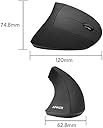
| Product Dimensions | 10.11 x 8.2 x 8 cm; 127.01 g |
| Special Features | Ergonomic design, additional buttons |
C**O
Good quality, just a bit slippery
I like this mouse, it's comfortable to use and took only a little while to get used to the new orientation since this was my first ergonomic mouse. I also appreciate the ease of switching mouse speed, I use this at work so I can't install extra software and having this setting directly on the mouse and not a software change is perfect. Only bad point is that the coating on itakes it very slippery so I can't really rest my hand on it as it just slides away from my hand. Don't know how that could be improved though so it's fine.
ツ**ウ
他メーカーで既にこのタイプの有線マウスを試しており、気に入ったため無線でかつ新品1000円とお安くなっていたため購入。 端的に感想を言うと、個人的には大変満足。ただし個人差があることは間違いない。 以下気に入っている点を箇条書きする。 ・手を添えるだけで無理なく操作できる ・滑りにくい素材のため握りやすい ・一般的なマウスと比べて大きいため、窮屈でない ・非常に軽いため操作しやすい ・電池が少なくなってくると側面のランプで知らせてくれる ・無線だが接続に不安定さなどない(自分の環境では) 以下少し気になる点。 ・マウスの土台の先端が丸っこくなっているため、カッチリとした操作感をしようとすると、マウスがお辞儀をするように前に傾いてしまうため少しブレてしまう。以前使っていたのだと、先端の土台はしっかりと地面と接していたためブレることはなかった。 以上他に気になる点はない。 このタイプのマウスを使うようになってから、一般的なマウスがいかに小さく、そして使いにくいかしみじみと感じる。 しかし何度も書いているように、使いやすいかどうかは本当に人によるため、1度お店などに出向きどのようなものか触ってみたり、実際に使って自分に合わなければフリマアプリで即売るなどしないと大変損すると思われる。 ただし、1度試して見る価値はある。
あ**ー
縦型マウスとしては握りやすく、操作もスムーズです。 しかし、自分の手には少し大きく、人差し指の付け根が当たって長時間使用すると痛くなります。 慣れれば使えるかもしれませんが、手のサイズに合うかどうかを確認した方が安心です。
K**様
結論から言うと手首の痛みは解消されやすいと思います。 商品というかエルゴノミクスマウスについて。よくあるタイプのマウスで長時間作業中、手首の痛みを覚えるので調べてこちらの商品を購入。一ヶ月以上使用しましたが同様の症状はなく作業できました。 ただやや大きめであったり、軽量マウスと比べると重かったりするので疲労は感じやすい印象です。 個人的な意見ですが、今時傾斜は緩いけれど捻りを抑えるマウスも売られているので両極端にならずそちらも検討してみても良いかもしれません。 本製品自体の効果はとても感じられました。
T**Y
使用中にいきなり反応しなくなり、電池のせいかと思い入れ替えてみたけどレーザーが光らない。使い物にならなかった。
さ**し
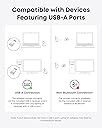
【良かった点】 ・腕を捻らずに手のひらを立てた状態で使え、手首というよりは腕全体で操作するので、腕の痛みがなくなった。 ・通信・レーザーの読み込み・反応は良好だった 【残念な点】 ・2年くらいで表面がベタつくようになりました(おそらく加水分解)。3年をすぎた頃に範囲もべたつき加減も我慢できない程度になりました(私は別製品に買い替え)。 ・私は分かった上で購入したのでマイナス評価ではないですが、BluetoothではなくUSBでの接続なので、人によってはその点が気になるかも。 【総評】 機能や特徴には満足だっただけに、ベタつきが残念です。 他のマウスに比べて高額という訳でもないので、買い替えながら使い続けるのもありかもしれませんが、私はベタつきでまたイライラしたくなかったので他製品に変えました。
K**A
今まで3~4個購入して継続して使用しています。エルゴノミクスマウスは比較的高価なものが多かった印象ですが、このマウスは普通のマウス位の価格で購入でき、エルゴノミクスマウスの入門としてはとても使いやすいと思います。 その一方、この手のサラサラ加工にありがちな加水分解は1~2年で発生、また、ホイールのチャタリングも起こりやすくなり、寿命としては1年半程度かなと思います。買った最初のサラサラが好きです。 それらを考慮しても安価で操作感も良いので頻繁に買い替えるのが苦でなければおすすめです。DPI変更は3段階らしいですが、一度決めてしまえばほぼ変えることはないです。2画面行ったり来たりもそこまで大変ではない感度です。
あ**け
今日届きました。さっそくリモートワークで使用。 1・表面がさらさらして滑る結果、握る力が入って掌が疲れます。疲れちゃダメじゃん。 2・エルゴマウスって傾斜とか様々なので一概にこれはダメあればダメはないのですが、自分は手を載せてリラックスして使いたい、手の平をマウスパッドで擦るような使い方をしたくないので(18時間くらいデスクの前いるので摩擦で手の平が痛くなります)、このマウスは向いてなかったです。 3・奥までしっかり手を差し込んで使う用に見えますが、多分半分くらい、手を添えるように使った方が使い勝手は良いですね。 4・サラサラに加え形状が丸くなっている箇所があり、滑る。これなければ、良いマウスなんですよね。。。 5・本当に人間工学かは疑問です。 6・比較対象は、仕事でも遊びでも使っているサンワダイレクト Bluetoothマウス 3台ペアリング エルゴノミクス 乾電池式 静音 Windows/Mac対応 シルバー 400-MABT102Sです。
M**R
I had never heard of ergonomic mice before and for years I had quite happily used a 'normal' mouse for computer work. Until I had an injury to my dominant arm and using a normal mouse was just so painful. The ergonomic mouse was a game changer. So I continue using these mice even though my arm is better. How you hold the mouse ergonomic is so natural and comfortable to use. A few weeks ago I bought the same mouse but wired. The wired mouse is brilliant but the wire kept getting in my way. Now I have got the wireless one. Identical to the wired one. Easy to use and go back pages. I love it. It comes with a USB for the computer and requires 2 AAA batteries for the mouse. Once the batteries are in it is ready to go. There is no need to go to settings to set it up.It works straight away. However, I have returned it. There was nothing wrong with the mouse apart from the red light not coming on when I was using it. It is hard to explain.The wired mouse's stripe lights up red when you use it, which I liked. I could see the computer was on and ready to go. However the wireless mouse same model just wireless the light strip does not light up at all. So it looks like a dead mouse. I have got used to seeing the red light on the other model. So, I don't know if it is a fault or just how its designed. I SENT THE WIRELESS MOUSE BACK AND GOT ANOTHER THE SAME. tHE SAME THING THE STRIP DOES NOT SHINE WITH ALIGHT LIKE THE WIRED ANKER. i CONTACTED ANKER AND THEY SAID THE WIRELESS MOUSE DOES NOT LIGHT UP. I like anker but I also like a wireless mouse with lights so I sent this back again.
J**Z
Me gusta mucho este mouse, tengo varios años usándolo y este es el tercero que compro
S**H
مريح لليد جدا عن الماوس التقليدي
V**E
Total game changer. I had been suffering wrist pain and tingling in my fingers from using a standard mouse so my chiro recommended this type of mouse. It took about a week for my muscles to adjust properly but I’m now enjoying pain free computer use. Very comfortable and great quality.
P**A
I have bigger than average hands for a female and I find this mouse to be comfortable. It may be a little bulky for small hands. The DPI-button works well so you can adapt to different speeds and I like that it has a receiver so that I don't have to rely on my old laptop's Bluetooth, which is a little unstable.
ترست بايلوت
منذ 3 أسابيع
منذ 3 أيام