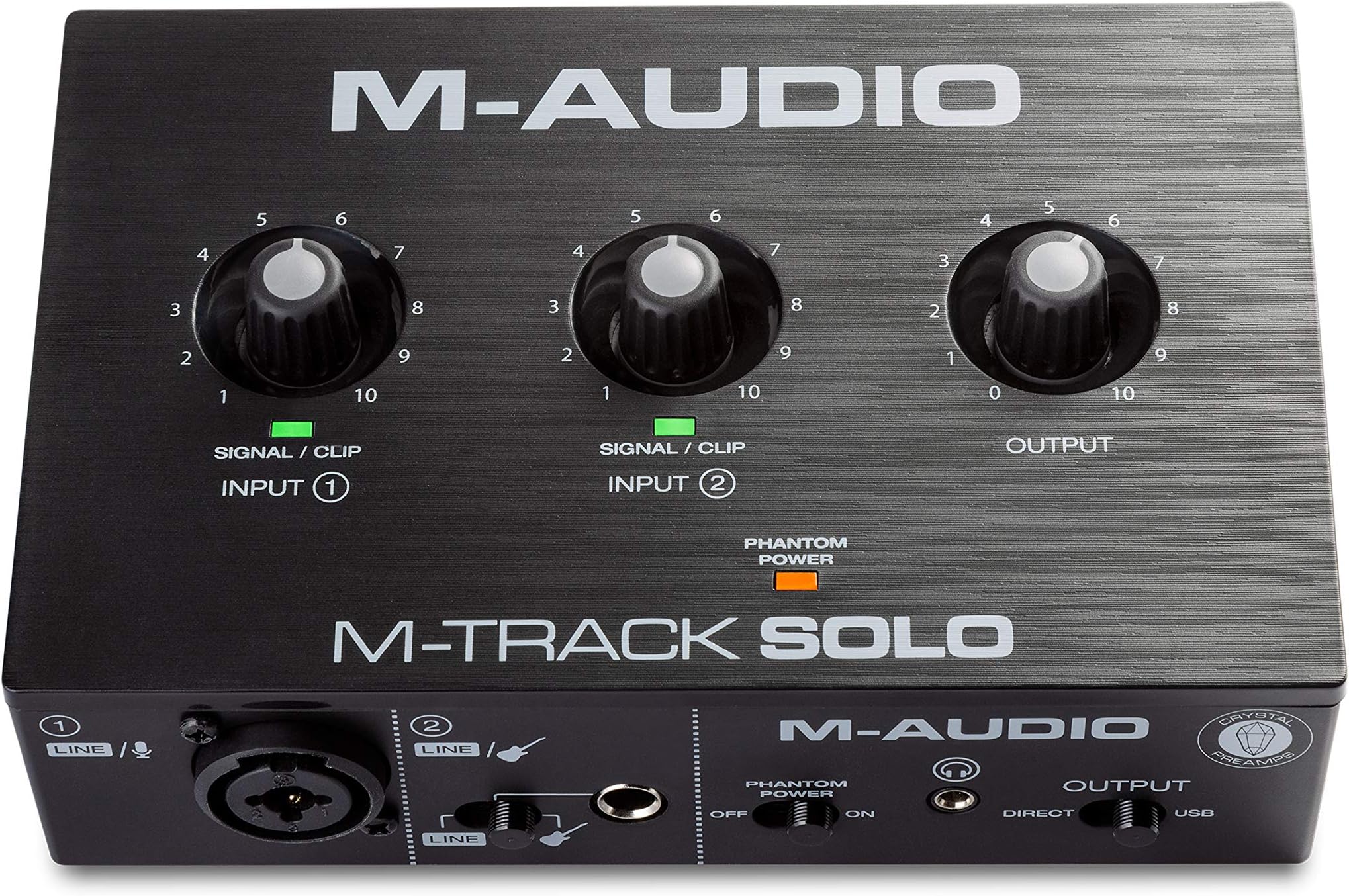


🎛️ Elevate your sound game — studio quality, zero compromise.
The M-Audio M-Track Solo is a compact USB audio interface designed for podcasting, home recording, and live streaming. It delivers high-resolution 48 kHz audio with versatile combo XLR/Line inputs featuring phantom power, plus latency-free monitoring via USB/direct switch. Bundled with MPC Beats software, it offers a complete production toolkit compatible with Mac and Windows, making professional-grade recording accessible and portable.


| ASIN | B08Q1NJSBQ |
| Amazon Bestseller | #170 in Musical Instruments ( See Top 100 in Musical Instruments ) #5 in Computer Recording Audio Interfaces |
| Compatible Devices | Laptop, Personal Computer, Tablet |
| Customer Reviews | 4.0 4.0 out of 5 stars (13,432) |
| Date First Available | December 18, 2020 |
| Hardware Interface | USB |
| Is Discontinued By Manufacturer | No |
| Item model number | MTRACKSOLOII |
| Operating System | Windows, macOS |
| Size | 48kHz、XLR端子x1 |
| Supported Software | Mac Win |
こ**ん
昔使用してたオーディオインターフェースは、録音後に再生するとレイテシーが酷く、毎回修正を余儀なくされました。 レイテシーをほぼ感じないクオリティに驚き! 音質、使い勝手共にこの価格とは思えないクオリティかと思います。
カ**ー
宅録で使用。キャノン含むインプット2 十分でツマミも操作しやすいです。 ただヘッドフォンプラグがフォンプラグなら尚良しでした。
A**ー
初めてオーディオインターフェースを購入しましたが、初心者でも使いやすくて 良かったです。音質も申し分なく、宅録やライブ配信には十分だと思います。 また、PCとの接続もスムーズにできました。 遅延のないモニタリングも助かります。
佐**田
ベースをアンプシミュで聴く用で購入。低音がまあまあバラけるので使うにしてもかなり工夫が必要だった。マイクやギターを普通に使う分にはコスパもよく使いやすくてとても良い商品だと思うが、ベースでの使用はもちろんギターでも歪ませて使う場合は音作りがかなり難しいのでオススメはできない。あと、outputが結構ヘッドホンやスピーカーで使う前提で作られているのでイヤホンを使用したい場合は別途アッテネーター等の購入がオススメ。
Y**H
オーディオインターフェースとしては問題なく使えますのでコスパは良いです。 音質を期待するなら別の選択もあると思います。
N**I
Xlr端子付きを買ったのにXLR端子が無かった
T**J
オーディオインターフェイスを購入したのは初めてです。ケースがプラスチック製ですが、価格からすると問題無いかと思います。性能は問題無いと思います。ギターアンプはポジティブグリッドミニを使用しています。ヘッドフォンの所から本機のLINEにつなげて使用してます。
S**A
macを使っててケーブルを刺しても音が出ない、 マイクにノイズが出る。遅れる。と、何かがおかしい人は、 FInder→環境設定→ハードディスク✔💾にチェックを入れる ↓ ハードディスク→ライブラリ→Preferences→Audioフォルダ内にある ”com.apple.audio.SystemSettings.plist” ”com.apple.audio.DeviceSettings.plist” というファイルをゴミ箱に入れる 次に、上の「移動」をクリック。optionボタンを押すと、ライブラリがぴょこっと出るのでクリック Preferencesフォルダ内の、 "com.apple.audio.AudioMIDISetup.plist" というファイルもゴミ箱へ ↓ 再起動 この作業をやったら音が正常になりました。 (「M-Audio|オーディオインターフェイスの音声信号に関するトラブルシューティング」より) ガレージバンドが使えるようになったので、満足です。 マイクのケーブルは、XLR端子でなくても、φ6.5のTS、TRS端子でも使用可能です。
P**H
Top notch product. Midi latency dropped from 60ms to 8 ms on abelton live Works as intended and looks premium too.
B**R
It's an excellent USB sound card covers all the basics. I needed it for a laboratory interface. There are much more expensive equivalents of which I have a few but this one definitely gets the job done. I like the 16-bit 48 kHz. I like having two XLR inputs. I like the uncomplicated basic user controls. Plugged it into Linux bang works right off no issues. I looked at the TI Burr Brown PCM2900C data sheet and it could be easily connected to an embedded processor like an ARM or DSPIC. I'm not using it for straight up stereo audio but it would work right for that. All of my music is 16-bit flac so 24 or 32-bit would not help anyway.
P**I
Melhor interface de áudio custo benefício
A**T
👌
A**T
This little audio interface is handy, reliable and gives ya bang for ya buck. For quick guitar and vocal tracking into Logic, the M-Track Solo is all I need.
ترست بايلوت
منذ أسبوع
منذ شهر