We remain fully operational. Our teams are working around the clock to ensure your deliveries continue safely.

قم بتنزيل التطبيق


معلومات عنا
حقوق الطبع والنشر © 2024 Desertcart Holdings Limited
قم بتنزيل التطبيق

Buy anything from 5,000+ international stores. One checkout price. No surprise fees. Join 2M+ shoppers on Desertcart.
Desertcart purchases this item on your behalf and handles shipping, customs, and support to KUWAIT.
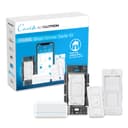
💡 Light up your life—smart, sleek, and effortlessly connected.
The Lutron Caseta Original Smart Dimmer Switch Kit includes a smart hub, in-wall dimmer, and Pico remote for wireless control. It supports up to 150W LED/incandescent bulbs, installs easily without a neutral wire, and integrates with Alexa, Apple HomeKit, and Google Home. The system offers reliable, fast response via a dedicated hub that doesn’t rely on Wi-Fi, enabling advanced features like scheduling, scenes, and multi-location control—all managed through a sleek app and voice commands.


| ASIN | B07G5V6M6G |
| Actuator Type | Push Button |
| Best Sellers Rank | #1,432 in Tools & Home Improvement ( See Top 100 in Tools & Home Improvement ) #6 in Dimmer Switches |
| Brand Name | Lutron |
| Circuit Type | 3-way |
| Color | White |
| Connectivity Protocol | N.A |
| Connector Type | Wires |
| Contact Material | Brass |
| Contact Type | Normally Closed |
| Control Method | Voice |
| Controller Type | Amazon Alexa |
| Current Rating | 1.25 Amps |
| Customer Reviews | 4.7 4.7 out of 5 stars (2,690) |
| Global Trade Identification Number | 00784276257992 |
| Included Components | Smart Bridge Caseta In-Wall Dimmer Pico Remote Control and Pico Wallplate |
| International Protection Rating | IP00 |
| Item Dimensions | 1.13 x 2.93 x 4.69 inches |
| Item Type Name | Smart Dimmer Switch Kit |
| Lower Temperature Rating | 32 Degrees Fahrenheit |
| Manufacturer | Lutron |
| Material Type | Metal, Plastic |
| Model | P-BDG-PKG1W-A |
| Mounting Type | wall_mount |
| Number of Items | 1 |
| Number of Positions | 2 |
| Operating Voltage | 120 Volts |
| Operation Mode | ON-OFF |
| Specification Met | cULus |
| Switch Type | Push Button |
| Terminal | Dimmer Switch |
| UPC | 784276257992 |
| Unit Count | 1.0 Count |
| Upper Temperature Rating | 104 Degrees Fahrenheit |
| Warranty Description | 1 year. |
| Wattage | 150 watts |
J**D
So EZ to set up, sleek looking, not the least expensive.
I've been eyeing this whole Lutron Caseta for quite a long time now. Replacing my X10 system from 30+ years ago. But to do the whole house will get quite expensive. I prefer this over individual smart bulbs, as that can get REALLY expensive, especially when replacing many bulbs. This was a breeze to connect to the hub, to Alexa, to my iPad and Android, and to integrate with the modules and Pico remotes. I wish I hopped on board earlier. Amazon had a little sale on these, so I went full in. By the end of the day my entire home was set up with multiple switches, modules, the hub and Picos. The switches and modules look very sleek and modern, without standing out like they are trying to win a design award. Just a nice basic modern look. Honestly, some of the other brands are very nice looking, but not in a classic way, much more like a passing fad. I can't attest to the operability of the other brands, since this Lutron set up worked out of the box. Also, it was the only one I found that worked on older homes with out the third wire. My home was built in 1893, the elctrical probably is from the 1950's or earlier. Bam! It worked. Oh, and YES, you can brighten from a "dead off" position without having to go first to full brightness as on some brands. The ONLY issue: With the wall switches, it will not remember the last brightness setting. (Pico's will, with a pre-programmed dim/bright level - center round button). On either, you can brighten up from zero as I said.
J**P
The “no longer a newbie” take: Lutron's Hub vs. other Wifi switches
I was once a newbie with Caseta - but no longer, so I hope this helps you. This kit is the first purchase you need for Lutron’s system. Once you have the hub, no more kits are needed for future switch purchases. One hub can manage up to 75 switches (and I think the Hub is included in that count). Some buyers complain about having to wire in Lutron's hub to your network with an ethernet cable. But you can't beat the speed and reliability of a wired network connection. Given that Lutron’s product works reliably and is 100% responsive all the time, this is a non-issue for me. Since I put in the first few Casetas, we truly love them and have started to replace switches all over the home. Which brings up another issue... if I had chosen a WiFi connected switches (and I did briefly for use in limited locations, more on that later) I could potentially be adding a much larger number of connected devices onto my network. If your WiFi isn't all that great to begin with - think entry level routers - this could potentially impact network performance and your connectivity with your switches. For me, that's just a no go. I really want my WiFi to work well for the things that need to be on it. The PROs of the Lutron Switches: Setting the switches up is straightforward and fast. The setup process works like expected each and every time. I cannot say the same about other non-Lutron WiFi products. Having problems setting them up or is a switch not acting right? Lutron’s support is the bees knees. They have helped me several times and each time they are great. The switches are incredibly responsive both in person and via the app. There are no delays in turning things off and on. The ceiling fan switch is especially a godsend for our old ceiling fan - no more standing on the bed to pull strings or getting up out of bed to adjust things. Lutron and Ring also teamed up and added some camera integrations where movement and/or doorbell pushes can activate lights. It works quite well, but the feature was a little buried in the Lutron app. Big bonus - the integration will also turn off lights after 15 minutes. About the app (and this is a biggie) Purchasing good hardware is one thing, having an app that you only get to experience after you purchase the hardware is downright crazy. But that's the world that smart switches seem to live in, so here's the scoop on Lutron - and the apps for a couple other systems I tried. Lutron's app is well designed and intuitive. You can quickly add new devices, program in schedules and scenes. The app also interfaces with my Lennox thermostat to display the current temp in the home (with the help of Apple's Home (home kit) app that's running on a dedicated iPad that never leaves the home). The Ring cam integration is good too. Having tried WeMo and Leviton's WiFi connected switches, my take on those apps is that they are incredibly clunky. This seems like a misstep, especially when you are going to spend most of your time interfacing with the app than the switch. Since I also use Apple's Home app with my family, every time a switch gets added into the Lutron hub, it seamlessly shows up in Apple Home. This is of course magically great. Since I didn't want to add another app into the mix for my wife and family, it's nice that there have been zero issues with cross platform integration, everything works seamlessly. The Lutron App also has a geofence capability that will turn on/off lights when you arrive and depart from the home. Haven't used that yet, but it's cool. Another side benefit, Lutron's app has an Apple watch app that you can control lights and fans with. The CONS: Edited - The Caseta hub for whatever reason didn’t have auto off timers built in. That said, the addition of their motion sensor product effectively solves this issue. If you have Ring cams, you can turn on the Caseta integration, and a motion or doorbell can turn on lights and after 15 minutes, turn them off again. This works beautifully. Other thoughts: Edited - I used IFTTT (If This Then This) before Ring and Lutron added their cam integration as a trigger to turn on/off lights. IFTTT works, but there was always a bit of a delay to turn on lights if you use it. Plus if you’re internet went down, it didn’t work. Before the Ring integration, I used a couple WeMo switches for my outdoor lighting as they had auto-off timers. But their setup and app was super clunky. Happy to be rid of them. As software support is now kinda important for app driven switches, making sure you get a switch from a company that's going to be around a while is more important than it used to be. It would be bad if your OS on your phone, requires your apps to get an update and your smart switch maker is MIA. Side note - For the two years I had WeMo switches, changes in Wifi forced me to individually reconnect all switches to it, and it was a horrible process to get them re-paired with WiFi. Lutron has never had this issue, being wired into the network. One switch I purchased from Amazon warehouse (open box) had issues with setup and Lutron’s support was fantastic. They sent a replacement switch so quickly and were really nice about it. Bottom line - stick with Lutron, it works really well.
L**7
High quality remote dimmer that just works
Lutron was founded by the inventor of the dimmer switch, and has more experience and a broader range of them than anyone else. These are an easy way to replace a regular switch, or add a new switch anywhere without new wiring. An optional hub (included with some kits) expands its capabilities, but it does all the most common functions even without the hub. I've tried dimming several brands of LED light bulbs and it's worked well, dimmed to low levels, and not flickered with all of them. It also works with many home-automation ecosystems (i use Apple Homekit). Highly recommended.
R**.
Bought 1 unit so that my driveway lights can come on at dusk and off at dawn. Extremely easy to install since it's one of the few units that does not require a neutral a the box. Very easy to pair with the app. Love the fact that after it's programmed, it does not require Wifi to function. Plan on buying at least another 4. A bit expensive, but it is a Lutron.
E**O
Me encanto, muy fácil de instalar
A**ー
家中にこのスイッチが設置してる。 何年も使ってるけどホームアクセサリーの中で最も信頼性が高いアイテムです。
M**O
Cada vez le suben más de precio y con la competencia de focos inteligentes en el mercado cada vez menos justificado. Un gran sistema estable y confiable pero caro
J**S
I bought this to replace an older lighting control product. Integrates with my Google Home and works better than the old product.
ترست بايلوت
منذ شهر
منذ شهر