Buy anything from 5,000+ international stores. One checkout price. No surprise fees. Join 2M+ shoppers on Desertcart.
Desertcart purchases this item on your behalf and handles shipping, customs, and support to KUWAIT.
🚀 Elevate your office game with speed, smarts, and seamless wireless power!
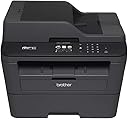
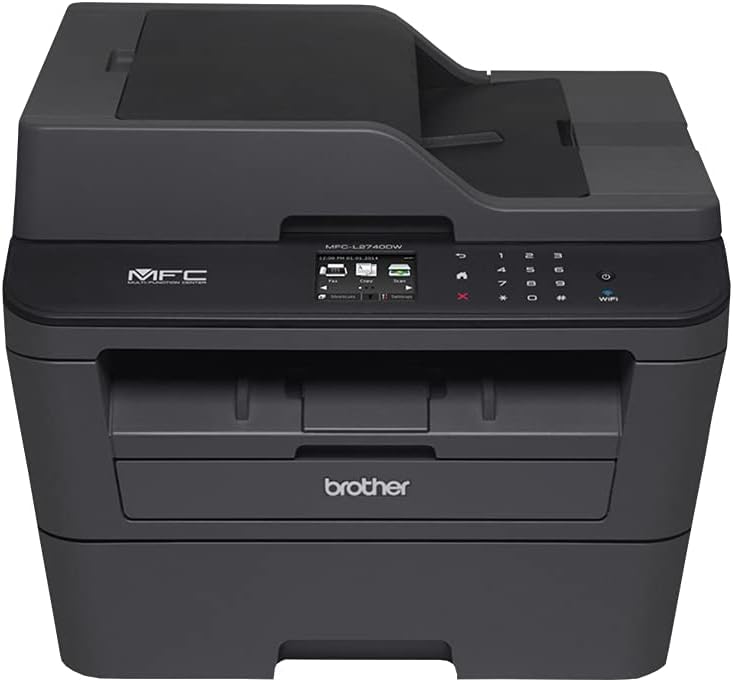
The Brother MFCL2740DW is a monochrome laser all-in-one printer offering fast 32 ppm printing, wireless connectivity including mobile and cloud printing, and a user-friendly 2.7" color touchscreen. It features automatic duplex scanning, a 250-sheet capacity, and smart toner auto-replenishment to keep your office running smoothly and efficiently.
| ASIN | B00MRAU8OE |
| Additional Printer Functions | Copy, Fax, Scan |
| B&W Pages per Minute | 32 ppm |
| Best Sellers Rank | #389,135 in Office Products ( See Top 100 in Office Products ) #550 in Laser Computer Printers |
| Brand | Brother |
| Built-In Media | Printer Accessory |
| Color | Black |
| Color Pages per Minute | 25 |
| Compatible Devices | Laptops, PC, Smartphones |
| Connectivity Technology | Ethernet, Wi-Fi |
| Control Method | App |
| Controller Type | Vera |
| Customer Reviews | 4.1 out of 5 stars 1,461 Reviews |
| Display Type | LCD |
| Dual-sided printing | Yes |
| Duplex | Manual |
| Global Trade Identification Number | 00012502638896, 00799198070505, 04977766739603 |
| Hardware Interface | USB 3.0 |
| Ink Color | Black |
| Item Type Name | Brother MFC-L2740DW Mono Laser MFP |
| Item Weight | 25.8 Pounds |
| Manufacturer | Brother Printer |
| Maximum Copies Per Run | 99 |
| Maximum Copy Resolution Black and White | 2400 dpi |
| Maximum Media Size | 8.5 x 14 inch |
| Maximum Print Resolution Black and White | 2400 x 600 dpi |
| Maximum Sheet Capacity | 250 |
| Model Name | MFCL2740DW |
| Model Number | MFCL2740DW |
| Model Series | MFCL |
| Number of Trays | 1 |
| Other Special Features of the Product | Auto Document Feeder |
| Output sheet capacity | 250 |
| Paper Size | 8.5 inches |
| Power Consumption | 510 Watts |
| Print media | Paper (plain) |
| Printer Connectivity Type | Ethernet, Wi-Fi |
| Printer Output Type | Monochrome |
| Printer Type | Laser |
| Printing Technology | Laser |
| Processor Count | 1 |
| Resolution | 2400 x 600 |
| Scanner Type | Sheetfed |
| Special Feature | Auto Document Feeder |
| Specific Uses For Product | Office |
| Total USB 2.0 Ports | 2 |
| Total USB 3.0 Ports | 1 |
| Total Usb Ports | 1 |
| UPC | 727584675133 809099134463 012502638896 012502633969 799198070505 |
| Unit Count | 1.0 Count |
| Warranty Type | Limited Warranty |
| Wattage | 510 watts |
S**S
Good laser printer, lots of extra features (scanning!)
It's a printer first and foremost, with all of the idiosyncrasies and baffling quirks that go along with that. Once you're over that and have it set up the way you want, the device works very well and has fit in to our needs nicely. I purchased it primarily for the integration with Google Cloud Print and the upload capabilities of scanned files/pictures (using it for Google Drive but it supports Dropbox, Box, plus a ton of others I've never heard of so there are plenty of options). Once all of the features I wanted were set up (add device to the Google Cloud and Drive, both processes were somewhat obtuse and clunky on Brother's part) they have overall worked swimmingly. A few occasional hiccups here and there, but as I prefaced the review with: it's a printer, it's going to do those inexplicable "things" that printers do (as I believe we've already unknowingly reached the Singularity, it happened by accident and it's in every printer; unfortunately, it's really dopey AI). Scanning is the main reason I went with this device instead of just a cloud-enabled printer; it has been well worth the extra cost so far. Regular paper files and even picture-scanning has been excellent quality overall. Scanned papers can be PDFs (searchable as well) or jpegs, and Brother wisely gives you "shortcut" options from the teeny-tiny menu screen to make the process as streamlined as it can be (which isn't terribly streamlined, it's still pretty clunky but it gets the job done). You can make shortcuts for however you want the scans to come out, including whether to upload all in one action (which is exactly why I got the thing, so this works out well). It's slow at times, especially with large documents but this has only impacted the "initial" job I've created for myself to do tons of file scans, old photographs, etc. As a workflow process, Brother has made it about as easy as it can be to do a "one button" scan for once we have all the major work done. This is much appreciated and will allow us to keep much less "stuff" while still preserving the important things. The other major reason this device was purchased: children's artwork. While the standard-sized glass can't do any page much larger than letter (still need a digital camera to do these), this is still a great option for being able to "keep" the ever-growing mass of output our delightful younglings produce on a day-to-day basis. You can't physically keep it all, yet you still feel terrible getting rid of the majority of it; with digital files and storage these days being so cheap, it's no longer a question of "is this worth keeping?" Scan it, upload it, then recycle it. We can of course also physically hold on to those keepsakes that are truly dear and yet not be bogged down with stacks and boxes of the prolific output our children produce. This is a superb bonus and was the tipping point for getting this Brother device instead of lower-cost options without the extra features.
K**T
Printing freedom has arrived!!!
I love that I no longer have to worry about how much I'm printing. This is the third multipurpose printer we added to our home network. Before this we had two color inkjet printers. One of them has just become outdated and doesn't seem to want to sync with anything else on the network. The other one is almost brand new, but it seemed like every time I would turn around I was out of ink. After my second late night Walmart run to get ink so I could turn in a paper I decided it was time to make a change. Between all of the stuff I was printing out to read for class, with all of the coupons my girlfriend likes to print, and then two teenagers printing stuff for school we decided that our home office had grown to the point that we could justify the investment in a laser printer. Initially I wasn't planning on spending as much on a printer as we did on this one, but I'm glad we did for a couple of reasons. 1.) The touch screen makes operation a breeze. Buttons don't have to have multiple uses, whatever menu you need just comes up on the scree, and sometimes it does it automatically. If you scan something in all you have to do is swipe to wherever you want to send the file. My girlfriend is not technologically inclined, in fact she struggles with the remote, but the menu system on this is so easy to use she was able to make copies and scan without any assistance or training. 2.) Double sided scanning: One of the reasons that we went up to this particular scanner was that it would automatically do double sided scanning. This is nice, all you have to do is put it in the top feed tray and it will line everything up for you. I believe it is just a box that you check before you scan to let it know you need it to scan both sides. I have only done it once, but I didn't need to consult the manual in order to do it. 3.) Wireless setup was fast and easy. There is a quick start guide that comes with the printer, and I was able to use that to wirelessly network the printer with both my computer and the family computer with ease. 4.) You can print from your phone. Equally easy is using this printer to print from your smart phone or wireless device. I personally haven't tried this, but my girlfriend has printed coupons on it several times, and she said it was really easy. I talked to quite a few business professional friends before buying this printer, and they all told me that Brother was the brand to go with. They said their equipment just performs better and lasts longer, and I can't say that I disagree. It seems like a great printer, and hopefully it will last for years to come. The last comments I will give you are the only cons I've had with this printer, and they are at best just me nitpicking. First off the color of the printer is lighter than it is pictured. Also it is not all one solid color the control panel and the top flip out paper holder for the feed tray are black plastic while the rest of the printer is gray, not charcoal as it appears the entire printer is, but gray. I thought I was ordering a black printer, which would have matched everything else in the office, but other than the initial surprise it is really a non-issue for me, I'm just including it so you know, just in case its important to you. The second thing is that its a little confusing at first where the paper goes in for the feed tray that goes to the scanner. I was trying to feed in where the paper comes out. This is probably just my own stupidity for not even looking at the manual, so now I have the feed tray flipped out and can use that part of the scanner. Again, maybe its common sense, and I wasn't paying attention, but just incase anyone is wondering you do have to fold that out to use the auto feed scan function. Over all excellent printer, and now I can print in gray-scale to my hearts content.
A**R
WiFi Might Work For a Month, Then Totally Stop. Customer Service Will Not Help You.
I had a Brother laser printer, which still works just fine after a more then decade of use. When I needed to duplex scan documents with an ADF via WiFi, I decided to look for Brother devices first. That is when I found this device, and pretty much hit the purchase button without looking at any other brand. At first this multifunction worked just fine. It connected to my WiFi and I was able to print and scan with ease. I was able to Scan via Image Capture with Mac OS X, Scan directly to Email, to Google Drive, to Dropbox, and even Evernote. It was great. However after a month, the WiFi functionality just stopped working completely. After the WiFi broke down, I had to plug it into my computer via USB to do any printing/scanning. I tried everything to at least get scanning to work with WiFi again, from reinstalling software/drivers multiple times, reinstalling the firmware on the multifunction, reconnecting to WiFi, reconfiguring Google Drive, Dropbox, etc. I tried different computers and different routers. Even embedded functions which required no computer interaction such as scanning directly to Email failed. Nothing worked. I contacted Brother customer service to get help after exhausting everything. After 2 hours working with Brother customer service, I sadly have to say my experience was frustrating and completely unproductive. The rep first asked me to reinstall software on my computer over and over again. When we got to the point of just trying to have the multifunction email a scanned document (which requires no interaction from a computer, as scan to email is an embedded function) the rep asked me to go though a series of instructions, which involved connecting to the printer via the web browser. When that part did not work, the rep disconnected, and I was reconnected with a completely different person. The new rep had me go though a new set of instructions, which also did not work. Each time I tried to impress that using any WiFi functions on the multifunction gave an error directly from the multifunction (displayed on the multifunction touch screen). Each time they assured me that the multifunction was fine, it was my computer that had problems (even for builtin functions such as scanning to email). As a key part of this multifunction broke within a month, and customer service was unhelpful, I have to give this a 1-star review. This is disappointing, as I would have given this a 5-star review for how it worked for the first month. But, as I'm unable to fix this current machine, or replace it with a new one (as customer services still believes my computer is the problem, again even for built in functions), this machine is something that I now consider a sunk cost and will have to soon replace. And its replacement will certainly not be a Brother machine, which is sad as my respect for Brother went from hero to zero so drastically.
T**6
Almost perfect and one incredible bargain
Truly a printer that does it all and does it well. Setup was easy, even the wireless function - no cables required. It's even easier when you figure out the software that comes with it will do almost everything remotely instead of trying to type on the tiny keyboard on the touchscreen. Simply get the wireless connected, download the latest version of the software (it's a HUGE file at 168MB), install the software and then access the printer for all the various functions. I am replacing a Brother HL-2270DW with this and the 2270 is lot to live up to. This machine does everything its little brother did and lots more. The scan function is very high quality and super fast if you're just doing PDF documents as you can load them in the feeder and let it rip. The fax was equally easy to set up but we don't do a lot of faxing so it's set to manual answer mode but has many other choice. One thing I really liked about the fax options is one for VOIP phone. Our previous fax was not adjustable and would sometimes have trouble with our nettalk duo phone system but having the VOIP option lowers the transmit/receive speeds but appears to make faxing error free. The unit seems very well built - it's not extremely heavy but feels very solid, as have all the Brother machines I've owned or used - they seem to have the low cost laser market wrapped up IMHO. So, why four stars instead of five? Envelope feed. It wants you to open up the back of the machine (which for most of us, is not easily accessible), throw some levers, open the feed door, set the guides and then print your envelope. Every other Brother just feeds it through the feed door and out the normal paper route. So, I tried feeding it as my old machines and the first three jammed on the way out - they printed fine but continuously got caught up in the back of the machines. So I played around with really flattening the envelope as much as possible by running a ruler across it to flatten the seams and the flap as much as possible. Doing that, it would feed them properly but my old Brother would just take the envelope as it came out of the box and never jammed once. While I don't print a lot of envelopes, I'm not going through the suggested routine each time for if they don't feed consistently over the next thirty days, could be a deal killer. Given the availability of off-brand toner and drum cartridges for this machine, the cost of printing is dirt cheap. I've used Linkyo cartridges in numerous Brother machines and they perform just like OEM, ditto with their drum units. Inkjet costs were killing me and I did very little color printing and have access to a color laser in our technology club should I need it. At 1/2 penny per page ($12.48 for Linkyo/2600 pages), you simply cannot print any cheaper. One final thing - it will print on legal size paper but it has to be fed a single sheet at a time - the paper tray is strictly letter or smaller. I do almost nothing with legal size so it's not a big deal to me but if you use it frequently, perhaps shop for a two tray system. Update 11/27/2015 - the envelope feeding problem has fixed itself. Envelopes now feed fine from the front of the machines so user can ignore the convoluted printing instructions provided in the manual. Now a true five star device. Another update, 08/27/2016 - Printer continues to amaze, never jams, never loses wi-fi signal, is quiet and seemingly indestructible. My wife just go through with a huge publishing project where she had to scan in over 300 documents to include in the book. Quality was exceptional, it was very fast and the author and ultimate publisher are very pleased with the print ready output provided. I'm seriously contemplating buying another of these to put in the closet for the future, assuming this one ever breaks.
A**M
A great printer - Low Five stars
I wanted a sturdy printer that would last a long time and put up with a lot of printing. I wanted to be able to link up to the printer wirelessly as I have several different computers and ipads etc around the house. It also needed to be very easy to operate as I am not the most techy type person. Immediately after opening this the one thing I noticed was that the printer was heavy. It felt sturdy and well made. Set up was easy. We were able to add this to our wifi network with very little problem. One of the plus options is that this prints on double sided. I didn't anticipate wanting to use that option but I have found I really enjoy it. Another thing that I have noticed in using this is that it is quiet. My previous printer wasn't as quiet but I didn't notice it as I had just gotten used to it. I noticed a difference once I started using this printer. As I don't need to fax very often I have not tried the fax portion of the machine. I imagine it will work fine and if I have any problems I will report back here. I have given this a low five star rating for two reasons. We still have one computer in the house that we can not get it to hook up to the printer wirelessly. The computer has the capability to do this, the printer has the capability but for some reason I haven't been able to make it work. I'm going to stick the teenager in the house on this job and see if he can fix it. However, as a housewife with little time to spare I need things I purchase to be fairly easy to operate and this is causing me problems. The other problem I have noticed is that some pages come out crisper and clearer than other pages. All of the pages are legible and are fine for day to day use. However, the other day I printed up a recipe five times and I noticed that one of the pages (the first one) was clearer and crisper and darker than the other pages. I'll watch this and if it stops doing this I'll report back.
W**J
It Is a Brother It Has to Be Good.
Arrived one day early. Setup was simple and quick. I used the touch screen to run the Network Setup Wizard. It quickly found my network, I provided the network key and bam...I was on. Set up for Amazon Dash was relatively easy. Register your product and then select how you want to handle the dash connection... IP address, PC app to download or touch screen on printer. I elected the touch screen. On the PC just follow the instructions and steps. Very easy to do. Eventually the PC setup will provide a pin for you to plug into the touch screen on the printer. Bingo you are connected to Dash. Select which cartridge you prefer and Amazon will handle the rest. When your toner starts running low a new toner cartridge will be shipped. I will update later as to how well this goes. \ The printer itself seems well built and is extremely fast printing. Particularly if you are used to ink jet printers. It should crank out about 32 pages per minute or one every 2 seconds or so. Warm up seems to be relatively fast as is the wireless data speed to the printer. Scanning to a file is very straight forward. The printer automatically defaults you to the :Print To File option but there are the standard other options available as well. The printer detects those computers on the network that have the Brother driver installed and present you with those destinations as a list. Very straight forward and simple and most importantly, it works. Cost of operation should be outstanding as the larger cartridge is only $49 and that is a certified Brother cartridge. There are others much cheaper but I prefer to stick to the OEM brand. I have tried many brands of printers over the years but have settled on Brother as my preferred brand. They are less expensive, easier to setup and are very reliable. I have two other Brother wireless inkjet printers which I have owned for years. One recently started have some network issues so I decided to go with a monotone laser for black and white and my other Brother Color Inkjet MFC for color needs. I am thinking about a color laser in the near future. I will update this as time goes on but I don't foresee any problems as this is a Brother.
J**.
Shoulda done this sooner
Finally broke the chains of inkjet printing with this purchase, and couldn't be happier. Sure, we can't do the occasional color print, but it's an easy tradeoff for the printer WORKING every time I go to print. Color jobs look better just running up to FedEx Kinko's anyway. Sounds strange, but I feel so much more secure and happier knowing the printer will print, and I won't be faced with an "out of ink" (or ink expired) problem. Nevermind the exorbitant cost of just having an inkjet in the house and having those cartridges sit there and expire even when you don't use them. Print quality is really good, too. And warmup time is better than expected. At first I was dissatisfied with the delay in printing, until I realized it was just warming up. The old HP 6500 inkjet would jig and bop, use bits of costly color ink to prime the printheads, and still take forever before the printjob came out. This one is deadly silent when you send the first print of the day, just long enough for the new user to start wondering where that print job went. But then just like clockwork, she fires up and out comes your duplexed print job, slick as snot. I really like the recessed paper tray. I read some complaints about reaching into the printer to get your print, but it's not like you can't reach it, even with my meaty fingers. You just can't see the whole paper, and bonus: there's no paper tray jutting out from the printer to get hit as you walk by. Kudos to Brother for supplying Linux drivers on their website! And a very nifty installer too. Posh. My only complaint is both my linux machines defaulted to A4 paper size instead of letter. Showed up on test print, fixed it, non-issue. But does anyone really use A4? Maybe it's a european thing. Interestingly, my Win10 machine recognized the printer over the network, I didn't have to do a thing (except crown a new default printer and remove the entry for the old inkjet). And Win10 somehow knows I don't have A4 paper around the house. They warned me about Win10's privacy settings. Other notes: I dig the generous paper tray, touchscreen menu is easy to navigate and intuitive (easily navigated the menus and directly found the option to turn off auto-answer faxes). Copying and feeder tray works faster and smoother than I expected. I like the button-less control panel front for easy cleaning, and the flush buttons are plenty responsive and work very well. The button push feedback tone is understated, slick, and professional.
C**L
NOT ideal for a home office
This is a nice printer for home use, especially if you have kids in school who need to print up reports here and there. The scanning is good quality and it is easy to copy / print 2-sided pages, make labels, or print envelopes. The drawback is it is not that great as an office printer. I am a consultant, who a few times a month must print up a multiple copies of multi-page documents. This printer cannot handle the load. For example, I needed to make 12 double-sided copies of an 8 page text document. After printing 8 copies (a total of 24 sheets of paper), i got a message stating the printer was out of memory and it quit printing. This is a problem. I now have to break my print jobs into smaller batches, which means it takes me longer to get the job done. Though the printouts are nicer looking and the machine is easier to use than my now deceased Canon ImageClass, the Brother is not that useful for my home office. If you are an accountant, teacher, consultant, or anyone who has to make multiple copies of 1 document, you may want to look elsewhere. If you only print a page here or there, the occasional tax return, or you don't mind breaking up big print/copy jobs, this printer is great. UPDATE: Regarding the memory error. This appears to occur when you are printing and not copying. So if you have worked on a 10 page document and need 20 copies, print 1 copy of the document off of your computer. Then make 20 photocopies of that document. If you try to print 20 copies of the document from the computer print menu, you get the "out of Memory" message half way through. I still am giving this 3 stars because it prints significantly slower than advertised.
C**N
Muy buena relación calidad precio
Excelente producto en cuanto a calidad precio, el 20 minutos estaba instalado en todas las maquinas de la red y ya lista para escanear e imprimir, muy bien empaquetada y llego en 2 días aún cuando decia que el envío tardaría más.
Y**E
Great Printer, Great features
An great printer, setup was a breeze over wifi, operation is simple. I was looking for wifi, reliable double sided printing, black and white, Laser printing with affordeable ink, good scanning, copying, good speed. Got what I was looking for. Wifi connectivity from computer to printer or starting job from the printer to the computer is reliable. Installed the brother apps to my Nexus mobile phone, works great. This looks, feels and operate like a high end printer but with the new low price at amazone, very affordeable. Only surprise did not realised power consumption of laser printer so much higher than injet. I was surprised to find that my ceiling light is on the same circuit as the wall outlet where the laser printer is connected. When I print the light flickers. I looked it up in the manuals and found that when it prints it can consume up to 9.5amps or 500 watts (the user manual even talks about peak at 1000 watts). Compared to injet at 1amp and maybe 16-20 watts during printing. Good thing is, I don`t print that often and the printer has a good power saving mode, comparable to injet power saving mode. But turning it off is even better power saving and when I power it on, it automatically re-established the connection over wifi. Best multi-function printer I found for the price !
M**L
Lieferung ohne Deutsch als Einstellung
Es war nicht aufgeführt dass die Ware aus Italien versendet wird. Als das Gerät endlich ankam musste ich feststellen dass am Gerät selber nur die Sparachen Italienisch, Spanisch und Portugisisch einstellbar sind. Bei der Rückgabe stelle ich nun fest dass ich die Kosten tragen soll. Geht gar nicht. Das Gerät selber ist eigentlich super.
M**S
Atende minhas necessidades
Muito boa impressão, rápida, muito fácil instalar, preço compatível ao produto.
Y**N
Parfait
Commandée le 12/01, reçue le 16. Rapide. Colis en bon état. L'imprimante est en Français ainsi que les docs et câbles (j'avais téléphoné au préalable à Ecoburotic pour m'en assurer, ils sont très pro et aimables). L'imprimante fonctionne très bien et possède de nombreuses fonctions pratiques. Scan to Cloud, mail, ..... Le scanner fonctionne très bien. L'application IOS de Brother permet d'imprimer et de scanner depuis Ipad et Iphone. Imprimante reconnue par Fine reader, VueScan et autres applications MacOSX contrairement à la MFC-L2750DW qui n'est pas compatible Sierra (obligation d'utiliser une application propriétaire très limitée). Le faible encombrement est un plus. Je conseille ce produit et recommande ce vendeur.
Trustpilot
5 days ago
4 days ago