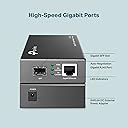
⚡ Upgrade your network game with TP-Link’s gigabit converter!
The TP-Link MC220L 1000BTX to 1000SX SFP Converter delivers reliable gigabit Ethernet connectivity with a compact, plug-and-play design. Perfect for professionals seeking seamless network upgrades, it offers 1000 Mbps speed, low power consumption, and trusted TP-Link quality.



| ASIN | B003CFATL0 |
| Batteries Included | No |
| Batteries Required | No |
| Brand | TP-Link |
| Colour Screen | No |
| Compatible Devices | Desktop |
| Connector Type | Ethernet |
| Customer Reviews | 4.6 4.6 out of 5 stars (817) |
| Data Link Protocol | Fast Ethernet |
| Data Transfer Rate | 1000 Megabits Per Second |
| Date First Available | 7 August 2012 |
| Does it contain liquid? | No |
| Hardware Interface | Ethernet |
| Includes Rechargeable Battery | No |
| Includes remote | No |
| Item Dimensions LxWxH | 9.4 x 7.3 x 2.7 Centimeters |
| Item Weight | 136 g |
| Item model number | MC220L |
| Manufacturer | TP-Link |
| Model | MC220L |
| Model Year | 2009 |
| Net Quantity | 1 Count |
| Number of Ports | 1 |
| Product Dimensions | 9.45 x 7.3 x 2.7 cm; 136.08 g |
| Wattage | 3.95 Watts |
| Wireless Type | Radio Frequency |
R**S
Replace the product
I didn't received the actually product ,I want to replace it,but no one is responding.
G**K
Reliable, cheap and good brand with a good quality
D**Y
This device performs exactly as it says. I was looking for the easiest way to bypass the piece of junk that is the Bell Home Hub 3000. Bell says that the Advanced DMZ will allow you to effectively put any device of your choosing into a virtual bridge mode. What a finicky piece of software implementation that is. It rarely worked, and when it did, it would randomly just stop working. The HH3000 had to go so I began searching for a way to bypass it. Well, it turns out that the TP-Link MC220L media converter has a bit of a cult following by Bell Canada Fibe customers, and that's for good reason. It allows you to easily bypass the HH3000 by removing the SFP module and installing it in this media converter. From there, you just have to have a router that allows you to specify the VLAN that the Internet is supplied on, (VLAN 35 in Ontario), and you're up and running. If you want to get a little more complicated, you can use a device that allows you to pull VLAN 36 off and that's what your Fibe TV is running on. If you don't have Fibe TV service, you don't even need to worry about this part though. Speeds are no different from when the HH3000 was being used. (It's one area the HH3000 didn't have an issue with, at least for wired connections.) I was routinely getting download speeds in the 100 - 110MB/s range before and that's still the case with the MC220L. Upload speeds are as consistent too. Ping times are the same - still 8ms to Google's DNS servers which is blisteringly fast. One note: When you first power on the MC220L after installing the SFP module and connecting the fibre line, you won't get a fibre sync light. Don't panic. It'll take a little bit - maybe 10 - 15 seconds. There's no flashing like on a DSL modem while it's negotiating. Just give it a moment... it'll sync up. Enjoy your new HH3000-less experience.
A**I
I am pleased with the product . Fast delivery.
T**H
I recently purchased the TP-Link MC220L Gigabit SFP to RJ45 Fiber Media Converter, and it has proven to be an excellent addition to my home network setup. Here’s why I highly recommend it: **Ease of Use:** The plug-and-play feature made the installation straightforward. No complex configurations were needed, which is great for someone not deeply technical. **Performance:** This converter delivers high-speed data transfer rates, ensuring that my fiber connection maintains optimal speed when converting to Ethernet. I experienced no drop in performance, making it perfect for streaming, gaming, and other high-bandwidth activities. **Compatibility:** The device supports multiple SFP modules, which adds versatility. I used it with a TP-Link SFP module, but it’s compatible with various other brands, making it highly adaptable to different network setups. **Design:** Compact and durable, the MC220L has a solid build quality. It fits neatly into my setup without taking up much space and runs quietly without overheating. **Value for Money:** Considering the features and performance, the MC220L offers great value. It’s a cost-effective solution for extending a fiber network to a traditional Ethernet environment. **Conclusion:** Overall, the TP-Link MC220L has exceeded my expectations. It’s reliable, easy to use, and delivers excellent performance. Whether for home or office use, this media converter is a fantastic choice for anyone looking to bridge the gap between fiber and Ethernet seamlessly.
F**A
Ciao a tutti, come nuovo acquirente di prodotti in fibra ottica, non saprei come fare una valutazione tecnica in questo momento, comunque! potrei dire soltanto che lo o usato per collegare diversi computer in una rete privata e o notato una alta prestazione e velocita nel trasferimento dei dati con questo prodotto. Per tanto lo considero un componente di ottima qualità. In riguardo alla spedizione, niente che dire. ricevuto in ottime condizione. Grazie mille
ترست بايلوت
منذ 5 أيام
منذ يومين