We remain fully operational. Our teams are working around the clock to ensure your deliveries continue safely.

قم بتنزيل التطبيق


معلومات عنا
حقوق الطبع والنشر © 2024 Desertcart Holdings Limited
قم بتنزيل التطبيق


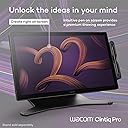
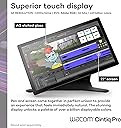
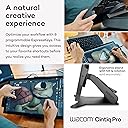


🎨 Elevate your art with precision, speed, and color that commands attention!
The Wacom Cintiq Pro 22 is a professional-grade 21.5" drawing tablet featuring an Ultra HD 4K touchscreen with 120Hz refresh rate and virtually zero latency. Equipped with the Pro Pen 3 offering 8192 pressure sensitivity levels and customizable ergonomics, it supports Windows and macOS. Designed for creative pros, it includes 8 ExpressKeys, multi-touch gestures, and an adjustable stand for a seamless, immersive digital art experience.


| Display Size | 21.5 Inches |
| Compatible Devices | Desktop, Laptop |
| Color Name | Black |
| Batteries Included | Yes |
| Batteries Required | No |
| Brand | Wacom |
| Manufacturer | Wacom Technology Corporation |
| Item Model Number | DTH227K0A |
| Included Components | Digital Pen, HDMI Cable, Pen Holder, Power Cord, USB Cable |
| Operating System | Windows, macOS |
| Special Features | 10 point multi-touch |
| Connectivity Technology | 1x USB-C (DP ALT Mode) 1x USB-C 1x USB-A 1x HDMI 1x Mini DisplayPort |
| Size | 22 inch touch |
| Display Type | LCD |
| Material | No Information |
| Product Dimensions | 51.56 x 31.24 x 0.25 cm; 4.99 kg |
| Item Weight | 4.99 kg |
E**I
انا جربت أجهزة كثيرة ويعتبر هذا الجهاز من افظل الجهاز كدقه و قوة الوضوح في الالوان وغير كذا شاشة لم
W**Z
I have had this monitor for 3 months now. Before I got this, I had tried Huion and Xencelabs displays. Build Quality The build quality is excellent. The materials and fit and finish on my unit are top notch. The glass feels great underhand. Screen Out of the box color reproduction is within a few percent of what was advertised based on my test with an xrite color calibration sensor. There is a very slight backlight bleed on the right edge of the screen but this is only noticeable against a black background and will be covered up by the UI of any drawing program. The screen is very crisp despite the good anti-glare coating on it. Compared to other 4k drawing tablets with antiglare coatings, this one blows them out of the water in terms of clarity (looking at you, xencelabs 24). There is no point in buying a 4k monitor if the anti glare coating is blurry, and with this monitor you truly do get the benefits of 4k. The touch functions fine but I don't like using touch because I will occasionally accidentally trigger it. This is a problem for me regardless of device, even on iPads, so I wouldn't knock this unit for being overly sensitive. It's nice to have a physical switch to quickly disable touch on the back of the unit so I can use touch on occasion if I want to. The 120 hz is very nice but it is the sort of luxury you take for granted until you have to use a 60 hz screen again. The screen is plenty bright for me at default settings, but there are a multitude of different settings you can adjust for colorspaces, etc. I just leave it on default settings sRGB. Drawing Experience The pen is excellent. It is extremely accurate and all pressure levels are usable. I do not see any line wobble in an unstabilized pen on this display. Other Notes I don't use the trigger buttons but they are there if you want them and the buttons feel quality to press. I currently have the unit on the official Wacom stand for it and I think it is also excellent, very solid and easy to adjust. My particular unit has zero fan noise. The pen holder that comes with the unit sucks. Sorry Wacom, but this pen holder is practically designed to drop your pen at the slightest bump regardless of where you screw it in to the tablet. Just something to be aware of, you might want to store the pen somewhere else. The only true downside is this tablet is $3k and the stand is $500. This is certainly overpriced, but I believe the product is best in class for a 22" tablet. Time will tell what the lifetime of the product is but I expect it will last a long time, especially since the display does not use OLED technology.
M**Y
Reading some of the reviews here, I was a bit worried about purchasing this expensive tablet. My tablet arrived 4 days before the estimated date. The screen quality is outstanding. Upgraded from a 13HD. You need to get used to the size space-wise on your desk, but it works like a charm. My only complaint about it is the back board, where to plug the cables. It was so hard to lift, I thought I’d break it. Quite ridiculous, for such an expensive product. You can’t find a slicker way to open the back board? Also, you have to get used to a slight fan noise. But I already forgot about it. I LOVE MY TABLET!
M**E
To keep things brief, The Wacom Cintiq Pro is the best display tablet on the market. It's long-lasting, durable, and offers a beautiful 4K Display with high color fidelity, but... it's not for everyone. In this review I'm going to discuss the Cintiq Pro from the perspective of both a layperson and the perspective of a professional artist. I've been using Wacom tablets for about 10 years now, and I've been working as a professional artist for about three. First and foremost, if you're combing through reviews, I assume you're asking yourself the same question I did when I was shopping for a display tablet: -Between Huion's Kamvas, XP Pen's Graphic Display, and Wacom's Cintiq, which brand of display tablet is right for me? Why is Wacom's product so much more expensive than both Huion and XP Pen? Is there something here I'm missing? It really depends on what you want out of your tablet. Wacom's premium price tag is largely due to the fact that the brand dominated the tablet space for nearly half a decade before any real competition (Huion) entered the game, and it established itself as the brand for professionals. That said, Wacom's hardware is designed to last... and last... and last. There's a reason that Wacom still sells and supports the tablets they released a decade ago: they still work as well as ever! In my opinion, buying a Wacom tablet is like buying a pair of expensive leather shoes. It might cost more now, but you know it won't be giving out on you... even if it gets roughed up a bit. My old Cintiq 13HD went through a LOT, and it's still kickin' like new. But does this longevity really justify the difference in price? In my opinion, not really. If all you want out of this purchase is a display tablet that you can draw/paint on, there's nothing you'll get out of the Wacom Cintiq Pro 24 that you wouldn't get out of Huion or XP Pen for a fraction of the price. INSTALLATION: The installation process was surprisingly painless. The tablet comes with two different setup configurations depending on the build of your PC/Mac, allowing you to use either a USB -Type C connection OR a USB and Displayport connection. Because the Cintiq 24 Pro is a 4K display, a standard HDMI port will not work without an adapter. all the cables were neatly packaged and clearly labeled, and I was able to get things running out of the box with no hassle. ACCESSORIES & PORTS: The tablet comes with Wacom's ExpressKey and their new pen. The ExpressKey was the biggest surprise for me; I expected to toss it to the side and keep using my keyboard shortcuts, but the ExpressKey is extremely easy to configure and very easy to get used to. Incorporating it into my workflow was a snap, and it's a feature I think I'll sorely miss if I'm working elsewhere. The additional USB ports and audio port allowed me more flexibility in my workstation setup, which I appreciate seeing as a few of the ports on my main machine are now taken up by Wacom's wiring. SIZE: The size of this tablet is formidable, but not too large for a dedicated office space. In some ways I wish I'd upgraded to the 32 because I'm used to a slightly larger monitor size, but when I'm using it as a drawing surface the tablet feels almost too large! Likewise, when I'm using it as a monitor, the bevels are a bit annoying. When I'm using it as a tablet, I'm glad they're there! WORKFLOW BOOST: The ExpressKey and pen work intuitively with most any software I've tried so far. ZBrush, Substance Painter, Photoshop, Clip Studio, Maya... Being able to customize those hotkeys is fantastic! CONS: The glass on the front is beautifully matte, but does catch a glare just a little more than a standard monitor might. I have to close the blinds in my office (which are directly across from my workstation) while I work to avoid this. I would not recommend buying this tablet without buying a Flex Arm or an Ergo Stand. In the images I've provided you can see it mounted to the Flex Arm. The freedom of being able to rotate and twist this tablet so freely makes it so much more of a joy to use. I've seen other reviews mention that their tablet dies out within 6 months to a year of purchase, so I paid extra for insurance. If any issues arise, I will return to this review with updates. UPDATE: 15 Months later and I have had no issues with the tablet’s functionality. The only thing that’s changed is that the ExpressKey accessory doesn’t stick to the magnetic bevel as well as it used to because the rubber backing of the ExpressKey is prone to collecting dust (which makes it slide). It’s a little difficult to clean, but otherwise… no complaints!
C**B
Best investment for an artist/illustrator!
ترست بايلوت
منذ شهرين
منذ يوم واحد