We remain fully operational. Our teams are working around the clock to ensure your deliveries continue safely.

قم بتنزيل التطبيق


معلومات عنا
حقوق الطبع والنشر © 2024 Desertcart Holdings Limited
قم بتنزيل التطبيق
![SABRENT USB 3.0 to SATA External Hard Drive Lay-Flat Docking Station for 2.5 or 3.5in HDD, SSD [Support UASP] (EC-DFLT)](/_next/image?url=https%3A%2F%2Fm.media-amazon.com%2Fimages%2FI%2F81Y8qIYM2eL.jpg&w=3840&q=75)
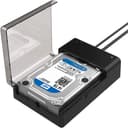
💼 Elevate your data hustle with SABRENT’s ultra-fast, universal docking station!
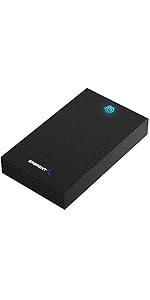
The SABRENT USB 3.0 to SATA External Hard Drive Lay-Flat Docking Station supports 2.5" and 3.5" SATA HDDs and SSDs up to 20TB, featuring SuperSpeed USB 3.0 connectivity with UASP protocol for accelerated data transfer rates up to 5Gbps. Designed for easy plug-and-play use, it includes an external power adapter for 3.5" desktop drives and offers a compact, stable lay-flat design ideal for professionals needing quick, reliable access to legacy or additional storage.



| ASIN | B00LS5NFQ2 |
| Best Sellers Rank | #1 in Hard Drive Docking Stations |
| Brand | SABRENT |
| Built-In Media | External Hard Drive Lay-Flat Docking Station |
| Color | Black |
| Compatible Devices | Desktops, Laptops |
| Customer Reviews | 4.4 out of 5 stars 36,494 Reviews |
| Data Transfer Rate | 5 Gigabits Per Second |
| Enclosure Material | Single Bay |
| Global Trade Identification Number | 00819921011572 |
| Hard Disk Form Factor | 3.5 Inches |
| Hardware Interface | 3.5-Inch Floppy, USB 3.0 Type A, eSATA |
| Hardware Platform | Windows |
| Item Dimensions L x W x H | 7.09"L x 4.8"W x 1.6"H |
| Item Weight | 7.5 Ounces |
| Manufacturer | SABRENT |
| Material | Single Bay |
| Memory Storage Capacity | 20 TB |
| Product Dimensions | 7.09"L x 4.8"W x 1.6"H |
| Supported Devices Quantity | 1 |
| UPC | 780746852766 819921011572 737989665660 650135421227 |
| Unit Count | 1.0 Count |
| Warranty Description | 1 Year Limited |
C**H
Great product
This thing works wonders on my 256 GB seadisk hard drive from a computer that the motherboard failed on many many years ago. I must say this first because at first I did not think it worked because it would not go into it. What I did have to do is remove the adapter that comes off of the front side that plugs into the computer itself. After you do that more than likely it will go in just as designed because most laptops have adapter pins specific to their branding or whenever it was made. I did have to remove the outer shell which had the mounting screws in it to slide in and I hook the power supply up as well as plugged it right into the USB and it started reading everything flawlessly. I can't speak on anything further than this because that is the only hard drive I have tried but initially I thought it was a botched attempt to manipulate words because it says all hard drives from 2.5 in to 3.5 in less than 20 TB. Again once I pulled the plastic adapter piece off of the front of the hard drive where it would go into the computer it slid right in just fine and started to read immediately. Basically you can turn a failed computer hard drive into an external or if you cannot gain access to that computer any longer because the motherboard has failed or something along those lines use this and you can recover everything just the same ways you would see it on the computer you were using without any extra software
R**E
handy
so far so good, It is simple, effective and seems to be of reliable construction. If you have old drives regardless of type or regularly utilize disc hard drives this will always be useful.
S**.
Great enclosure
My old laptop pc died, one too many falls to the floor. I needed the files on the drive so I took apart the pc and rescued the hard drive from it. I didn't know what type the drive so took a chance and ordered an enclosure last night just before midnight. It was here by 6am this morning. The harddrive slid right in. I connected it to the computer (usb) plugged it in a it works wonderfully. Ive only had it for a few hours but it's working great. Up and working in 10 minutes. Great! Now if I could access my old onedrive cloud files on my new pc, I'd be a happy camper.
H**K
Big and sturdy
A little bit bigger than I expected but it works flawlessly.
J**.
Excellent drive case
Works great for a 3.5 inch drive. Excellent heat dissipation. Works with Apple or windows.
T**R
A must have for transferring files and a great storage case for old 3.5 in. HDD.
I recently swapped out the an old HDD drive on my aging computer with a SSD and did a fresh install of Windows. I had a ton of stuff on the old HDD that I needed to copy over to the SSD. Once I had my fresh Windows install done it was time to copy all the files I needed to the new SSD. I had no intention of getting rid of the old 3.5 in. HDD and basically wanted to keep it for backup purposes. What better place to store it than an enclosure that I can access at will? This docking station worked perfectly and makes it easy to transfer files. So easy to use!
N**.
I really wish it worked as intended
If you are looking into a device like this, you already know that data is extremely important and sensitive. It isn’t the kind of thing you want to take chances on. You’re probably either looking into this to save data from an old hard drive, using this to transfer files into a backup drive, or copying files to replace a drive. Either way, any of these use cases don’t have much room for error, and this dock SHOULD be the perfect solution for those use cases. I am sorry, but I do not think this is the dock you are looking for. I bought this dock because I needed to copy over my files from my external drives to new backup drives of the same data. This was a mix of data like decades of photos, videos, movies, music, games and programs. These things are important enough to want to backup twice. When I first got the device, I was really impressed with the build quality but that’s about where my praise ended. It was a hassle to get the brand new drives recognized and formatted, the drives would keep disconnecting. Now, I thought this was a matter of new drives not being initialized or formatted so I didn’t blame the dock. After I finally got the drives formatted and ready for use, it would still randomly disconnect the drives. After reformatting them again, I got a solid connection and thought it was all behind me. I started to transfer my files over in chunks of about 20GB at a time to keep track of any errors. After a few days, my files were all transferred over and I left the dock and new drives (in protective cases) alone in storage. Now, a little over a month later, I needed to access these drives and I am having the same original issues with the dock and disconnecting the drives! I have tried powering on the PC with the dock on/ off, different USB ports, cover open or closed, changed USB power options, updated firmware, all of it. In a sign of desperation, I even wiped and reformatted the drive using both disk management and CMD. My computer keeps making the device connected sound, then the device disconnected sound over and over again. The blue light is blinking and the drives are spinning but then it loses connection. Sometimes file explorer will open and sometimes it won’t sometimes disk management will recognize the device and sometimes it won’t or even if it does, it can say it’s not initialized or unallocated. It typically just opens and closes a window saying “location is not available” and that the drive letter is not accessible. Look, if this was a USB Bluetooth dongle, or some keyboard, this would still be serious inconvenience, but my children’s photos would not be at risk or being lost forever. I tried this device out because it was a competitive price, and the company seemed legit. If you dig around in the reviews, you’ll find similar ones to mine. I am not sure what is different about my use case, I’ve read through the manual and am using the device as intended. For now, it looks like I might need to go back to the drawing board with a solution to connecting drives because, as of now, I do not have confidence in this device or my current backups. I would really appreciate if Sabrent would reach out to me in regards to this experience. Maybe I got a dud, or maybe this model is outdated. All I know, is that I can’t access my drives using this device that is designed to literally do just that. At the moment, I cannot recommend this product at all.
P**D
Fit for purpose. You don’t need to spend more.
This thing has one job, and it does it perfectly. I have never been made so happy by such an inexpensive gadget. This device along with some terminal commands allowed me to recover 15 GB of old family photos from a drive that had corrupt boot sector and was from the Windows 7 era.
ترست بايلوت
منذ 3 أسابيع
منذ شهرين