We remain fully operational. Our teams are working around the clock to ensure your deliveries continue safely.

قم بتنزيل التطبيق


معلومات عنا
حقوق الطبع والنشر © 2024 Desertcart Holdings Limited
قم بتنزيل التطبيق
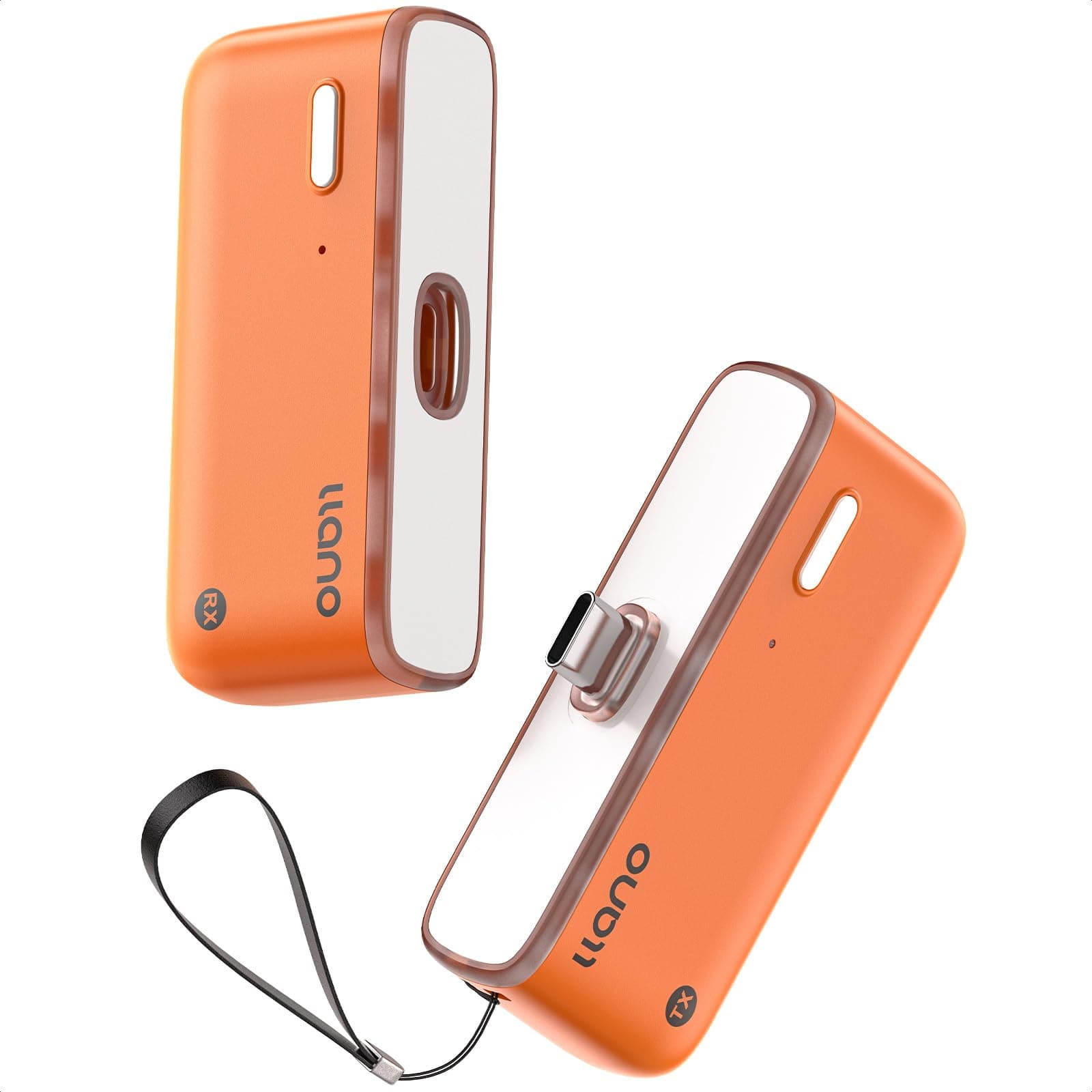
🚀 Cut the cords, not the quality — wireless 4K freedom for the modern pro.
The llano S850 is an upgraded Type-C wireless HDMI transmitter and receiver offering a 50-meter range with dual-band 5G+2.4G connectivity. It supports ultra HD 4K decode input and 1080P@60Hz output, delivering zero-latency streaming for phones, tablets, laptops, and PCs to monitors, projectors, or TVs. Featuring plug-and-play ease, wireless mirroring and extended display modes, and convenient Type-C charging, it combines portability with professional-grade performance for seamless presentations, gaming, and entertainment.


| ASIN | B0GHMYS5KK |
| Audio Output Mode | 1080P&60Hz |
| Audio Output Type | HDMI |
| Best Sellers Rank | #9,574 in Electronics ( See Top 100 in Electronics ) #14 in Audio/Video Receivers & Amplifiers |
| Brand | llano |
| Built-In Media | Transmitter and Receiver |
| Color | Orange |
| Compatible Devices | iOS/PC/Projector/TV Box |
| Connectivity Technology | HDMI |
| Connector Type | HDMI |
| Controller Type | HDMI |
| Customer Reviews | 4.7 out of 5 stars 155 Reviews |
| Format | 4K |
| Item Weight | 180 Grams |
| Manufacturer | llano |
| Model Number | S850 |
| Other Special Features of the Product | llano S850 Upgraded Type-C Wireless HDMI Transmitter and Receiver |
| Special Feature | llano S850 Upgraded Type-C Wireless HDMI Transmitter and Receiver |
| Video Encoding | 4K, 1080p |
| Warranty Description | 2 |
| Wireless Technology | 5G, 2.4G |
P**N
Screen mirroring
Awesome work perfectly as advertised
H**N
The wireless design makes it simple and convenient to use.
Traditional HDMI cables for connecting TVs and projectors are not only troublesome to route but also tend to create clutter. That’s why I purchased this wireless HDMI transmitter and receiver set. Its wireless transmission, plug-and-play design, and dual-mode functionality perfectly meet my needs. In receiver mode, simply connecting the RX device enables screen mirroring without requiring an additional transmitter, making the setup extremely simple. When using transmitter/receiver mode, just plug in both the TX and RX devices—they automatically pair without any complicated configuration, truly delivering a plug-and-play experience. During use, the picture quality is clear and smooth, with no noticeable delay when streaming videos or giving PPT presentations. It also provides a relatively long transmission range, maintaining a stable connection even when used between the living room and bedroom. Charging via Type-C is convenient, and the overall setup process is straightforward and user-friendly. It supports both mirror and extended display modes, making it suitable for office meetings, online teaching, home entertainment, and gaming. This wireless HDMI device balances convenience, stability, and high-definition image quality. It keeps desktops tidy and connections flexible, making it a practical tool for enhancing both work and entertainment experiences.
E**F
Short mirror link between two screens
One piece stayed near the phone stand while the other slipped behind the projector input. A small Type-C plug extends directly from the transmitter, so the phone connects without extra cables, and the larger screen begins showing the same image after a brief moment. A charging line runs into the side of the transmitter at the same time, letting the phone battery climb slowly while the video continues playing. The receiver remains hidden behind the display once inserted, leaving only a narrow silver edge visible if looking from the side. Metal shell feels smooth in the hand when picking it up again to switch devices, though the surface shows faint fingerprints after moving it around the desk a few times. Later the transmitter sits beside the phone stand while the receiver stays in the display port, the larger screen quietly reflecting whatever moves across the phone screen.
J**O
Pocket transmitter beside the laptop
Palm lifts the small metal transmitter from the desk and the matte shell sits cool against the fingers. USB-C plug slides into the laptop port while the receiver pushes into the HDMI slot on the monitor, then the tiny indicator light turns on and the desktop screen appears across the display without opening any apps. Thumb taps the narrow power button once and the video from a tablet shows up on the TV across the room, the picture staying stable while a short clip plays. Back edge of the unit feels slightly rounded when sliding it back onto the desk, not sharp but noticeable when turning it over in the hand. Short strap loop hangs from the corner and makes it easier to pick up again when switching devices. Receiver stays connected behind the monitor while the transmitter moves between the laptop and a phone, the small metal body lying flat near the keyboard with the cable tucked loosely along the side of the desk.
V**S
It's definitely a very practical device.
While organizing my work desk at home recently, the most annoying thing was all the cables. Connecting my laptop to the monitor and projector meant unplugging and replugging everything every time I moved it. After switching to this wireless HDMI transmitter, my desk is much tidier. Once the transmitter and receiver are connected, there's basically no need for special settings; the screen displays the image quickly, and the operation is very intuitive. I usually use it to project my laptop screen onto the living room tv to watch videos or share photos. The playback is very smooth, and switching between videos or dragging the progress bar is quick with no noticeable lag. The audio is also transmitted synchronously, making for a great experience when watching movies or tv shows. After using it for a while, I find its greatest convenience to be its flexibility and compact size, taking up minimal space in my bag.
A**A
cable free setup that makes sharing screens simple
I picked up this wireless HDMI transmitter and receiver because I wanted an easier way to mirror my laptop to a TV without running a long cable across the room. The first time I tried it, I was honestly relieved at how little effort it took. I plugged both ends in, waited a moment, and my screen showed up without digging through complicated menus. In daily use, it’s been great for casual movie nights and quick presentations. I can sit comfortably on the couch with my laptop while the picture plays on the bigger screen. Videos look smooth, and audio stays in sync, which makes the whole experience feel natural instead of glitchy. I’ve also used it to share photos with friends, and being able to pass control around without unplugging anything keeps things relaxed. The connection has stayed steady in my living room, even when I move around a bit. I like not having cables stretched across walkways, especially when people are walking through. It keeps the space tidy and safer. If I had to point out a small thing, the initial pairing pause made me wonder if I did something wrong, but it connected right after and hasn’t needed extra attention since. Overall, this wireless setup makes screen sharing feel effortless. It removes the hassle of cables and lets me focus on what I’m watching or showing, which fits perfectly into everyday use.
Z**I
practical and well-designed product
I have been very pleased with the performance of the HDMI Transmitter and Receiver. The setup process is truly simple and user-friendly. I especially appreciate the new Receiver Mode, which allows me to mirror my screen just by connecting the receiver, without always needing the transmitter. It makes everyday use much more convenient. The plug-and-play design works exactly as described. There is no need for Wi-Fi, apps, or complicated configuration. The connection is fast and stable, and the video quality at 1080P@60Hz looks clear and smooth. I have used it for meetings, watching movies, and even light gaming, and the experience has been reliable. The 50-meter wireless range is also impressive, providing flexibility without messy cables. I also like the Type-C charging feature, which lets me charge my device while using it.
E**A
Clean setup and smooth screen sharing
I originally picked this up because I was tired of dealing with HDMI cables every time I needed to share my screen in meetings. The first time I used it, I plugged the transmitter into my laptop and connected the receiver to the TV, and the screen appeared almost instantly. There was no setup process or extra steps, which made the whole experience feel very straightforward. During presentations, the connection stayed steady even while moving around the room. Slides, videos, and documents displayed clearly, and motion looked smooth without noticeable delay. The audio also matched perfectly with the video, so switching between speaking and playing media felt natural without interruptions. I’ve since started using it at home as well when I want to mirror my tablet to the TV. Not having cables stretched across the room makes everything feel more organized, and packing the device in my bag is easy when I need it somewhere else. After regular use, it’s become one of those small upgrades that quietly makes everyday tasks simpler.
ترست بايلوت
منذ أسبوعين
منذ 4 أيام